
Introduzione
This manual provides instructions for the VTech CS6114-11 DECT 6.0 Cordless Phone. It covers the installation, operation, and maintenance of your new telephone system. The DECT 6.0 digital technology ensures clear communication and enhanced security.
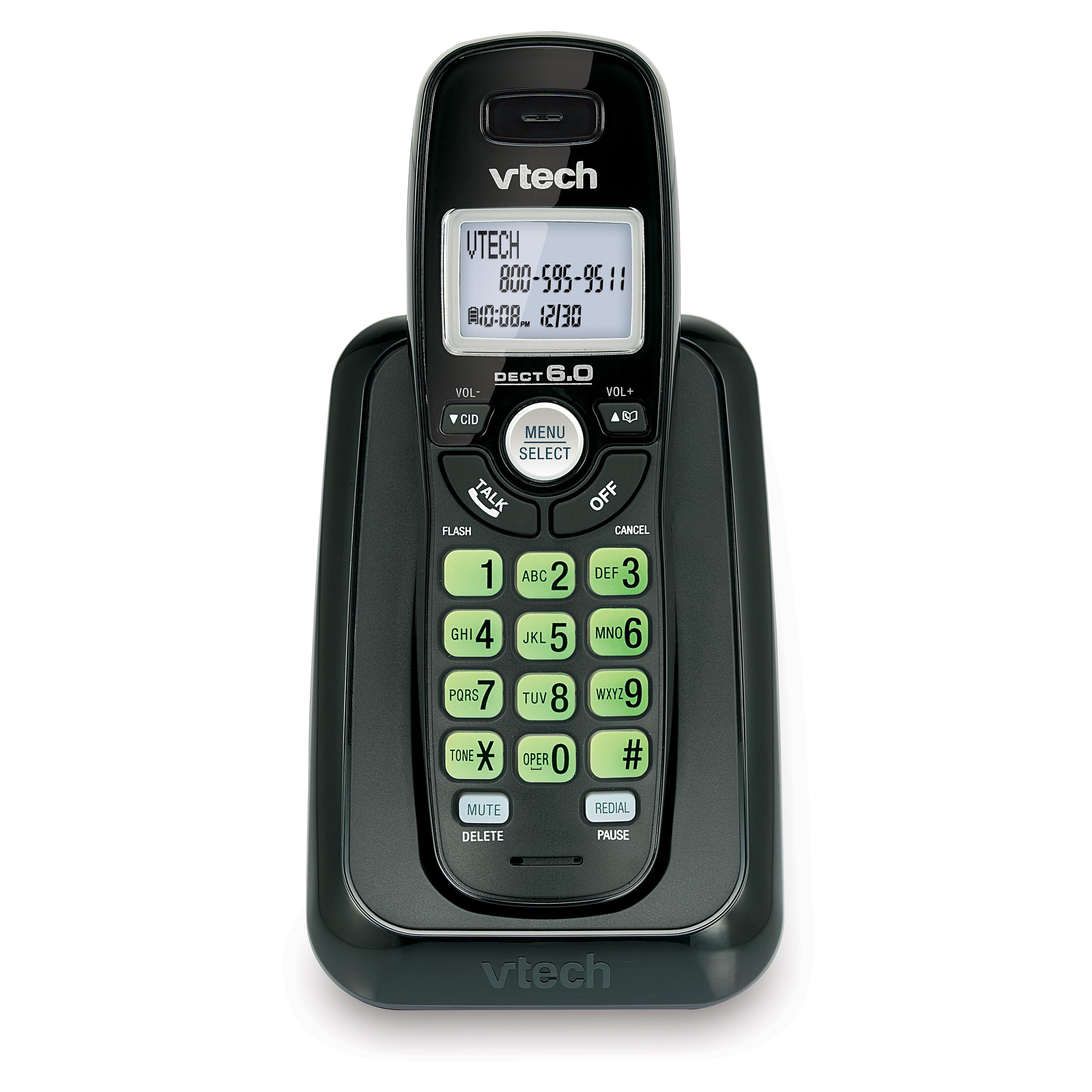
Immagine: Frontale view of the VTech CS6114-11 DECT 6.0 Cordless Phone, showing the handset in its charging base.
Impostare
1. Contenuto della confezione
Assicurati che il tuo pacco contenga i seguenti articoli:
- One cordless handset
- One telephone base
- One power adapter for the telephone base
- One telephone line cord
- Two AAA rechargeable batteries
- Questo manuale utente
2. Installazione della batteria
Install the provided rechargeable AAA batteries into the handset.
- Individuare il coperchio del vano batteria sul retro del telefono.
- Per rimuoverlo, far scorrere il coperchio verso il basso.
- Insert the two AAA rechargeable batteries, observing the correct polarity (+ and - markings).
- Richiudere il coperchio del vano batterie facendolo scorrere verso l'alto finché non scatta in posizione.

Immagine: Lato view of the VTech CS6114-11 DECT 6.0 Cordless Phone handset, showing its profile and the charging contacts.
3. Connecting the Telephone Base
- Collegare un'estremità del cavo della linea telefonica alla presa TEL LINE sul retro della base del telefono.
- Collegare l'altra estremità del cavo telefonico a una presa telefonica a muro.
- Plug the small end of the power adapter into the POWER jack on the back of the telephone base.
- Collegare l'estremità grande dell'adattatore di corrente a una presa elettrica non controllata da un interruttore a parete.
Importante: Use only the power adapter provided with this product.
4. Caricare il portatile
Place the handset in the telephone base to charge. The handset will begin charging automatically. Allow the handset to charge for at least 12 hours before initial use to ensure optimal battery performance.
5. Initial Handset Setup
After the handset is charged, you may need to set the language, date, and time.
- Lingua: The phone offers trilingual prompts (English, Spanish, French). Follow the on-screen prompts to select your preferred language.
- Data e ora: The date and time will typically set automatically with Caller ID service. If not, refer to the "Settings" section under "Operation" to manually adjust.
Operazione
Effettuare e ricevere chiamate
- Per effettuare una chiamata: Premere PARLARE, quindi componi il numero di telefono.
- Per rispondere a una chiamata: Premere un tasto qualsiasi (escluso SPENTO or CANCELLARE) quando squilla il telefono.
- Per terminare una chiamata: Premere SPENTO or place the handset back in the telephone base.
- Ricomposizione ultimo numero: Premere RICHIAMA/PAUSA to redial the last 5 numbers called.
ID chiamante e avviso di chiamata
This phone supports Caller ID and Call Waiting services. A subscription to these services from your telephone service provider is required.
- The handset displays the name, number, time, and date of incoming calls.
- The phone stores up to 30 Caller ID entries.
- A Voicemail Waiting Indicator (icon and text message) on the handset alerts you to new voicemail messages (requires voicemail service from your provider).
Elenco telefonico
The phonebook can store up to 30 names and numbers for quick dialing.
- Per aggiungere una voce: Premere MENU/SELEZIONA, navigate to Phonebook, then select Add New Entry. Follow the prompts to enter the name and number.
- Per chiamare dalla rubrica: Premere CID or vol- to scroll through entries, then press PARLARE comporre il numero.
Impostazioni del portatile
- Controllo del volume: Utilizzare il Volume+ E vol- buttons on the side of the handset to adjust the earpiece volume during a call.
- Volume della suoneria: Premere MENU/SELEZIONA, navigate to Ringer Volume, and adjust as desired.
- Tastiera e display retroilluminati: The keypad and LCD screen illuminate for easier viewing in penombra.
- Impostazioni lingua: To change the display language, press MENU/SELEZIONA, navigate to Settings, then Language.
Tecnologia digitale DECT 6.0
This phone utilizes DECT 6.0 digital technology, which operates on the latest available frequency band. This technology provides:
- Superior voice and sound quality.
- Enhanced protection against eavesdropping.
- Interference-free communication with other wireless devices.
Manutenzione
Pulizia del telefono
Pulisci il telefono e l'unità base con un panno morbido eamp panno. Non utilizzare spray detergenti o prodotti chimici aggressivi, poiché potrebbero danneggiare la finitura o i componenti elettrici.
Cura della batteria
- Utilizzare sempre le batterie AAA ricaricabili fornite.
- For optimal performance, keep the handset in the base when not in use to ensure it is fully charged.
- Se il telefono non verrà utilizzato per un periodo prolungato, rimuovere le batterie per evitare perdite.
- Sostituire le batterie quando il portatile indica che la batteria è scarica o quando il tempo di conversazione diminuisce notevolmente.
Risoluzione dei problemi
Nessun tono di linea
- Assicurarsi che il cavo della linea telefonica sia collegato saldamente sia alla base del telefono sia alla presa a muro.
- Verify that the power adapter is correctly connected to the telephone base and a working electrical outlet.
- Check if other phones on the same line have a dial tone. If not, contact your telephone service provider.
Poor Sound Quality or Interference
- Avvicinare la cornetta alla base del telefono.
- Avoid placing the telephone base near other electronic devices such as microwaves, Wi-Fi routers, or computers, which can cause interference.
- DECT 6.0 technology minimizes interference, but extreme proximity to other devices can still affect performance.
- Assicurarsi che le batterie del portatile siano completamente cariche.
Handset Does Not Charge
- Ensure the power adapter is securely plugged into the telephone base and a working electrical outlet.
- Verify that the handset is correctly seated in the charging cradle of the telephone base. The charge indicator on the handset should illuminate.
- Pulire i contatti di ricarica sia sul portatile che sulla base con un panno asciutto.
- The batteries may need replacement if they no longer hold a charge.
Specifiche
| Numero di modello | CS6114-11 |
| Marca | VTech |
| Tipo di telefono | Senza fili |
| Tecnologia | DECT 6.0 digitale |
| Colore | Nero |
| Dimensioni del prodotto (L x P x A) | 7.8 x 5.2 x 3.82 pollici |
| Peso dell'articolo | 0.67 once (19 grammi) |
| Batterie | Sono necessarie 2 batterie ricaricabili AAA |
| Fonte di alimentazione | Alimentato a batteria |
| Tipo di sistema di risposta | Digital (Note: This model does not include an integrated answering machine, refers to digital processing) |
| Dispositivi compatibili | Landline Phone Networks |
| Capacità di teleconferenza | 3 vie |
| Memoria dell'ID chiamante | 30 chiamate |
| Elenco telefonico | 30 nomi e numeri |
Garanzia e supporto
Informazioni sulla garanzia
VTech products are manufactured with high-quality components. For specific warranty details, please refer to the warranty card included in your product packaging or visit the official VTech websito. Conserva la ricevuta d'acquisto come prova d'acquisto.
Assistenza clienti
If you require assistance with your VTech CS6114-11 Cordless Phone, please visit the VTech support website or contact their customer service line. Contact information can typically be found on the VTech official websito o nella confezione del prodotto.