
beyerdynamic 721360
Beyerdynamic Stegos TB Wireless Boundary Microphone User Manual
Modello: 721360
Introduzione
This manual provides comprehensive instructions for the setup, operation, and maintenance of your Beyerdynamic Stegos TB Wireless Boundary Microphone. Please read this manual thoroughly before using the device to ensure optimal performance and longevity.
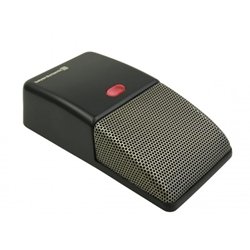
Image: Beyerdynamic Stegos TB Wireless Boundary Microphone. This image displays the compact, black wireless boundary microphone, designed for discreet placement on surfaces like conference tables.
Importanti istruzioni di sicurezza
- Non esporre il dispositivo all'acqua o a umidità eccessiva.
- Evitare temperature estreme.
- Non tentare di aprire o modificare il dispositivo. Per qualsiasi intervento di assistenza, rivolgersi a personale qualificato.
- Utilizzare solo le fonti di alimentazione e gli accessori specificati.
- Tenere fuori dalla portata dei bambini.
Contenuto della confezione
Verificare che tutti gli articoli siano presenti nel pacco:
- Beyerdynamic Stegos TB Wireless Boundary Microphone
- Cavo di ricarica USB (Micro USB)
- Manuale dell'utente (questo documento)
Impostare
1. Ricarica del microfono
- Connect the Micro USB end of the charging cable to the microphone's charging port.
- Connect the standard USB end of the cable to a powered USB port (e.g., computer, USB wall adapter).
- The LED indicator on the microphone will show charging status.
- Una volta caricata completamente, scollegare il cavo di ricarica.
2. Connessione a un dispositivo
The Stegos TB microphone connects wirelessly to compatible devices, typically personal computers, for video conferencing applications.
- Assicurarsi che il microfono sia carico e acceso.
- Activate Bluetooth on your personal computer or compatible device.
- Put the microphone into pairing mode (refer to the device's specific button combination, usually holding a power/pairing button). The LED indicator will typically flash to indicate pairing mode.
- On your computer, search for available Bluetooth devices. Select "Beyerdynamic Stegos TB" from the list.
- Once paired, the LED indicator on the microphone will show a solid light, indicating a successful connection.
- In your computer's sound settings or video conferencing software, select the "Beyerdynamic Stegos TB" as the input audio device.
Istruzioni per l'uso
Accensione/spegnimento
- To power on: Press and hold the power button for approximately 3 seconds. The LED indicator will illuminate.
- To power off: Press and hold the power button for approximately 3 seconds. The LED indicator will turn off.
Funzione silenziosa
The microphone features a mute function for privacy during calls.
- To mute: Press the mute button once. The LED indicator may change color or flash to indicate mute status.
- To unmute: Press the mute button again. The LED indicator will return to its normal operating state.
Posizionamento per prestazioni ottimali
For best audio pickup, place the Stegos TB microphone on a flat surface in the center of the participants. Its omnidirectional polar pattern ensures 360-degree sound capture.
Manutenzione
Pulizia
- Wipe the microphone's exterior with a soft, dry, or slightly damp stoffa.
- Non utilizzare prodotti chimici aggressivi, solventi o detergenti abrasivi.
- Ensure no liquid enters the microphone grille or ports.
Magazzinaggio
When not in use for extended periods, store the microphone in a cool, dry place, away from direct sunlight and extreme temperatures. It is recommended to fully charge the battery before long-term storage and recharge it every few months to maintain battery health.
Risoluzione dei problemi
| Problema | Possibile causa | Soluzione |
|---|---|---|
| Il microfono non si accende. | Batteria scarica o scarica. | Caricare il microfono utilizzando il cavo USB in dotazione. |
| Impossibile connettersi in modalità wireless. | Bluetooth is off on the device; microphone not in pairing mode; out of range. | Ensure Bluetooth is enabled. Put microphone into pairing mode. Move microphone closer to the device. |
| Nessun input audio dal microfono. | Microphone is muted; incorrect audio input selected on computer/software. | Unmute the microphone. Select "Beyerdynamic Stegos TB" as the input device in your system settings or application. |
| Qualità audio scadente. | Microphone too far from speaker; environmental noise; interference. | Place microphone closer to speakers. Reduce background noise. Ensure no obstructions between microphone and receiving device. |
Specifiche
- Marca: Beyerdinamica
- Modello: Stegos TB (721360)
- Tecnologia di connettività: Wireless (USB for charging)
- Tipo di connettore: Micro USB (per la ricarica)
- Caratteristica speciale: Senza fili
- Dispositivi compatibili: Personal computer
- Colore: Nero
- Diagramma polare: Omnidirezionale
- Fonte di energia: Alimentato a batteria
- Utilizzi consigliati: Videoconferenza
Informazioni sulla garanzia
Beyerdynamic products are covered by a limited warranty. For specific warranty terms and conditions, please refer to the warranty card included with your product or visit the official Beyerdynamic websito. Conservare la prova d'acquisto per eventuali reclami in garanzia.
Note: Warranty details are subject to change and may vary by region.
Supporto e contatti
For further assistance, technical support, or service inquiries, please contact Beyerdynamic customer support through their official websito o le informazioni di contatto fornite nella confezione del prodotto.
Ufficiale Websito: www.beyerdynamic.com
Quando contatti l'assistenza, tieni a portata di mano il numero del modello (721360) e il numero di serie.
Ask a question about this manual
Ask about setup, troubleshooting, compatibility, parts, safety, or missing instructions. Manuals+ will review the question and use this page’s manual context to help answer it.