
1. Introduzione
This manual provides comprehensive instructions for the installation, operation, maintenance, and troubleshooting of your Seasonic G Series 550 SSR-550RM 550W 80+ Gold Semi-Modular Power Supply. Designed for reliable and efficient power delivery, this unit combines 80 PLUS Gold efficiency with high electrical performance and advanced fan control for optimal system stability and quiet operation.
2. Caratteristiche del prodotto
- Potenza di uscita continua 550W: Provides stable and consistent power for your system components.
- Certificazione 80 PLUS Gold: Ensures high power efficiency, reducing energy consumption and heat generation.
- Semi-Modular Cable Design: Allows for flexible cable management by connecting only the necessary cables, improving airflow and reducing clutter.
- Advanced Fan Control (S2FC): Optimizes fan speed based on temperature, ensuring efficient cooling with minimal noise.
- 120 mm Fluid Dynamic Bearing (FDB) Fan: Provides quiet operation and extended lifespan.
- Condensatori giapponesi di alta qualità: Utilizes premium components for enhanced reliability and durability.
- Funzionalità di protezione completa: Includes Over Power Protection (OPP), Over Voltage Protection (OVP), ai sensi del voltagProtezione da cortocircuito (SCP) e protezione da sovratemperatura (OTP).
3. Informazioni sulla sicurezza
Please read and follow these safety guidelines carefully to prevent injury and damage to your equipment:
- Non aprire l'alimentatore. Alto volumetagsono presenti all'interno, anche quando l'unità è scollegata.
- Ensure the power supply is properly grounded to prevent electrical shock.
- Installare l'alimentatore in un'area ben ventilata per evitare il surriscaldamento.
- Use only the cables provided with your Seasonic power supply. Using incompatible cables may cause damage.
- Disconnect the AC power cord from the wall outlet before installing or removing any components.
- In caso di dubbi su una qualsiasi fase dell'installazione, consultare un tecnico qualificato.
4. Contenuto della confezione
Verifica che tutti gli articoli siano presenti nel tuo pacco:
- Seasonic G Series 550 SSR-550RM Power Supply Unit
- Cavo di alimentazione CA
- Set di cavi modulari:
- 2 x PCIe 6+2 Pin Cables
- SATA Power Cables (various connectors)
- Peripheral (Molex) Power Cables
- Viti di montaggio
- Cable Ties (plastic and Velcro)
- Manuale dell'utente (questo documento)
5. Configurazione e installazione
Per installare l'alimentatore, seguire questi passaggi:
- Prepara il tuo sistema: Assicurati che il computer sia spento e scollegato dalla presa a muro. Apri il case del computer.
- Montare l'alimentatore: Insert the Seasonic G Series 550 into the designated power supply bay in your computer case. Secure it with the provided mounting screws. Ensure the fan is facing the correct direction for optimal airflow (typically facing down if your case has a bottom vent, or up if it's a top-mounted PSU).

Image: The Seasonic G Series 550 Power Supply with its main 24-pin ATX cable, ready for installation.
- Connect Fixed Cables: The 24-pin ATX motherboard cable and the 8-pin (4+4) CPU power cable are permanently attached. Connect the 24-pin cable to your motherboard's main power connector and the 8-pin CPU cable to the CPU power connector.

Immagine: Posteriore view of the power supply unit, highlighting the modular cable connection ports.
- Collegare i cavi modulari: Identify the necessary modular cables for your components (e.g., PCIe for graphics cards, SATA for SSDs/HDDs, Peripheral for fans or other accessories). Plug these cables into the corresponding ports on the power supply and then connect them to your devices.

Image: The Seasonic G Series 550 power supply with a selection of its modular cables, ready for connection.
- Gestione dei cavi: Route cables neatly behind the motherboard tray or in other designated areas of your case to improve airflow and aesthetics. Use the provided cable ties to secure them.
- Collegare l'alimentazione CA: Once all internal connections are made, connect the AC power cord to the power supply's inlet and then to a wall outlet. Ensure the power switch on the PSU is in the OFF position before plugging it in.
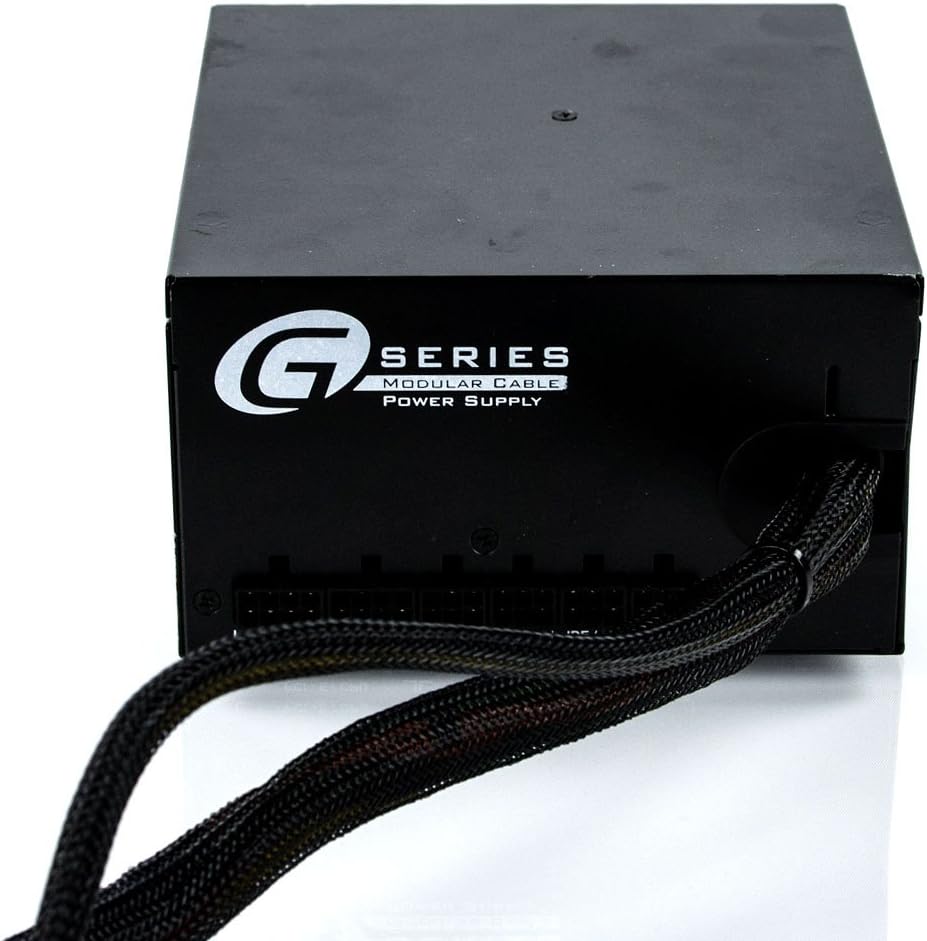
Image: The rear panel of the power supply, showing the AC power inlet and the main power switch.
- Controllo finale: Controlla attentamente tutti i collegamenti per assicurarti che siano ben saldi. Chiudi il case del computer.
Video di installazione
Video riassuntivo del prodotto:
Questo video fornisce una breve panoramicaview and summary of the power supply unit's features and design.
Prodotto finitoview Video:
Un dettagliato sopraview dell'alimentatore, showcasing its various components and design aspects.
6. Istruzioni per l'uso
- Accensione: After ensuring all connections are secure and the AC power cord is plugged in, flip the power switch on the back of the power supply to the 'ON' position.
- Avvio del sistema: Premere il pulsante di accensione sul case del computer per avviare il sistema.
- Funzionamento del ventilatore: The 120mm Fluid Dynamic Bearing fan operates under Seasonic's S2FC (Smart and Silent Fan Control) system. The fan speed will automatically adjust based on the power supply's internal temperature and load, ensuring optimal cooling while maintaining low noise levels. The fan may not spin at very low loads, which is normal operation for silent performance.
- Spegni: To shut down your system, use the operating system's shutdown procedure. Once the system is off, you can flip the power switch on the PSU to the 'OFF' position for complete power disconnection.
7. Manutenzione
Una manutenzione regolare contribuisce a garantire la longevità e le prestazioni ottimali del tuo alimentatore:
- Pulizia della polvere: Periodically clean the power supply's fan and vents to prevent dust buildup, which can impede airflow and lead to overheating. Use compressed air to gently blow dust out of the unit. Ensure the power supply is unplugged before cleaning.
- Controllare le connessioni: Occasionally check all power cable connections (both at the PSU and to components) to ensure they are secure and free from damage.
- Condizioni ambientali: Operate the power supply within its specified environmental conditions (temperature and humidity) to prevent premature wear.
8. Risoluzione Dei Problemi
Se riscontri problemi con l'alimentatore, fai riferimento ai seguenti problemi comuni e alle relative soluzioni:
- Nessuna alimentazione al sistema:
- Ensure the AC power cord is securely plugged into both the wall outlet and the power supply.
- Verificare che l'interruttore di alimentazione sul retro dell'alimentatore sia in posizione "ON".
- Check all internal power connections (24-pin ATX, 8-pin CPU, PCIe, SATA) to ensure they are firmly seated.
- Prova la presa a muro con un altro dispositivo per verificare che sia alimentata.
- Instabilità del sistema o arresti casuali:
- This could indicate an overloaded power supply or a faulty component. Ensure your system's power requirements do not exceed the PSU's 550W capacity.
- Verificare la corretta ventilazione all'interno del case del computer per evitare il surriscaldamento.
- If the issue persists, consider testing components individually or consulting a professional.
- Rumore eccessivo della ventola:
- Ensure the power supply fan and vents are free from dust and obstructions.
- The fan speed adjusts with load; higher system load will result in increased fan speed and noise. This is normal.
- If the noise is unusual (e.g., grinding, rattling), contact customer support.
Per problemi più complessi, fare riferimento alla sezione garanzia e supporto.
9. Specifiche
| Caratteristica | Specificazione |
|---|---|
| Marca | Stagionale |
| Numero di modello | SSR-550RM |
| Uscita Wattage | 550 Watt |
| Certificazione di efficienza | 80 PLUS Gold |
| Fattore di forma | ATX |
| Progettazione dell'alimentatore | Semi-Modulare |
| Metodo di raffreddamento | Air (120mm Fluid Dynamic Bearing Fan) |
| Tipo di connettore | ATX, EPS, PCIe, SATA, Peripheral |
| Peso dell'articolo | 5.8 libbre |
| Dimensioni del prodotto (LxWxH) | 6.3 x 3.39 x 5.9 pollici |
| Produttore | Stagionale |
| Data prima disponibilità | 10 settembre 2012 |
10. Garanzia e supporto
The Seasonic G Series 550 SSR-550RM Power Supply comes with a Garanzia del produttore di 5 annoLa presente garanzia copre i difetti di materiali e di fabbricazione in normali condizioni di utilizzo.
For warranty claims, technical support, or any questions not covered in this manual, please visit the official Seasonic webo contattare il servizio clienti. Conservare la prova d'acquisto per la convalida della garanzia.