
1. Introduzione
This manual provides detailed instructions for the safe and effective use of your ElectraStim EM60 Flick Electro Stimulator. Please read this manual thoroughly before operating the device and retain it for future reference. The ElectraStim EM60 is designed for electro stimulation, featuring 7 stimulation settings with escalating patterns and pulsations, and 24 intensity levels. Its patented Flick feature offers rhythmic stimulation synchronized with hand movements.
2. Informazioni importanti sulla sicurezza
Although ElectraStim products are not medical devices, they are designed in accordance with European General Requirements for Safety of Medical Electrical Equipment (EN60601-1 and section 2.10 for nerve and muscle stimulators). All stimulators and accessories carry the mandatory CE mark.
Prima dell'uso: Always read the stimulator and electrode instructions carefully. If any instructions are unclear, contact ElectraStim for further advice before use. Failure to follow instructions may result in injury or device malfunction.
Avvertenza sulla Proposta 65: Questo prodotto può contenere sostanze chimiche note allo Stato della California come causa di cancro e difetti alla nascita o altri danni riproduttivi.
3. Contenuto della confezione
Verifica che tutti gli articoli elencati di seguito siano presenti nel tuo pacco:
- ElectraStim EM60 Flick Stimulator Unit
- Electrode Pads (typically 4 pads)
- Lead Wires (for connecting electrodes)
- Cavo di ricarica USB
- Microfibre Storage Bag
- Manuale dell'utente (questo documento)

4. Prodotto finitoview
The ElectraStim EM60 Flick is a compact and rechargeable electro stimulator designed for ease of use and portability. It features a clear control panel with intuitive buttons for power, intensity adjustment, mode selection, and a unique Flick mode.

Comandi e indicatori:
- Pulsante di accensione (⏻): Accende o spegne il dispositivo.
- Intensity Up Button (▲): Increases stimulation intensity.
- Intensity Down Button (▼): Decreases stimulation intensity.
- Pulsante Modalità (↻): Cycles through the 7 available stimulation patterns.
- Intensity Indicator LEDs: Displays the current stimulation level.
- Indicatore della batteria: Shows battery status (bottom left).
5. Impostazione
- Carica il dispositivo: Before first use, fully charge the EM60 unit using the provided USB cable. Connect the small end of the USB cable to the charging port on the device and the larger end to a USB power source (e.g., computer, wall adapter). The battery indicator will show charging status.
- Collegare i cavi conduttori: Insert the pin connectors of the lead wires into the output ports on the top of the EM60 unit.
- Applicare gli elettrodi: Collegare l'altra estremità dei cavi ai cuscinetti degli elettrodi. Assicurarsi che il collegamento sia saldo.
- Applicare gli elettrodi: Carefully peel the electrode pads from their protective backing. Apply the pads to clean, dry skin in the desired area. Ensure good contact for effective stimulation.
6. Istruzioni per l'uso
6.1. Accensione/spegnimento
- Per accendere: tenere premuto il pulsante di accensione (⏻) for approximately 2 seconds. The intensity indicator LEDs will light up.
- Per spegnere: tenere premuto il pulsante di accensione (⏻) for approximately 2 seconds. The LEDs will turn off.
6.2. Regolazione dell'intensità
The EM60 offers 24 intensity settings.
- To increase intensity: Press the Intensity Up button (▲). Each press increases the intensity by one level.
- To decrease intensity: Press the Intensity Down button (▼). Each press decreases the intensity by one level.
- The intensity indicator LEDs will visually represent the current level. Start at the lowest setting and gradually increase to a comfortable level.
6.3. Changing Stimulation Modes
The device features 7 distinct stimulation patterns.
- To change mode: Press the Mode button (↻). Each press will cycle to the next available pattern.
- Experiment with different modes to find the one that best suits your preference.
6.4. Flick Mode Operation
The patented Flick feature allows for motion-controlled stimulation, utilizing an internal accelerometer to synchronize stimulation with your hand movements.
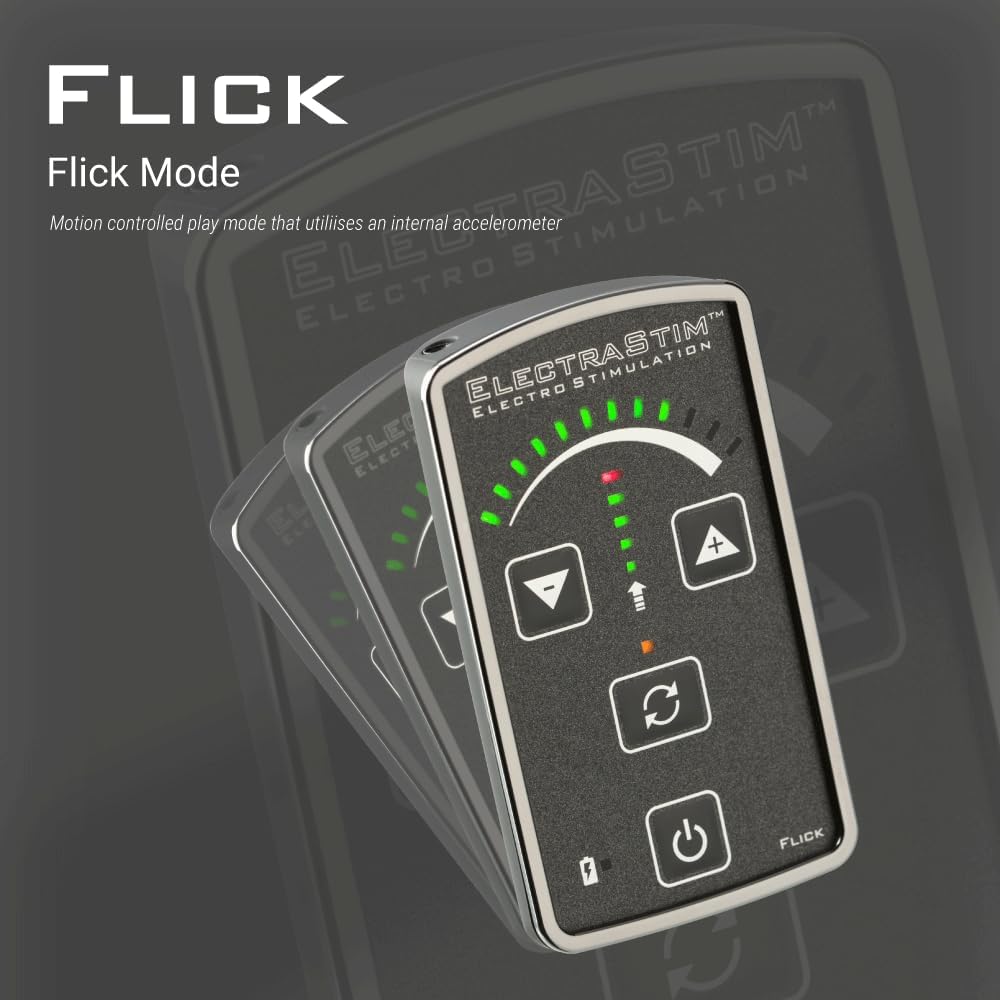
- Once active, the device will respond to your hand movements, providing a dynamic and interactive stimulation experience.
7. Ricarica e durata della batteria
The ElectraStim EM60 features a rechargeable battery for convenience.

- Tempo di ricarica: Approximately 3 hours for a full charge using the provided USB cable.
- Durata della batteria: The device will run for approximately 6 hours at 50% intensity. Actual battery life may vary depending on the selected intensity level and mode.
- Indicazione di carica: The battery indicator on the device will show the charging status.
8. Manutenzione e cura
- Pulizia dell'unità: Wipe the EM60 unit with a soft, damp cloth. Do not submerge the device in water or use abrasive cleaners.
- Elettrodi: After each use, gently re-apply the electrode pads to their protective backing to maintain their adhesive quality. Replace pads when they lose their stickiness.
- Magazzinaggio: Store the device and accessories in the provided microfibre bag in a cool, dry place, away from direct sunlight and extreme temperatures.

9. Risoluzione Dei Problemi
| Problema | Possibile causa | Soluzione |
|---|---|---|
| Il dispositivo non si accende. | La batteria è scarica. | Caricare il dispositivo tramite il cavo USB. |
| Non si è avvertita alcuna stimolazione. |
|
|
| Stimulation feels weak or inconsistent. |
|
|
10. Specifiche
| Modello | EM60 Flick |
| Marca | ElectraStim |
| Impostazioni di stimolazione | 7 modelli |
| Livelli di intensità | 24 livelli |
| Canali | Single Channel (for up to 2 unipolar accessories) |
| Fonte di alimentazione | Ricaricabile USB |
| Tempo di carica | Circa 3 ore |
| Tempo di esecuzione | Approx. 6 hours (at 50% intensity) |
| ASIN | B00AJ0G7FS |
| Produttore | ElectraStim |
11. Garanzia e supporto
The ElectraStim EM60 Flick Stimulator comes with a standard warranty. An image in the product listing indicates a "Free 3 year warranty upgrade." Please refer to the product packaging or the official ElectraStim websito per termini e condizioni di garanzia specifici.
For technical support, troubleshooting assistance, or warranty claims, please contact ElectraStim customer service through their official websito o rivenditore presso cui è stato acquistato il prodotto.