
1. Introduzione
The Lorex LW2731AC1 is an add-on wireless camera designed to expand your existing Lorex 7-Inch LCD Wireless Home Monitoring System. This camera provides additional surveillance capabilities, allowing you to monitor more areas of your home or property. It features day and night viewing, two-way audio communication, and a secure digital wireless signal for reliable performance.
This manual provides essential information for the proper installation, operation, and maintenance of your LW2731AC1 add-on camera.
2. Contenuto della confezione
Verificare che tutti i componenti siano presenti nella confezione:
- 1 x Indoor/Outdoor Wireless Camera (LW2731AC1)
- 1 x adattatore di alimentazione per fotocamera
3. Caratteristiche del prodotto
The LW2731AC1 camera is equipped with several features to enhance your monitoring experience:
- VGA (640 x 480) Resolution Sensor: Fornisce video foo chiaritage.
- 52 gradi Viewangolo di ing: Offers a focused field of view for specific areas.
- Visione notturna a infrarossi da 40 piedi: Enables monitoring in low-light or complete darkness, with black and white video.
- Filtro taglia IR: Ensures accurate color reproduction during daylight conditions.
- Advanced Day/Night Mode: Automatically switches between color (day) and black and white (night) modes for optimal clarity.
- Passive Infrared (PIR) Motion Detection: Detects movement to trigger recording or alerts.
- Audio bidirezionale: Built-in microphone and speaker allow for listening and speaking through the camera.
- Secure Digital Wireless Signal: Utilizes Frequency Hopping Spread Spectrum (FHSS) technology for private and secure video and audio transmission.
- Design resistente agli agenti atmosferici: Suitable for both indoor and outdoor installation. For outdoor use, install under shelter to protect from direct exposure to rain or snow.

Figura 3.1: Angolato anteriore view of the Lorex LW2731AC1 Add-on Camera, showing the lens, IR LEDs, and antenna.

Figura 3.2: Primo piano frontale view of the camera, highlighting the lens, infrared LEDs, and the motion sensor below.
4. Impostazione
4.1 Installazione fisica
- Scegli una posizione: Select a suitable location for your camera. Consider the desired viewing area, proximity to a power outlet, and wireless signal strength to your Lorex 7-Inch LCD monitor. For outdoor use, ensure the camera is installed under shelter to protect it from direct weather exposure.
- Montare la fotocamera: Use the provided mounting hardware to securely attach the camera to a wall or ceiling. Adjust the camera's angle to cover the desired area.
- Connetti alimentazione: Plug the camera's power adapter into the camera and then into a standard electrical outlet. The camera requires a local power outlet for operation.
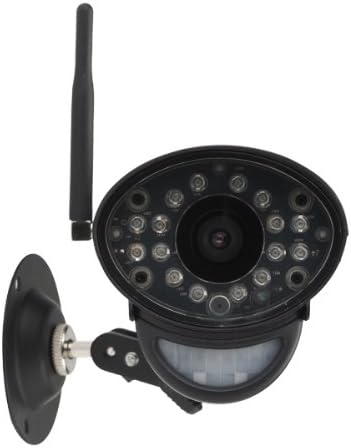
Figura 4.1: Fronte view of the camera with its adjustable mounting bracket, ready for installation.
4.2 Pairing with Your Monitoring System
To integrate the LW2731AC1 add-on camera with your Lorex 7-Inch LCD monitoring system, follow the pairing instructions provided with your main monitoring system. Typically, this involves:
- Access the menu on your Lorex 7-Inch LCD monitor.
- Navigate to the 'Camera Pairing' or 'Add Camera' section.
- Select an unused channel for the new camera.
- Follow the on-screen prompts, which usually instruct you to press a 'Pair' or 'Sync' button on the back of the camera within a specified timeframe (e.g., 30 seconds).
- Once successfully paired, the camera's video feed will appear on the selected channel of your monitor.
Note: Refer to your Lorex 7-Inch LCD monitoring system's manual for specific pairing instructions, as steps may vary slightly by model.
5. Funzionamento
Once paired, the LW2731AC1 camera operates in conjunction with your Lorex 7-Inch LCD monitoring system. Refer to your main system's manual for detailed instructions on:
- Viewing Modalità: How to switch between single camera view, scan mode (automatic switching), and quad split-screen mode (if supported by your monitor).
- Impostazioni di rilevamento del movimento: Adjusting sensitivity and recording triggers for the camera's passive infrared motion sensor.
- Audio bidirezionale: Using the talk-back function to communicate through the camera.
- Registrazione e riproduzione: Managing video recordings stored on your monitoring system's SD card.
The camera's digital wireless signal ensures a private and secure connection, minimizing interference and unauthorized access to your video feed.
6. Manutenzione
6.1 Pulizia della fotocamera
To maintain optimal image quality, periodically clean the camera lens and housing:
- Prima di procedere alla pulizia, assicurarsi che la fotocamera sia spenta.
- Use a soft, lint-free cloth to gently wipe the lens. If necessary, dampBagnare leggermente il panno con acqua o con una soluzione detergente delicata per lenti.
- Wipe the camera housing with a soft, damp panno. Evitare prodotti chimici aggressivi o detergenti abrasivi.
6.2 Considerazioni ambientali
While the camera is weather-resistant, extreme conditions can affect its performance and lifespan:
- Avoid installing the camera in direct sunlight for prolonged periods, as this can cause overheating.
- Protect the camera from direct exposure to heavy rain, snow, or hail. Install under an overhang or eave when used outdoors.
- Ensure the power adapter is protected from moisture.
7. Risoluzione Dei Problemi
If you encounter issues with your LW2731AC1 add-on camera, consider the following common solutions:
- Nessun segnale video:
- Ensure the camera is powered on and its power adapter is securely connected to a working outlet.
- Verify the camera is within range of your Lorex 7-Inch LCD monitor. Obstructions like thick walls or multiple floors can reduce wireless range.
- Attempt to re-pair the camera with your monitoring system (refer to Section 4.2).
- Check for sources of interference (e.g., other wireless devices, microwaves) near the camera or monitor.
- Scarsa qualità dell'immagine:
- Clean the camera lens (refer to Section 6.1).
- Garantire un'illuminazione adeguata nell'area monitorata durante il giorno.
- For night vision, ensure there are no obstructions directly in front of the camera's IR LEDs.
- Il rilevamento del movimento non funziona:
- Check the motion detection settings on your Lorex 7-Inch LCD monitor to ensure it is enabled and sensitivity is appropriately set.
- Ensure the camera's motion sensor is not obstructed.
- Problemi con l'audio bidirezionale:
- Verify the volume settings on your Lorex 7-Inch LCD monitor.
- Assicurarsi che non vi siano ostacoli fisici che bloccano il microfono o l'altoparlante della telecamera.
If problems persist, consult the support section of the Lorex website or contact Lorex customer support for further assistance.
8. Specifiche
| Caratteristica | Specificazione |
|---|---|
| Numero di modello | LW2731AC1 |
| Risoluzione di acquisizione video | 640x480 (VGA) |
| Campo di View | 52 gradi |
| Gamma di visione notturna | Fino a 40 piedi (12 m) |
| Tecnologia di connettività | Senza fili (FHSS) |
| Fonte di alimentazione | Elettrico con cavo |
| Audio | Audio bidirezionale (microfono e altoparlante integrati) |
| Rilevamento del movimento | Infrarossi passivi (PIR) |
| Uso interno/esterno | Indoor, Outdoor (Weather-Resistant) |
| Dimensioni (L x P x A) | 9.6 x 3.6 x 3.4 pollici (24.4 x 9.1 x 8.6 cm) |
| Peso dell'articolo | 1.05 libbre (0.48 kg) |
| Colore | Nero |
| Valutazione internazionale di protezione | Grado di protezione IP67 |
9. Garanzia e supporto
For information regarding product warranty, technical support, and additional resources, please visit the official Lorex websito. In genere, qui puoi trovare FAQ, download di software e informazioni di contatto per il servizio clienti.
Websito: www.lorex.com