
1. Introduzione
This manual provides essential information for the proper installation, operation, and maintenance of your Intel Pentium III 733/256/133/1.65V SL45Z processor. The Intel Pentium III processor is designed to deliver reliable performance for compatible computer systems. Please read this manual thoroughly before proceeding with installation or operation.
2. Informazioni sulla sicurezza
Quando si maneggiano i componenti del computer, osservare sempre le seguenti precauzioni di sicurezza:
- Protezione dalle scariche elettrostatiche (ESD): Processors are sensitive to static electricity. Always wear an anti-static wrist strap or frequently touch a grounded metal object before handling the processor.
- Spegni: Prima di installare o rimuovere qualsiasi componente, assicurarsi che il computer sia completamente spento e scollegato dalla presa a muro.
- Maneggiare con cura: Avoid touching the gold contacts or the bottom pins of the processor. Hold the processor by its edges.
- Strumenti adeguati: Use appropriate tools for opening your computer case and securing components.
3. Configurazione e installazione
Follow these steps to install your Intel Pentium III SL45Z processor:
- Preparare il sistema: Power off your computer, unplug it, and open the computer case.
- Locate CPU Socket: Identify the Socket 370 on your motherboard. If an old CPU is present, carefully remove it.
- Open Socket Lever: Gently push down and away the small metal lever on the side of the CPU socket to open it.
- Allinea processore: Carefully align the processor with the socket. The processor has a notched corner (or a missing pin) that corresponds to a specific orientation on the socket. Do not force the processor into the socket.
- Inserisci processore: Once aligned, gently place the processor into the socket. It should drop in with minimal pressure.
- Processore sicuro: Push the socket lever back into its locked position to secure the processor.
- Applicare la pasta termica: Apply a small amount of high-quality thermal paste to the center of the processor's integrated heat spreader (IHS).
- Installare il dissipatore di calore e la ventola: Place the compatible heatsink and fan assembly directly onto the processor, ensuring even contact. Secure the heatsink according to its manufacturer's instructions. Connect the fan's power cable to the designated CPU fan header on the motherboard.
- Chiudere la custodia e accendere: Close your computer case, plug in all cables, and power on the system. Verify that the CPU fan is spinning.
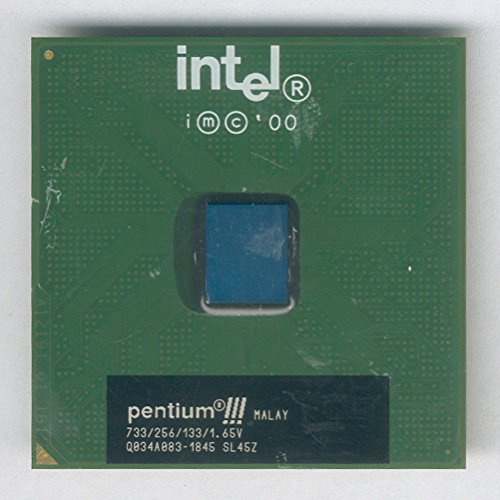
Figura 3.1: in alto view of the Intel Pentium III SL45Z processor. This image displays the green printed circuit board (PCB) with the Intel logo, copyright information, and the central silicon die area. The bottom black label indicates 'pentium®!!! MALAY 733/256/133/1.65V Q034A083-1845 SL45Z'.
4. Principi operativi
The Intel Pentium III SL45Z processor is the central processing unit (CPU) of your computer system. It is responsible for executing instructions, performing calculations, and managing the flow of data. Once installed and powered on, the processor works in conjunction with your motherboard, RAM, and other components to run the operating system and applications. Proper cooling via a heatsink and fan is crucial for stable operation and longevity.
5. Specifiche
Key technical specifications for the Intel Pentium III 733/256/133/1.65V SL45Z processor:
| Caratteristica | Dettaglio |
|---|---|
| Modello CPU | Pentium III |
| Numero di parte | SL45Z |
| Velocità di clock | 733 MHz |
| Cache L2 | 256 KB |
| Front Side Bus (FSB) Speed | 133 MHz |
| Nucleo Voltage | 1.65V |
| Presa CPU | Presa 370 |
| Produttore | Intel |
| Dimensioni del prodotto | 6 x 8 x 5 pollici (confezione) |
| Peso dell'articolo | 1 pound (packaging) |
| ASIN | B00B871CA6 |
6. Manutenzione
The Intel Pentium III processor itself requires minimal maintenance. However, proper care of the cooling system is essential for its longevity and performance:
- Rimozione della polvere: Periodically clean dust from the heatsink fins and fan blades using compressed air. Ensure the system is powered off and unplugged before cleaning.
- Pasta termica: If you remove the heatsink for any reason, it is recommended to clean off the old thermal paste from both the CPU and heatsink and apply a fresh layer before reinstallation.
- Funzionalità della ventola: Ensure the CPU fan is always spinning freely and quietly when the system is operating. Replace noisy or non-functional fans promptly.
7. Risoluzione Dei Problemi
Se riscontri problemi dopo l'installazione del processore, prendi in considerazione i seguenti passaggi comuni per la risoluzione dei problemi:
- Il sistema non si avvia: Double-check all power connections, especially to the motherboard and CPU fan. Ensure the processor is correctly seated in its socket and the lever is locked.
- Surriscaldamento: If the system shuts down unexpectedly or experiences performance throttling, check that the heatsink is properly installed and making good contact with the CPU. Verify the CPU fan is spinning and not obstructed. Ensure adequate airflow within the computer case.
- Instability/Crashes: Ensure your motherboard's BIOS/UEFI is updated to support the Pentium III processor. Verify that RAM modules are correctly installed.
- Nessuna visualizzazione: Confirm that your graphics card is properly seated and connected to the monitor.
If problems persist, consult your motherboard's manual or seek assistance from a qualified technician.
8. Garanzia e supporto
For information regarding warranty coverage and technical support for your Intel processor, please refer to the official Intel websito o contattare direttamente il servizio clienti Intel. Conservare la prova d'acquisto per eventuali reclami in garanzia.