
Modello CD-490 di Jensen
JENSEN CD-490 Portable Stereo CD Player with AM/FM Radio and Aux Line-in Instruction Manual
Introduzione
The JENSEN CD-490 is a portable stereo CD player equipped with an AM/FM stereo radio and an auxiliary line-in. It features a top-loading CD player with an LED track display, skip/search/repeat functions, and programmable memory. The unit includes a telescopic antenna for radio reception, a foldable carrying handle for portability, and a stereo headphone jack. An auxiliary input allows connection of external audio devices such as MP3 players.
Informazioni importanti sulla sicurezza
AVVERTENZA: questo prodotto contiene sostanze chimiche note allo Stato della California come causa di cancro e difetti alla nascita o altri danni riproduttivi.
Seguire sempre le precauzioni di sicurezza di base quando si utilizzano apparecchi elettrici per ridurre il rischio di incendi, scosse elettriche e lesioni personali. Conservare questo manuale per riferimento futuro.
Cosa è incluso
- JENSEN CD-490 Portable Stereo CD Player with AM/FM Radio
- Cavo di alimentazione CA
- Manuale del proprietario
Prodotto finitoview
Familiarize yourself with the controls and features of your JENSEN CD-490 unit.
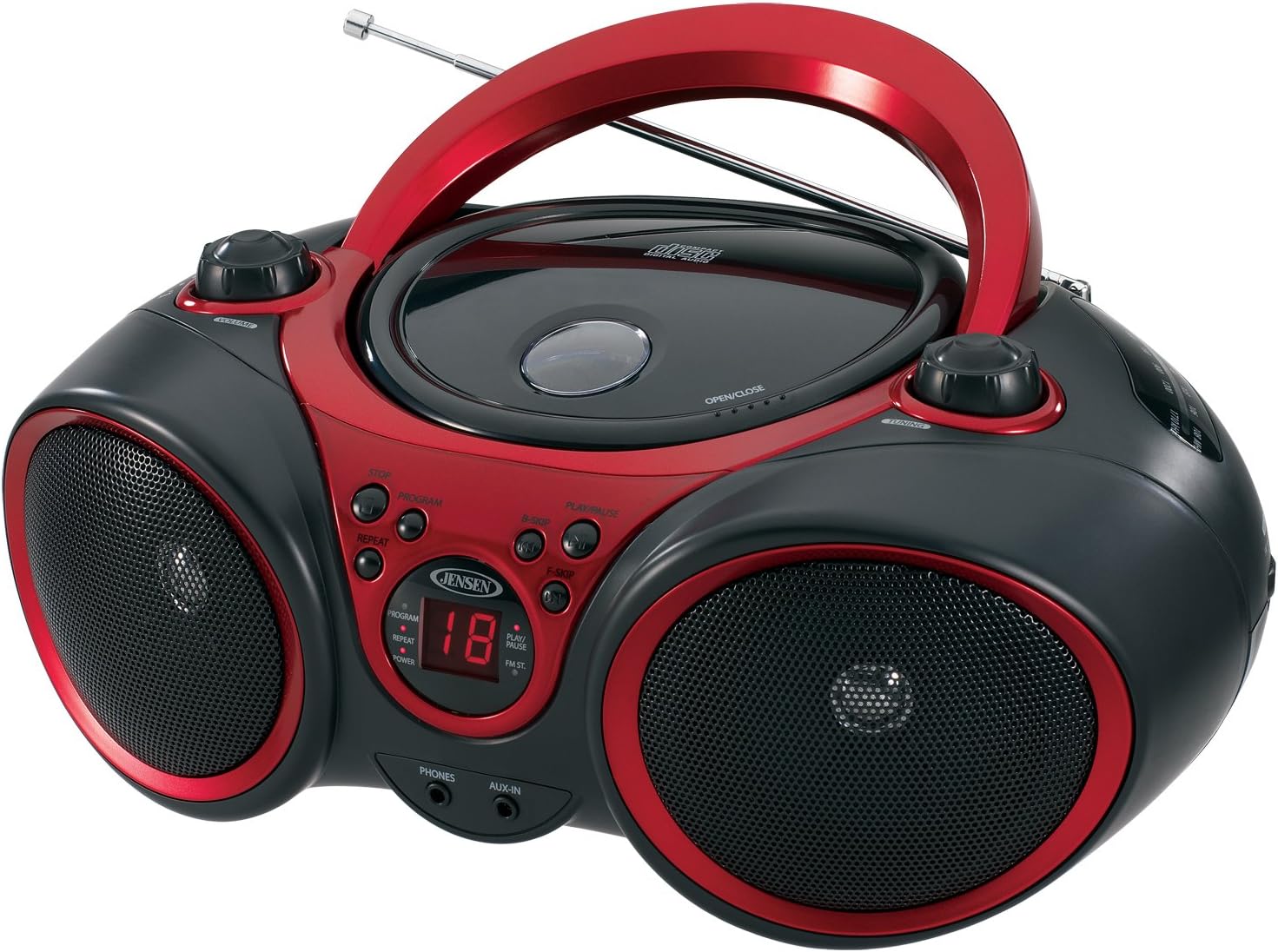
Immagine: Frontale view of the JENSEN CD-490 unit, showing the CD compartment, speakers, control buttons, and display.
Controlli del pannello frontale:
- Manopola VOLUME: Regola il livello di uscita audio.
- Pulsante STOP: Interrompe la riproduzione del CD.
- Pulsante PROGRAMMA: Utilizzato per programmare le tracce del CD.
- Pulsante RIPETI: Ripete la traccia corrente o tutte le tracce.
- B-SKIP Button: Skips backward through CD tracks.
- Pulsante RIPRODUCI/PAUSA: Avvia o mette in pausa la riproduzione del CD.
- F-SKIP Button: Skips forward through CD tracks.
- Display a LED: Shows CD track number and function indicators (PROGRAM, REPEAT, POWER, PLAY/PAUSE, FM ST).
- TELEFONO Jack: Per il collegamento di cuffie stereo.
- Presa AUX-IN: Per collegare dispositivi audio esterni.
Controlli del pannello superiore:
- Scomparto CD: Area di caricamento dall'alto per compact disc.
- OPEN/CLOSE Latch: Sblocca il coperchio del vano CD.
- Manopola di accordatura: Adjusts AM/FM radio frequency.
Comandi del pannello laterale:
- Interruttore FUNZIONE: Selects between RADIO, CD/AUX IN, and OFF modes.
- Selettore di banda AM/FM: Seleziona tra le bande radio AM e FM.
Caratteristiche del pannello posteriore:
- Ingresso alimentazione CA: Per collegare il cavo di alimentazione CA.
- Vano batteria: Holds 8 'C' (UM-2) batteries for portable operation.
- Antenna telescopica: Antenna estensibile per la ricezione radio FM.
Impostare
Alimentazione dell'unità:
The CD-490 can be powered by either AC power or batteries.
Alimentazione CA:
- Ensure the unit is in the OFF position using the FUNCTION switch.
- Collegare il cavo di alimentazione CA all'ingresso di alimentazione CA sul retro dell'unità.
- Plug the other end of the AC power cord into a standard AC 120V/60Hz wall outlet.
Potenza della batteria:
- Ensure the unit is in the OFF position.
- Aprire il coperchio del vano batterie situato nella parte inferiore dell'unità.
- Insert 8 'C' (UM-2) size batteries (not included), ensuring correct polarity (+/-).
- Chiudere saldamente il coperchio del vano batterie.
Configurazione dell'antenna:
For optimal FM radio reception, fully extend the telescopic antenna. For AM reception, the unit has a built-in antenna, so no adjustment is typically needed.
Operating the CD Player
The CD-490 supports standard audio CDs and CD-R/RW discs.
- Set the FUNCTION switch to the 'CD/AUX IN' position.
- Press the 'OPEN/CLOSE' latch to open the CD compartment lid.
- Place an audio CD into the compartment with the label side facing up.
- Close the CD compartment lid firmly until it clicks. The LED display will show the total number of tracks on the CD.
- Press the 'PLAY/PAUSE' button to begin playback. The current track number will appear on the LED display.
- Regolare la manopola 'VOLUME' al livello di ascolto desiderato.
- To pause playback, press the 'PLAY/PAUSE' button. Press it again to resume.
- To skip to the next track, press the 'F-SKIP' button. To go back to the beginning of the current track or the previous track, press the 'B-SKIP' button.
- To stop playback, press the 'STOP' button.
Funzione di ripetizione:
- During playback, press the 'REPEAT' button once to repeat the current track. The 'REPEAT' indicator will light up.
- Press the 'REPEAT' button a second time to repeat all tracks on the CD. The 'REPEAT' indicator will flash.
- Press the 'REPEAT' button a third time to cancel the repeat function.
Riproduzione programmata:
- In STOP mode, press the 'PROGRAM' button. The 'PROGRAM' indicator will light up and '00' will flash on the display.
- Use the 'F-SKIP' or 'B-SKIP' buttons to select your desired track.
- Press the 'PROGRAM' button again to confirm the track. The display will show the next program number.
- Ripetere i passaggi 2 e 3 per programmare fino a 20 brani.
- After programming, press the 'PLAY/PAUSE' button to start programmed playback.
- To cancel programmed playback, press the 'STOP' button twice.
Operating the AM/FM Radio
- Set the FUNCTION switch to the 'RADIO' position.
- Select either 'AM' or 'FM' using the AM/FM band selector switch.
- Extend the telescopic antenna for FM reception. Adjust its position for best reception.
- Rotate the 'TUNING' knob to select your desired radio station.
- Regolare la manopola 'VOLUME' al livello di ascolto desiderato.
Utilizzo dell'ingresso ausiliario
The AUX-IN jack allows you to connect an external audio device (e.g., MP3 player, smartphone) to play through the CD-490's speakers.
- Set the FUNCTION switch to the 'CD/AUX IN' position.
- Connect one end of a 3.5mm audio cable (not included) to the AUX-IN jack on the front of the CD-490.
- Connect the other end of the audio cable to the headphone jack or line-out jack of your external audio device.
- Turn on your external audio device and start playback.
- Adjust the volume on both your external device and the CD-490's 'VOLUME' knob for optimal sound.
Manutenzione e cura
- Tenere l'unità lontana dalla luce solare diretta, da fonti di calore e da polvere o umidità eccessive.
- Pulire l'unità con un panno morbido e asciutto. Non utilizzare detergenti abrasivi o solventi.
- Per pulire la lente del CD, utilizzare un detergente per lenti del CD disponibile in commercio.
- Se si utilizzano batterie, rimuoverle se si prevede di non utilizzare l'unità per un periodo prolungato, per evitare perdite.
Risoluzione dei problemi
| Problema | Possibile causa | Soluzione |
|---|---|---|
| Nessun potere | Cavo CA non collegato; batterie scariche o inserite in modo errato. | Controllare il collegamento del cavo CA; sostituire le batterie o verificare la corretta polarità. |
| CD does not play / 'NO DISC' error | CD inserted incorrectly; CD is dirty or scratched; Unit in wrong function mode. | Re-insert CD with label side up; Clean or replace CD; Set FUNCTION switch to 'CD/AUX IN'. |
| Scarsa ricezione radio | Antenna non estesa/regolata; segnale debole. | Extend and adjust FM telescopic antenna; Reposition the unit for better signal. |
| Nessun suono dall'ingresso AUX-IN | Audio cable not connected; Volume too low on external device or unit. | Ensure audio cable is securely connected; Increase volume on both devices. |
Specifiche
- Modello: Codice CD-490
- Fonte di energia: AC 120V/60Hz or 8 x 'C' (UM-2) batteries (not included)
- Potenza di uscita: 2 x 1.5W RMS
- Compatibilità CD: CD, CD-R/RW
- Bande radiofoniche: Stereo AM/FM
- Connettività: Jack di ingresso ausiliario, jack per cuffie stereo
- Dimensioni (L x P x A): 12.7 x 9.1 x 5.8 pollici
- Peso: 3.4 libbre
- Produttore: Spettri Merchandising International, Inc.
- Primo disponibile: 14 maggio 2003
Garanzia e supporto
Specific warranty information and customer support contact details are typically provided with your product packaging or on the manufacturer's official websito. Si prega di fare riferimento a tali risorse per informazioni più accurate e aggiornate.
Video del prodotto
Guarda questo video ufficiale del prodotto per una panoramica visivaview of the JENSEN CD-490 Stereo.
Video: Un oltreview of the JENSEN CD-490 Portable Stereo CD Player, highlighting its features and design.
Ask a question about this manual
Ask about setup, troubleshooting, compatibility, parts, safety, or missing instructions. Manuals+ will review the question and use this page’s manual context to help answer it.