
Prodotto finitoview
The VTech IS7101 is an accessory cordless handset designed to expand your existing VTech IS7121 series phone system. This handset cannot operate independently and requires a compatible base unit from the IS7121 series to function. It offers features such as Voice Announce Caller ID, a 50-picture history, and Push-to-Talk functionality.
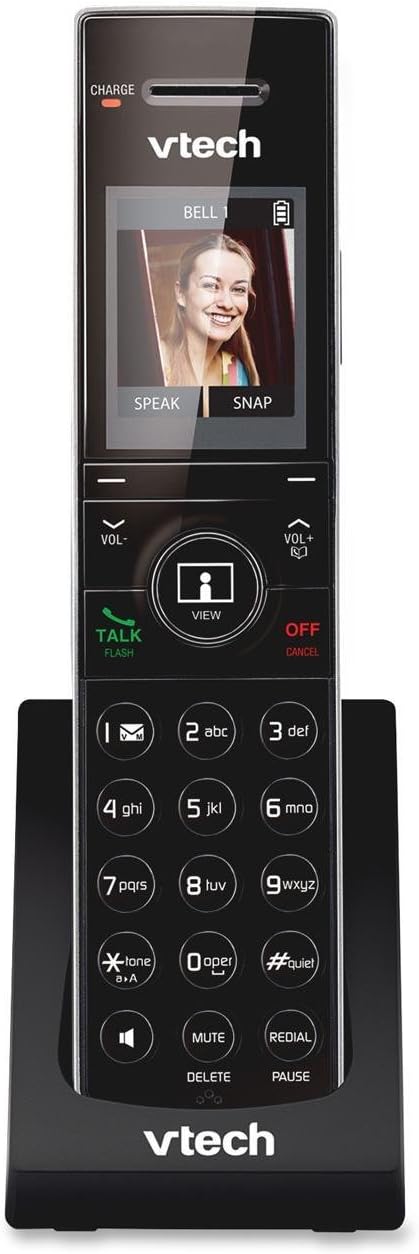
Image: VTech IS7101 Accessory Cordless Handset in its charging cradle. The handset features a large screen displaying a caller's image, a numeric keypad, and various function buttons.
Configurazione e installazione
1. Installazione della batteria
The IS7101 handset requires 1 AAA battery (included). Ensure correct polarity when inserting the battery into the battery compartment located on the back of the handset.
2. Ricarica iniziale
Place the handset in the charging cradle. The "CHARGE" indicator light on the handset (visible at the top left of the screen area) will illuminate, indicating that the handset is charging. For optimal battery performance, charge the handset for at least 16 hours before initial use.
3. Registrazione del telefono
This accessory handset must be registered to a VTech IS7121 series base unit to function. Refer to your IS7121 series base unit's user manual for detailed instructions on how to register new handsets. Typically, this involves placing the handset in the base unit's charger and initiating a registration process from the base unit.
Istruzioni per l'uso
Effettuare e ricevere chiamate
- Per effettuare una chiamata: Dial the desired phone number, then press the PARLA/FLASH pulsante.
- Per ricevere una chiamata: Quando squilla il telefono, premere il tasto PARLA/FLASH pulsante.
- Per terminare una chiamata: Premere il tasto OFF/ANNULLA pulsante o rimettere il portatile nella base di ricarica.
Tastierino e pulsanti funzione
The handset features a standard numeric keypad and several function buttons:
- PARLA/FLASH: Initiates or answers a call; used for call waiting.
- OFF/ANNULLA: Ends a call; cancels an operation; deletes digits while dialing.
- VOL- / VOL+: Adjusts listening volume during a call; navigates menus.
- VIEW: Accesses the picture history or caller ID log.
- DISATTIVARE/ELIMINARE: Mutes the microphone during a call; deletes entries from logs or memory.
- RICHIAMA/PAUSA: Redials the last number called; inserts a dialing pause.
- #SILENZIOSO: Activates or deactivates Quiet Mode.
- *TONE/aA: Switches between tone and pulse dialing; changes text input mode.
Voice Announce Caller ID
When a call comes in, the handset will announce the name of the caller (if available in your directory or caller ID service). This feature allows you to screen calls without looking at the display.
50 Picture History
The handset stores a history of up to 50 pictures associated with incoming calls. Use the VIEW button to browse through the picture history. You can speak to or snap a picture of the caller directly from this screen, if supported by your base unit and service.
Premi per parlare
The Push-to-Talk feature allows for instant, two-way communication between handsets registered to the same base unit, similar to a walkie-talkie. Consult your IS7121 series base unit manual for specific instructions on initiating and using Push-to-Talk.
Manutenzione
- Pulizia: Clean the handset and charging cradle with a soft, damp panno. Non utilizzare spray detergenti o prodotti chimici aggressivi.
- Cura della batteria: To prolong battery life, avoid exposing the handset to extreme temperatures. If the handset will not be used for an extended period, remove the battery.
- Magazzinaggio: Conservare il telefono in un luogo fresco e asciutto, lontano dalla luce solare diretta e dall'umidità.
Risoluzione dei problemi
| Problema | Soluzione |
|---|---|
| Il telefono non si accende o non è alimentato. | Ensure the battery is correctly installed and fully charged. Place the handset in the charging cradle and check if the "CHARGE" indicator light is on. |
| Impossibile effettuare o ricevere chiamate. | Verify that the handset is registered to the IS7121 series base unit. Ensure the base unit has power and is connected to the telephone line. |
| Scarsa qualità audio o rumore statico. | Move closer to the base unit. Check for interference from other electronic devices. Ensure the telephone line cord is securely connected to the base unit. |
| Caller ID is not displayed or announced. | Assicurati di aver sottoscritto il servizio di identificazione del chiamante con il tuo operatore telefonico. |
Specifiche
- Modello: IS7101
- Dimensioni: 3.4 x 4.7 x 7.4 pollici (L x L x A)
- Peso: 0.96 once (27.22 g)
- Colore: Nero
- Tipo di telefono: Senza fili
- Fonte di energia: Alimentato a batteria
- Tipo di batteria: 1 batteria AAA (inclusa)
- Materiale: Plastica
- Compatibilità: Requires VTech IS7121 series phone system to operate.
Garanzia e supporto
For detailed warranty information, technical support, or to download the complete user manual, please visit the official VTech website or refer to the user manual provided with your VTech IS7121 series phone system.
A digital copy of the user manual can also be accessed via this link: VTech IS7101 User Manual (PDF)