
QanbaQ1
Qanba Q1 PS3 & PC Joystick Instruction Manual
Modello: Q1
1. Prodotto finitoview
The Qanba Q1 joystick is a high-performance arcade controller designed for use with PlayStation 3 and PC platforms. It features authentic Qanba arcade components, providing a responsive and durable gaming experience. This manual provides essential information for setting up, operating, and maintaining your Qanba Q1 joystick.
Caratteristiche principali:
- Compatible with PlayStation 3 and PC systems.
- Equipped with a Qanba joystick and 8 Qanba action buttons.
- Includes an adjustable and removable table clamp per un montaggio sicuro.
- Comes with square, circle, and hex joystick gates for customization.
- Features rubber pads on the base for non-slip use on tables or laps.

Figura 1.1: primo piano view of the Qanba Q1 joystick and action buttons.
2. Istruzioni per l'installazione
2.1 Connessione a un dispositivo
- Locate the USB cable stored in the compartment on the side of the joystick.
- Connect the USB cable from the Qanba Q1 joystick to an available USB port on your PlayStation 3 console or PC.
- The system should automatically detect the joystick. For PC, driver installation may be required, which typically occurs automatically upon first connection.
2.2 Attaching the Table Clamp
The Qanba Q1 includes an adjustable table clamp for enhanced stability during use.
- Allineare il clamp arms with the designated slots on the sides of the joystick unit.
- Fai scorrere il clamp arms into place until they are securely seated.
- Place the joystick on a flat surface, such as a table or desk.
- Stringere le viti sul clamp until the joystick is firmly secured to the surface. Do not overtighten.

Figure 2.1: Qanba Q1 joystick with the table clamp allegato.
2.3 Changing Joystick Gates
The Qanba Q1 comes with interchangeable joystick gates (square, circle, hex) to suit different playstyles.
- Carefully open the bottom panel of the joystick (if applicable, refer to specific model instructions for access).
- Locate the existing joystick gate.
- Gently unclip or unscrew the current gate and remove it.
- Insert the desired gate (circle or hex) into position, ensuring it clicks or screws into place securely.
- Chiudi il pannello inferiore.
3. Istruzioni per l'uso
3.1 Controlli di base
The Qanba Q1 features a standard arcade layout with a joystick and eight primary action buttons.
- joystick: Used for directional input.
- Pulsanti di azione: Eight buttons for in-game actions (e.g., punches, kicks, special moves).
- Tasto CASA: Functions as the PlayStation button on PS3, or a system menu button on PC.
- Pulsante SELEZIONA: Functions as the Select button on PS3.
- Pulsante Start: Functions as the Start button on PS3.
3.2 interruttore modalità
The joystick includes a mode switch to toggle between different input modes, typically for compatibility or specific game requirements. Refer to the labels near the switch for available modes (e.g., D-Pad, Left Analog Stick, Right Analog Stick).
3.3 Funzione Turbo
The Turbo function allows for rapid, automatic pressing of a selected button. To activate:
- Premere e tenere premuto il tasto Turbosoffiante pulsante.
- Mentre si tiene Turbosoffiante, press the desired action button you wish to apply the turbo function to.
- Release both buttons. The selected action button will now rapidly repeat when pressed.
- Per disattivare, ripetere il procedimento: tenere premuto Turbosoffiante and press the turbo-enabled action button again.
4. Manutenzione
4.1 Pulizia
- Wipe the surface of the joystick with a soft, dry cloth.
- Per sporco ostinato, leggermente dampLavare il panno con acqua. Evitare l'uso di prodotti chimici aggressivi o detergenti abrasivi.
- Ensure no liquids enter the internal components of the joystick.
4.2 Gestione dei cavi
The Qanba Q1 features a convenient storage compartment for its USB cable.
- When not in use, carefully coil the USB cable and store it within the designated compartment to prevent damage and tangling.
- Avoid sharp bends or excessive force on the cable.
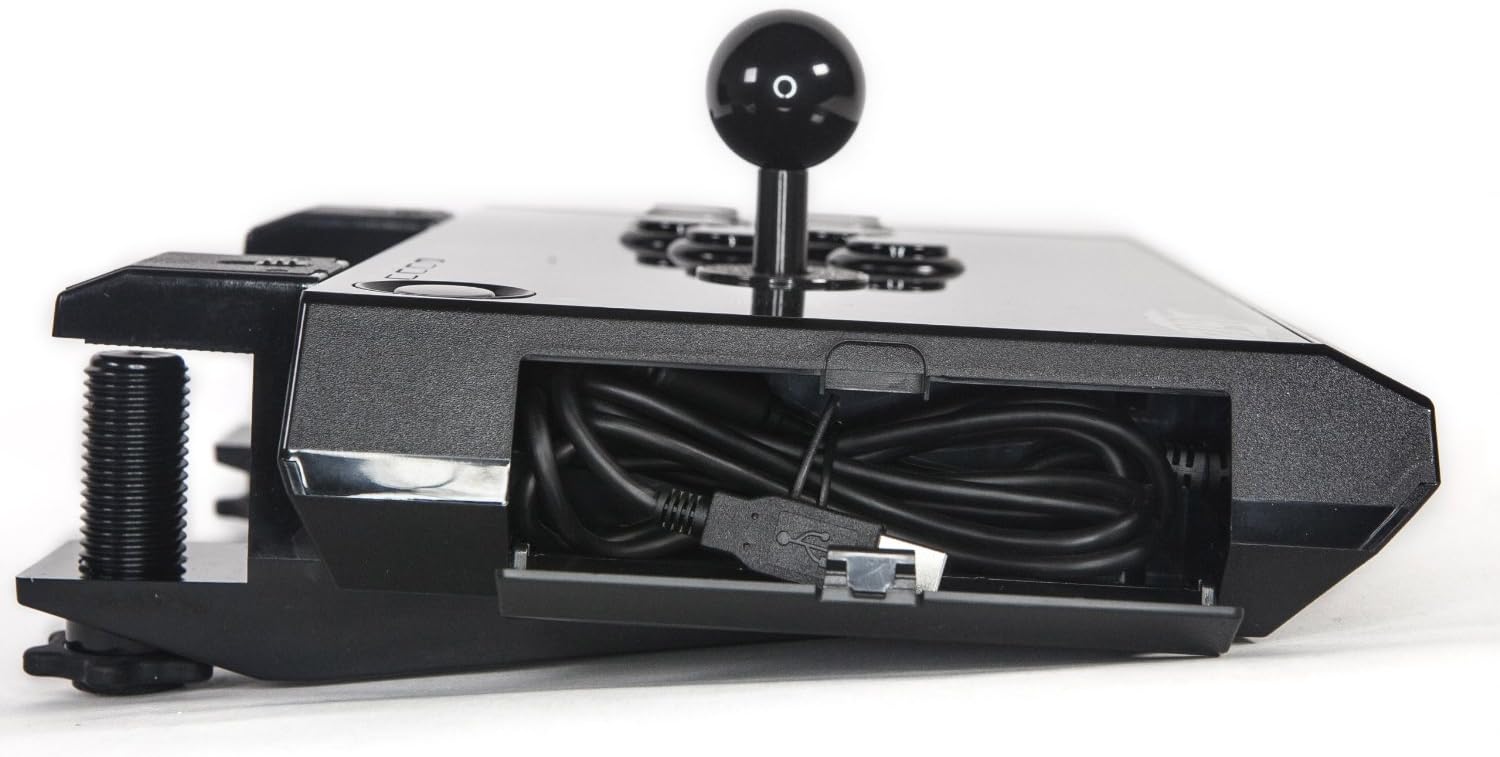
Figure 4.1: USB cable storage compartment.
5. Risoluzione Dei Problemi
5.1 Joystick Not Recognized
- Controllare la connessione USB: Ensure the USB cable is firmly connected to both the joystick and the console/PC. Try a different USB port.
- Riavvia dispositivo: Restart your PlayStation 3 or PC.
- Driver per PC: For PC, ensure that necessary drivers are installed. Windows typically installs these automatically, but manual installation may be required in some cases. Check Device Manager for any unrecognized devices.
- Prova un altro dispositivo: If possible, test the joystick on another compatible PS3 or PC to determine if the issue is with the joystick or the original device.
5.2 I pulsanti o il joystick non rispondono
- Controllare l'interruttore di modalità: Ensure the mode switch is set to the correct input mode for your game or system.
- Impostazioni di gioco: Verify that the game's controller settings are configured correctly for a joystick/arcade stick.
- Aggiornamento del firmware: Check the Qanba official website for any available firmware updates for your Q1 model.
6. Specifiche
| Caratteristica | Dettaglio |
|---|---|
| Marca | Qanba |
| Nome del modello | Q1 |
| Dispositivi compatibili | PC, PlayStation 3 |
| Tipo di controllore | Leva di comando |
| Tecnologia di connettività | USB |
| Caratteristiche aggiuntive | Ergonomic |
| Quantità del pulsante | 16 (including system buttons) |
| Piattaforma hardware | PC, PS3 |
| Modelli di console per videogiochi compatibili | PlayStation 3 di Sony |
| Peso dell'articolo | 5 libbre (circa 2.27 kg) |
| Dimensioni articolo (L x P x A) | 13.5 x 3 x 8.5 pollici (circa 34.3 x 7.6 x 21.6 cm) |
7. Garanzia e supporto
For warranty information, please refer to the documentation included with your purchase or visit the official Qanba website. For technical support or further assistance, please contact Qanba customer service through their official channels.
Qanba Official Websito: qanba.com
Ask a question about this manual
Ask about setup, troubleshooting, compatibility, parts, safety, or missing instructions. Manuals+ will review the question and use this page’s manual context to help answer it.