
SC-25 supersonico
SuperSonic SC-25 2.0 Channel DVD Player with USB Input User Manual
Modello: SC-25
Introduzione
Grazie per l'acquistoasing the SuperSonic SC-25 2.0 Channel DVD Player with USB Input. This manual provides essential information for the safe and efficient operation of your new device. Please read it thoroughly before use and retain it for future reference.
Precauzioni di sicurezza
- Non esporre l'unità alla pioggia o all'umidità per evitare incendi o scosse elettriche.
- Non aprire il casing. Affidare tutti gli interventi di manutenzione a personale qualificato.
- Garantire un'adeguata ventilazione attorno all'unità.
- Evitare di posizionare l'unità su superfici instabili.
- Scollegare il cavo di alimentazione durante i temporali o quando non si utilizza l'apparecchio per lunghi periodi.
Contenuto della confezione
Before setup, please verify that all items are present:
- 1 SuperSonic SC-25 DVD Player Unit
- 1 telecomando
- 1 Manuale utente (questo documento)
- Cavo di alimentazione
- Audio/Video (AV) Cable
Istruzioni di installazione
1. Collegamento a un televisore
- Ensure both the DVD player and your television are powered off.
- Connect one end of the AV cable (red, white, yellow connectors) to the corresponding output jacks on the back of the DVD player.
- Connect the other end of the AV cable to the corresponding input jacks on your television.
- For optimal video quality, ensure the television input is set to the correct AV channel (e.g., Video 1, AV1). The player supports NTSC video format.
2. Collegamento elettrico
- Plug the power cable into the AC IN port on the back of the DVD player.
- Collegare l'altra estremità del cavo di alimentazione a una presa elettrica standard.
3. Accensione iniziale
- Press the Power button on the front panel of the DVD player or on the remote control.
- Turn on your television and select the correct input source (e.g., AV1, Video 1) to see the DVD player's display.
Istruzioni per l'uso
1. Riproduzione del disco
- Premere il pulsante OPEN/CLOSE sul pannello frontale o sul telecomando per aprire il vassoio del disco.
- Place a compatible disc (DVD, CD, VCD, SVCD, MP3, Picture CD, CD-R, CD-RW) onto the disc tray with the label side facing up.
- Premere nuovamente il pulsante OPEN/CLOSE per chiudere il vassoio del disco. Il lettore inizierà automaticamente la lettura del disco.
- Per gestire la riproduzione, utilizzare i pulsanti PLAY, PAUSE, STOP, FAST FORWARD e REWIND sul telecomando.
- The player supports multi-level fast forward and backward scan functionalities.
2. Riproduzione USB
- Insert a USB flash drive into the USB input port on the front of the DVD player.
- The player should automatically detect the USB device and display its contents. If not, use the SOURCE or USB button on the remote to switch to USB mode.
- Naviga attraverso il tuo files using the arrow keys and SELECT/ENTER button on the remote.
- The player supports MP3 file format for audio playback.
3. Language and Subtitle Settings
- During DVD playback, press the AUDIO button on the remote to cycle through available audio languages (up to 8 languages supported).
- Press the SUBTITLE button on the remote to cycle through available subtitle languages (up to 32 subtitles supported).
Manutenzione
1. Pulizia dell'unità
- Wipe the exterior of the DVD player with a soft, dry cloth.
- Non utilizzare detergenti liquidi o spray aerosol, poiché potrebbero danneggiare la finitura o i componenti interni.
2. Pulizia dei dischi
- Maneggiare i dischi tenendoli per i bordi per evitare impronte digitali.
- If a disc is dirty, wipe it gently from the center outwards with a soft, lint-free cloth.
- Do not use abrasive cleaners or solvents on discs.
3. Conservazione
- Store the DVD player in a cool, dry place away from direct sunlight and extreme temperatures.
- When not in use, store discs in their cases to protect them from dust and scratches.
Risoluzione dei problemi
| Problema | Possibile causa | Soluzione |
|---|---|---|
| Nessun potere | Cavo di alimentazione non collegato; presa di corrente non attiva. | Assicurarsi che il cavo di alimentazione sia collegato saldamente. Testare la presa con un altro dispositivo. |
| Nessuna immagine o suono | AV cables incorrectly connected; Incorrect TV input selected. | Check AV cable connections. Select the correct input source on your TV. |
| Il disco non viene riprodotto | Disc is dirty or scratched; Disc is incompatible; Disc inserted incorrectly. | Clean the disc. Ensure the disc type is supported. Insert disc with label side up. |
| Dispositivo USB non riconosciuto | Dispositivo USB non inserito correttamente; Non supportato file format on USB. | Re-insert the USB device. Ensure filesono in formato MP3. |
Specifiche
- Marca: Supersonico
- Numero modello: SC-25
- Tipo di media: CD, DVD (Compatible with DVD/CD/VCD/SVCD/MP3/Picture/CD-R/CD-RW)
- Tecnologia di connettività: Powerline (Implies standard AC power connection)
- Colore: Nero
- Peso dell'articolo: 1.9 libbre
- Dispositivi compatibili: Televisione
- Input Video Compatibility: Formato NTSC
- Numero di canali: 2
- Formato video analogico: Formato NTSC
- Tipo di controller: Telecomando
- File Format (USB): MP3
- Codice UPC: 639131000254
- Produttore: SUPERSONIC INC.
- Dimensioni della confezione: 7.874 H x 24.13 L x 24.13 W (centimetri)
- Peso del pacco: 2.160 libbre
- Paese di origine: Cina
Garanzia e supporto
This SuperSonic SC-25 DVD Player is covered by a Garanzia del produttore. For specific details regarding warranty terms and conditions, please refer to the documentation included with your purchase or contact SuperSonic customer support.
For technical assistance or customer service inquiries, please visit the official SuperSonic website or contact their support channels. Keep your purchase receipt for warranty claims.
Prodotto finitoview
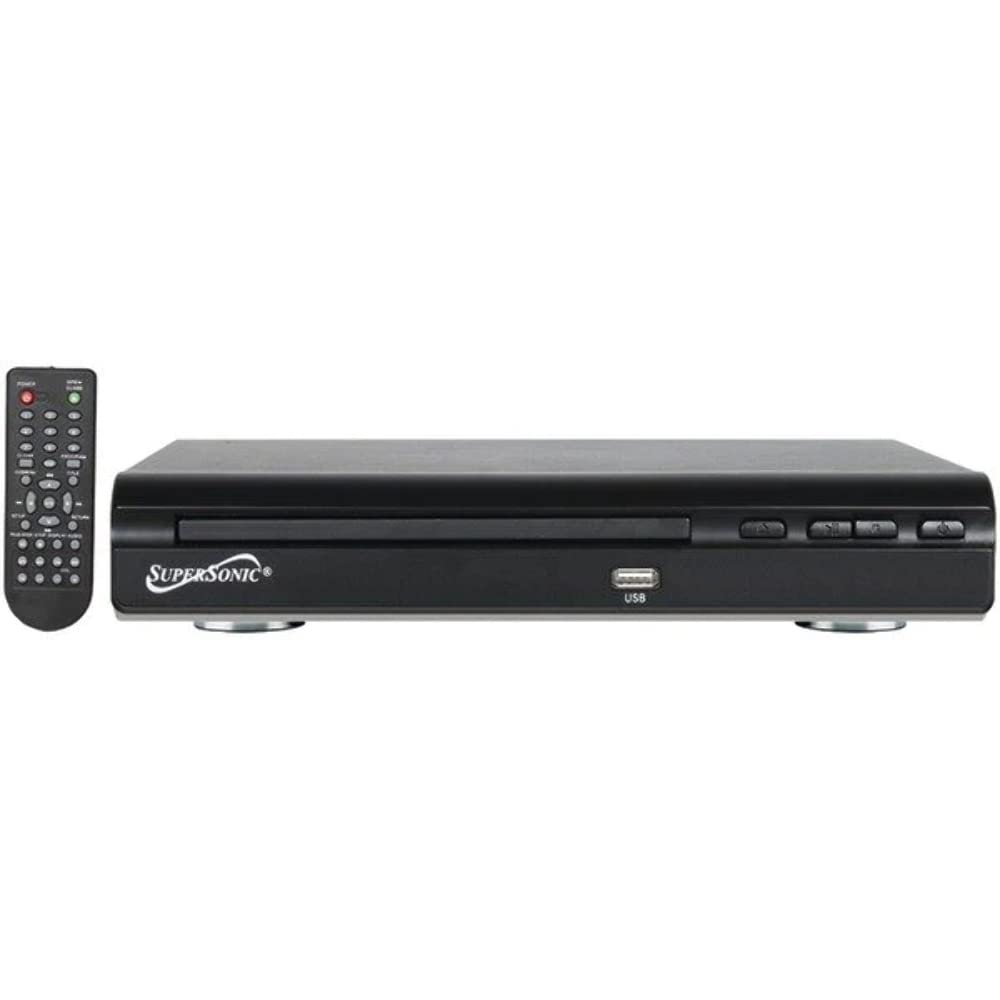
Davanti view of the SuperSonic SC-25 DVD player, showing the disc tray, USB port, and control buttons.
Ask a question about this manual
Ask about setup, troubleshooting, compatibility, parts, safety, or missing instructions. Manuals+ will review the question and use this page’s manual context to help answer it.