
1. Introduzione
This manual provides detailed instructions for the installation, operation, and maintenance of the Bogen TAMB2 Telephone Access Module with PRS2403 Power Supply. Please read this manual thoroughly before attempting to install or operate the unit to ensure proper function and safety.
2. Prodotto finitoview
The Bogen TAMB2 Telephone Access Module, paired with the PRS2403 Power Supply, is designed to provide reliable telephone access for paging systems. It offers efficient cooling, supports a wide range of voltages, and features a compact, durable design for seamless integration into your existing setup.
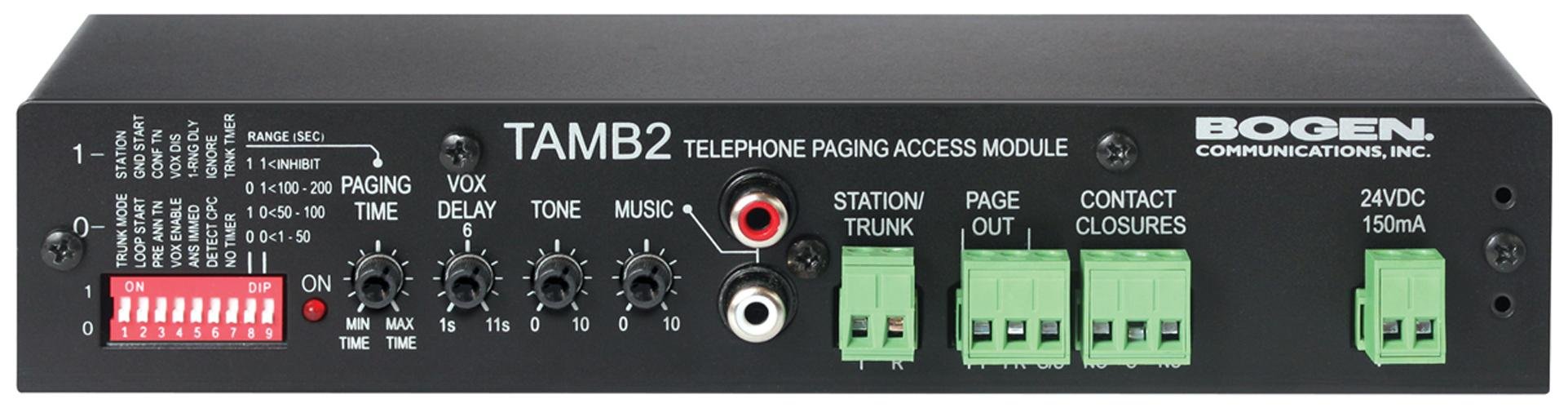
Figure 1: Bogen TAMB2 Telephone Access Module with PRS2403 Power Supply. This image shows the compact design of the module and its accompanying power supply, highlighting the various ports and indicators.
Caratteristiche principali:
- Raffreddamento efficiente: Equipped with a high-performance fan to maintain optimal operating temperatures.
- Powerful Supply: Compatible with 120-264 VAC for versatile and reliable power delivery.
- Design salvaspazio: Compact dimensions (9.54" L x 6.12" W x 2.25" H) for easy placement.
- Facile integrazione: Features an ATX connector for straightforward installation with compatible telephone systems.
- Costruzione durevole: Built with robust materials for long-lasting performance.
3. Informazioni sulla sicurezza
Per evitare lesioni e danni all'apparecchiatura, osservare sempre le seguenti precauzioni di sicurezza:
- Leggere tutte le istruzioni prima di utilizzare il dispositivo.
- Non esporre l'unità a umidità, pioggia o temperature estreme.
- Ensure the power supply is disconnected before making any connections or performing maintenance.
- Only use the provided PRS2403 Power Supply with the TAMB2 module.
- Non tentare di aprire o riparare l'unità autonomamente. Per qualsiasi intervento di manutenzione, rivolgersi a personale qualificato.
- Keep the unit away from heat sources and ensure adequate ventilation.
4. Contenuto della confezione
Verifica che il pacco contenga i seguenti articoli:
- Bogen TAMB2 Telephone Access Module
- Bogen PRS2403 Power Supply
- Manuale dell'utente (questo documento)
- Hardware di montaggio (se applicabile, controllare la confezione)
5. Impostazione
Follow these steps to properly set up your Bogen TAMB2 Telephone Access Module:
- Disimballare l'unità: Carefully remove the TAMB2 module and PRS2403 power supply from their packaging. Inspect for any signs of damage.
- Scegli una posizione: Select a dry, well-ventilated location away from direct sunlight, heat sources, and moisture. Ensure there is enough space for proper air circulation around the unit.
- Montaggio (facoltativo): If mounting is required, use appropriate hardware (not always included) to secure the module in place. Refer to the product dimensions for space planning.
- Collegare l'alimentatore: Connect the PRS2403 Power Supply to the TAMB2 module using the designated power input port. Do not plug the power supply into a wall outlet yet.
- Connect to Telephone System: Use an appropriate ATX connector cable to link the TAMB2 module to your compatible telephone system. Ensure all connections are secure. The module is designed to interface with analog station ports for paging output.
- Connect to Paging System (if applicable): If integrating with a separate paging amplifier, connect the audio output of the TAMB2 module to the input of your paging amplifier. The module can provide line-level 600 ohm or 8 ohm paging output.
- Applicare potenza: Once all connections are secure, plug the PRS2403 Power Supply into a standard electrical outlet. The unit should power on, and any status indicators should illuminate.
6. Istruzioni per l'uso
The Bogen TAMB2 module facilitates telephone access for paging. Once properly installed and powered, its operation is typically integrated with your telephone system's functionality.
- Initiating a Page: From a connected telephone, dial the designated access code or extension configured for the TAMB2 module.
- Making an Announcement: After accessing the module, you will typically hear a confirmation tone. Speak clearly into the telephone handset to make your announcement.
- Ending a Page: Hang up the telephone handset to terminate the paging session.
Note: Specific dialing procedures and features may vary depending on your telephone system's configuration. Consult your telephone system's administrator or manual for detailed instructions on accessing the paging function.
7. Manutenzione
The Bogen TAMB2 module and PRS2403 power supply are designed for reliable, low-maintenance operation. Follow these guidelines for optimal performance:
- Pulizia: Disconnect power before cleaning. Use a soft, dry cloth to wipe the exterior surfaces. Do not use liquid cleaners, aerosols, or solvents.
- Ventilazione: Ensure that the ventilation openings are not blocked. Periodically check for dust accumulation and gently clean if necessary to maintain efficient cooling.
- Connessioni via cavo: Controllare periodicamente tutti i collegamenti dei cavi per assicurarsi che siano saldi e privi di danni.
- Condizioni ambientali: Operate the unit within its specified environmental conditions (temperature, humidity) to prevent premature failure.
8. Risoluzione Dei Problemi
If you encounter issues with your Bogen TAMB2 module, refer to the following common problems and solutions:
| Problema | Possibile causa | Soluzione |
|---|---|---|
| Nessuna alimentazione/L'unità non si accende | Power supply not connected or faulty; outlet not active. | Check power connections. Ensure the power outlet is functional. Test with another outlet if possible. Verify the PRS2403 power supply is working. |
| No audio output during paging | Incorrect connection to telephone or paging system; volume settings too low; faulty cable. | Verify all audio cables are securely connected. Check the input/output settings on your telephone system and paging amplifier. Ensure volume levels are appropriate. Test with a different cable. |
| Qualità audio distorta o scarsa | Improper impedance matching; signal interference; faulty connections. | Ensure the TAMB2 output impedance (600 ohm or 8 ohm) matches the input requirements of your paging amplifier. Check for loose connections or damaged cables. Relocate the unit away from potential sources of electrical interference. |
| Cannot access paging function from telephone | Incorrect telephone system configuration; module not properly connected to telephone system. | Confirm the TAMB2 module is correctly connected to an analog station port. Verify the access code or extension for paging is correctly configured in your telephone system. Consult your telephone system administrator. |
If the problem persists after attempting these solutions, contact Bogen technical support or a qualified service technician.
9. Specifiche
| Caratteristica | Dettaglio |
|---|---|
| Marca | Arco |
| Nome del modello | TAMB2PS |
| Numero modello articolo | BG-TAMB2PS |
| Dispositivi compatibili | Telephone systems |
| Tipo di connettore | ATX |
| Fattore di forma | ATX |
| Metodo di raffreddamento | Air (1 fan) |
| Dimensioni articolo (LxPxA) | 9.54 x 6.12 x 2.25 pollici |
| Peso dell'articolo | 1.75 libbre |
| Numero di connettori | 1 |
| Potenza in ingresso | 120-264 VAC (via PRS2403 Power Supply) |
| Uscita cercapersone | Line level 600 ohm or 8 ohm |
10. Garanzia e supporto
Bogen products are designed for durability and reliability. For specific warranty information, please refer to the warranty card included with your product or visit the official Bogen websito. Conserva la ricevuta d'acquisto come prova d'acquisto.
For technical assistance, troubleshooting beyond this manual, or service inquiries, please contact Bogen customer support:
- Websito: www.bogen.com
- Telefono: Refer to the Bogen websito per i numeri di contatto regionali.
When contacting support, please have your product model number (TAMB2PS) and serial number (if applicable) ready.