
Phanteks PH-ES813P_BL
Manuale utente del case per computer full tower Phanteks Enthoo Series Primo Ultimate
Model: PH-ES813P_BL
Introduzione
Phanteks Enthoo Primo è un case per computer full tower progettato per gli appassionati che cercano eccezionali possibilità di raffreddamento e un design funzionale. Questo manuale fornisce istruzioni dettagliate per l'installazione, il funzionamento, la manutenzione e la risoluzione dei problemi del case Enthoo Primo, garantendo prestazioni ottimali e longevità.

Figure 1: Phanteks Enthoo Primo Ultimate Full Tower Computer Case (Black/Blue)
Configurazione e installazione
Proper installation is crucial for the performance and stability of your system. Follow these steps carefully.
1. Installazione dell'unità di alimentazione (PSU)
The Enthoo Primo features a unique thermally isolated PSU location at the rear of the case, promoting cooler temperatures and improved cable management.
- Locate the PSU compartment at the bottom rear of the case.
- Slide your PSU into the designated area.
- Secure the PSU with the provided screws from the rear of the case.
Video 1: Animated demonstration of internal case features, including PSU placement, HDD trays, and cable management. This video highlights the thermally isolated PSU location and hidden cable routing.

Figura 2: Posteriore view of the Enthoo Primo case, showing the PSU mounting area at the bottom.
2. Drive Installation (HDD/SSD)
The case supports up to 6 HDDs with dual repositionable and removable HDD cages, and features Drop-n-Lock double stack SSD brackets.
- Access the hidden HDD trays by removing the side panel.
- Slide your 3.5" HDDs into the trays and secure them.
- For 2.5" SSDs, utilize the removable Drop-n-Lock brackets. These can be installed in three different locations within the case.
- Ensure all drives are securely fastened to prevent vibration.

Figura 3: Interno view of the Enthoo Primo, highlighting the hidden HDD trays and SSD mounting points.
3. Installazione della scheda madre e dei componenti
The Enthoo Primo supports ATX motherboards and offers ample space for various components.
- Install your ATX motherboard onto the standoffs.
- Install your CPU, RAM, and graphics cards as per their respective manuals.
- Utilize the pre-installed cable management tools behind the motherboard tray to route cables neatly.
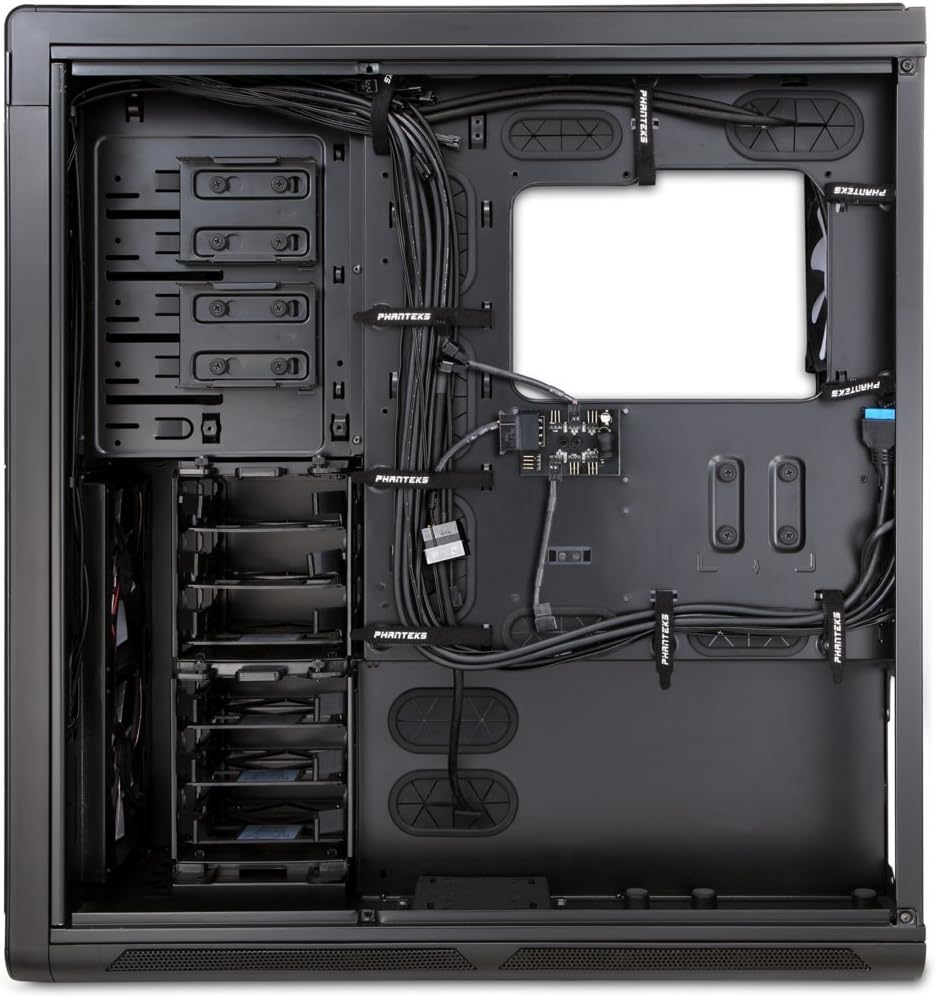
Figura 4: Interno view of the Enthoo Primo, showcasing the cable management features behind the motherboard tray.
Caratteristiche di funzionamento
The Enthoo Primo is designed with user convenience and optimal performance in mind.
I / O del pannello frontale
Il pannello I/O frontale consente un facile accesso alle porte e ai controlli essenziali:
- 2 porte USB 3.0: Per il trasferimento dati ad alta velocità.
- 2 porte USB 2.0: Per connessioni periferiche standard.
- Jack per microfono: Per l'ingresso audio.
- Jack audio da 3.5 mm: Per l'uscita audio.
- Interruttore LED: Controls the integrated LED lighting (LED strip & Fan LED).

Figura 5: Angolo superiore view of the Enthoo Primo, illustrating the accessible front I/O panel.
Sistema di raffreddamento
The Enthoo Primo offers extensive cooling support for both air and liquid cooling configurations.
- Ventole preinstallate: Includes 1x 140mm fan on top, 2x 140mm LED fans in front, 1x 140mm fan in the rear, and 1x 140mm fan on the bottom. All are Phanteks' PH-F140SP fans.
- Raffreddamento ad aria: Supports up to 14x 120mm fans or 11x 140mm fans for comprehensive airflow.
- Raffreddamento ad acqua: Provides up to 5 different installation areas for slim and thick radiators (120mm and 140mm form factors), including clearance for push-pull fan configurations. Innovative liquid cooling mounting systems include radiator brackets and a versatile reservoir/pump bracket.

Figura 6: Fronte view of the Enthoo Primo, showcasing the clean design and intake areas.
Manutenzione
Regular maintenance ensures optimal performance and extends the lifespan of your computer case.
- Filtri antipolvere: The Enthoo Primo features removable dust filters located at the front, top, bottom (2x), and side panel (2x). Regularly remove and clean these filters to maintain optimal airflow and prevent dust buildup inside the case.
- Pulizia esterna: Utilizzare un morbido, damp cloth to wipe down the aluminum front and top panels. Avoid abrasive cleaners.
- Pulizia interna: Periodically use compressed air to clear dust from internal components and fan blades. Ensure the system is powered off and unplugged before cleaning.
Risoluzione dei problemi
Questa sezione affronta i problemi più comuni che potresti incontrare.
- Nessun potere:
- Ensure the PSU is properly seated and connected to the motherboard and wall outlet.
- Verificare che il cavo dell'interruttore di alimentazione del pannello frontale sia collegato correttamente al connettore della scheda madre.
- Fans Not Spinning / LED Not Lighting:
- Check fan connections to the motherboard or fan hub.
- Ensure the fan hub is powered (SATA connection).
- Verify the LED switch on the front panel is in the 'on' position.
- Porte USB non funzionanti:
- Confirm that the USB 3.0 and USB 2.0 headers from the front panel are securely connected to the motherboard.
- Rumore eccessivo:
- Check if all fans are securely mounted and free from obstructions.
- Ensure drive trays are properly secured to minimize vibration.
- Clean dust filters and fan blades if necessary.
Specifiche
| Caratteristica | Dettaglio |
|---|---|
| Nome del modello | PH-ES813P_BL |
| Tipo di caso | Torre completa |
| Compatibilità della scheda madre | ATX |
| Materiale | Aluminum Faceplates, Steel Chassis |
| Colore | Nero/Blu |
| Dimensioni (LxWxH) | 23.62 x 9.84 x 25.59 pollici |
| Peso dell'articolo | 50 libbre |
| Porte USB 3.0 | 2 |
| Porte USB 2.0 | 2 |
| Porte audio | 1x Microphone, 1x 3.5mm Audio Jack |
| Slot di espansione | 8 |
| Metodo di raffreddamento | Aria / Acqua |
| Ventole preinstallate | 5x 140mm (1 top, 2 front LED, 1 rear, 1 bottom) |
| Supporto massimo delle ventole | 14x 120mm o 11x 140mm |
| Supporto radiatore | Up to 5 locations (120mm/140mm form factors) |
Garanzia e supporto
Per informazioni sulla garanzia e supporto tecnico, fare riferimento al sito ufficiale Phanteks websito o il manuale utente completo.
You can download the complete user manual in PDF format here: Phanteks Enthoo Primo User Manual (PDF)
Ask a question about this manual
Ask about setup, troubleshooting, compatibility, parts, safety, or missing instructions. Manuals+ will review the question and use this page’s manual context to help answer it.