
Introduzione
This manual provides comprehensive instructions for the setup, operation, and maintenance of your VTech CS6829-2 2-Handset Cordless Phone with Answering System. This system is designed for home use, offering features such as caller ID, a digital answering machine, backlit keypad, and a full duplex speakerphone for enhanced communication.
Cosa c'è nella scatola
Verifica che tutti gli articoli siano inclusi nel tuo pacco:
- Unità di base
- 2 ricevitori cordless
- Caricabatterie
- 2 adattatori
- 2 pacchi batteria
- Cavo della linea telefonica
- Staffa di montaggio a parete
- Guida rapida
Impostare
Follow these steps to set up your VTech CS6829-2 phone system:
- Collegare l'unità base:
Plug one end of the telephone line cord into the TEL LINE jack on the back of the base unit. Plug the other end into a telephone wall jack. Plug the small end of the power adapter into the POWER jack on the back of the base unit. Plug the large end of the power adapter into a wall outlet not controlled by a wall switch.
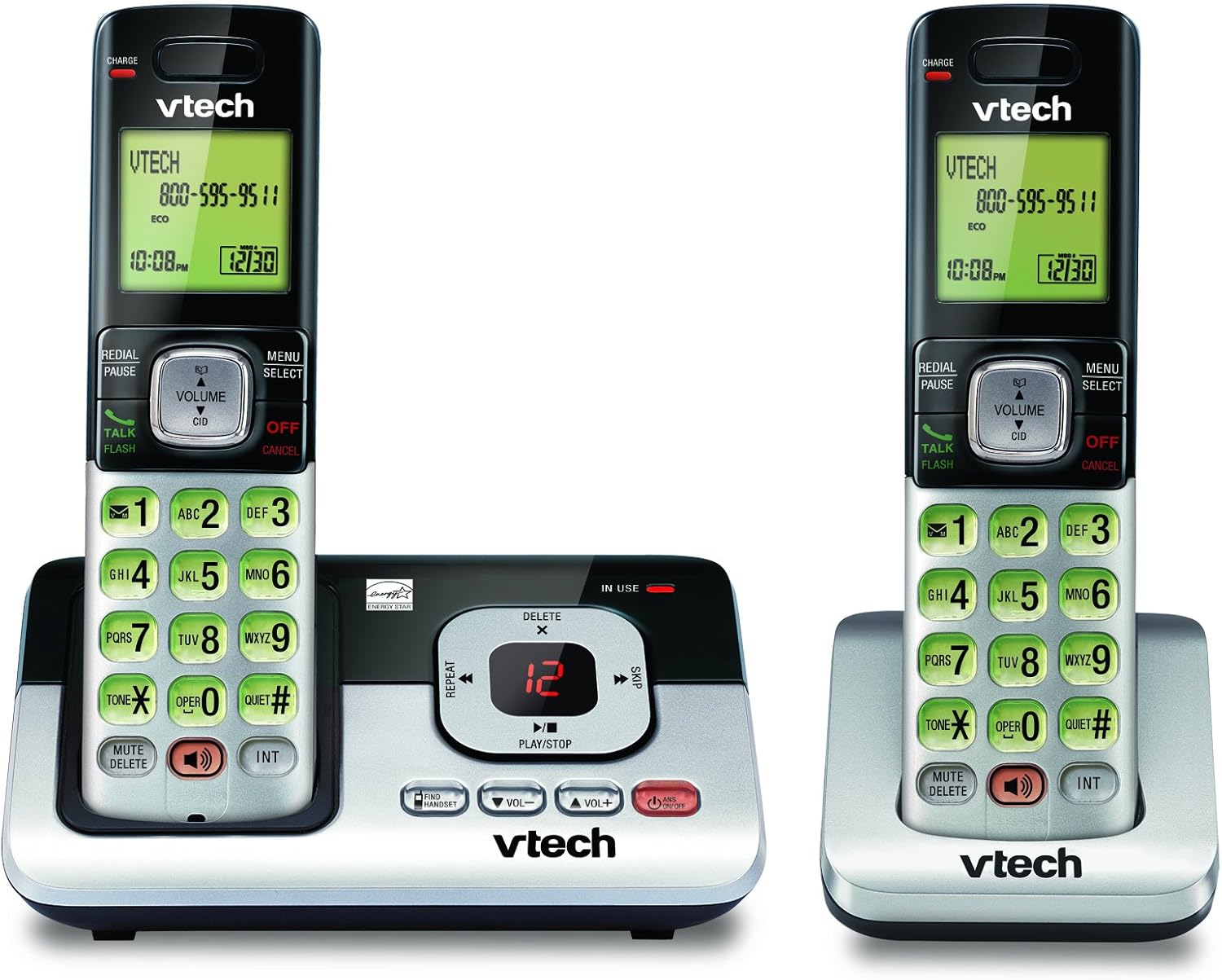
Image: The VTech CS6829-2 base unit with one handset docked, and a second handset with its charging cradle. This illustrates the main components of the phone system.
- Installare le batterie del telefono:
Open the battery compartment cover on the back of each handset. Connect the battery pack connector securely into the jack inside the compartment. Place the battery pack with the label facing up and tuck the wires inside the compartment. Close the battery compartment cover.
- Caricare i cellulari:
Place each handset in the base unit or charger with the display facing up. The CHARGE light on the handset will illuminate, indicating proper charging. Allow the handsets to charge for at least 16 hours before initial use for optimal battery performance.

Immagine: Un angolo view of the VTech CS6829-2 base unit with one handset docked, and the second handset in its separate charging cradle. This shows how the handsets are placed for charging.
- Imposta data e ora:
After the handsets are charged, follow the on-screen prompts or refer to the quick start guide to set the date and time. This is important for accurate caller ID and answering system timestamps.
Istruzioni per l'uso
Effettuare e rispondere alle chiamate
- Per effettuare una chiamata: Premere PARLA/FLASH or any dialing key to get a dial tone, then dial the phone number.
- Per rispondere a una chiamata: Quando il telefono squilla, premere PARLA/FLASH o qualsiasi tasto di composizione.
- Per terminare una chiamata: Premere OFF/ANNULLA or place the handset back in the base unit/charger.
Sistema di risposta digitale
- Riproduzione dei messaggi: Sull'unità base, premere RIPRODUCI/ARRESTA. On a handset, press MENU/SELEZIONA, scroll to "Answering System", then select "Play Messages".
- Recording an Outgoing Announcement: On the base unit or handset, navigate to the answering system menu and select "Record OGM" (Outgoing Message).
- Eliminazione dei messaggi: Mentre un messaggio è in riproduzione, premere ELIMINARE sull'unità base o sul portatile.
Funzione vivavoce
- To Use Speakerphone: Durante una chiamata, premere il tasto ORATORE button on the handset. Press it again to switch back to the handset earpiece.
Caratteristiche principali
- Digital Answering System with LED Indicator and Volume Control: This system records up to 14 minutes of messages, announcements, and memos. An LED indicator notifies you of new messages. Volume control keys on the base allow easy adjustment of message playback volume.
- Caller ID / Call Waiting — Stores up to 50 Calls: Displays the name, number, time, and date of incoming calls, helping you identify callers before answering.
- Vivavoce full duplex: The handset features a full duplex speakerphone, enabling natural two-way conversations where both parties can speak and be heard simultaneously.
- Tastiera e display retroilluminati: The entire keypad and LCD screen on the handset illuminate, ensuring clear visibility and easy dialing even in low-light conditions.
- Tecnologia di risparmio energetico in modalità ECO: This technology optimizes power consumption for extended battery performance and energy efficiency.
- Modalità silenziosa: Allows you to silence the ringer on both the handset and base unit immediately or for a set period, providing peace and quiet when needed.
Manutenzione
- Pulizia: Pulisci il telefono e l'unità base con un panno morbido eamp panno. Non utilizzare spray detergenti o detergenti liquidi.
- Cura della batteria: Replace batteries when they no longer hold a charge. Use only the specified battery type. Dispose of old batteries responsibly according to local regulations.
- Condizioni ambientali: Evitare di esporre il telefono alla luce diretta del sole, vicino a fonti di calore o in luoghi eccessivamente umidi.
Risoluzione dei problemi
Se riscontri problemi con il tuo telefono, prova le seguenti soluzioni:
| Problema | Soluzione |
|---|---|
| Nessun segnale di linea. | Ensure the telephone line cord is securely plugged into both the base unit and the wall jack. Check that the power adapter is plugged into a working electrical outlet. |
| Il telefono non si carica. | Ensure the handset is properly seated in the base unit or charger. Clean the charging contacts on both the handset and base/charger with a dry cloth. Verify the power adapter is connected. |
| Scarsa qualità del suono / Disturbo statico. | Move the handset closer to the base unit. Avoid placing the phone near other electronic devices (e.g., microwaves, computers) that may cause interference. Check the telephone line cord for damage. |
| La segreteria telefonica non registra i messaggi. | Assicurarsi che la segreteria telefonica sia accesa. Verificare che la memoria non sia piena; cancellare i vecchi messaggi se necessario. |
Specifiche
| Caratteristica | Dettaglio |
|---|---|
| Numero di modello | CS6829-2 |
| Dimensioni del prodotto | 5.77 x 3.41 x 6.77 pollici |
| Peso dell'articolo | 1.41 libbre |
| Batterie | 2 batterie specifiche del prodotto richieste (incluse) |
| Tipo di sistema di risposta | Digitale |
| Memoria dell'ID chiamante | Fino a 50 chiamate |
| Tempo di registrazione del sistema di risposta | Fino a 14 minuti |
| Colore | Nero/Argento |
| Tipo di telefono | Senza fili |
Garanzia e supporto
For warranty information and technical support, please refer to the warranty card included with your product or visit the official VTech websito. Conservare la ricevuta d'acquisto come prova d'acquisto per eventuali reclami in garanzia.
Puoi anche visitare il Negozio VTech su Amazon per ulteriori informazioni sul prodotto e risorse di supporto.