
Introduzione
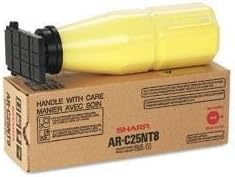
This instruction manual provides comprehensive guidance for the proper handling, installation, and maintenance of your Sharp BR AR-C150 1-300GM Yellow Toner cartridge, model ARC25NT8. This product is designed to deliver consistent, high-quality yellow prints for compatible Sharp printer models. Please read this manual thoroughly before use to ensure optimal performance and safety.
Informazioni sulla sicurezza
Always observe the following safety precautions when handling toner cartridges:
- Tenere le cartucce del toner fuori dalla portata dei bambini.
- Non ingerire il toner. In caso di ingestione, consultare immediatamente un medico.
- Avoid direct contact with toner powder. If contact occurs, wash affected areas thoroughly with soap and water.
- Do not incinerate used toner cartridges, as this can cause toner dust to explode.
- Store toner in a cool, dry place away from direct sunlight and extreme temperatures.
Configurazione e installazione
Follow these steps to properly install the toner cartridge into your compatible Sharp printer.
- Unpack the Toner: Carefully remove the new Sharp BR AR-C150 Yellow Toner cartridge from its packaging. Avoid shaking or dropping the cartridge.
- Preparare la stampante: Ensure your printer is powered on and open the front cover or toner access door according to your printer's specific instructions.
- Rimuovere la vecchia cartuccia (se applicabile): If replacing an empty cartridge, gently pull out the old yellow toner cartridge. Place it in a protective bag for proper disposal.
- Inserire una nuova cartuccia: Align the new toner cartridge with the corresponding slot in the printer. Push it firmly until it clicks into place. Do not force the cartridge.
- Chiudere il coperchio della stampante: Close the printer's front cover or toner access door. The printer may perform a calibration cycle.
Istruzioni per l'uso
Once installed, the Sharp BR AR-C150 Yellow Toner cartridge operates automatically with your compatible Sharp printer. The printer's internal system will detect the new toner and manage its usage.
- Monitoraggio del livello del toner: Most Sharp printers provide a way to monitor toner levels through the printer's control panel or via printer software on your computer. Refer to your printer's specific user manual for details on checking toner status.
- Qualità di stampa: This toner is designed for optimal print quality. If you notice any degradation in yellow print output, refer to the Troubleshooting section.
Manutenzione
Proper maintenance ensures the longevity and performance of your toner cartridge.
- Magazzinaggio: Conservare le cartucce di toner non utilizzate nella confezione originale sigillata in un ambiente fresco e asciutto, lontano dalla luce solare diretta e da temperature estreme.
- Gestione: Always handle the toner cartridge by its designated handles or edges to avoid touching the drum or toner outlet.
- Disposizione: Dispose of empty toner cartridges responsibly. Many manufacturers and retailers offer recycling programs. Do not dispose of toner cartridges in regular household waste. Check local regulations for proper disposal methods.
Risoluzione dei problemi
If you encounter issues with your Sharp BR AR-C150 Yellow Toner, consider the following common problems and solutions:
- Messaggio "Toner scarso" o "Sostituire toner":
- Assicurarsi che la cartuccia sia completamente inserita nel suo alloggiamento. Rimuoverla e reinserirla saldamente.
- If the message persists after reinstallation, the cartridge may indeed be empty or nearing its end of life. Replace with a new cartridge.
- Poor Print Quality (Faded Yellow, Streaks, Spots):
- Check the toner level. Low toner can cause faded prints.
- Perform a printer cleaning cycle. Refer to your printer's manual for instructions on cleaning the print heads or drum unit.
- Ensure the toner cartridge is a genuine Sharp product. Non-genuine cartridges may cause print quality issues.
- If the issue persists, the cartridge may be defective. Contact customer support.
- Cartuccia non riconosciuta:
- Remove the cartridge and check for any protective tapes or covers that may not have been removed during installation.
- Assicurarsi che la cartuccia sia installata correttamente e completamente inserita.
- Riavvia la stampante.
Specifiche
| Attributo | Dettaglio |
|---|---|
| Marca | Affilato |
| Numero di modello | ARC25NT8 |
| Nome del prodotto | BR AR-C150 - 1-300GM Yellow Toner |
| Colore | Giallo |
| Peso dell'articolo | 2.6 libbre (circa 1.18 kg) |
| Dimensioni del prodotto | 1 x 1 x 1 pollici (circa 2.54 x 2.54 x 2.54 cm) |
| Dispositivi compatibili | Printer (specific Sharp models) |
| Codice UPC | 700465276391 |
Garanzia e supporto
This Sharp toner cartridge is covered by the manufacturer's standard warranty. For specific warranty terms and conditions, please refer to the documentation included with your purchase or visit the official Sharp websito.
For technical assistance, troubleshooting beyond this manual, or warranty claims, please contact Sharp customer support. Contact information can typically be found on the Sharp official websul sito o sulla confezione del prodotto.