
1. Introduzione
This manual provides essential information for the safe and effective operation of the Rigol DG5352 Function/Arbitrary Waveform Generator. The DG5352 is a high-performance, 2-channel device capable of generating various waveforms with a maximum frequency of 350 MHz and a sampling rate of 1 GSa/s. Please read this manual thoroughly before using the instrument to ensure proper functionality and to prevent damage.
2. Informazioni sulla sicurezza
Observe the following safety precautions to prevent injury and avoid damage to the instrument or any connected products.
- Fonte di energia: Connect the instrument to a power source that provides the specified voltage gamma.
- Messa a terra: Assicurarsi che lo strumento sia correttamente collegato a terra per evitare scosse elettriche.
- Ventilazione: Non ostruire le aperture di ventilazione. Garantire un adeguato flusso d'aria attorno allo strumento.
- Ambiente: Operate the instrument in a dry, well-ventilated area, away from direct sunlight, high temperatures, and excessive dust.
- Pulizia: Scollegare l'alimentazione prima della pulizia. Utilizzare un panno morbido eamp panno; evitare detergenti abrasivi o solventi.
- Manutenzione: Per qualsiasi intervento di assistenza, rivolgersi a personale qualificato. Non tentare di riparare lo strumento da soli.
3. Prodotto finitoview
The Rigol DG5352 is a versatile function/arbitrary waveform generator designed for a wide range of applications in electronics testing and development. It features two independent output channels, allowing for simultaneous generation of different waveforms or synchronized signals.
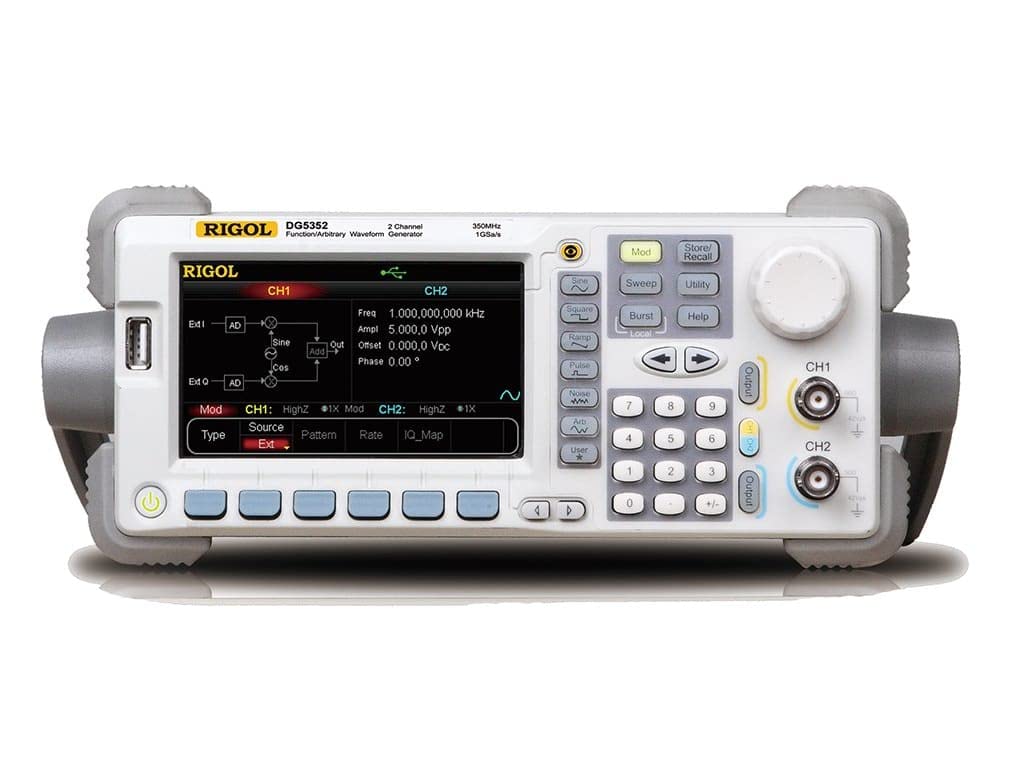
Figure 3.1: Front Panel of the Rigol DG5352. This image displays the front panel of the Rigol DG5352, highlighting its main display, control buttons, rotary knob, and output connectors for Channel 1 (CH1) and Channel 2 (CH2). The display shows current settings for frequency, amplitude, offset, and phase, along with waveform type and modulation options.
Caratteristiche principali:
- Canali: 2 independent output channels.
- Gamma di frequenza: Fino a 350 MHz.
- Samptasso di ling: 1 GSa/s.
- Tipi di forma d'onda: Seno, Quadrato, Ramp, Pulse, Noise, Arbitrary, and more.
- Modulation Functions: AM, FM, PM, FSK, ASK, PSK, PWM, Sweep, Burst.
- Interfaccia utente: Intuitive front panel with a clear display, dedicated function buttons, and a rotary knob for precise adjustments.
4. Impostazione
- Disimballaggio: Carefully remove the DG5352 from its packaging. Verify that all accessories listed in the packing list are present.
- Collegamento elettrico: Connect the provided power cord to the AC input on the rear panel of the instrument, then plug the other end into a grounded AC power outlet.
- Accensione: Premere il pulsante di accensione situato sul pannello frontale per accendere lo strumento. Il display si illuminerà e il sistema eseguirà un autotest.
- Connessioni di uscita: Connect your test leads or cables to the desired output channels (CH1 or CH2) on the front panel. Ensure proper impedance matching for your application.
- USB/LAN Connection (Optional): For remote control or data transfer, connect a USB cable to the USB host/device port or an Ethernet cable to the LAN port on the rear panel.
5. Istruzioni per l'uso
This section outlines basic operation procedures for generating standard waveforms.
5.1. Generating a Standard Waveform (e.g., Sine Wave)
- Seleziona canale: Premere il tasto CH1 or CH2 button on the front panel to select the desired output channel. The active channel will be highlighted on the display.
- Seleziona il tipo di forma d'onda: Premere il tasto seno button (or other waveform buttons like Piazza, Ramp, Impulso) located on the left side of the control panel. The display will show the default sine wave parameters.
- Imposta frequenza: Use the numeric keypad to enter the desired frequency value, then press the corresponding unit button (e.g., MHz, kHz). Alternatively, use the rotary knob to adjust the frequency.
- Impostato Amplitudine: Premere il tasto Ampl softkey on the display. Use the numeric keypad and unit buttons (e.g., Vpp) or the rotary knob to set the peak-to-peak amplitudine.
- Set Offset: Premere il tasto Offset softkey. Use the numeric keypad and unit buttons (e.g., Corrente continua) or the rotary knob to set the DC offset voltage.
- Abilita output: Premere il tasto Produzione button for the selected channel (CH1 or CH2) to enable the waveform output. The button will illuminate when active.
5.2. Modulation Functions
The DG5352 supports various modulation types. To access these, press the Modo button on the front panel. Follow the on-screen prompts and use the softkeys and rotary knob to configure the desired modulation parameters (e.g., AM, FM, PM).
5.3. Storing and Recalling Settings
To save current instrument settings, press the Memorizza/Richiama button. Select a memory location using the softkeys and rotary knob, then confirm to save. To recall settings, press Memorizza/Richiama again, select the desired memory location, and confirm.
6. Manutenzione
- Pulizia: Pulire regolarmente l'esterno dello strumento con un panno morbido e asciutto. Per lo sporco ostinato, utilizzare un panno leggermenteampfinito con acqua. Non utilizzare prodotti chimici o solventi aggressivi.
- Ventilazione: Ensure that the ventilation openings on the instrument remain clear of dust and obstructions to prevent overheating.
- Magazzinaggio: When not in use for extended periods, store the DG5352 in a clean, dry environment within its specified operating temperature range.
- Calibrazione: Periodic calibration by qualified personnel is recommended to maintain measurement accuracy. Refer to Rigol's official support for calibration services.
7. Risoluzione Dei Problemi
| Problema | Possibile causa | Soluzione |
|---|---|---|
| Lo strumento non si accende. | Cavo di alimentazione non collegato; presa di corrente difettosa; fusibile interno bruciato. | Check power cord connection; test power outlet; contact service for fuse replacement. |
| Nessun segnale in uscita. | Output channel not enabled; incorrect waveform parameters; faulty cable. | Premere il tasto Produzione button for the channel; verify frequency/amplitude settings; check/replace cables. |
| Il display mostra un messaggio di errore. | System error; invalid input. | Refer to the on-screen message for specific instructions; restart the instrument; contact support if persistent. |
8. Specifiche
The following are key specifications for the Rigol DG5352 Function/Arbitrary Waveform Generator.
- Numero modello: DG5352
- Produttore: Rigolo
- Canali: 2
- Frequenza massima: 350 MHz
- Samptasso di ling: 1 GSa/s
- ASIN: B00EPECMLC
- Primo disponibile: 3 settembre 2014
9. Garanzia e supporto
Rigol products typically come with a standard manufacturer's warranty. For detailed warranty terms, technical support, or service inquiries, please refer to the official Rigol website or contact your local Rigol distributor. Keep your purchase receipt as proof of purchase for warranty claims.