
Introduzione
This manual provides essential instructions for the setup, operation, maintenance, and troubleshooting of the IMPINJ Speedway Revolution R420 UHF RFID Reader. Please read this document thoroughly before using the device to ensure proper functionality and safety.
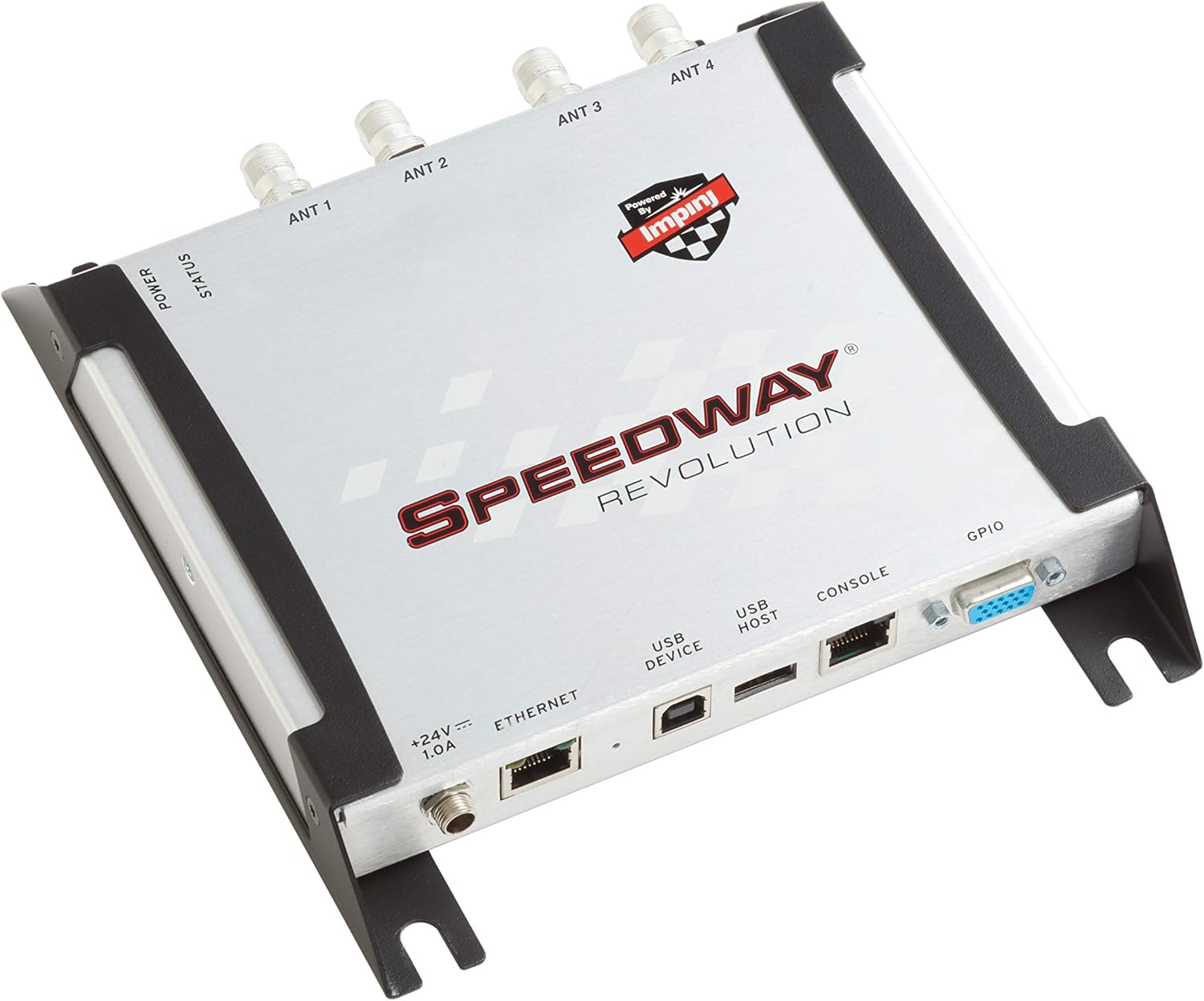
Figura 1: IMPINJ Speedway Revolution R420 UHF RFID Reader. This image displays the top-down view of the RFID reader, highlighting its compact design and various ports.
Istruzioni di installazione
Follow these steps to properly set up your Speedway Revolution R420 RFID Reader.
1. Collegamento elettrico
The R420 reader supports Power over Ethernet (PoE) or an external 24V, 1.0A power supply. Ensure you use the appropriate power source.
- PoE: Connect an Ethernet cable from a PoE-enabled switch or injector to the Ethernet port on the reader.
- Potenza esterna: If PoE is not used, connect a compatible 24V, 1.0A power adapter to the '+24V === 1.0A' power input port.
2. Connessione di rete
Connect the reader to your network using a standard Ethernet cable. The Ethernet port is an RJ45 type.
3. Collegamento dell'antenna
The R420 features four antenna ports (ANT 1, ANT 2, ANT 3, ANT 4). Connect your UHF RFID antennas to these ports. Ensure secure connections for optimal performance.
4. Connessioni periferiche
- Host USB: Per collegare periferiche USB.
- Dispositivo USB: For connecting the reader to a host computer.
- Consolle: For serial communication and configuration.
- GPIO: General Purpose Input/Output for external device control and sensing.

Figura 2: Labeled diagram of the IMPINJ Speedway Revolution R420 ports. This image clearly indicates the location of the Power LED, Status LED, Antenna ports (ANT 1-4), Power Supply input, Ethernet port, USB Device port, USB Host port, Console port, and GPIO port.

Figura 3: Posteriore view of the IMPINJ Speedway Revolution R420 showing the power input, Ethernet, USB, Console, and GPIO ports. This image provides a detailed look at the connectivity options on one side of the reader.

Figura 4: Davanti view of the IMPINJ Speedway Revolution R420 displaying the four antenna ports. This image highlights the antenna connectivity side of the device.
Istruzioni per l'uso
The IMPINJ Speedway Revolution R420 is a high-performance UHF RFID reader designed for various applications.
1. Accensione
Once all connections are secure, apply power to the reader. The ENERGIA LED indicator will illuminate, and the STATO LED will indicate the operational state.
2. Configurazione software
The reader requires software configuration for specific RFID tag reading operations. This typically involves using Impinj's reader management software or integrating with custom applications via its API. An easy-to-use API is available for C# applications, allowing for custom business logic implementation.
3. Applicazioni
The R420 is suitable for a wide range of applications, including:
- Gestione dell'inventario
- Monitoraggio delle risorse
- Gestione della catena di approvvigionamento
- Retail Operations
- Manufacturing Processes
- Healthcare Systems
- Logistica
With proper antenna configuration, the reader can detect standard UHF tags at ranges of 30-50 feet.
Manutenzione
To ensure the longevity and optimal performance of your IMPINJ Speedway Revolution R420 reader, follow these general maintenance guidelines:
- Pulizia: Keep the device clean and free from dust and debris. Use a soft, dry cloth for cleaning. Avoid liquid cleaners that could damage internal components.
- Condizioni ambientali: Operate the reader within its specified environmental conditions (temperature, humidity) to prevent damage.
- Verifiche della connessione: Periodically inspect all cable connections (power, Ethernet, antennas, USB, console, GPIO) to ensure they are secure and free from damage.
- Aggiornamenti del firmware: Controllare il produttore websito per eventuali aggiornamenti firmware disponibili. Mantenere il firmware aggiornato può migliorare le prestazioni e aggiungere nuove funzionalità.
Risoluzione dei problemi
If you encounter issues with your Speedway Revolution R420, consider the following troubleshooting steps:
- Nessun potere: Verificare che l'alimentatore sia collegato correttamente e fornisca la tensione specificatatage (24V, 1.0A) or that the PoE source is active. Check the ENERGIA Indicatore LED.
- Nessuna connettività di rete: Ensure the Ethernet cable is securely connected to both the reader and the network switch/router. Check network settings and IP configuration.
- Unable to Read Tags:
- Confirm antennas are properly connected to all four ports.
- Verify antenna cables are not damaged.
- Check software configuration for antenna power levels and read settings.
- Garantire tags are within the read range and orientation.
- Status LED Issues: Refer to the Impinj documentation for specific STATO LED patterns and their meanings to diagnose operational issues.
- Software Communication Problems: Ensure the correct drivers are installed for USB or console connections. Verify network settings for Ethernet communication.
For advanced troubleshooting or persistent issues, consult the official Impinj documentation or contact technical support.
Specifiche
| Caratteristica | Dettaglio |
|---|---|
| Marca | IMPINJ |
| Numero di modello | R420 (LYSB00KHR41CY-ELECTRNCS) |
| Tipo di connettore | RJ45 (Ethernet) |
| Tipo di cavo | Etereo |
| Dispositivi compatibili | Network Device, Personal Computer, Router, Server |
| Caratteristica speciale | PoE (alimentazione tramite Ethernet) |
| Usi consigliati | Inventory management, asset tracking, supply chain management, retail, manufacturing, healthcare, logistics |
| Connector Gender | Da femmina a femmina |
| Numero di pin | 8 (for RJ45) |
| Conteggio unità | 1 Conteggio |
| Specifica Met | Commissione federale delle comunicazioni |
| Peso dell'articolo | 2.29 libbre |
| Dimensioni del pacco | 12.3 x 9.5 x 2.9 pollici |
| Codice UPC | 754235664055, 633131662788 |
| Data prima disponibilità | 20 marzo 2013 |
Informazioni sulla garanzia
The IMPINJ Speedway Revolution R420 RFID Reader is sold as a brand new unit and comes with a full manufacturer's warranty. For specific terms and conditions of the warranty, please refer to the official Impinj warranty documentation or contact Impinj directly.
Supporto e contatti
For technical assistance, product inquiries, or to explore the full line of Impinj products, please contact your authorized Impinj reseller or visit the official Impinj website. If you purchased this product from a reseller and require support, please reach out to them directly for assistance.