
1. Introduzione
The JMA Em-IR Universal Remote Control is designed for copying fixed-code commands from various original remote controls. This device integrates the functionalities of both the EM2IR and EM2-433 remote controls into a single unit, offering versatile compatibility. It is ideal for applications such as garage door openers and car remote controls.
This manual provides essential information for setting up, operating, and maintaining your JMA Em-IR remote control.
2. Caratteristiche del prodotto
- Compatibilità universale: Designed to copy fixed-code commands from a wide range of original remote controls.
- Funzionalità integrate: Combines the features of EM2IR and EM2-433 remotes into one device.
- Unlimited Copying: Allows for an unlimited number of copies, irrespective of previous copying or customization of the original remote.
- Utilizzo versatile: Commonly used for garage door openers, gate controls, and car remote applications.
- Tecnologia a infrarossi: Utilizes infrared connectivity for reliable signal transmission.
3. Setup: Copying an Original Remote Control
To program your JMA Em-IR Universal Remote Control, follow these steps to copy the code from your original fixed-code remote.
- Cancella i codici esistenti (facoltativo ma consigliato):
Press and hold buttons A and B (or the top two buttons) simultaneously on the JMA Em-IR remote until the LED flashes rapidly (usually 3 times, then continuously). Release both buttons. This clears any previously stored codes. - Enter Copy Mode:
Press and hold the button on the JMA Em-IR remote that you wish to program (e.g., button A). The LED will flash slowly. - Posizione Telecomandi:
Place your original remote control and the JMA Em-IR remote control side-by-side, with their transmitting ends facing each other, at a distance of approximately 2-5 cm (1-2 inches). - Trasmetti il codice originale:
While still holding the button on the JMA Em-IR remote, press and hold the corresponding button on your original remote control that you want to copy. - Conferma copia:
The LED on the JMA Em-IR remote will flash rapidly (usually 3 times, then continuously) to indicate that the code has been successfully copied. Release both buttons. - Prova il telecomando:
Test the newly programmed button on your JMA Em-IR remote with the device it controls (e.g., garage door opener). - Ripetere l'operazione per gli altri pulsanti:
Repeat steps 2-6 for any other buttons you wish to program on the JMA Em-IR remote.
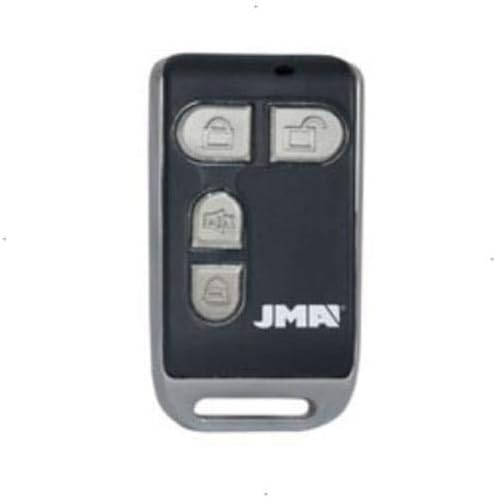
Image of the JMA Em-IR universal remote control, featuring a black body with a silver trim and four grey buttons. The JMA logo is visible at the bottom right.
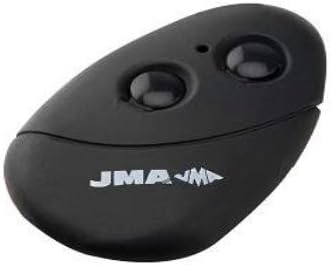
Image of a different JMA remote control model, featuring a black, oval-shaped body with two prominent black buttons and the JMA logo.
4. Utilizzo del telecomando
Once programmed, operating the JMA Em-IR remote control is straightforward:
- Attivazione: Press the desired button on the JMA Em-IR remote that corresponds to the function you wish to activate (e.g., open/close garage door).
- Allineare: Ensure you are within the operational range of the receiving device. Obstructions can reduce effective range.
- Indicatore LED: The LED on the remote will illuminate when a button is pressed, indicating signal transmission.
5. Manutenzione
5.1 Sostituzione della batteria
The JMA Em-IR remote control requires 1 A battery. When the remote's range decreases significantly or the LED indicator becomes dim, it is time to replace the battery.
- Locate the battery compartment on the back or side of the remote control.
- Open the compartment using a small screwdriver or by sliding the cover, as appropriate for your model.
- Rimuovere la vecchia batteria.
- Insert a new 1 A alkaline battery, ensuring correct polarity (+/-).
- Chiudere bene il vano batterie.
5.2 Pulizia
To clean the remote, use a soft, dry cloth. Do not use liquid cleaners or abrasive materials, as these can damage the remote's surface or internal components.
6. Risoluzione Dei Problemi
- Il telecomando non funziona dopo la programmazione:
- Ensure the original remote is a fixed-code type. This universal remote is not compatible with rolling code remotes.
- Repeat the programming steps carefully, ensuring the remotes are positioned correctly and the buttons are held down for the required duration.
- Check the battery in the JMA Em-IR remote. Replace if necessary.
- Cannot copy the code:
- Verify that the original remote is transmitting a strong signal. Its battery might be low.
- Adjust the distance between the two remotes during the copying process (try slightly closer or further).
- Ensure there are no obstructions between the remotes during copying.
- Breve raggio d'azione:
- Replace the battery in the JMA Em-IR remote.
- Ensure there are no significant physical obstructions between the remote and the receiver.
7. Specifiche
| Marca | JMA |
| Numero di modello | 3016150 |
| Tecnologia di connettività | Infrarossi |
| Caratteristica speciale | Universale |
| Dispositivi compatibili | Various devices with infrared remote control |
| Numero di pulsanti | 6 (for the model shown in the first image) |
| Tipo di controllore | Controllo dei pulsanti |
| Requisiti della batteria | 1 Una batteria |
| Descrizione della batteria | Alcalino |
| Colore | Multicolore |
8. Garanzia e supporto
Information regarding product warranty and specific customer support contacts is not available in the provided product details. Please refer to the retailer or manufacturer's official websito per i termini di garanzia e le opzioni di supporto.