
CHAUVET DJ DFIHUB
CHAUVET DJ D-Fi Hub Wireless DMX Controller User Manual
Model: DFIHUB
Introduzione
The CHAUVET DJ D-Fi Hub is a compact and versatile DMX unit designed for wireless control of stage lighting. It functions as both a wireless DMX transmitter and receiver, providing flexible and reliable signal transmission for various lighting setups. This manual provides essential information for the safe and effective operation of your D-Fi Hub.
Informazioni sulla sicurezza
- Collegare sempre l'unità a un circuito con messa a terra per evitare il rischio di folgorazione.
- Garantire l'alimentazione voltage corrisponde ai requisiti dell'unità.
- Non utilizzare l'unità se il cavo di alimentazione è danneggiato.
- Evitare di esporre l'unità alla pioggia o all'umidità.
- Affidare qualsiasi intervento di manutenzione a personale qualificato.
- Tenere l'unità lontana da materiali infiammabili.
Contenuto della confezione
- CHAUVET DJ D-Fi Hub
- Adattatore di alimentazione
- Quick Reference Guide (not included in this digital manual)
Prodotto finitoview
The D-Fi Hub features a compact design with essential controls and connectivity for wireless DMX operation.

Davanti view of the D-Fi Hub, showing the OLED display and control buttons.

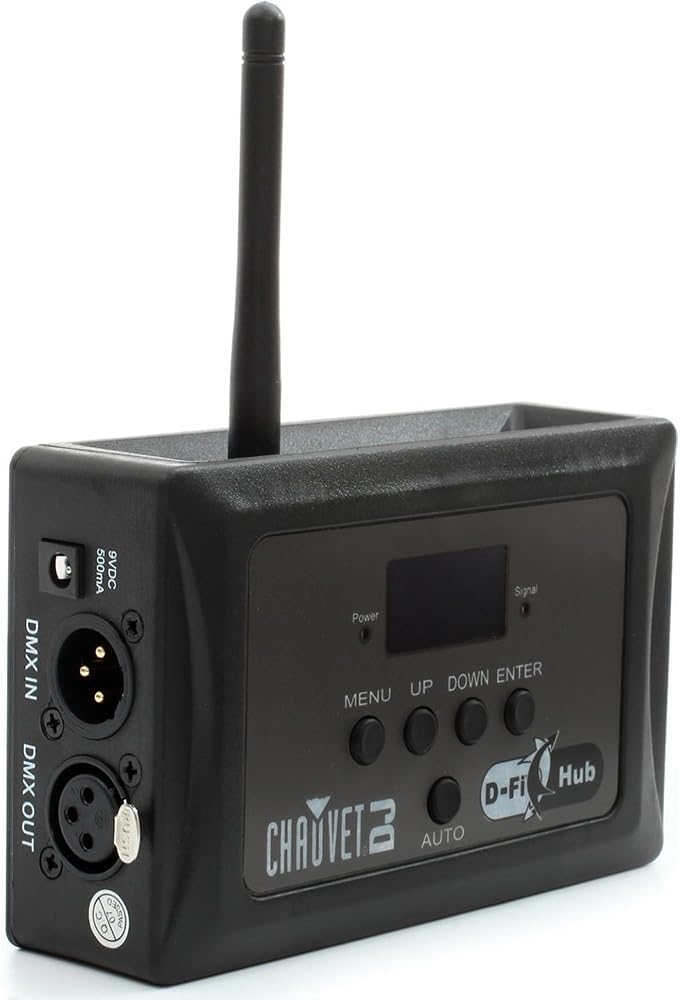
Angolato view of the D-Fi Hub, highlighting the antenna and side ports.
Caratteristiche principali:
- Compact Wireless DMX: Functions as both a transmitter and receiver.
- Auto Frequency Sync: Automatically selects the best 2.4 GHz channel for stable communication.
- Unlimited D-Fi Fixture Synchronization: Connects to an unlimited number of D-Fi-ready fixtures.
- Display OLED: Clear digital display for easy setup and adjustments.
- FCC and RTTE Compliant: Professional design for reliable operation.
Identificazione dei componenti:
- Display OLED: Mostra le impostazioni e lo stato correnti.
- Control Buttons (MENU, UP, DOWN, ENTER, AUTO): Per navigare nei menu e regolare le impostazioni.
- Antenna: For wireless DMX signal transmission and reception.
- Porte DMX IN/OUT: 3-pin XLR connectors for wired DMX connections.
- Potenza in ingresso: 9VDC, 500mA connection for the power adapter.
- Opzioni di montaggio: Includes keyhole mounting holes and M10/M12 threaded holes for truss mounting.

Posteriore view showing the DMX In/Out ports and power input.
Lato view illustrating the M10 and M12 mounting holes.
Impostare
- Collegamento elettrico: Connect the provided power adapter to the 9VDC input on the D-Fi Hub and then to a suitable power outlet. The unit will power on automatically.
- DMX Connection (Transmitter Mode):
- Connect your DMX controller's output to the INGRESSO DMX port on the D-Fi Hub using a 3-pin DMX cable.
- The D-Fi Hub will now transmit the DMX signal wirelessly.
- DMX Connection (Receiver Mode):
- If using the D-Fi Hub as a receiver for non-D-Fi-ready fixtures, connect the USCITA DMX port of the D-Fi Hub to the DMX IN port of your first lighting fixture.
- Daisy-chain additional fixtures using DMX cables from the DMX OUT of one fixture to the DMX IN of the next.
- Montaggio: Utilize the keyhole mounting holes or M10/M12 threaded holes to securely mount the D-Fi Hub to a truss or other suitable surface.
Istruzioni per l'uso
The D-Fi Hub offers both manual and automatic modes for DMX transmission and reception.
OLED Display and Navigation:
The OLED display provides real-time information about the unit's status and settings. Use the MENU, UP, GIÙ, E ENTRARE pulsanti per navigare tra le opzioni.
Selezione della modalità operativa:
- Premere il tasto MENU pulsante per accedere al menu principale.
- Utilizzare il UP or GIÙ buttons to scroll to "Settings" and press ENTRARE.
- Within "Settings", you can choose between:
- Transmit Manual: Manually select a DMX channel for transmission.
- Receive Manual: Manually select a DMX channel for reception.
- Transmit Auto: The unit automatically selects the best available channel for transmission. This is often the recommended setting for ease of use and stable performance.
- Premere ENTRARE per confermare la selezione.
Auto Frequency Sync:
The D-Fi Hub operates on the 2.4 GHz frequency range. In "Transmit Auto" mode, the unit will automatically scan and select the clearest channel to minimize interference, ensuring a stable wireless DMX signal.

The D-Fi Hub mounted on a truss, demonstrating its application in a professional lighting rig.

Visual representation of the D-Fi Hub's wireless DMX capabilities and auto-sync technology.
Manutenzione
- Pulizia: Pulire l'esterno dell'unità con un panno morbido e asciutto. Non utilizzare prodotti chimici aggressivi o materiali abrasivi.
- Magazzinaggio: Conservare l'unità in un luogo fresco e asciutto, lontano dalla luce solare diretta e da temperature estreme.
- Ispezione: Periodically inspect the power cable and DMX connectors for any signs of damage.
Risoluzione dei problemi
| Problema | Possibile causa | Soluzione |
|---|---|---|
| Nessun potere | Adattatore di alimentazione non collegato o difettoso. | Ensure power adapter is securely connected and plugged into a live outlet. Test with another adapter if available. |
| No wireless DMX signal | Incorrect channel selection, interference, or unit not in transmit mode. | Verify both transmitter and receiver are on the same DMX channel. Try "Transmit Auto" mode. Check for other 2.4 GHz devices causing interference. Ensure antenna is properly attached. |
| Segnale intermittente | Ostruzioni, distanza o interferenze. | Reduce distance between units. Clear line of sight. Change DMX channel or use "Transmit Auto". |
Specifiche

Image detailing the physical dimensions and key specifications of the D-Fi Hub.
- Modello del prodotto: DFIHUB
- Dimensioni (L x P x A): 3.2" x 1.6" x 4" (8.1 cm x 4.1 cm x 10.2 cm)
- Peso: 0.25 kg (0.55 libbre)
- Fonte di energia: Elettrico con cavo
- Voltage: 230 Volt
- Ampera: 0.1 Amps
- Frequenza wireless: 2.4 GHz
- Portata wireless: Up to 656 ft (200 m) unobstructed
- DMX Connection Type: 3-pin XLR (In/Out)
- Tipo di montaggio: Built-in hook and loop fastener strap, keyhole mounting holes, M10 and M12 threaded holes.
- Materiale: Acciaio inossidabile, plastica
- Colore: Nero
- Tipo di sorgente luminosa: Light Emitting Diode (for internal indicators)
- Caratteristiche speciali: Manual/Automatic Channel Selection, OLED Display
Garanzia
The CHAUVET DJ D-Fi Hub comes with a 1-year limited manufacturer's warranty. Please retain your proof of purchase for warranty claims. For detailed warranty terms and conditions, refer to the official CHAUVET DJ websito o contattare l'assistenza clienti.
Supporto
For technical assistance, troubleshooting, or further information regarding your CHAUVET DJ D-Fi Hub, please visit the official CHAUVET DJ website or contact their customer support team. You can find contact details and additional resources on their websito: www.chauvetdj.com
Ask a question about this manual
Ask about setup, troubleshooting, compatibility, parts, safety, or missing instructions. Manuals+ will review the question and use this page’s manual context to help answer it.