
Modello M280
Manuale utente del mouse wireless Logitech M280
Modello: M280 (910-004287)
1. Prodotto finitoview
The Logitech M280 Wireless Mouse is designed for comfort and efficiency, featuring contoured grips made of soft rubber for extended use. Its energy-efficient engineering provides an impressive 18-month battery life, with an automatic sleep function when not in use. Experience ultra-precise and responsive tracking with Logitech Advanced Optical Tracking. The included Nano receiver offers convenient and reliable wireless connectivity.

Figure 1: Logitech M280 Wireless Mouse
2. Cosa c'è nella scatola
- Mouse wireless Logitech M280
- Ricevitore nano
- 1 batteria AA (preinstallata o inclusa)
3. Guida all'installazione
3.1. Installazione della batteria
- Individuare il coperchio del vano batteria sul lato inferiore del mouse.
- Per aprire il vano, far scorrere il coperchio.
- Inserire la batteria AA fornita, assicurandosi della corretta polarità (+/-).
- Riposizionare il coperchio del vano batteria finché non scatta saldamente in posizione.
3.2. Collegamento del Nano Receiver
- Remove the Nano receiver from its storage slot inside the battery compartment (if applicable).
- Collega il ricevitore Nano a una porta USB disponibile sul tuo computer.
- Turn on the mouse using the On/Off switch located on the underside. The mouse should automatically connect to the receiver.

Figure 2: Mouse features and receiver storage
4. Utilizzo del mouse
4.1. Funzioni di base
- Clic sinistro: Selezione e attivazione primaria.
- Clic destro: Accede ai menu contestuali.
- Rotella di scorrimento: Scorrere verso l'alto o verso il basso i documenti e web pages. The scroll wheel is designed for precise, quiet operation.

Figure 3: Precise Scrolling with the M280
4.2. Advanced Optical Tracking
The Logitech M280 utilizes advanced optical tracking technology, providing smooth and precise cursor control on a variety of surfaces. This technology ensures high responsiveness and accuracy for daily tasks.

Figure 4: Smooth Navigation and Precise Scrolling on Most Operating Systems
4.3. Design ergonomico
The mouse features a contoured shape with soft rubber grips, specifically crafted for the right hand to provide enhanced comfort during prolonged use. This ergonomic design helps reduce strain and fatigue.

Figure 5: Contoured Shape & Grips for Enhanced Comfort
5. Manutenzione
5.1. Sostituzione della batteria
When the mouse's performance degrades or the indicator light (if present) signals low battery, replace the AA battery by following the steps in Section 3.1. The M280 is designed for energy efficiency, offering up to 18 months of battery life.
5.2. Pulizia
To maintain optimal performance, regularly clean the mouse's optical sensor and the surface of the mouse with a soft, dry cloth. Avoid using harsh chemicals or abrasive materials.
6. Risoluzione Dei Problemi
6.1. No Cursor Movement or Unresponsive Mouse
- Ensure the mouse is turned ON using the switch on the underside.
- Check the battery. Replace it if it's low or depleted.
- Ensure the Nano receiver is securely plugged into a working USB port on your computer. Try a different USB port.
- Riavvia il computer.
6.2. Connettività lag o intermittente
- Move the mouse closer to the Nano receiver. The wireless range is approximately 10 meters (33 feet).
- Avoid using the mouse on metallic surfaces, which can interfere with the wireless signal.
- Remove any large metal objects between the mouse and the receiver.
- If using a USB hub, try plugging the receiver directly into the computer.
7. Specifiche
| Caratteristica | Specificazione |
|---|---|
| Modello | M280 (910-004287) |
| Connettività | Wireless (RF 2.4 GHz) via Nano USB Receiver |
| Tecnologia di rilevamento del movimento | Tracciamento ottico avanzato |
| Tipo di batteria | 1 batteria AA |
| Durata della batteria | Fino a 18 mesi |
| wireless Range | Fino a 10 metri (33 piedi) |
| Dimensioni (LxWxH) | 105.4 mm x 67.9 mm x 38.4 mm (4.15 x 2.67 x 1.51 pollici) |
| Peso | 91 g (3.21 once) |
| Compatibilità del sistema operativo | Windows, macOS, ChromeOS, Linux |
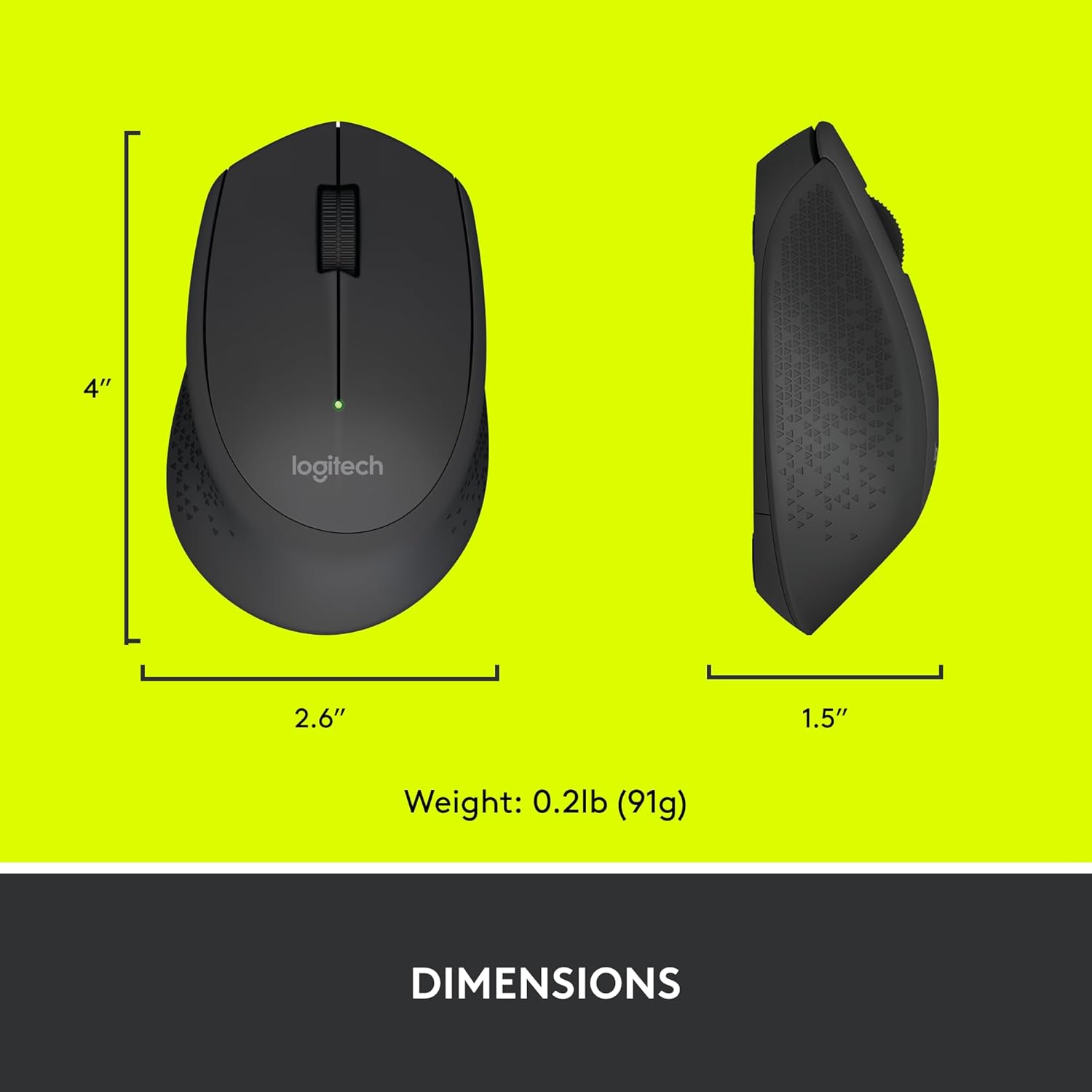
Figure 6: Logitech M280 Dimensions
8. Garanzia e supporto
Per informazioni sulla garanzia e supporto tecnico, visitare il supporto ufficiale Logitech website or refer to the warranty card included with your product. You can also find frequently asked questions and troubleshooting tips online.
Per ulteriori risorse, visitare il Negozio Logitech su Amazon.
Ask a question about this manual
Ask about setup, troubleshooting, compatibility, parts, safety, or missing instructions. Manuals+ will review the question and use this page’s manual context to help answer it.