
1. Introduzione
This manual provides comprehensive instructions for the setup, operation, maintenance, and troubleshooting of your Genius Traveler 9005BT 4-D Bluetooth Mouse. Please read this manual thoroughly before using the device to ensure proper functionality and longevity.
Caratteristiche principali:
- Precision 1200 dpi BlueEye engine for versatile surface tracking.
- Bluetooth 4-button wireless optical mouse.
- Ergonomic design suitable for both left and right-handed users.
- Turbo Scroll function for rapid document and web navigazione della pagina.
- BlueEye technology allows operation on various surfaces including dusted glass, marble, carpet, and sofa upholstery.
- Compatible with multiple operating systems: Android 3.0+, Windows 7/XP/Vista, and Mac OS X 10.4 or later.
2. Contenuto della confezione
Verifica che tutti gli articoli elencati di seguito siano presenti nella confezione del prodotto:
- Genius Traveler 9005BT Mouse
- CD driver for mouse 4-D Scroll function
- Two AA Alkaline batteries
- Manuale utente multilingue
3. Impostazione
3.1. Installazione della batteria
- Individuare il coperchio del vano batteria sul lato inferiore del mouse.
- Per aprire il vano, far scorrere o sollevare delicatamente il coperchio.
- Insert the two AA Alkaline batteries, ensuring correct polarity (+ and -) as indicated inside the compartment.
- Riposizionare il coperchio del vano batteria finché non scatta saldamente in posizione.
3.2. Accoppiamento Bluetooth
To connect your Traveler 9005BT mouse to your device:
- Ensure the mouse is powered on. There is typically a power switch on the underside of the mouse.
- Activate Bluetooth on your computer, laptop, or Android device.
- On your device, navigate to the Bluetooth settings and initiate a search for new devices.
- The Genius Traveler 9005BT should appear in the list of available devices. Select it to begin the pairing process.
- Follow any on-screen prompts to complete the pairing. A successful connection will be indicated by a confirmation message on your device.
The mouse supports Bluetooth EDR 2.0 technology, providing a reliable working distance of up to 10 meters. It is compatible with Android 3.0+, Windows 7/XP/Vista, and Mac OS X 10.4 or later.
3.3. Driver Installation (for 4-D Scroll Function)
For optimal use of the 4-D Scroll function, install the provided driver:
- Insert the included CD driver into your computer's optical drive.
- Seguire le istruzioni sullo schermo per installare il software necessario.
- Restart your computer if prompted to ensure the driver is fully installed and recognized.
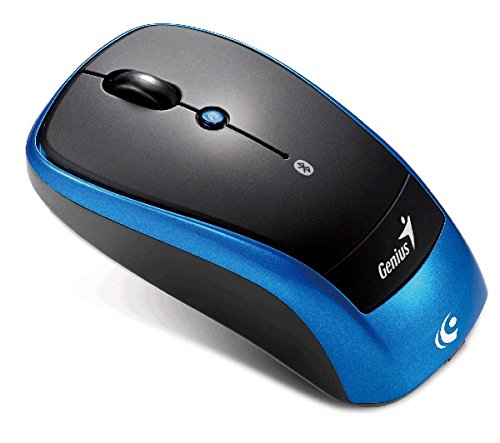
Un overhead view of the Genius Traveler 9005BT 4-D Bluetooth Mouse, showcasing its ergonomic design with a black top surface and blue sides. It features a scroll wheel, left and right click buttons, and a small button for 4-D scroll functionality.
4. Utilizzo del mouse
4.1. Funzioni di base
- Clic sinistro: Press the left button for primary selection and activation.
- Clic destro: Press the right button to access contextual menus.
- Rotella di scorrimento: Roll the wheel up or down to scroll vertically through documents and web pagine.
4.2. 4-D Scroll Function
The Traveler 9005BT features a dedicated 4-D scroll function key. Once the driver is installed, this function allows for more natural and convenient scrolling by simply moving your mouse in the direction you wish to scroll (up, down, left, or right) while holding down the 4-D scroll button.
4.3. Turbo Scroll
Engage the Turbo Scroll feature for hyper-fast navigation through lengthy documents, spreadsheets, and web pages. This function allows you to accelerate scrolling speed, significantly improving efficiency when reviewing extensive content.
4.4. BlueEye Technology
The integrated BlueEye technology enables the mouse to operate on a wide variety of surfaces that traditional optical mice may struggle with. This includes challenging textures such as dusted glass, marble, carpet, and sofa upholstery, providing flexibility in your workspace.
5. Manutenzione
5.1. Pulizia
Per mantenere prestazioni e aspetto ottimali:
- Prima di pulirlo, assicurarsi che il mouse sia spento.
- Per pulire le superfici esterne, utilizzare un panno morbido, asciutto e privo di lanugine.
- Per sporco ostinato, leggermente dampPulire il panno con acqua o con un detergente delicato e non abrasivo. Evitare l'eccessiva umidità.
- Do not use harsh chemicals, solvents, or abrasive materials, as these can damage the mouse's finish or internal components.
- Pulire periodicamente l'area del sensore ottico nella parte inferiore del mouse con un batuffolo di cotone per evitare problemi di tracciamento.
5.2. Sostituzione della batteria
When the mouse's performance degrades or it stops responding, it may be time to replace the batteries. Follow the battery installation steps outlined in Section 3.1.
6. Risoluzione Dei Problemi
If you encounter issues with your Genius Traveler 9005BT mouse, refer to the following common solutions:
- Il mouse non risponde:
- Assicurarsi che il mouse sia acceso.
- Controllare e sostituire le batterie se necessario.
- Verify that Bluetooth is enabled on your device and the mouse is paired correctly. Try re-pairing if needed.
- Avvicina il mouse al dispositivo per escludere problemi di portata.
- Movimento irregolare del cursore:
- Pulisci il sensore ottico sul lato inferiore del mouse.
- Ensure you are using the mouse on a suitable surface. While BlueEye technology is versatile, extreme surfaces or highly reflective ones can still cause issues.
- Check for any obstructions around the optical sensor.
- 4-D Scroll Function Not Working:
- Confirm that the 4-D scroll driver has been installed correctly from the provided CD.
- Riavviare il computer dopo l'installazione del driver.
- Disconnessioni Bluetooth:
- Assicurarsi che nessun altro dispositivo stia causando interferenze Bluetooth.
- Aggiorna i driver Bluetooth del tuo dispositivo.
- Riassocia il mouse al tuo dispositivo.
If these steps do not resolve the issue, consult the multi-language user manual included in your package or contact Genius customer support.
7. Specifiche
| Caratteristica | Dettaglio |
|---|---|
| Marca | Genio |
| Numero di modello | Traveler 9005BT |
| Tecnologia di rilevamento del movimento | Optical (BlueEye) |
| DPI | 1200 dpi |
| Connettività | Bluetooth EDR 2.0 |
| Numero di pulsanti | 4 |
| Orientamento della mano | Ambidestro |
| Fonte di alimentazione | 2 batterie alcaline AA (non incluse) |
| Sistemi operativi compatibili | Windows® 7, Vista, XP / Android 3.0+ / Mac OS X 10.4+ |
| Piattaforma hardware | Computer portatile, personal computer |
8. Garanzia e supporto
For warranty information, please refer to the documentation provided with your purchase or contact your retailer. Genius products typically come with a limited warranty. For technical support or further assistance, please consult the multi-language user manual included in your package or visit the official Genius websito per le informazioni di contatto.