
1. Introduzione
This manual provides detailed instructions for the proper use, setup, and maintenance of your Genius HS-920BT Bluetooth Headset. Please read this manual thoroughly before using the device to ensure optimal performance and longevity.
The Genius HS-920BT is a versatile Bluetooth headset designed for wireless audio streaming and hands-free communication with compatible devices such as smartphones, tablets, and PCs.
2. Contenuto della confezione
Verifica che tutti gli articoli siano presenti nel tuo pacco:
- Genius HS-920BT Bluetooth Headset
- Cavo di ricarica USB
- Manuale utente multilingue (questo documento)
3. Prodotto finitoview
The HS-920BT headset features an adjustable headband and comfortable earcups, integrating controls for audio playback and call management.
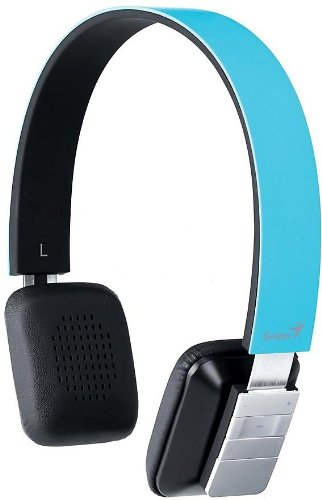
Figure 1: Genius HS-920BT Bluetooth Headset (Blue)
This image displays the Genius HS-920BT Bluetooth Headset in blue, viewed from an angle, highlighting its adjustable headband and earcup design.
Caratteristiche principali:
- Wireless Bluetooth connectivity for audio and calls (A2DP support)
- Integrated rechargeable Lithium-Ion battery
- Microfono integrato per comunicazioni a mani libere
- On-ear controls for volume adjustment, track skipping (AVRCP support)
- Archetto regolabile per una vestibilità comoda
- 40 mm driver units for clear sound
4. Impostazione
4.1 Ricarica dell'auricolare
Before initial use, fully charge the headset. Use the provided USB charging cable.
- Connect the small end of the USB charging cable to the charging port on the headset.
- Connect the larger end of the USB cable to a powered USB port (e.g., computer, USB wall adapter).
- The LED indicator on the headset will illuminate during charging and change color or turn off when fully charged. Refer to the headset's LED behavior for specific indications.
Una carica completa richiede in genere circa 2-3 ore.
4.2 Associazione con un dispositivo Bluetooth
To use the HS-920BT wirelessly, you must pair it with your Bluetooth-enabled device.
- Accensione: Press and hold the Power button on the headset until the LED indicator flashes, usually alternating blue and red, indicating pairing mode.
- Attiva Bluetooth: On your smartphone, tablet, or PC, enable Bluetooth functionality.
- Cercare Dispositivi: In your device's Bluetooth settings, search for available devices. The headset should appear as "HS-920BT".
- Seleziona e abbina: Select "HS-920BT" from the list. If prompted for a passcode, enter "0000" (four zeros).
- Conferma: Once paired, the headset's LED indicator will typically flash blue slowly, and your device will confirm the connection.
The headset will automatically attempt to reconnect to the last paired device when powered on, if that device's Bluetooth is active and within range.
5. Istruzioni per l'uso
The HS-920BT features intuitive controls located on the earcup.

Figure 2: Earcup Controls of HS-920BT
This image shows a close-up of the right earcup of the Genius HS-920BT Bluetooth Headset, detailing the control buttons for power, volume, and track navigation.
5.1 Accensione/spegnimento
- Accensione: Tenere premuto il pulsante di accensione per circa 3 secondi finché l'indicatore LED non lampeggia in blu.
- Spegni: Tenere premuto il pulsante di accensione per circa 3 secondi finché l'indicatore LED non si spegne.
5.2 Riproduzione di musica
- Riproduci/Pausa: Premi una volta il pulsante Riproduci/Pausa.
- Traccia successiva: Press the "Next Track" button (usually marked with a forward arrow).
- Traccia precedente: Press the "Previous Track" button (usually marked with a backward arrow).
5.3 Gestione delle chiamate
- Rispondi/Termina chiamata: Press the Multi-function button (often the same as Play/Pause) once during an incoming call to answer, or once during a call to end it.
- Rifiuta chiamata: Durante una chiamata in arrivo, tenere premuto il pulsante Multifunzione per circa 2 secondi.
- Ricomponi l'ultimo numero: Premere due volte il pulsante Multifunzione quando non si è impegnati in una chiamata.
5.4 Controllo del volume
- Aumenta volume: Premere il pulsante Volume su (+).
- Diminuisci volume: Premere il pulsante Volume giù (-).
6. Manutenzione
Proper care ensures the longevity of your headset.
- Pulizia: Per pulire le cuffie, utilizzare un panno morbido e asciutto. Non utilizzare detergenti abrasivi o solventi.
- Magazzinaggio: Conservare le cuffie in un luogo fresco e asciutto, lontano dalla luce solare diretta e da temperature estreme.
- Cura della batteria: Per preservare la durata della batteria, evitare di scaricarla completamente frequentemente. Caricare regolarmente le cuffie, anche se non vengono utilizzate per periodi prolungati.
- Esposizione all'acqua: Il visore non è impermeabile. Evitare l'esposizione all'acqua o a umidità eccessiva.
7. Risoluzione Dei Problemi
If you encounter issues with your HS-920BT headset, refer to the following common solutions:
| Problema | Possibile soluzione |
|---|---|
| L'auricolare non si accende. | Ensure the battery is charged. Connect the headset to a power source using the USB cable. |
| Impossibile associare l'auricolare a un dispositivo. |
|
| Nessun suono o volume basso. |
|
| La qualità delle chiamate è scarsa. |
|
8. Specifiche
| Nome modello: | HS-920BT |
| Tecnologia wireless: | Bluetooth |
| Unità driver: | 40 millimetri |
| Batteria: | Batteria agli ioni di litio ricaricabile integrata |
| Tipo di controllo: | Controllo del volume, navigazione delle tracce, gestione delle chiamate |
| Microfono: | Incorporato |
| Professionisti supportatifiles: | A2DP, AVRCP |
| Piattaforma Hardware: | PC, Smartphone, Tablet |
| Peso dell'articolo: | 110 grammi |
| Dimensioni (LxWxH): | Dimensioni: 13.6 x 17.3 x 2.9 cm |
9. Garanzia e supporto
For warranty information and technical support, please refer to the warranty card included with your product or visit the official Genius websito. Conserva la ricevuta d'acquisto come prova d'acquisto.
Per ulteriore assistenza, puoi contattare il servizio clienti Genius tramite i suoi canali ufficiali.