
1. Introduzione
Grazie per l'acquistoasing the EONON A0119J Backup Camera. This device is designed to enhance safety and convenience when reversing your vehicle by providing a clear view of the area behind your car. This manual provides essential information for proper installation, operation, and maintenance of your backup camera. Please read it thoroughly before use and retain it for future reference.

Image 1.1: The EONON A0119J Backup Camera unit. This compact camera is designed for discreet installation on your vehicle.
2. Informazioni sulla sicurezza
Si prega di osservare le seguenti precauzioni di sicurezza per evitare danni al prodotto o lesioni a se stessi e agli altri:
- This product is designed for 12V vehicle electrical systems only. Do not connect to other voltage sistemi.
- Se non si ha familiarità con i sistemi elettrici automobilistici, l'installazione deve essere eseguita da un professionista qualificato.
- Ensure the vehicle's power is off before beginning installation to prevent electrical shock or damage.
- Always use caution when reversing, even with the backup camera. The camera is an aid and does not replace direct observation.
- Keep cables away from hot surfaces, moving parts, and sharp edges.
- Do not attempt to disassemble or modify the camera unit. This will void the warranty.
3. Contenuto della confezione
Verificare che tutti gli articoli siano presenti nel pacco:
- EONON A0119J Backup Camera Unit
- Cavo di alimentazione (1 m)
- Cavo video (6 m)
- Viti di montaggio (2 pezzi)
- Instruction Manual (Japanese, refer to this document for English)

Image 3.1: Illustration of the package contents and a basic wiring diagram for the EONON A0119J Backup Camera.
4. Configurazione e installazione
The EONON A0119J backup camera is designed for easy installation. However, professional installation is recommended if you are not experienced with car electronics.
4.1. Montaggio della fotocamera
- Choose a suitable location on the rear of your vehicle, typically above the license plate or near the trunk handle, ensuring a clear view.
- Secure the camera unit using the provided mounting screws. The camera's small size (20mm x 18mm x 24mm) allows for discreet placement.

Image 4.1: The compact size of the EONON A0119J camera, shown next to a coin for scale, facilitating discreet installation.
4.2. Collegamenti elettrici
Refer to the wiring diagram (Image 3.1) and the following steps:
- Collegamento elettrico:
- Collegare il red wire (ACC cable) of the power cable to the positive (+) terminal of your car's reverse light.
- Collegare il filo nero (terra) to a suitable ground point on the vehicle chassis.
- Collegamento del segnale video:
- Collegare il yellow RCA output terminal of the camera to the video input terminal of your car navigation system or monitor.
- If your monitor has a reverse trigger input, connect the red trigger wire from the video cable to this input. If your monitor does not have a reverse trigger input, this wire can be left unconnected.
- Instradamento dei cavi: Route all cables securely, avoiding sharp edges, moving parts, and heat sources. The video cable is approximately 6 meters long. If additional length is required, a backup camera extension cable must be purchased separately. Secure any unused cables to prevent interference.
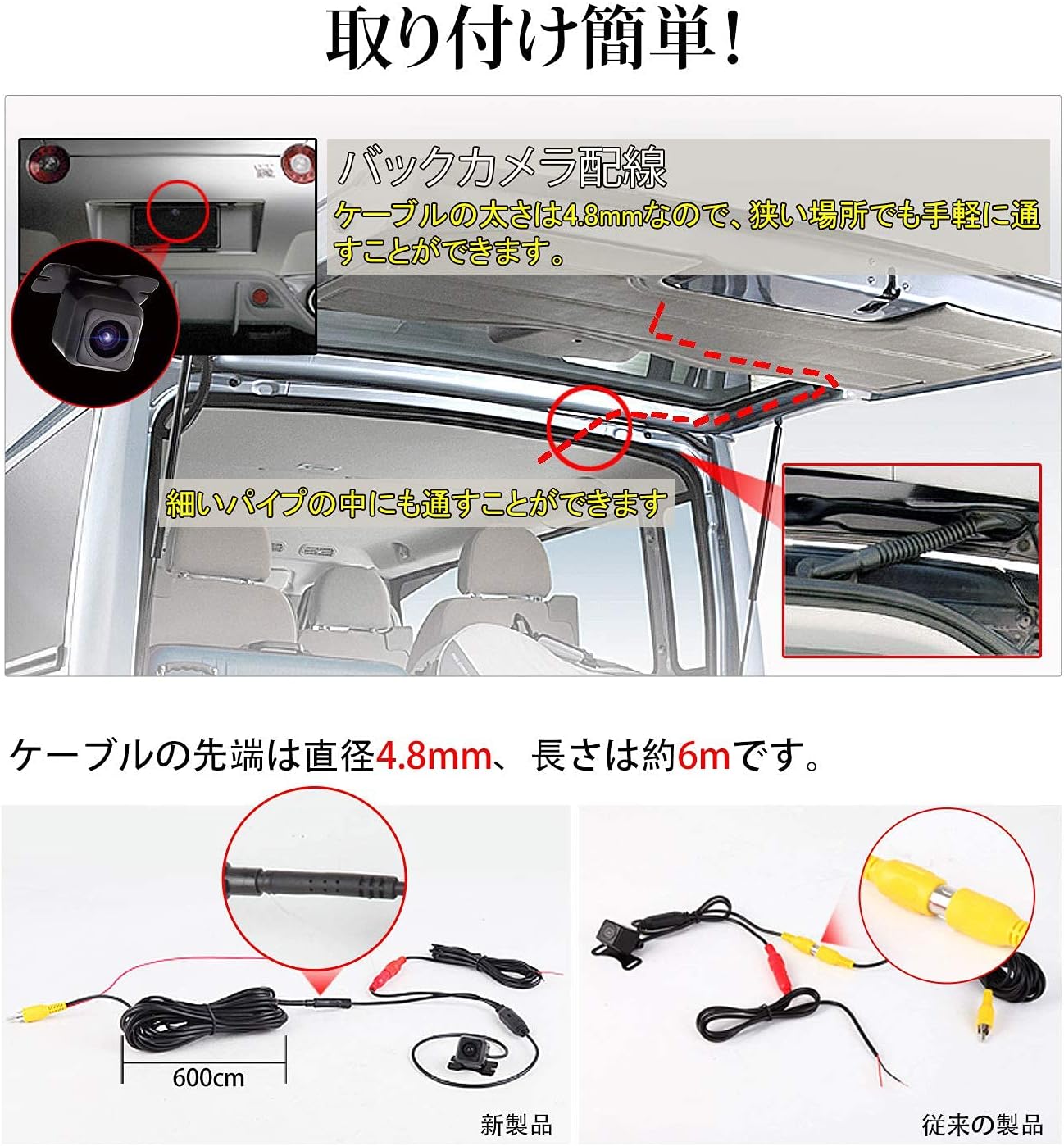
Immagine 4.2: Es.ample of routing the camera cable through the vehicle. The slim cable (4.8mm diameter) allows for passage through narrow spaces.
5. Istruzioni per l'uso
The EONON A0119J Backup Camera operates automatically when the vehicle is put into reverse gear, provided it is correctly installed.
5.1. Attivazione automatica
When you shift your vehicle into reverse, the camera will automatically power on and transmit video to your connected monitor or car navigation system.
5.2. Guideline Display
The camera features an integrated guideline display on the video feed to assist with parking and judging distance. These guidelines are fixed and cannot be disabled.

Image 5.1: The camera's guideline display function, showing colored lines to assist with parking maneuvers.
5.3. Mirror Image Function
The camera outputs a mirror image by default, which is standard for rear-view applications. Depending on your car navigation system or monitor, it may be possible to switch to a normal (non-mirror) image if desired.
5.4. Grandangolo View
La fotocamera offre un grandangolo view (120° horizontal, 170° wide angle) to minimize blind spots behind the vehicle, helping to prevent collisions with objects or structures.

Image 5.2: An illustration demonstrating the wide 170-degree viewing angle of the camera, significantly reducing rear blind spots.
6. Manutenzione
To ensure optimal performance and longevity of your EONON A0119J Backup Camera, follow these maintenance guidelines:
- Pulizia: Pulire regolarmente l'obiettivo della fotocamera con un panno morbido eamp panno per rimuovere sporco, polvere o macchie d'acqua che potrebbero ostruire il viewEvitare detergenti abrasivi o solventi.
- Ispezione: Periodically check the camera's mounting and wiring connections to ensure they are secure and free from damage.
- Impermeabile/antipolvere: The camera is rated IP68 for dust and water resistance, meaning it is protected against dust ingress and can withstand immersion in water up to 1.5 meters for 30 minutes. However, avoid high-pressure washing directly on the camera.

Image 6.1: The EONON A0119J camera demonstrating its IP68 waterproof and dustproof capabilities, ensuring durability in various weather conditions.
7. Risoluzione Dei Problemi
If you encounter issues with your EONON A0119J Backup Camera, refer to the following common problems and solutions:
| Problema | Possibile causa | Soluzione |
|---|---|---|
| No image on monitor when reversing. |
|
|
| L'immagine è sfocata o poco chiara. |
|
|
| Image is reversed (not mirror image). | Monitor setting or specific car navigation system behavior. | The camera outputs a mirror image by default. Check your monitor or car navigation system settings for an option to flip the image if a normal view è desiderato. |
| Guidelines are not displayed. | The camera's guidelines are fixed and always displayed. If not visible, check video connection or camera functionality. | Ensure the video signal is correctly transmitted. If the guidelines are still absent, the camera unit may be faulty. |
| Cable length is insufficient. | Vehicle size requires longer cables. | Purchase a separate backup camera extension cable. The included video cable is 6 meters. |
8. Specifiche
| Caratteristica | Specificazione |
|---|---|
| Numero di modello | A0119J |
| Marca | EONON |
| Colore | Nero |
| Dispositivi compatibili | Car navigation systems |
| Tipo di installazione | Telecamera di backup |
| Voltage | 12 Volt |
| Tecnologia dei sensori ottici | Comando |
| Pixel totali | 360,000 pixel |
| Illuminazione minima | 0.1 lux |
| Tipo di lente | Grandangolo |
| Angolo effettivo di View | 120° (Horizontal), 170° (Wide Angle) |
| Dimensioni del sensore ottico | 1/3 pollici |
| Product Dimensions (Camera Unit) | 24 mm (Lunghezza) x 20 mm (Larghezza) x 18 mm (Altezza) |
| Grado di impermeabilità/antipolvere | Grado di protezione IP68 |
| Uscita immagine speculare | Supported (Default) |
| Visualizzazione delle linee guida | Supported (Fixed, cannot be disabled) |
9. Garanzia e supporto
9.1. Informazioni sulla garanzia
The EONON A0119J Backup Camera typically comes with a 1-year manufacturer's warranty from the date of purchase. Please retain your proof of purchase for warranty claims. The warranty covers defects in materials and workmanship under normal use. It does not cover damage caused by improper installation, misuse, accidents, modifications, or unauthorized repairs.
9.2. Assistenza clienti
For technical assistance, troubleshooting not covered in this manual, or warranty inquiries, please contact EONON customer support through the retailer where you purchased the product or visit the official EONON websito per le informazioni di contatto.