
1. Introduzione
The Ooma Telo Air provides crystal-clear nationwide calling for free, requiring only monthly applicable taxes and fees. This device connects to your high-speed internet and existing home phone, offering superior voice quality with Ooma PureVoice™ HD technology. It includes essential features such as voicemail, caller-ID, call-waiting, and 911 service with text alerts. Users can choose a new phone number or port an existing one for a one-time fee. Optional Ooma Premier service offers advanced features like robocall blocking, free calls to Canada and Mexico, an Instant Second Line, and voicemail-to-email forwarding. The Ooma Telo Air also integrates with smart home products like Amazon Echo and Nest for enhanced convenience and security.

Figure 1: The Ooma Telo Air integrated into a modern home environment, demonstrating its seamless use.

Figura 2: in alto view of the Ooma Telo Air device, highlighting its sleek design and control buttons.
2. Cosa c'è nella scatola
Verificare che tutti gli articoli siano presenti nel pacco:
- Ooma Telo Air Device
- adattatore Bluetooth
- Cavo Ethernet
- Adattatore di alimentazione

Figure 3: The Ooma Telo Air Bluetooth Adapter, included for wireless connectivity.
3. Istruzioni per l'installazione
Setting up your Ooma Telo Air is a straightforward process. Ensure you have a high-speed internet connection and a standard home phone available.
- Connettiti a Internet: Plug one end of the provided Ethernet cable into the "INTERNET" port on the Ooma Telo Air and the other end into an available Ethernet port on your home router or modem.
- Connetti il telefono: Plug your existing home phone into the "PHONE" port on the Ooma Telo Air.
- Accensione: Connect the power adapter to the Ooma Telo Air and then plug it into a wall outlet. The Ooma logo on the device will light up.
- Attiva il servizio: Visit the Ooma website or use the Ooma Mobile HD app to activate your service. You will need the activation code located on the bottom/back of your Ooma Telo Air device.
- Optional Bluetooth Adapter: If using the Bluetooth adapter, insert it into the USB port on the Ooma Telo Air. Follow the instructions in the Ooma Mobile HD app to pair Bluetooth devices.
Video 1: Un prodotto finitoview demonstrating the Ooma Telo Air device and its features, including setup and connectivity options.
4. Istruzioni per l'uso
4.1 Effettuare e ricevere chiamate
Once your Ooma Telo Air is set up, you can use your connected home phone to make and receive calls just as you would with a traditional landline. Enjoy crystal-clear voice quality thanks to PureVoice HD technology.
4.2 Voicemail and Caller-ID
The Ooma Telo Air includes voicemail and caller-ID features. Access your voicemail by pressing the voicemail button on your Ooma Telo Air device or through the Ooma Mobile HD app. Caller-ID information will display on your connected phone's screen.
4.3 911 Calling and Text Alerts
Ooma provides address-based 911 service, ensuring dispatchers know your exact location in an emergency. Text alerts can also be configured for 911 calls.
4.4 Ooma Mobile HD App
Download the Ooma Mobile HD app to manage your service on-the-go. Make calls using your Ooma number, check voicemail, and configure settings directly from your smartphone.
4.5 Ooma Premier Features (Optional)
With an optional Ooma Premier subscription, you gain access to advanced features:
- Blocco delle chiamate automatiche: Block unwanted telemarketers and scammers.
- Free International Calling: Make free calls to Canada and Mexico.
- Seconda linea istantanea: Provides an additional line for simultaneous calls.
- Segreteria telefonica su e-mail: Ricevi audio files of your voicemails directly in your email inbox.
5. Manutenzione
To ensure optimal performance and longevity of your Ooma Telo Air, follow these maintenance guidelines:
- Mantenere pulito: Pulire regolarmente il dispositivo con un panno morbido e asciutto. Evitare l'uso di detergenti liquidi o spray.
- Ventilazione: Assicurarsi che il dispositivo sia posizionato in un'area ben ventilata per evitare il surriscaldamento. Non ostruire le aperture di ventilazione.
- Ciclo di alimentazione: If you experience minor issues, try power cycling the device by unplugging it from the power outlet, waiting 10 seconds, and then plugging it back in.
- Aggiornamenti software: Ooma Telo Air automatically receives software updates. Ensure your device is connected to the internet for these updates.
6. Risoluzione Dei Problemi
If you encounter problems with your Ooma Telo Air, refer to the following common issues and solutions:
- Nessun segnale di linea:
- Check all cable connections (internet, phone, power).
- Ensure your Ooma Telo Air is powered on and the Ooma logo is lit.
- Verifica che la tua connessione Internet sia attiva.
- Poor Voice Quality:
- Assicurati che la tua connessione Internet sia stabile e abbia una larghezza di banda sufficiente.
- Try connecting the Ooma Telo Air directly to your modem, bypassing the router, to rule out router issues.
- Restart your modem, router, and Ooma Telo Air.
- Impossibile effettuare/ricevere chiamate:
- Confirm your Ooma service is activated and your account is in good standing.
- Check if your phone is properly connected to the "PHONE" port.
- Problemi di associazione del dispositivo Bluetooth:
- Ensure the Bluetooth adapter is securely inserted into the USB port.
- Follow the pairing instructions within the Ooma Mobile HD app carefully.
For further assistance, contact Ooma customer support.
7. Specifiche
| Caratteristica | Dettaglio |
|---|---|
| Marca | stanza |
| Modello | Ooma Telo Air |
| Colore | Nero |
| Fonte di alimentazione | Elettrico con cavo |
| Dimensioni (L x P x A) | 10.4 x 2.99 x 8.2 pollici |
| Peso dell'articolo | 1.63 libbre |
| Tipo di sistema di risposta | Digital (22 Minutes Recording Capacity) |
| Identificazione del chiamante | SÌ |
| Dispositivi compatibili | Smartphone (via Ooma Mobile HD app) |
| Media integrati | Bluetooth Adapter, Ooma Telo Air |
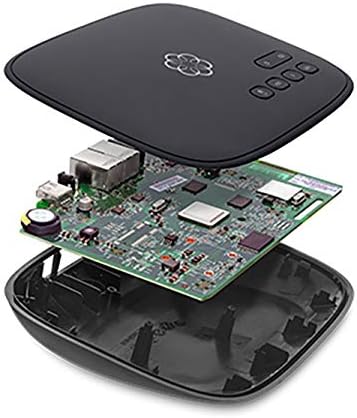
Figure 4: Internal components of the Ooma Telo Air device, showcasing its advanced circuitry.
8. Garanzia e supporto
The Ooma Telo Air is backed by a 30-day money-back guarantee and an extendable 1-year warranty. For customer support, visit www.ooma.com or call 866-747-6887. 24/7 customer support is available.