
Introduzione
This manual provides comprehensive instructions for the setup, operation, maintenance, and troubleshooting of your Proscan CRK83X PSVR82 TV Remote Control. This remote is designed to work seamlessly with various Proscan TV and VCR models, offering a direct replacement or compatible control solution.
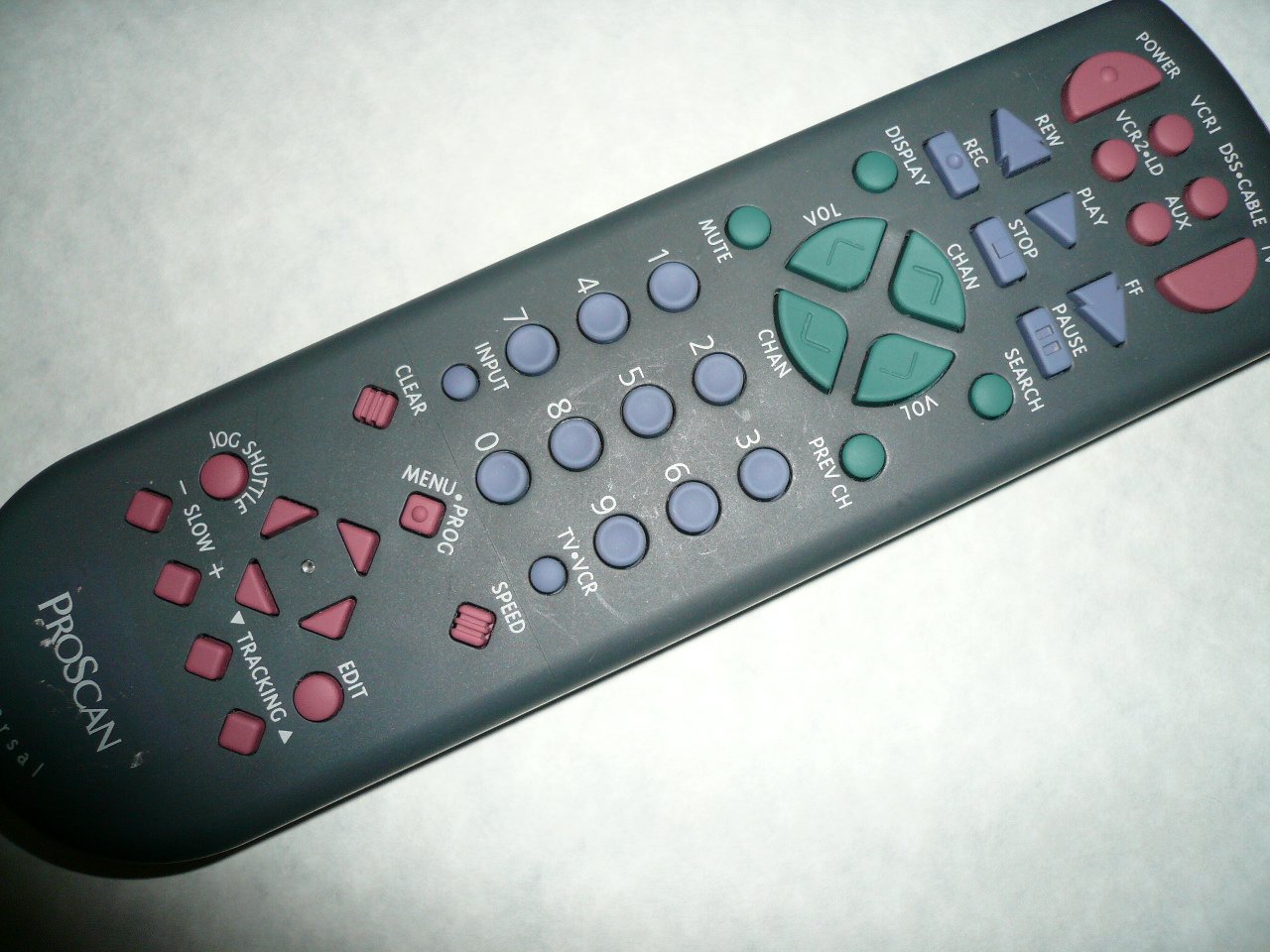
An image showing the Proscan CRK83X PSVR82 TV Remote Control, highlighting its ergonomic design and button layout. The remote is dark gray with purple and teal buttons, clearly labeled for various functions.
Impostare
1. Installazione della batteria
- Individuare il coperchio del vano batterie sul retro del telecomando.
- Per aprirlo, far scorrere il coperchio verso il basso oppure premere il fermo.
- Inserire due (2) batterie AAA (non incluse), assicurandosi che i terminali positivo (+) e negativo (-) siano allineati correttamente con le marcature all'interno del vano.
- Richiudere il coperchio del vano batteria facendolo scorrere in posizione finché non scatta in posizione.
2. Utilizzo iniziale
The Proscan CRK83X PSVR82 remote control is typically pre-programmed for compatible Proscan TV and VCR models. No complex programming steps are usually required for initial use with supported devices. Simply point the remote at your device and press the desired function button.
This remote is compatible with a wide range of models, including but not limited to: P5VR74, PAVR57, PCVR72, PRVR71, PSDR72, PSDR73, PSNKVSR72, PSNPSVR57, PSNPSVR65, PSNPSVR70, PSNPSVR71, PSNPSVR72, PSNPSVR73, PSNPSVR74, PSNPSVRR73, PSNR65, PSNVR74, PSRV65, PSRV71, PSRV72, PSRV74, PSRVR65, PSRVR71, PSUR70, PSUR72, PSV174, PSV65, PSV71, PSV72, PSVDR73, PSVER72, PSVH57, PSVP71, PSVR22, PSVR27, PSVR57, PSVR61, PSVR62, PSVR65, PSVR72L, PSVR72VCR, PSVR75, PSVR79, PSVR83, PSVT73, PSVV73, PSZR65, PSZR71, PSZR73, PVSR73, R65, RCU800, RSVR73, SPVR65, SSVR62, VR653HF, VR730, VR730HF.
Istruzioni per l'uso
Familiarize yourself with the buttons and their functions for optimal control of your television and VCR.
| Nome del pulsante | Funzione |
|---|---|
| ENERGIA | Turns the connected device (TV/VCR) on or off. |
| VCR1, DSS/CABLE, VCR2/LD, AUX | Selects the input source for the television or VCR. |
| MUTE | Disattiva o attiva l'audio in uscita. |
| volume +/- | Regola il livello del volume verso l'alto o verso il basso. |
| CANALE +/- | Cambia il canale in alto o in basso. |
| CAP PREC | Passa al precedente viewed canale. |
| DISPLAY | Displays on-screen information such as channel number or time. |
| RICORDA | Initiates recording on the VCR. |
| RIVISTA | Rewinds the tape during VCR playback. |
| GIOCARE | Starts playback of a tape or disc. |
| FF | Fast forwards the tape during VCR playback. |
| FERMARE | Interrompe la riproduzione o la registrazione. |
| PAUSA | Mette in pausa la riproduzione o la registrazione. |
| RICERCA | Activates search function, typically for VCR content. |
| Tastierino numerico (0-9) | Inserisce direttamente i numeri dei canali o le selezioni del menu. |
| INGRESSO | Scorre le sorgenti di input disponibili. |
| CHIARO | Clears entered numbers or menu selections. |
| MENU / PROG | Accesses the on-screen menu or programming functions. |
| TV-videoregistratore | Toggles control between TV and VCR modes. |
| NAVETTA JOG | Provides frame-by-frame or variable speed control for VCR playback. |
| LENTO +/- | Adjusts slow-motion speed during VCR playback. |
| VELOCITÀ | Adjusts playback speed, typically for VCR. |
| TRACKING ▲/▼ | Adjusts the VCR tracking for optimal picture quality. |
| MODIFICARE | Activates editing functions, typically for VCR. |
Manutenzione
Pulizia del telecomando
- Pulire il telecomando con un panno morbido e asciutto.
- Per sporco ostinato, leggermente dampPulire il panno con acqua o con un detergente delicato e non abrasivo. Non spruzzare il detergente direttamente sul telecomando.
- Evitare l'uso di prodotti chimici aggressivi, solventi o spugne abrasive, poiché potrebbero danneggiare la superficie del telecomando o i componenti interni.
Sostituzione della batteria
Replace batteries when the remote's response becomes sluggish or it stops functioning. Refer to the "Battery Installation" section under Setup for detailed instructions.
Smaltire sempre le batterie usate in modo responsabile, nel rispetto delle normative locali.
Risoluzione dei problemi
| Problema | Possibile causa/soluzione |
|---|---|
| Il telecomando non funziona. |
|
| Il telecomando funziona a intermittenza. |
|
| Alcuni pulsanti non rispondono. |
|
Specifiche
- Marca: PROSCANO
- Modello: CRK83X PSVR82
- Produttore: Proscan
- Dispositivi compatibili: Television (and various Proscan VCR models as listed in Setup section)
- Tecnologia di connettività: Infrarossi
- Tipo di controller: Controllo dei pulsanti
- Caratteristica speciale: Design ergonomico
- ASIN: B00P82T2LS
- Data prima disponibilità: 4 novembre 2014
Garanzia e supporto
Specific warranty information for the Proscan CRK83X PSVR82 TV Remote Control is not provided in this manual. Please refer to the product packaging or contact your retailer for details regarding warranty coverage.
For further assistance or technical support, please contact the manufacturer or your point of purchase. No specific support contact details are available in this document.