
Introduzione
The HIFIMAN RE400i V2 is an in-ear earphone specifically designed for use with iOS devices, featuring an integrated in-line control for convenient audio management and communication. This earphone incorporates an 8.5mm coated Titanium driver, engineered by HIFIMAN, to deliver detailed sound and an extended frequency response. The design prioritizes a superb fit and comfort, making it suitable for prolonged listening sessions.
Key features include Oxygen-Free Copper cabling for optimal signal transmission, an improved in-line control for enhanced reliability and durability, and advanced ergonomics for comfortable and extended listening. Its lightweight and stylish design complement its acoustic performance, providing a balanced sound profile.
Contenuto della confezione
- HIFIMAN RE400i V2 Earphones
- Multiple sizes of silicone ear tips (various pairs)
- Clip per la gestione dei cavi
Impostare
1. Choosing and Fitting Ear Tips
Selecting the correct ear tip size is crucial for optimal sound quality and comfort. Experiment with the included silicone ear tips to find the pair that creates a secure seal in your ear canal. A proper seal enhances bass response and passive noise isolation.
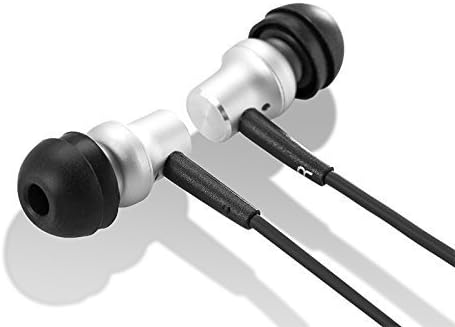
Immagine: Primo piano view of the HIFIMAN RE400i V2 earphone earpieces, showing the silver housing and black silicone ear tips.
2. Connessione al dispositivo
Insert the 3.5mm audio jack of the RE400i V2 earphones firmly into the headphone port of your compatible iOS device. Ensure the connection is secure to prevent audio interruptions.
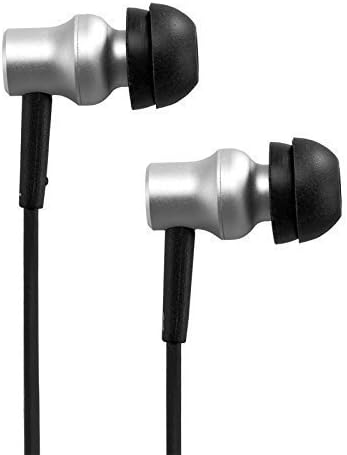
Immagine: Lato view of the HIFIMAN RE400i V2 earphones, highlighting their compact and ergonomic design.
Istruzioni per l'uso
Using the In-Line Control
The HIFIMAN RE400i V2 features an in-line control unit designed for seamless interaction with your iOS device. This unit allows you to manage audio playback and phone calls without needing to access your device directly.

Image: The HIFIMAN RE400i V2 earphones, showing the full cable length with the in-line control unit.
- Pulsante di aumento del volume (+): Premere per aumentare il volume audio.
- Pulsante Volume Giù (-): Premere per diminuire il volume audio.
- Pulsante centrale (multifunzione):
- Stampa singola: Play/Pause audio, Answer/End a phone call.
- Doppia pressione: Passa alla traccia successiva.
- Tripla pressione: Torna alla traccia precedente.
- Premere e tenere premuto: Activate Siri or other voice assistant (if configured on your iOS device).

Image: Detailed close-up of the in-line control unit on the HIFIMAN RE400i V2, showing the buttons.
Funzionalità microfono
The in-line control unit also houses a microphone, enabling hands-free communication during phone calls. Position the microphone close to your mouth for clear voice transmission.
Manutenzione
Pulizia degli auricolari
- Rimuovere regolarmente i gommini auricolari in silicone e pulirli con un panno morbido e asciutto.amp panno. Lasciarli asciugare completamente prima di riattaccarli.
- Gently wipe the earphone housings and cable with a dry, soft cloth to remove dust and debris.
- Avoid using harsh chemicals or abrasive materials, as these can damage the earphones.
Cura dei cavi
While the RE400i V2 features Oxygen-Free Copper cabling, proper care is essential for longevity. Avoid sharp bends, excessive pulling, or tangling of the cable. When storing, coil the cable loosely to prevent damage.
Risoluzione dei problemi
- Nessun suono o audio intermittente:
- Assicurati che il jack da 3.5 mm sia completamente inserito nel dispositivo.
- Controlla il livello del volume sia sul tuo dispositivo sia utilizzando i controlli in linea.
- Test the earphones with another audio source to rule out device issues.
- Scarsa qualità del suono (ad esempio, mancanza di bassi, suono metallico):
- Verify that the ear tips are correctly sized and creating a proper seal in your ear canal.
- Check for any debris or earwax buildup in the earphone nozzles and clean if necessary.
- In-Line Control Not Responding:
- Ensure the earphones are fully connected to your iOS device.
- Riavvia il tuo dispositivo iOS.
- Confirm that your device's software is up to date.
- Microfono non funzionante:
- Assicurarsi che gli auricolari siano ben collegati.
- Check your device's privacy settings to ensure microphone access is granted to relevant applications.
Specifiche
| Caratteristica | Specificazione |
|---|---|
| Marca | Uomo HiFi |
| Numero di modello | RE400I |
| Fattore di forma | Nell'orecchio |
| Impedenza | 32 Ohm |
| Presa per cuffie | 3.5 mm Jack |
| Tipo di controllo | Controllo del volume |
| Tecnologia di connettività | Cablato |
| Peso dell'articolo | 13.61 grammi |
| Materiale di recinzione | Rame |
| Caratteristiche aggiuntive | Designed for iPhone/ iPad/ iPod, Perfect sound same as RE400 |
Garanzia e supporto
For detailed warranty information, technical support, and service inquiries regarding your HIFIMAN RE400i V2 earphones, please refer to the official HIFIMAN website or contact your authorized retailer. It is recommended to retain your proof of purchase for any warranty claims.