
1. Introduzione
This manual provides essential information for the installation, operation, and maintenance of your FSP Group Mini ITX/Flex ATX 300W Power Supply, model FSP300-60LG-5K. This unit is designed to provide stable and efficient power for compact PC systems, featuring 80 Plus Bronze certification for energy efficiency and reliable performance at altitudes up to 5000 meters.
2. Informazioni sulla sicurezza
WARNING: Risk of electric shock. Do not open the power supply unit. There are no user-serviceable parts inside.
- Prima dell'installazione o della manutenzione, assicurarsi che l'alimentazione sia scollegata dalla presa CA.
- Installare l'alimentatore in un'area ben ventilata per evitare il surriscaldamento.
- Use only the provided power cord or a certified equivalent.
- Non esporre l'unità a umidità o temperature estreme.
- This product is designed for use with compatible computer components. Refer to your system's documentation for compatibility.
3. Contenuto della confezione
Verificare che tutti gli articoli siano presenti nel pacco:
- FSP300-60LG-5K Flex ATX 300W Power Supply Unit
- Cavo di alimentazione CA
- Documentazione (questo manuale)

Image: Contents of the FSP300-60LG-5K package, including the power supply unit, AC power cord, and brown cardboard box.
4. Prodotto finitoview
The FSP300-60LG-5K is a compact Flex ATX power supply featuring a 40mm ball-bearing fan for cooling and a comprehensive set of connectors for various system components.

Immagine: dall'alto verso il basso view of the FSP300-60LG-5K power supply unit, showing its compact form factor and product label.
4.1 Connettori
The power supply includes the following connectors:
- Main 24-Pin ATX Connector: Per l'alimentazione della scheda madre.
- P4-Pin Connector: For CPU power.
- Serial-ATA (SATA) Connectors (x3): For SATA hard drives, SSDs, and optical drives.
- Molex 4-Pin Connectors (x2): Per periferiche più vecchie o ventole del case.

Image: The FSP300-60LG-5K power supply unit with its various power cables, including 24-pin ATX, P4, SATA, and Molex connectors, spread out for clear viewing.
4.2 Sistema di raffreddamento
The unit features a single 40mm ball-bearing fan designed to provide efficient cooling while maintaining low noise levels. Proper airflow within the PC chassis is crucial for optimal performance and longevity.

Immagine: un primo piano view of the FSP300-60LG-5K power supply, highlighting the 40mm cooling fan and the bundled power cables exiting the unit.
5. Configurazione e installazione
Follow these steps to install the FSP300-60LG-5K power supply into your system:
- Prepara il tuo sistema: Ensure your computer is powered off and unplugged from the wall outlet. Open your computer case to access the power supply bay.
- Montare l'alimentatore: Carefully slide the FSP300-60LG-5K into the Flex ATX power supply bay of your chassis. Secure it with the appropriate screws.
- Collegare l'alimentazione della scheda madre: Connect the 24-Pin ATX connector to the corresponding port on your motherboard. Ensure it clicks into place.
- Collegare l'alimentazione della CPU: Connect the P4-Pin connector to the CPU power port on your motherboard.
- Connetti le periferiche: Connect the SATA power connectors to your hard drives, SSDs, or optical drives. Use the Molex connectors for any other compatible peripherals or case fans.
- Gestire i cavi: Disporre i cavi in modo ordinato per migliorare il flusso d'aria e l'estetica all'interno del case.
- Chiudere la custodia e collegare l'alimentazione CA: Close your computer case. Connect the AC power cord to the power supply's inlet and then to a grounded wall outlet.
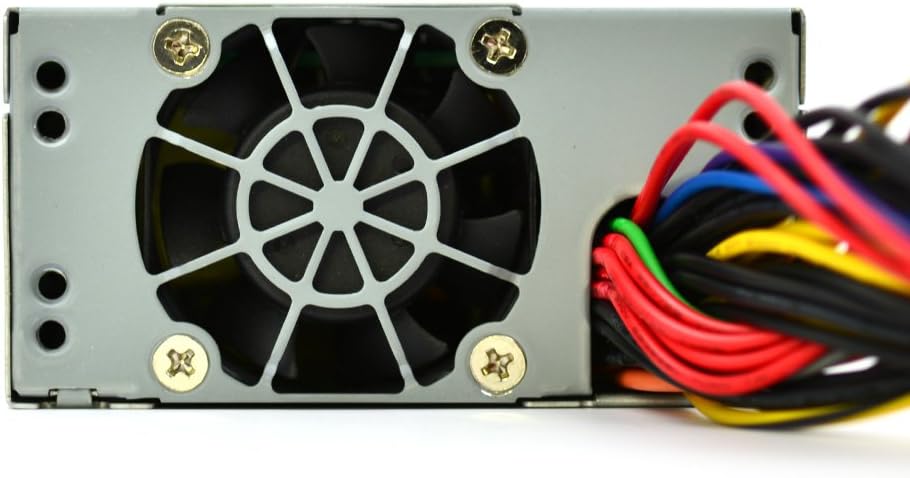
Immagine: Un dettaglio view of the FSP300-60LG-5K power supply's rear panel, showing the AC power input socket and the hexagonal ventilation grille.
6. Istruzioni per l'uso
After successful installation, you can power on your system. The FSP300-60LG-5K will automatically provide power to your components. The 40mm fan will operate to cool the unit. No specific user interaction is required for the power supply's operation beyond system power control.
7. Manutenzione
Una manutenzione regolare contribuisce a garantire la longevità e le prestazioni ottimali del tuo alimentatore:
- Rimozione della polvere: Pulire periodicamente la ventola e le griglie di ventilazione dell'alimentatore dalla polvere utilizzando aria compressa. Assicurarsi che il sistema sia spento e scollegato prima di procedere alla pulizia.
- Ventilazione: Ensure that the computer case has adequate airflow and that the power supply's intake and exhaust vents are not obstructed.
- Gestione dei cavi: Keep internal cables tidy to prevent interference with airflow.
8. Risoluzione Dei Problemi
Se riscontri problemi con l'alimentatore, fai riferimento ai seguenti passaggi comuni per la risoluzione dei problemi:
- Nessun potere:
- Verificare che il cavo di alimentazione CA sia collegato saldamente sia all'alimentatore sia alla presa a muro.
- Verificare che la presa a muro sia funzionante.
- Ensure all internal power connectors (24-Pin ATX, P4-Pin, SATA, Molex) are firmly seated.
- Instabilità del sistema/Arresti casuali:
- This could indicate insufficient power or overheating. Ensure the power supply is adequately ventilated.
- Verificare che i requisiti di alimentazione del sistema non superino la capacità di 300 W dell'alimentatore.
- Rumore eccessivo della ventola:
- A certain level of fan noise is normal, especially under load.
- If the noise is unusually loud or grinding, check for dust accumulation in the fan. If the issue persists, contact support.
If these steps do not resolve the issue, contact FSP Group technical support.
9. Specifiche
| Caratteristica | Descrizione |
|---|---|
| Marca | FSP |
| Numero di modello | FSP300-60LG-5K |
| Fattore di forma | Flex ATX |
| Uscita Wattage | 300 Watt |
| Efficienza | 80 più bronzo |
| Ingresso CA | 90-264 V |
| Metodo di raffreddamento | Air (40mm ball-bearing fan) |
| Dimensioni (LxWxH) | 5.9 x 3.2 x 1.6 pollici |
| Peso | 2.2 libbre |
| Connettori principali | 24-Pin ATX, P4-Pin |
| Peripheral Connectors | 3x Serial-ATA, 2x Molex 4-Pin |
| Protezioni | OVP (oltre voltage Protection), Line input fuse protection |
| Certificazioni | CE, FCC, cUL, CCC, TUV, CB, RoHS, Lead-Free, Green Product (G.P) |
| Tempo medio fra i guasti | 100,000 hours at full load at 25℃ |
| Valutazione di altitudine | 5km (5000 meters) |
10. Garanzia e supporto
For warranty information and technical support, please refer to the official FSP Group website or contact your local FSP Group distributor. Keep your purchase receipt for warranty claims.