
Modello M310
Manuale utente del mouse wireless Logitech M310
Modello: M310 (codice articolo: 910-003986)
Introduzione
The Logitech M310 Wireless Mouse is designed for comfortable and reliable everyday use. Its contoured shape with soft rubber side grips ensures a comfortable fit for either hand, even during extended periods of use. Featuring advanced 2.4 GHz wireless connectivity and precise optical tracking, this mouse offers smooth and responsive cursor control. The included plug-and-forget nano-receiver is small enough to remain in your USB port, providing hassle-free connectivity.
Impostare
1. Inserire la batteria
Locate the battery compartment on the underside of the mouse. Slide the cover open and insert one AA battery, ensuring correct polarity. The Logitech M310 is designed for an extended battery life of up to 18 months, though actual life may vary based on usage.
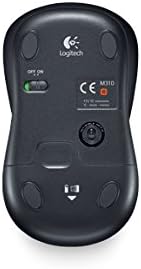
Immagine: Lato inferiore view of the Logitech M310 mouse, highlighting the battery compartment and the ON/OFF switch.
2. Connect USB Nano Receiver
Remove the USB nano receiver from its storage slot within the battery compartment (if stored there) or from its packaging. Plug the receiver into an available USB port on your computer (PC, Mac, or Laptop). The mouse should automatically connect to the receiver.

Image: The Logitech M310 Wireless Mouse positioned next to its compact USB nano receiver.
3. Accensione
Slide the ON/OFF switch on the underside of the mouse to the 'ON' position. The mouse is now ready for use.
Utilizzo del mouse
The Logitech M310 provides standard mouse functionality for seamless navigation.
- Clic sinistro: Premere il pulsante sinistro per selezionare gli elementi, aprire files, o attivare funzioni.
- Clic destro: Premere il tasto destro per accedere ai menu contestuali o alle opzioni specifiche.
- Rotella di scorrimento: Ruotare la rotellina verso l'alto o verso il basso per scorrere i documenti o web pages. The scroll wheel can also be pressed for middle-click functionality, often used to open links in new tabs.
- Tracciamento ottico: The advanced optical sensor provides smooth and precise cursor control on various surfaces, often eliminating the need for a mouse pad.
- Portata wireless: Enjoy reliable wireless connectivity with a range that allows for flexible positioning and movement.
Manutenzione
Sostituzione della batteria
When the mouse's performance degrades or the indicator light (if present) signals low battery, replace the AA battery. Always use a fresh, high-quality AA battery for optimal performance.
Pulizia
To maintain optimal performance, periodically clean the mouse. Use a soft, lint-free cloth slightly dampened with water or a mild cleaning solution to wipe the exterior. For the optical sensor on the underside, use a dry cotton swab to gently remove any dust or debris.
Conservazione del Nano Ricevitore
The USB nano receiver can be stored inside the mouse's battery compartment when not in use or when transporting the mouse. This helps prevent loss of the small receiver.
Risoluzione dei problemi
- Il mouse non risponde:
Ensure the mouse is switched 'ON'. Check the battery and replace it if necessary. Verify that the USB nano receiver is securely plugged into a working USB port on your computer.
- Movimento irregolare del cursore:
Clean the optical sensor on the underside of the mouse. Ensure you are using the mouse on a suitable surface; highly reflective or uneven surfaces can affect tracking performance. Try moving the mouse closer to the USB receiver to rule out interference.
- Problemi di connettività:
Unplug the USB nano receiver and plug it back into a different USB port. If possible, try the mouse with another computer to determine if the issue is with the mouse or the computer's USB ports. Ensure no other wireless devices are causing interference.
Specifiche
| Caratteristica | Dettaglio |
|---|---|
| Modello | Numero di modello: M310 |
| Numero modello articolo | 910-003986 |
| Tecnologia di connettività | Wireless (2.4 GHz USB Nano Receiver) |
| Tecnologia di rilevamento del movimento | Ottico |
| Fonte di alimentazione | Alimentato a batteria |
| Batterie richieste | 1 AA (incluso) |
| Durata media della batteria | Fino a 18 mesi |
| Piattaforma hardware | PC |
| Compatibilità del sistema operativo | Windows, macOS, Linux, Chrome OS |
| Peso dell'articolo | 3.49 once |
| Dimensioni del prodotto (LxWxH) | 4.96 x 3.37 x 1.91 pollici |
| Colore | Silver Grey (as per product title) |
Garanzia e supporto
Informazioni sulla garanzia
The Logitech M310 Wireless Mouse comes with a three-year limited hardware warranty from the date of purchase. This warranty covers defects in materials and workmanship under normal use. Please retain your proof of purchase for warranty claims.
Assistenza clienti
Per assistenza tecnica, risoluzione dei problemi o richieste di garanzia, visitare il supporto ufficiale Logitech website or contact their customer service. Detailed support resources, FAQs, and driver downloads (if applicable) are available online.
Note: Specific contact details and websito URLs may vary by region. Please refer to the packaging or Logitech's official websito per le informazioni di supporto più aggiornate.
Ask a question about this manual
Ask about setup, troubleshooting, compatibility, parts, safety, or missing instructions. Manuals+ will review the question and use this page’s manual context to help answer it.