
Urmet 1750/1
Manuale d'uso del sistema videocitofonico Urmet 1750/1
Modello: 1750/1 | Marca: Urmet
1. Introduzione
This manual provides comprehensive instructions for the installation, operation, and maintenance of your Urmet 1750/1 Video Intercom System. Please read this manual thoroughly before installation and use to ensure proper function and safety.
The Urmet 1750/1 is a color video intercom system designed for residential and commercial applications, offering enhanced security and communication features. It includes a backlit door opener button and three additional buttons for various auxiliary functions.

Figura 1: Fronte view of the Urmet 1750/1 Video Intercom System.
2. Informazioni sulla sicurezza
Always adhere to local electrical codes and regulations during installation. Installation should only be performed by qualified personnel. Disconnect power before performing any installation or maintenance. Do not expose the unit to moisture or extreme temperatures. Use only Urmet-approved accessories and replacement parts.
3. Contenuto della confezione
The Urmet 1750/1 package includes the following items:
- 1x Urmet 1750/1 Video Intercom Unit
- Manuale dell'utente (questo documento)
Prima di procedere con l'installazione, verificare che tutti i componenti siano presenti e integri.
4. Impostazione
4.1 Montaggio dell'unità
The Urmet 1750/1 unit is designed for wall mounting. Ensure the mounting surface is stable and can support the unit's weight. Refer to the back panel of the unit for mounting points.

Figura 2: Indietro view of the intercom unit, showing mounting points and connection terminal.
4.2 Collegamenti di cablaggio
Connect the intercom unit to your 2Voice system (e.g., 1083/55 LINE1 - LINE 4) as per the wiring diagram. Ensure all connections are secure and correctly polarized. Additional connections for an extension sounder (Urmet 1072/59) and an apartment doorbell button are also shown.
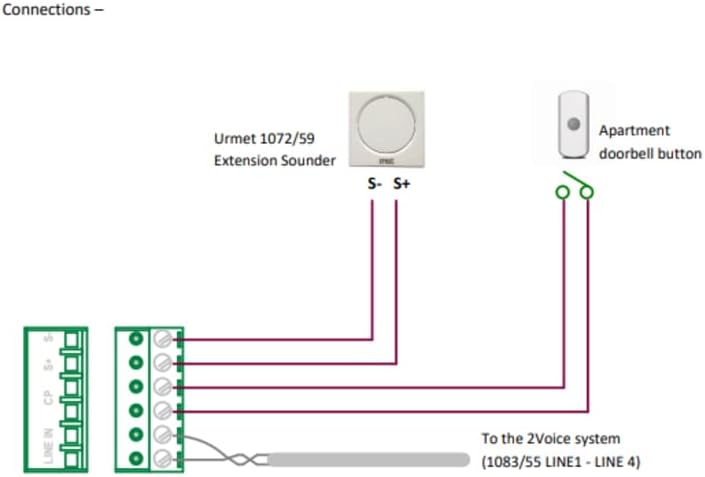
Figure 3: Wiring diagram for the Urmet 1750/1 system.
4.3 Collegamento del portatile
Connect the coiled cord of the handset to the designated port on the main unit. Ensure the connection is firm. The handset is essential for audio communication.

Figure 4: Urmet 1750/1 with handset detached, illustrating the connection point.
4.4 Guida all'installazione visiva
For a detailed visual guide on unboxing, connecting the handset, and understanding the unit's components, please refer to the official product video below:
Video 1: A closer look at the Urmet 1750/1, demonstrating its physical features and initial setup steps.
5. Istruzioni per l'uso
5.1 Funzioni di base
- Pulsante di apertura della porta: Press the backlit door opener button to unlock the main entrance.
- Pulsanti aggiuntivi: The three additional buttons can be configured for various functions such as opening a second entrance, activating staircase lighting, initiating a call to a control unit, or making an intercom call to another internal unit. Refer to your system installer for specific configurations.
5.2 Screen Activation
The screen can be activated at any time by pressing a designated button, even without an incoming call. This allows you to view the outdoor camera feed on demand.
5.3 Selezione suoneria
The device offers 5 different ringtones. You can select distinct ringtones for incoming calls from the outdoor unit and for internal intercom calls. This feature helps you identify the origin of the call easily.
5.4 Funzione MUTE
An LED indicator on the unit displays the status of the MUTE function. When active, the MUTE function silences incoming call notifications. Press the MUTE button to toggle this feature on or off.
6. Manutenzione
To ensure the longevity and optimal performance of your Urmet 1750/1 Video Intercom System, follow these maintenance guidelines:
- Pulizia: Utilizzare un panno morbido e asciutto per pulire l'esterno dell'unità. Per macchie ostinate, un panno leggermenteamp cloth with mild soap can be used, followed by drying. Avoid abrasive cleaners, solvents, or strong chemicals.
- Ispezione: Periodically check all cables and connections for any signs of wear or damage. Ensure the handset cord is not tangled or stressed.
- Condizioni ambientali: Tenere l'unità lontana dalla luce solare diretta, da calore eccessivo e dall'umidità.
7. Risoluzione Dei Problemi
If you encounter issues with your Urmet 1750/1, refer to the following common problems and solutions:
- Nessun video/schermo nero:
- Ensure the unit is properly powered.
- Controllare tutti i collegamenti dei cavi video.
- Verify the outdoor camera is functioning correctly.
- No Audio (Intercom/Call):
- Check the handset connection to the main unit.
- Ensure the MUTE function is not active (check LED indicator).
- Verificare i collegamenti del cablaggio audio.
- Apriporta non funzionante:
- Check the wiring to the door strike/lock.
- Ensure the door opener button is not physically stuck.
- L'unità non risponde:
- Temporarily disconnect and reconnect power to reset the unit.
- Verificare che l'alimentazione sia stabile.
If the problem persists after attempting these solutions, please contact Urmet customer support or a qualified technician.
8. Specifiche
Below are the key technical specifications for the Urmet 1750/1 Video Intercom System:
| Caratteristica | Specificazione |
|---|---|
| Produttore | URMET |
| Numero di modello | 1750/1 |
| Colore | Bianco |
| Dimensioni del prodotto (L x P x A) | 35 x 33 x 10 mm (1.38 x 1.30 x 0.39 pollici) |
| Peso dell'articolo | 1.05 chilogrammi (2.31 libbre) |
| Fonte di alimentazione | Cablato |
| Tipo di telefono | filo |
| Tipo di chiamata | Tastiera singola |
| Tipo di segreteria telefonica | Digitale |
| Funzionamento multilinea | Operazione su linea singola |
| Identificazione del chiamante | SÌ |
| Batterie richieste | NO |
| Batterie incluse | NO |

Figure 5: Dimensions of the Urmet 1750/1 unit.
9. Garanzia e supporto
Per informazioni sulla garanzia e supporto tecnico, fare riferimento al sito ufficiale Urmet webo contattare il distributore Urmet locale. Conservare lo scontrino d'acquisto come prova d'acquisto per eventuali reclami in garanzia.
Ask a question about this manual
Ask about setup, troubleshooting, compatibility, parts, safety, or missing instructions. Manuals+ will review the question and use this page’s manual context to help answer it.