
1. Introduzione
The Argox AS8520 is a high-performance cordless imager designed for efficient barcode scanning. It features advanced wireless communication technology, allowing for a data transmission range of up to 100 meters. Equipped with a long-lasting Li-ion battery and an IP42 sealing level, the AS8520 is built for durability and mobility across various environments, including offices, supermarkets, warehouses, and manufacturing facilities.
2. Prodotto finitoview
The AS8520 barcode scanner is designed for comfortable handling and robust performance. Key components include the scanning window, trigger button, and ergonomic grip.
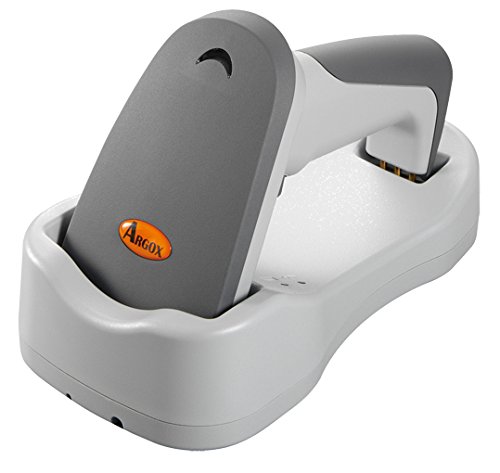
Figura 2.1: Lato view of the Argox AS8520 Barcode Scanner, showing the ergonomic handle and trigger button.
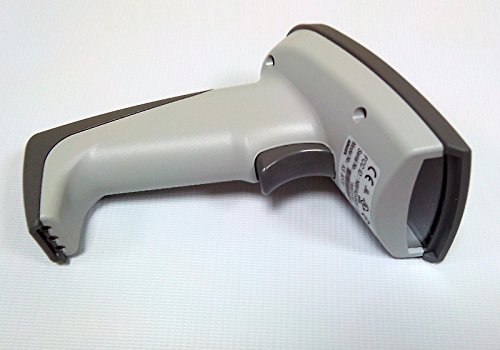
Figura 2.2: Davanti view of the Argox AS8520 Barcode Scanner, highlighting the scanning window and product labels.
3. Guida all'installazione
3.1. Installazione e ricarica della batteria
- Ensure the scanner is powered off before installing or removing the battery.
- Individuare il vano batteria sull'impugnatura dello scanner.
- Inserire la batteria agli ioni di litio, assicurandosi della corretta polarità.
- Chiudere bene il vano batterie.
- Connect the scanner to its charging base or power adapter using the provided cable. Allow the battery to fully charge before first use.
3.2. Connessione a un dispositivo host
The Argox AS8520 can connect wirelessly to various host devices, including desktops, laptops, and smartphones. Refer to the separate quick start guide for specific pairing instructions for your operating system or device type.
4. Istruzioni per l'uso
4.1. Scansione di base
- Assicurarsi che lo scanner sia acceso e correttamente associato al dispositivo host.
- Puntare la finestra di scansione verso il codice a barre che si desidera scansionare.
- Press and hold the trigger button. A red LED light source (630nm Visible Red LED) will illuminate the barcode.
- Position the scanner at an appropriate distance (the AS8520 offers superior depth of field up to 40 inches on 40-mil codes) until the barcode is successfully read. A successful scan is typically indicated by an audible beep and/or a visual indicator.
- Rilasciare il pulsante di attivazione.
4.2. Funzionalità di scansione avanzate
- Rapid Scan Rate: The AS8520 provides a rapid scan rate of 450 scans/sec for efficient data capture.
- Barcode Symbology Support: Supports GS1 Databar (RSS) and CS (Composite Symbology) barcodes.
- Sunlight Readability: Designed to be readable under direct sunlight conditions.
5. Manutenzione
5.1. Pulizia dello scanner
- Prima di procedere alla pulizia, assicurarsi che lo scanner sia spento.
- Utilizzare leggermente un panno morbido e privo di lanugine dampPulire la parte esterna dello scanner con acqua o una soluzione detergente delicata.
- Per la finestra di scansione, utilizzare un panno per la pulizia delle lenti per evitare graffi.
- Do not use abrasive cleaners, solvents, or immerse the scanner in liquid. The IP42 sealing level protects against dust and light water splashes, but not full immersion.
5.2. Cura della batteria
- To maximize battery life, avoid fully discharging the Li-ion battery frequently.
- Quando non si utilizza lo scanner per lunghi periodi, conservarlo in un luogo fresco e asciutto.
- If the battery performance degrades significantly, consider replacing it with an authorized Argox replacement battery.
6. Risoluzione Dei Problemi
| Problema | Possibile causa | Soluzione |
|---|---|---|
| Lo scanner non si accende. | La batteria è scarica o non è installata correttamente. | Caricare la batteria. Assicurarsi che la batteria sia correttamente inserita nel suo alloggiamento. |
| Lo scanner non legge i codici a barre. | Barcode is damaged, scanner is too far/close, or incorrect symbology settings. | Ensure the barcode is clear. Adjust scanning distance. Check scanner programming for supported barcode types. |
| Nessun dato trasmesso al dispositivo host. | Scanner not paired or out of range. | Re-pair the scanner with the host device. Ensure the scanner is within the 100-meter transmission range. |
| Lo scanner non risponde. | Problema temporaneo del software. | Perform a soft reset by powering off and then on the scanner. If issues persist, consult the manufacturer's support. |
7. Specifiche tecniche
| Caratteristica | Specificazione |
|---|---|
| Modello | AS8520 |
| Frequenza di scansione | 450 scansioni/sec |
| Sorgente luminosa | 630nm Visible Red LED |
| Prestazioni di scansione | Starting at 0.1mm (4 mil) |
| Profondità di campo | Up to 40 inches on 40-mil codes |
| Gamma di trasmissione dati | 100 metri (senza fili) |
| Dispositivi compatibili | Desktop, Laptop, Smartphone |
| Fonte di alimentazione | Battery Powered (Li-ion battery pack) |
| Temperatura di esercizio | da 0°C a 50°C (da 32°F a 122°F) |
| Temperatura di conservazione | -20°C a 70°C (-4°F a 158°F) |
| Umidità | Umidità relativa dal 10% all'90%, senza condensa |
| Livello di luce | Fino a 70,000 lux |
| Current - Operating | 225 mA a 4.2 V CC |
| Current - Standby | 32 mA a 4.2 V CC |
| Power - Operating | 900mW |
| Power - Standby | 150mW |
| Reliability (Trigger) | 1,000,000 volte |
| Reliability (Cable) | 320,000 times (90° bend) |
| Specifica di caduta | 1.5 metro |
| Sealing Level | Grado di protezione IP42 |
| Peso dell'articolo | 1.3 kg |
| GTIN/UPC | 702563636336 |
8. Garanzia e supporto
For detailed warranty information, please refer to the warranty card included with your product or visit the official Argox website. For technical support, service, or replacement parts, please contact your authorized Argox reseller or Argox customer service directly.