1. Introduzione
Grazie per l'acquistoasing the EUG x660s+ 3D HDMI LED Projector. This manual provides detailed instructions for setting up, operating, and maintaining your projector to ensure optimal performance and longevity. Please read this manual thoroughly before using the product.

Figura 1.1: The EUG x660s+ Projector, a compact and versatile device designed for home cinema and multimedia projection.
The EUG x660s+ is a versatile projector featuring a built-in Android system, WiFi connectivity, and DVB-T support, allowing for direct online video streaming, application installation, and reception of analog and digital TV signals. It supports various wireless protocols like DLNA, Miracast, and Airplay for seamless integration with your mobile devices and computers. With 2800 lumens brightness and a native resolution of 1280x720, it delivers a clear and vibrant viewing experience for home cinema, gaming, and presentations.
2. Prodotto finitoview
2.1. Contenuto della confezione

Figura 2.1: The image displays the EUG x660s+ projector, its retail packaging, and included accessories such as the remote control, various connection cables (HDMI, VGA, AV), and the user manual.
2.2. Componenti del proiettore

Figura 2.2: This diagram labels the key components of the projector, including the projection lens, infrared receiver, radiator inlets, adjustable lift leg, anti-dust mesh panel, keystone knob, power switch, signal connector, power wire connector, operation buttons, feature label, balance adjustment leg, two-dimensional code identification label, and hoisting screw holes.
2.3. Porte di ingresso/uscita
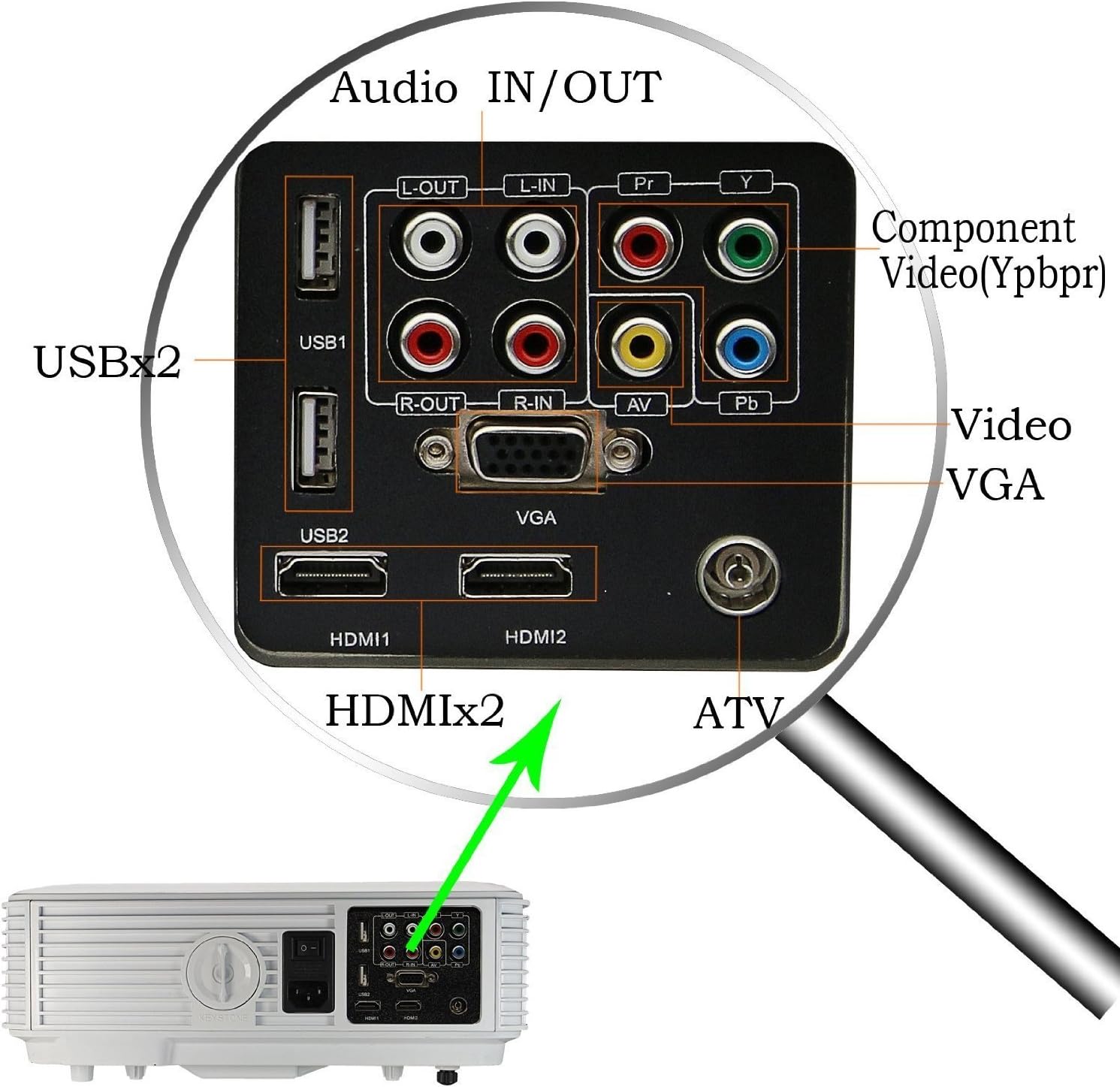
Figura 2.3: Un dettagliato view of the projector's rear panel, highlighting the available input and output ports: Audio IN/OUT, USBx2, Component Video (YPbPr), VGA, HDMIx2, and ATV (Antenna TV) input.
3. Impostazione
3.1. Posizionamento
Choose a stable, flat surface for the projector. Ensure adequate ventilation around the unit. The projection distance will determine the screen size.

Figura 3.1: This chart illustrates the recommended projection distances for various screen sizes (50", 70", 100", 120") when using a 4:3 image aspect ratio. Distances range from 1.90m for 50" to 4.40m for 120".
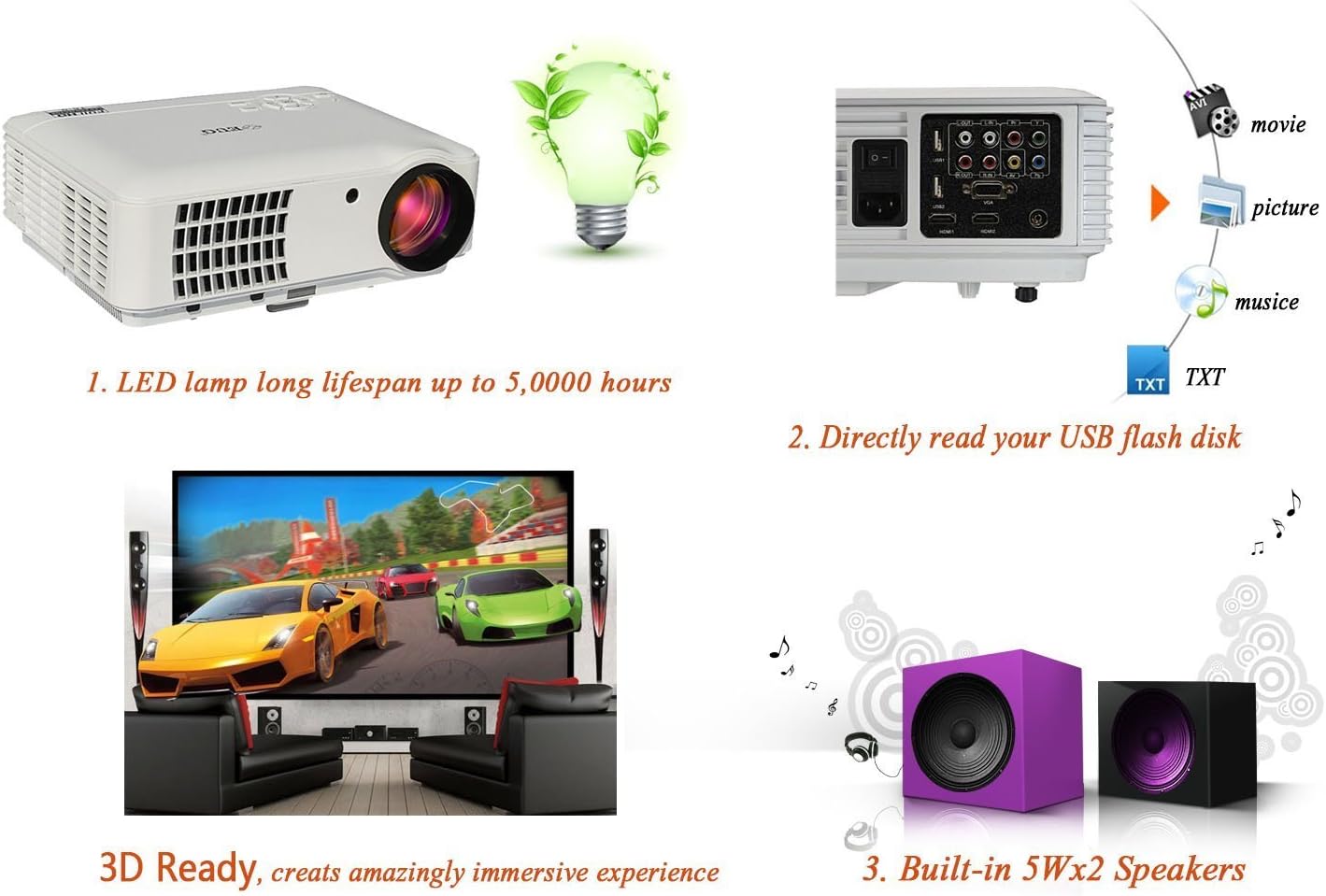
Figura 3.2: This chart illustrates the recommended projection distances for various screen sizes (50", 70", 100", 120") when using a 16:9 image aspect ratio. Distances range from 1.63m for 50" to 3.80m for 120".
The projector supports projection sizes from 50 to 200 inches with a projection distance of 1.2 to 5 meters.
3.2. Collegamento elettrico
Connect the power cable to the projector's power input and then to a wall outlet (AC 100-240V/50-60Hz).
3.3. Accensione iniziale
Press the power button on the projector or the remote control to turn on the device. The LED indicator will change color.
4. Istruzioni per l'uso
4.1. Regolazione della messa a fuoco e della distorsione trapezoidale
Use the focus ring around the lens to sharpen the image. If the image appears trapezoidal, use the keystone knob to correct the distortion and make the image rectangular.
4.2. Selezione della sorgente
Press the "Source" button on the remote control or the projector's control panel to select the desired input source (e.g., HDMI1, HDMI2, VGA, USB, AV, TV).
4.3. Android System and WiFi
The projector features a built-in Android system. Connect to your WiFi network via the system settings to access online content and install applications. You can navigate the Android interface using the remote control or by connecting a wired/wireless mouse.
4.4. DVB-T/ATV Functionality
Connect an antenna to the ATV port to receive digital (DVB-T) or analog TV signals directly through the projector. Use the TV source input to access this feature.
4.5. Wireless Connectivity (DLNA, Miracast, Airplay)
The projector supports screen mirroring technologies:
- DLNA: For streaming media content from compatible devices over your network.
- Miracast: For mirroring Android device screens wirelessly.
- Trasmissione in onda: For mirroring iOS device screens wirelessly.
Ensure your device and the projector are connected to the same WiFi network for these features to work.
4.6. Riproduzione multimediale tramite USB
Insert a USB flash drive into one of the USB ports. The projector can directly read and play various media files:
- Audio: WMA, MP3
- Immagine: Formato JPEG, BMP
- Video: MPG, MPEG-1, MPEG-2, MPEG-4, AVI, MP4, DivX, TS, TRP, MKV, WMV, RM, RMVB
5. Collegamento di dispositivi esterni
The EUG x660s+ projector offers a wide range of connectivity options for various devices:

Figura 5.1: This diagram illustrates the versatility of the projector, showing its ability to connect to a wide array of external devices such as DVD players, laptops, set-top boxes, HDD players, Xbox consoles, personal computers, iPhones, and digital video cameras.
- HDMI: Connect Blu-ray players, gaming consoles (Xbox, PlayStation), laptops, and set-top boxes using HDMI cables for high-definition audio and video.
- VGA: Connect older laptops or desktop computers using a VGA cable.
- Video componente (YPbPr): Connect devices with component video output.
- AV: Connect devices with composite video output (e.g., older DVD players, digital video cameras).
- USB: For media playback from USB drives or connecting USB peripherals like a mouse.
- Audio IN/OUT: Connect external speakers or audio systems for enhanced sound, or input audio from external sources. The projector also has built-in 2x5W speakers.
- Dispositivi iOS: For iOS devices with a Lightning connector, a Lightning Digital AV Adapter and an HDMI cable are required. For older 30-pin iOS devices, a 30-pin Digital AV Adapter is needed.
6. Specifiche
| Caratteristica | Descrizione |
|---|---|
| Marca | UEG |
| Numero di modello | PJA88W |
| Tipo | proiettore LCD |
| Sorgente luminosa | LED 170W Lamp |
| Luminosità | 2800 lumen |
| Risoluzione nativa | 1280x720 |
| Risoluzione massima | WUXGA(1920x1200) |
| Rapporto di contrasto | 3000:1 (Acceso/Spento completamente) |
| Distanza di proiezione | 1.2 - 5 metri |
| Dimensioni della proiezione | 50 - 200 pollici |
| Proporzioni | 16:9, 4:3 Compatible |
| Altoparlanti incorporati | 2 x 5W |
| Alimentazione elettrica | AC 100-240V / 50-60Hz |
| Consumo energetico | <180Settembre |
| Porte di ingresso/uscita | Component Video (YPbPr), VGA, HDMI, USB * 2, TV, Stereo Audio |
| Formati audio supportati | WMA, MP3 |
| Formati di immagine supportati | Formato JPEG, BMP |
| Formati video supportati | MPG, MPEG-1, MPEG-2, MPEG-4, AVI, MP4, DivX, TS, TRP, MKV, WMV, RM, RMVB |
| Versione del sistema | Android 4.2 e versioni successive |
| processore | ARM Cortex-A7 DualCore |
| Memoria RAM | DDR3 / 1GB |
| ROM | DDR3 / 4GB |
| Control Support | Infrared Remote Control, Wired/Wireless Mouse |
| Peso | 4 chilogrammi |
7. Manutenzione
7.1. Pulizia dell'obiettivo
Use a soft, lint-free cloth specifically designed for optical lenses to gently wipe the projection lens. Do not use abrasive cleaners or excessive force.
7.2. Pulizia del corpo del proiettore
Wipe the exterior of the projector with a soft, dry cloth. For stubborn stains, slightly dampImmergere il panno in acqua e poi asciugarlo. Evitare l'uso di detergenti chimici.
7.3. Ventilazione
Ensure that the projector's ventilation openings are not blocked. Regularly check and clean the anti-dust mesh panel to prevent overheating and maintain optimal performance.
8. Risoluzione Dei Problemi
8.1. No Image or "No Signal" Message
- Check if the power cable is securely connected and the projector is turned on.
- Verify that the correct input source is selected (e.g., HDMI1, VGA).
- Ensure the source device (laptop, DVD player) is powered on and outputting a signal.
- Try a different HDMI/VGA cable or port.
8.2. Immagine sfocata
- Regolare la ghiera di messa a fuoco sull'obiettivo finché l'immagine non risulta nitida.
- Assicurarsi che la distanza di proiezione rientri nell'intervallo consigliato.
- Clean the projector lens if it's dirty.
8.3. Immagine trapezoidale
- Use the keystone knob to correct the image distortion.
- Ensure the projector is placed on a level surface and is perpendicular to the screen.
8.4. Nessun suono
- Controllare le impostazioni del volume sia sul proiettore che sul dispositivo sorgente.
- Ensure audio cables are correctly connected if using external speakers or AV input.
- Se si utilizza HDMI, assicurarsi che il dispositivo sorgente trasmetta l'audio tramite HDMI.
8.5. WiFi/Screen Mirroring Issues
- Assicurati che il proiettore e il dispositivo siano connessi alla stessa rete Wi-Fi.
- Controlla la connessione di rete e le impostazioni del router.
- Restart both the projector and the device you are trying to connect.
9. Garanzia e supporto
The EUG x660s+ projector comes with the following warranty and service:
- Lamp Sostituzione: 1 month free lamp replacement shipping.
- Sostituzione del prodotto: 3 months replacement service.
- Servizio di riparazione: 6 months and 1 year repair service.
For technical support or warranty claims, please contact your retailer or the manufacturer's customer service with your purchase details and model number (PJA88W).