Franklin Spelling Ace SA-98 V1 Electronic Dictionary User Manual
Model: SA-98 V1
Introduzione
The Franklin Spelling Ace SA-98 V1 is a portable electronic dictionary designed to assist with spelling and word definitions. This manual provides essential information for setting up, operating, maintaining, and troubleshooting your device.
Impostare
1. Installazione della batteria
The Franklin Spelling Ace SA-98 V1 requires four (4) AAA batteries for operation.
Individuare il vano batteria sul retro del dispositivo.
Aprire il coperchio del vano batterie.
Inserire quattro batterie AAA, assicurandosi che la polarità sia corretta (+/-) come indicato all'interno del vano.
Richiudere il coperchio del vano batteria, assicurandosi che scatti saldamente in posizione.
Image: Open battery compartment of the Franklin Spelling Ace SA-98 V1. This image shows the device's back with the battery cover removed, revealing four empty slots for AAA batteries. The correct polarity markings are visible within the compartment.
2. Accensione iniziale
After installing the batteries, press the ON button located on the keyboard to power on the device. The display should illuminate, indicating the device is ready for use.
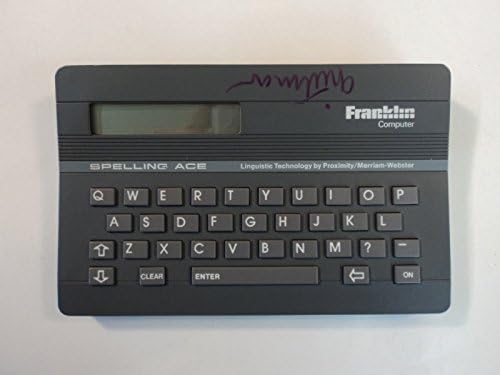
Immagine: Frontale view of the Franklin Spelling Ace SA-98 V1. This image displays the device from the front, highlighting its screen and the full QWERTY keyboard layout. The "ON" button is visible on the right side of the keyboard.
Istruzioni per l'uso
1. Spelling Correction
To correct a misspelled word:
Type the word as you believe it is spelled using the QWERTY keyboard.
Premere il tasto ENTRARE chiave.
The device will display the correct spelling or a list of possible spellings. Use the arrow keys to navigate through the suggestions.
2. Word Search and Definition
To search for a word and view its definition:
Type the word you wish to look up.
Premere il tasto ENTRARE chiave.
If the word is found, its definition will be displayed. Use the arrow keys to scroll through longer definitions.
3. Using the Keyboard and Display
Tastiera QWERTY: The device features a standard QWERTY keyboard layout for easy typing.
Pulsante CANCELLA: Premere CHIARO to erase the current input or return to the main spelling screen.
Tasti freccia: Use the directional arrow keys to navigate through lists of words, definitions, or menu options.
Schermo di visualizzazione: The LCD screen shows typed words, spelling suggestions, and definitions. Ensure adequate lighting for optimal visibility.
Immagine: Angolata view of the Franklin Spelling Ace SA-98 V1. This image provides a slightly angled perspective of the device, showcasing its compact design, the display screen, and the complete QWERTY keyboard.
Manutenzione
1. Pulizia del dispositivo
To clean your Spelling Ace:
Spegnere il dispositivo prima di pulirlo.
Per pulire l'esterno, utilizzare un panno morbido e asciutto.
Per segni ostinati, leggermente dampLavare il panno con acqua. Evitare l'uso di prodotti chimici aggressivi o detergenti abrasivi.
Do not allow moisture to enter the display or keyboard areas.
2. Sostituzione della batteria
When the display becomes dim or the device functions erratically, it is time to replace the batteries. Follow the battery installation steps outlined in the Impostare section. Always replace all four batteries at the same time with new AAA alkaline batteries.
3. Conservazione
Conservare il dispositivo in un luogo fresco e asciutto, lontano dalla luce solare diretta e da temperature estreme. Se non lo si utilizza per un periodo prolungato, rimuovere le batterie per evitare perdite.
Risoluzione dei problemi
Problema
Soluzione
Il dispositivo non si accende.
Assicurarsi che le batterie siano installate correttamente, rispettando la polarità corretta.
Sostituisci le vecchie batterie con nuove batterie alcaline AAA.
Premere il tasto ON pulsante con decisione.
Il display è scuro o vuoto.
Sostituire le batterie.
Garantire condizioni di illuminazione adeguate.
Incorrect spelling suggestions or no results.
Double-check your input for typing errors.
The word may not be in the device's dictionary.
I tasti non rispondono.
Sostituire le batterie.
Assicurarsi che non vi siano detriti incastrati sotto i tasti.
Specifiche
Modello: SA-98 V1
Marca: franklin
Produttore: Franklin Computer
Dimensioni: 6.5 x 4.15 x 0.85 pollici
Peso: 6.1 once
Fonte di energia: 4 batterie AAA (non incluse)
Colore: Grigio
Materiale: Plastica
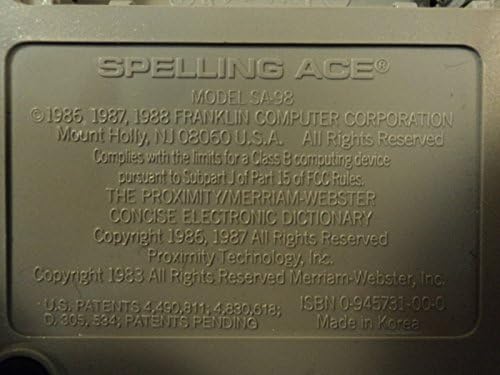
Image: Close-up of the back label of the Franklin Spelling Ace SA-98 V1. This detailed image shows the embossed label on the back of the device, clearly displaying the model number SA-98, copyright information from Franklin Computer Corporation, and manufacturing details.
Garanzia e supporto
Informazioni sulla garanzia
This product is typically covered by a limited manufacturer's warranty. Please refer to the original packaging or purchase documentation for specific warranty terms and conditions. Keep your proof of purchase for warranty claims.
Assistenza clienti
For technical assistance, troubleshooting beyond this manual, or warranty inquiries, please contact Franklin Computer customer support. Contact information can usually be found on the manufacturer's official websito o sulla confezione del prodotto.
Ask a question about this manual
Ask about setup, troubleshooting, compatibility, parts, safety, or missing instructions. Manuals+ will review the question and use this page’s manual context to help answer it.