
1. Introduzione
This manual provides detailed instructions for the Sharp EL1750V EL-1750V Two-Color Printing Calculator. This device is designed for efficient financial and general calculations, featuring a two-color printing mechanism for clear record-keeping. It includes functions such as automatic tax keys, a change calculation feature, and a large display for enhanced usability.
Le caratteristiche principali includono:
- Two-color printing (positive numbers in black, negative in red) at 2.2 lines per second.
- 12-digit LCD display for large calculations.
- Built-in antimicrobial protection.
- Change calculation feature.
- Automatic Tax Keys (TAX+, TAX-).
- Rounding and Decimal Switches.
- Grand Total (GT) function.
- 4-key memory.
- Cost, Sell, Margin (CSM) keys.
2. Prodotto finitoview
Familiarize yourself with the components and key features of your Sharp EL1750V calculator.

Figura 1: Fronte view of the Sharp EL1750V calculator, showing the display, keypad, and paper roll.

Figura 2: Oltreview of key functions including Automatic Tax Keys, Rounding Switch, Decimal Switch, Grand Total Function, 4 Key Memory, Backspace Key, and Percent Key.
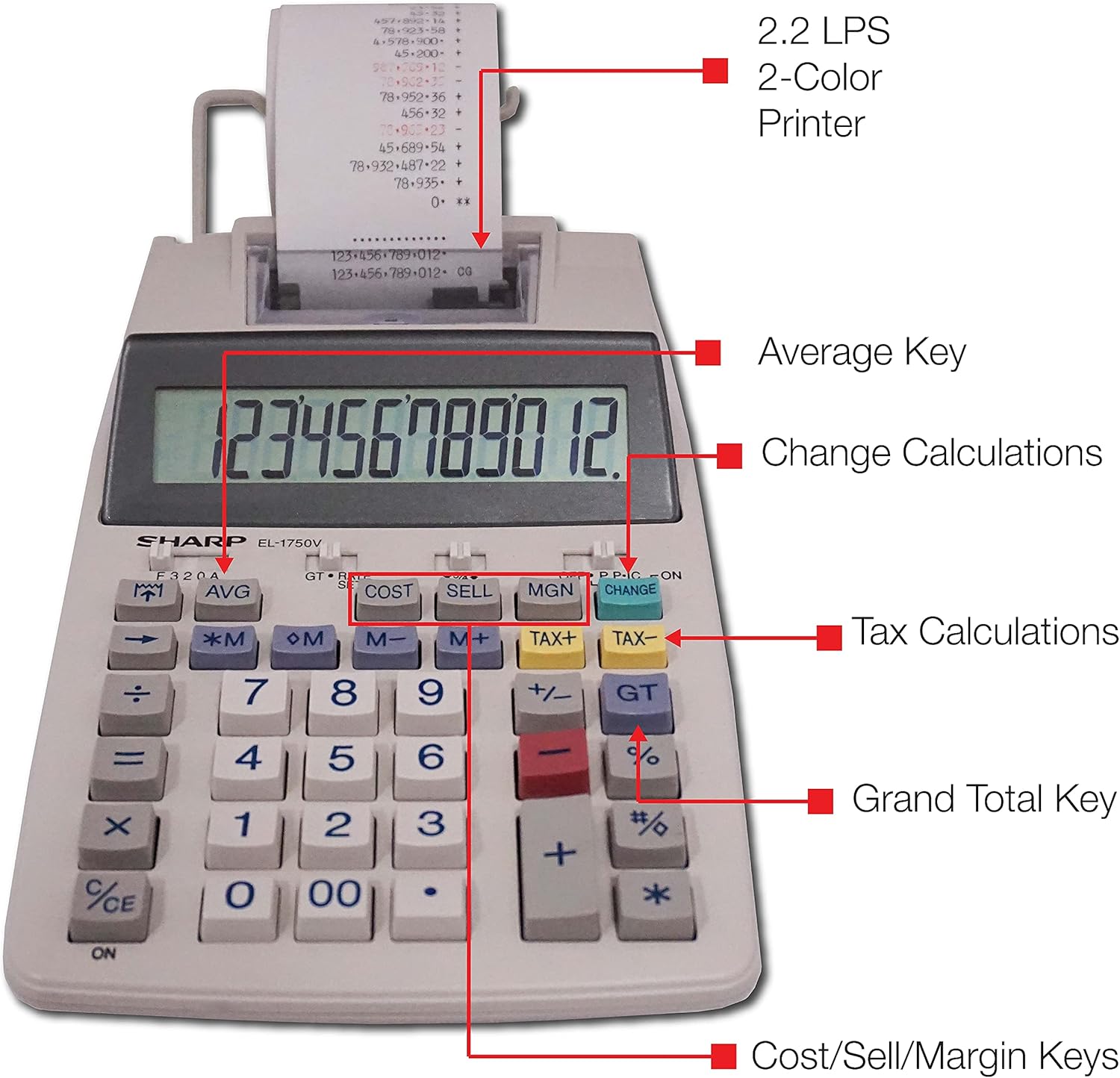
Figura 3: dettagliata view highlighting the 2.2 LPS 2-Color Printer, Average Key, Change Calculations, Tax Calculations, Grand Total Key, and Cost/Sell/Margin Keys.

Figure 4: Dimensions of the Sharp EL1750V calculator, showing a width of 5.9 inches, depth of 9.1 inches, and height of 2 inches, with a 0.75 inch 12-digit LCD display.
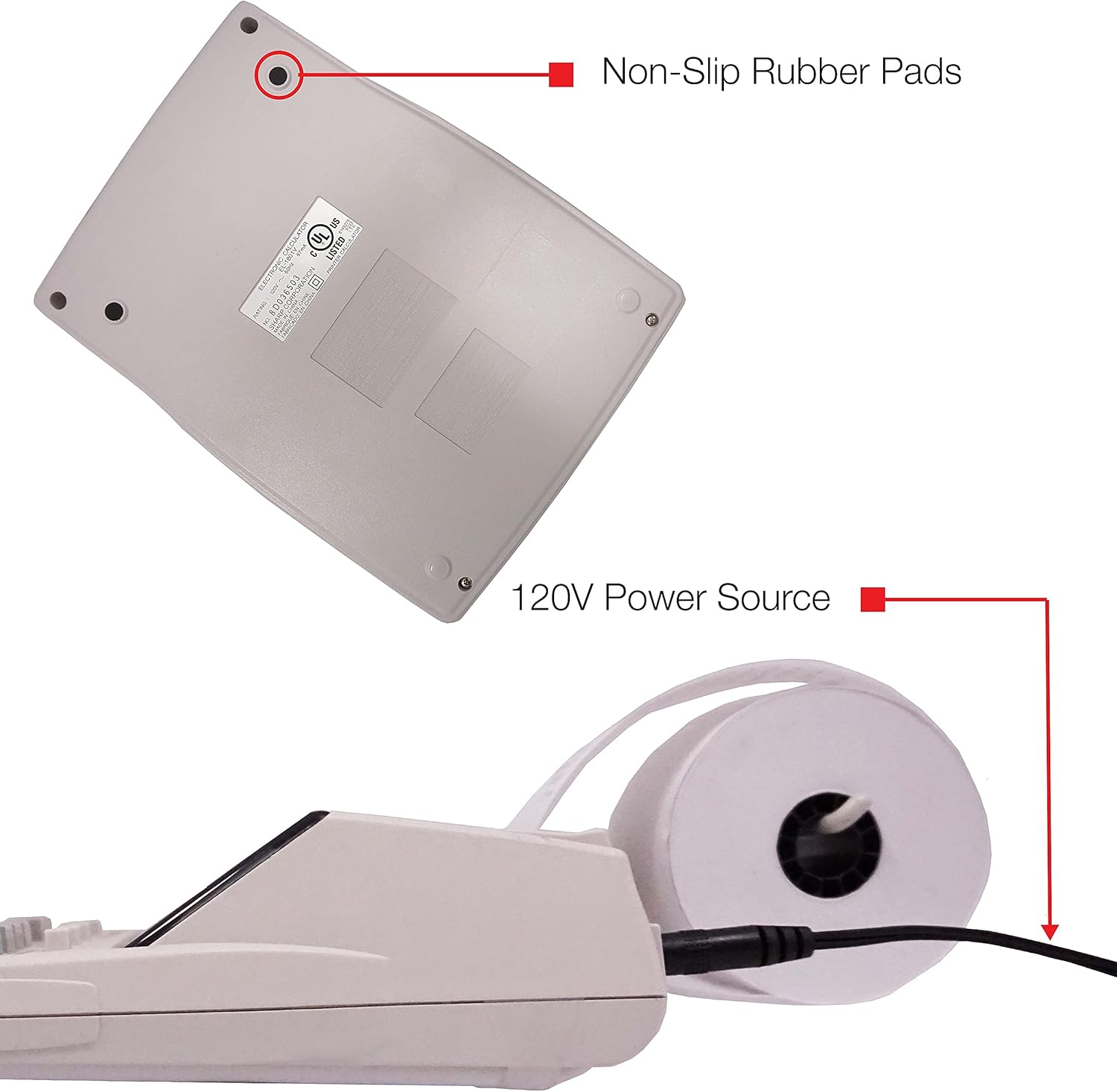
Figura 5: In basso view of the calculator, illustrating the non-slip rubber pads and the 120V power source input.
3. Impostazione
3.1 Fonte di alimentazione
The Sharp EL1750V can be powered by an AC adapter (120V) or batteries. Ensure the correct power source is connected before operation.
- Adattatore per corrente alternata: Connect the provided AC adapter to the power input port on the side of the calculator (refer to Figure 5) and plug it into a standard 120V electrical outlet.
- Batterie: If using batteries, open the battery compartment (typically on the underside) and insert the required batteries, observing correct polarity.
3.2 Installing the Paper Roll
- Lift the printer cover to expose the paper roll compartment.
- Inserire un nuovo rotolo di carta nello scomparto, assicurandosi che la carta venga inserita dal fondo del rotolo.
- Feed the leading edge of the paper into the printer mechanism slot until it emerges from the top.
- Chiudere il coperchio della stampante.
- Press the paper feed key (often marked with an arrow pointing up) to advance the paper and ensure it is properly aligned.
4. Istruzioni per l'uso
4.1 Calcoli di base
Eseguire operazioni aritmetiche standard:
- Aggiunta (+): Inserisci il primo numero, premi +, inserisci il secondo numero, premi =.
- Sottrazione (-): Inserisci il primo numero, premi -, inserisci il secondo numero, premi =.
- Moltiplicazione (x): Inserisci il primo numero, premi x, inserisci il secondo numero, premi =.
- Divisione (÷): Inserisci il primo numero, premi ÷, inserisci il secondo numero, premi =.
- Ingresso libero (CE/C): Cancella l'ultimo numero immesso.
- Tutto chiaro (AC): Cancella tutte le voci e i calcoli.
4.2 Funzioni speciali
- Tax Calculation (TAX+, TAX-):
- Set the tax rate using the appropriate function (refer to the calculator's specific tax rate setting procedure, usually involving a dedicated key or mode).
- Enter the amount, then press IMPOSTE+ to add tax or IMPOSTA- per sottrarre le tasse.
- Change Calculation (CHANGE):
- Enter the total amount of the sale.
- Premere il tasto MODIFICA chiave.
- Inserisci l'importo ricevuto dal cliente.
- Premere = to display the change due.
- Totale generale (GT): Premere GT to recall the grand total of all previous calculations.
- Memory Functions (M+, M-, RM/CM):
- M+: Aggiunge il valore visualizzato alla memoria.
- M-: Sottrae il valore visualizzato dalla memoria.
- RM/CM: Recalls memory content (first press) or clears memory (second press).
- Cost, Sell, Margin (COST, SELL, MGN): These keys are used for profit margin calculations.
- Enter two of the three values (Cost, Selling Price, Margin Percentage) and press the key for the unknown value to calculate it.
- Rounding and Decimal Switches: Adjust these switches (typically located above the keypad) to control the number of decimal places and rounding method for calculations.
5. Manutenzione
5.1 Pulizia
To maintain the calculator's performance and appearance:
- Pulisci l'esterno con un panno morbido e asciutto.
- Per sporco ostinato, leggermente dampBagnare il panno con acqua o un detergente delicato e non abrasivo.
- Do not use strong solvents or abrasive cleaners, as these can damage the surface or display.
- Evitare di spruzzare liquidi direttamente sulla calcolatrice.
5.2 Sostituzione del rotolo di carta
Sostituire il rotolo di carta quando è esaurito o la stampa diventa sbiadita. Per le istruzioni di installazione, consultare la Sezione 3.2.
5.3 Sostituzione del rullo inchiostratore
When the print becomes faint or incomplete, the ink roller needs to be replaced. Consult your calculator's specific instructions for ink roller replacement, as the procedure may vary slightly.
6. Risoluzione Dei Problemi
| Problema | Possibile causa | Soluzione |
|---|---|---|
| La calcolatrice non si accende. | No power, AC adapter not connected, or batteries depleted/incorrectly installed. | Ensure AC adapter is securely plugged in. If using batteries, check battery installation and replace if necessary. |
| Nessuna stampa o stampa sbiadita. | Paper roll empty or incorrectly installed; ink roller needs replacement. | Replace paper roll (Section 3.2). Replace ink roller (Section 5.3). |
| Display shows "E" or error message. | Calculation overflow, division by zero, or incorrect operation sequence. | Premere AC to clear the error. Re-enter the calculation carefully. |
| La carta si inceppa. | Paper roll not installed correctly or paper is creased. | Open printer cover, remove jammed paper, and re-install paper roll correctly (Section 3.2). |
7. Specifiche
- Modello: Sharp EL1750V
- Display: LCD a 12 cifre
- Velocità di stampa: 2.2 linee al secondo
- Printing Colors: 2 (Black for positive, Red for negative)
- Fonte di energia: AC Adapter (120V) or Battery Powered
- Dimensioni (circa): 5.9 pollici (L) x 9.1 pollici (P) x 2 pollici (A)
- Peso (circa): 0.16 ounces (Note: This weight seems unusually low for a printing calculator, likely an error in source data. User should refer to product packaging for accurate weight.)
- Materiale: Plastica
- Caratteristiche speciali: Antimicrobial protection, Change calculation, Tax functions, Cost/Sell/Margin functions, Grand Total, 4-key memory.
8. Garanzia e supporto
For warranty information and technical support, please refer to the documentation included with your purchase or visit the official Sharp websito. Conservare la ricevuta d'acquisto come prova d'acquisto per eventuali reclami in garanzia.
Produttore: Affilato
Websito: www.sharpusa.com