
Introduzione
The Cambridge Audio Azur 851N is a high-performance digital preamplifier and network player designed to deliver exceptional audio quality from various digital sources. It functions as a digital preamplifier, a network player for streaming audio, and a high-performance Digital-to-Analog Converter (DAC). This manual provides essential information for setting up, operating, and maintaining your Azur 851N.
Informazioni sulla sicurezza
Please read all safety instructions before operating this unit. Keep this manual for future reference.
- Alimentazione elettrica: Only use the power cable supplied with the unit. Ensure the voltage corrisponde all'alimentazione elettrica locale.
- Ventilazione: Non ostruire le aperture di ventilazione. Lasciare spazio sufficiente attorno all'unità per un corretto flusso d'aria.
- Umidità: Non esporre l'unità a pioggia, umidità, gocciolamenti o schizzi. Non posizionare oggetti contenenti liquidi, come vasi, sull'unità.
- Calore: Non collocare vicino a fonti di calore come radiatori, termosifoni, stufe o altri apparecchi (compresi amplificatori) che producono calore.
- Manutenzione: Non tentare di riparare questo prodotto da soli. Affidare tutte le operazioni di manutenzione a personale di assistenza qualificato.
Cosa c'è nella scatola
Carefully unpack your Azur 851N. The package should contain the following items:
- Lettore di rete Azur 851N
- Cavo di alimentazione
- 3 batterie AAA
- Telecomando
- Cavo bus di controllo
- Dongle Wi-Fi
Prodotto finitoview
The Azur 851N integrates multiple audio components into one unit, offering versatile connectivity and high-fidelity sound processing.
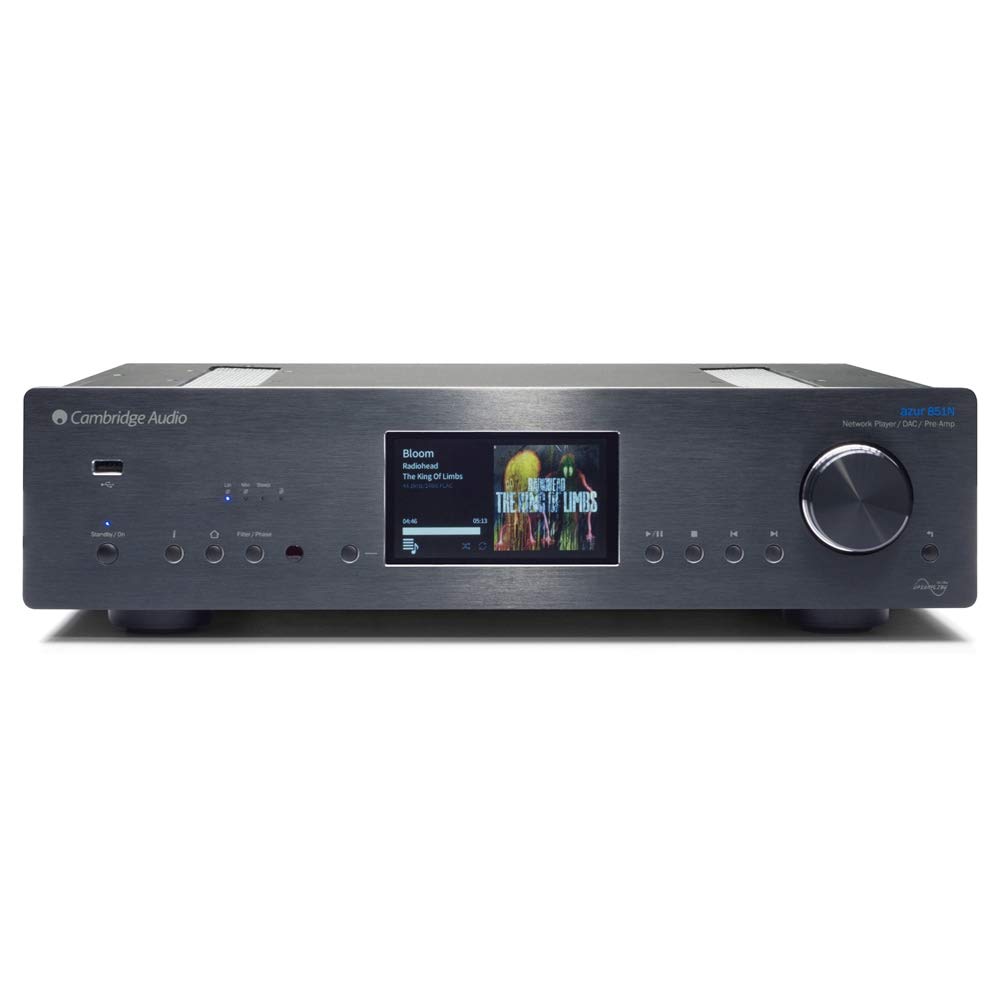
Davanti view of the Cambridge Audio Azur 851N, showing the display, control knob, and various buttons.
Caratteristiche principali:
- Pre digitaleamplificatore: Connects directly to power amplificatori o integrati amplificatori.
- Lettore di rete: Streams audio via wired Ethernet or Wi-Fi.
- DAC ad alte prestazioni: Features Twin Analog Devices AD1955 24-bit DACs.
- Advanced Upsamplingua: ATF2 up-s di seconda generazioneampling to 24-bit/384kHz with selectable filter modes.
- Ampia connettività: Includes AES/EBU, S/PDIF coaxial, TOSLINK optical, USB Type B, Balanced XLR, and Unbalanced RCA outputs.
- Streaming wireless: Supports UPnP, Internet Radio, Spotify, Tidal, Apple AirPlay, and Bluetooth (via BT100 receiver).
- Applicazione di controllo: Compatible with Cambridge Audio's control app for Apple and Android devices.
Impostare
1. Posizionamento fisico
Place the Azur 851N on a flat, stable surface away from direct sunlight, heat sources, and excessive moisture. Ensure there is adequate ventilation around the unit to prevent overheating.
2. Connessioni
Before making any connections, ensure the Azur 851N and all other audio components are powered off.
- Ingressi audio digitali: Connect your digital sources (CD players, media servers, etc.) to the 1 x AES/EBU, 2 x S/PDIF coaxial, or 2 x TOSLINK optical inputs.
- USB Audio Input (Type B): Connect your computer to this input for high-resolution audio playback. Select USB Audio profile 1.0 or 2.0 as required.
- Analogue Audio Outputs: Connect the Balanced XLR or Unbalanced RCA analogue audio outputs to your ampdiffusori acustici o attivi.
- Collegamento Ethernet: For the most stable network connection, connect an Ethernet cable from your router to the Ethernet port on the 851N.
- Wifi: Insert the supplied Wi-Fi dongle into an available USB port on the rear panel for wireless network connectivity.
- Bus di controllo: Use the Control Bus Cable to connect to other compatible Cambridge Audio components for integrated control.
3. Collegamento elettrico
Once all audio and network connections are made, connect the supplied power cable to the Azur 851N and then to a suitable wall outlet.
Istruzioni per l'uso
1. Accensione/spegnimento
Premere il pulsante di accensione sul pannello frontale o sul telecomando per accendere o spegnere l'unità. Il display si illuminerà all'accensione.
2. Configurazione di rete
Upon first power-up or after a factory reset, the unit may guide you through network setup. Follow the on-screen prompts to connect to your wired or wireless network. For Wi-Fi, select your network and enter the password using the front panel controls or the remote.
3. Servizi di streaming
- UPnP: Accedi alla musica files stored on your local network via UPnP servers.
- Radio Internet: Browse and play thousands of internet radio stations.
- Spotify Connetti: Stream music directly from the Spotify app on your device.
- Marea: Access your Tidal subscription for high-fidelity streaming.
- Utilizzo di Apple AirPlay: Trasmetti in streaming l'audio in modalità wireless dai dispositivi Apple.
- Bluetooth: Pair your Bluetooth device (via BT100 dongle) to stream audio.
4. Riproduzione di supporti USB
Connect a USB storage device (thumb drive or external hard drive) to the USB A ports on the front or rear panel. The 851N will scan the device for compatible audio files. Navigate through folders and select tracks using the front panel controls or the remote.
5. Control App Usage
Download the Cambridge Audio StreamMagic app from the Apple App Store or Google Play Store. This app provides a comprehensive interface for controlling the Azur 851N, browsing music libraries, and managing streaming services.
6. Modalità di filtro digitale
The Azur 851N features 2nd Generation ATF2 up-sampling with selectable digital filter modes: Linear Phase, Minimum Phase, or Steep. Experiment with these settings to find the sound profile che meglio si adatta alle tue preferenze e al contenuto audio.
Manutenzione
To ensure the longevity and optimal performance of your Azur 851N, follow these maintenance guidelines:
- Pulizia: Use a soft, dry, lint-free cloth to clean the unit's exterior. Do not use abrasive cleaners, waxes, or solvents.
- Ventilazione: Controllare regolarmente che le aperture di ventilazione siano libere da polvere e detriti.
- Spegni: Disconnect the unit from the power outlet if it will be unused for an extended period.
Risoluzione dei problemi
If you encounter issues with your Azur 851N, refer to the following common solutions:
| Problema | Possibile causa/soluzione |
|---|---|
| Nessun potere | Ensure the power cable is securely connected to the unit and the wall outlet. Check the power switch. |
| Nessuna uscita audio | Verify correct audio cable connections to your amplifier. Ensure the correct input source is selected on the 851N and your amplifier. Check volume levels. |
| Problemi di connessione di rete | For wired connections, check the Ethernet cable. For Wi-Fi, ensure the dongle is inserted, the network is selected, and the password is correct. Restart your router and the 851N. |
| USB media playback problems | Ensure the USB device is formatted correctly (FAT32 or NTFS). Check for compatible audio file formats. Some external hard drives may require external power. |
| Il telecomando non funziona | Check and replace batteries. Ensure there are no obstructions between the remote and the unit's IR sensor. |
If the problem persists after attempting these solutions, please contact Cambridge Audio customer support.
Specifiche
| Caratteristica | Dettaglio |
|---|---|
| Convertitori D/A | DAC gemelli Analog Devices AD1955 a 24 bit |
| Filtro digitale | ATF2 up-s di seconda generazioneampling to 24-bit/384kHz (Linear Phase, Minimum Phase, Steep modes) |
| Filtro analogico | 2-pole differential Bessel with DC servo (XLR and RCA outputs) |
| Ingressi audio digitali | 1 x AES/EBU, 2 x S/PDIF coaxial, 2 x TOSLINK optical |
| Ingresso audio USB | USB Type B (USB Audio profile 1.0 or 2.0 selectable) |
| Uscite audio analogiche | Balanced XLR and Unbalanced RCA |
| Compatibility (UPnP, Local USB) | Linear PCM 16-24 bit, 11.025-192kHz |
| Compatibility (USB Audio 1.0) | Linear PCM 16-24 bit, 44.1-96kHz |
| Compatibility (USB Audio 2.0) | Linear PCM 16-24 bit, 44.1-192kHz or DSD x64 |
| Compatibility (TOSLINK, S/PDIF, AES3/EBU) | 16-24 bit, 32-192kHz |
| Bluetooth | BT100 Bluetooth receiver: A2DP plus aptX |
| Radio Internet | 16-24 bit, 11.025-192kHz |
| Formati audio | ALAC, WAV, FLAC, AIFF, DSD (x64), WMA, MP3, AAC, HE AAC, AAC+, OGG Vorbis |
| Etereo | IEEE 802.3, 10 Base-T o 100 Base-T |
| Wifi | IEEE 802.11 b/g or n (2.4GHz) |
| Consumo energetico in standby | 0.5W |
| Dimensioni (A x L x P) | 115 x 430 x 360mm (4.5 x 16.9 x 14.7 pollici) |
| Peso | 8.1 kg (17.9 libbre) |
Garanzia e supporto
Cambridge Audio products are designed and built to high standards. For warranty information and technical support, please refer to the documentation included with your product or visit the official Cambridge Audio websito. Conservare la prova d'acquisto per eventuali reclami in garanzia.