
Introduzione
This manual provides comprehensive instructions for the installation, operation, and maintenance of your Alcatel-Lucent 4018 Extended Edition IPTouch VoIP Phone. Please read this manual carefully before using the device to ensure proper functionality and to prevent damage.
Informazioni sulla sicurezza
Observe the following safety precautions to reduce the risk of fire, electric shock, and injury:
- Utilizzare solo l'adattatore di alimentazione fornito con il telefono.
- Non esporre il telefono all'acqua o all'umidità.
- Evitare di posizionare il telefono vicino a fonti di calore o alla luce diretta del sole.
- Non tentare di aprire o riparare il telefono da soli. Per qualsiasi intervento di assistenza, rivolgersi a personale qualificato.
- Garantire un'adeguata ventilazione intorno al dispositivo.
Contenuto della confezione
Verifica che il pacco contenga i seguenti articoli:
- Alcatel-Lucent 4018 Extended Edition IPTouch VoIP Phone
- Cornetta
- Cavo del microtelefono
- Cavo Ethernet
- Adattatore di alimentazione (se applicabile)
- Guida rapida
Prodotto finitoview
The Alcatel-Lucent 4018 Extended Edition IPTouch VoIP Phone is designed for efficient communication. Familiarize yourself with its components:
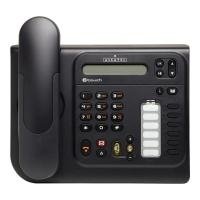
Davanti view of the Alcatel-Lucent 4018 Extended Edition IPTouch VoIP Phone, showing the display, keypad, and function buttons.
Componenti chiave:
- Schermo di visualizzazione: Shows call information, menus, and status.
- Contextual Keys: Buttons below the display that change function based on the current menu.
- Tasti di navigazione: For scrolling through menus and options.
- Tastiera: Tastierino numerico standard per la composizione.
- Tasti funzione: Dedicated buttons for features like voicemail, hold, transfer, and speakerphone.
- portatile: Per conversazioni private.
- Vivavoce: Per comunicazioni a mani libere.
Impostare
1. Collegamento del telefono
- Connect the handset cord to the handset and the designated port on the phone base.
- Collegare un'estremità del cavo Ethernet alla porta LAN sul retro del telefono e l'altra estremità allo switch o al router di rete.
- If Power over Ethernet (PoE) is not available, connect the power adapter to the phone's power port and then to an electrical outlet.
2. Configurazione iniziale
Upon first power-up, the phone will attempt to connect to your network and register with your VoIP server. This process may require network credentials or specific server settings, which are typically provided by your IT administrator.
- Per la configurazione iniziale, seguire le istruzioni visualizzate sullo schermo.
- Contact your system administrator for specific IP address, subnet mask, gateway, and DNS server settings if manual configuration is required.
Istruzioni per l'uso
Effettuare una chiamata:
- Sollevare il ricevitore o premere il tasto Oratore pulsante.
- Comporre il numero di telefono desiderato utilizzando la tastiera.
- Premere il tasto Comporre contextual key or wait for the call to connect automatically.
Risposta a una chiamata:
- Quando il telefono squilla, sollevare la cornetta o premere il tasto Oratore pulsante.
- In alternativa, premere il tasto Risposta contextual key.
Terminare una chiamata:
- Riagganciare il ricevitore o premere il tasto Termina chiamata contextual key or Oratore pulsante.
Segreteria telefonica:
- Premere il tasto dedicato Segreteria telefonica button (often indicated by an envelope icon).
- Follow the audio prompts to access and manage your messages.
Hold and Transfer:
- Durante una chiamata attiva, premere il tasto Presa pulsante per mettere in attesa la chiamata.
- To transfer a call, press the Trasferire pulsante, comporre il nuovo numero, quindi premere Trasferire again or hang up (consult your system's specific transfer method).
Manutenzione
- Pulizia: Use a soft, dry cloth to clean the phone's surface. Do not use liquid cleaners or aerosols directly on the phone.
- Magazzinaggio: If storing the phone for an extended period, disconnect it from power and network, and store it in a cool, dry place.
- Aggiornamenti software: Firmware updates are typically managed by your IT department. Do not attempt to update the firmware without guidance from your administrator.
Risoluzione dei problemi
| Problema | Possibile causa | Soluzione |
|---|---|---|
| Il telefono non si accende. | Nessuna connessione di alimentazione o adattatore di alimentazione difettoso. | Check power cable connection. Ensure power adapter is functional. If using PoE, verify network cable and switch. |
| Impossibile effettuare o ricevere chiamate. | Problema di connettività di rete o errore di registrazione VoIP. | Check Ethernet cable connection. Restart the phone. Contact your IT administrator to verify VoIP server settings and registration status. |
| Nessun segnale di linea. | Il ricevitore non è collegato correttamente o il telefono non è registrato. | Ensure handset cord is securely connected. Verify phone is registered to the VoIP server (check display for status). |
| Qualità audio scadente. | Network congestion or faulty handset/speaker. | Check network connection. Try restarting the phone. If problem persists, contact support. |
For issues not listed here, please contact your IT support or the product manufacturer.
Specifiche
| Caratteristica | Dettaglio |
|---|---|
| Numero di modello | 3GV27063DB |
| Dispositivi compatibili | Internet, computers, VoIP services |
| Tipo di telefono | filo |
| Materiale | Plastica |
| Fonte di alimentazione | Cavo elettrico |
| Tipo di combinatore | Tastiera singola |
| Tipo di sistema di risposta | Digitale |
| Peso dell'articolo | 4.52 libbre |
| ID chiamante | SÌ |
| Batterie richieste | Non-standard battery requires batteries (Note: This usually implies a backup battery or specific type, not standard AA/AAA) |
Garanzia e supporto
For warranty information, technical support, or service inquiries, please contact your vendor or IT administrator. Alcatel-Lucent provides support through authorized channels.
Spare parts availability: Information unavailable on spare parts.
Aggiornamenti software garantiti fino al: Informazioni non disponibili.