
Codice articolo: 920-007182
Manuale utente della tastiera illuminata per soggiorno Logitech K830
Modello: 920-007182 | Marca: Logitech
Introduzione
The Logitech Illuminated Living-Room Keyboard K830 is designed to enhance your home entertainment experience. This keyboard combines a full keyboard layout with a built-in touchpad, offering seamless wireless control of your connected TV or computer, even in low-light conditions, thanks to its bright backlit keys.

Figure 1: Logitech K830 Illuminated Living-Room Keyboard, top view.
Contenuto della confezione
Assicurarsi che tutti gli articoli siano presenti nel pacco:
- Logitech K830 Illuminated Living-Room Keyboard
- Ricevitore Logitech Unifying
- Cavo di ricarica USB
- USB range extender
- User information (this manual)
Impostare
1. Ricarica della tastiera
Before first use, fully charge the keyboard. Connect the supplied USB recharge cable to the micro-USB port on the keyboard and the other end to a USB power source (e.g., computer USB port, USB wall adapter).
- The battery indicator light will glow green when charging and turn off when fully charged.
- A full charge typically provides several weeks of use.
2. Collegamento della tastiera
The K830 keyboard offers two connection methods: Logitech Unifying receiver or Bluetooth Smart technology.
2.1. Using the Logitech Unifying Receiver (Recommended for PCs)
- Locate the Logitech Unifying receiver in the package.
- Plug the Unifying receiver into an available USB port on your computer or smart TV. For optimal range, use the included USB range extender if the receiver is obstructed or far from the keyboard.
- Turn on the keyboard by sliding the power switch located on the top edge of the keyboard to the ON position.
- The keyboard should automatically connect to the receiver. If not, use the Logitech Unifying Software (downloadable from Logitech's website) to pair the devices.

Figure 2: User operating the K830 keyboard from a comfortable distance.
2.2. Using Bluetooth Smart Technology (For compatible devices)
- Ensure your device (e.g., Android TV, tablet) has Bluetooth Smart (Bluetooth Low Energy) enabled.
- Accendi la tastiera.
- Press and hold the Bluetooth pairing button (usually indicated by a Bluetooth icon) on the keyboard until the indicator light starts blinking rapidly, indicating it's in pairing mode.
- Sul tuo dispositivo, vai alle impostazioni Bluetooth e seleziona "Logitech K830" dall'elenco dei dispositivi disponibili per l'associazione.
- Seguire le istruzioni visualizzate sullo schermo per completare il processo di associazione.
Istruzioni per l'uso
Layout e funzioni della tastiera
The K830 features a compact layout optimized for living room use, including standard alphanumeric keys, function keys, and dedicated media controls.
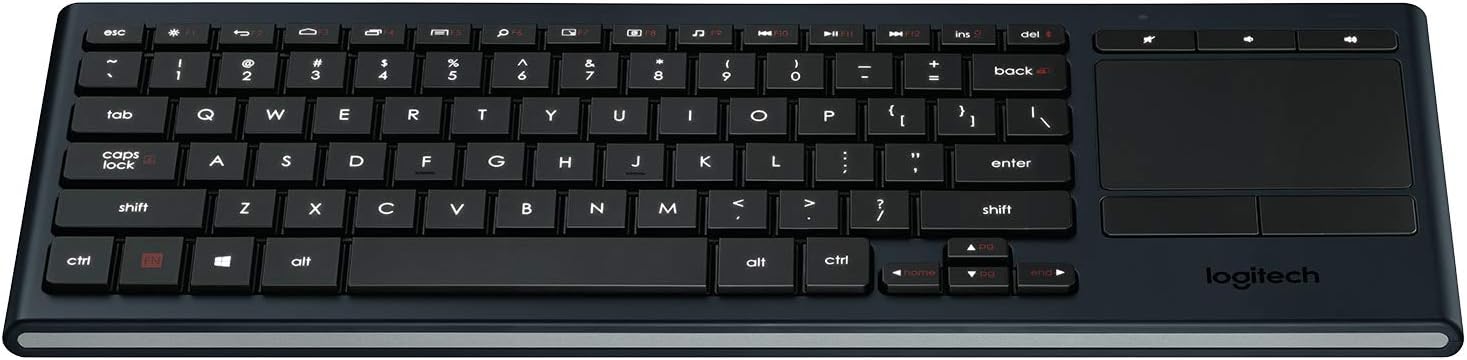
Figura 3: Oltreview of the K830 keyboard layout.
Retroilluminazione
The keyboard features automatic backlighting that adjusts to ambient light conditions. A sensor detects the room's light level and automatically brightens or dims the key backlights for optimal visibility. The backlighting also activates when your hands approach the keyboard and turns off when not in use to conserve battery.
Touchpad integrato
The large, responsive touchpad provides precise cursor control and supports multi-touch gestures. The two physical buttons below the touchpad function as left-click and right-click.
- Tocco con un solo dito: Fare clic con il pulsante sinistro del mouse.
- Tocco con due dita: Fare clic con il pulsante destro del mouse.
- Scorrimento con due dita: Trascina due dita verso l'alto o verso il basso per scorrere verticalmente.
- Zoom con pizzico: Per ingrandire, avvicina o allontana due dita.

Figura 4: lato view highlighting the integrated touchpad and power indicator.
Media Keys and Shortcut Keys
The top row of keys includes dedicated media controls and shortcut keys for quick access to common functions. These keys are optimized for Windows and Android operating systems.
- Controlli del volume: Disattiva audio, Abbassa volume, Alza volume.
- Riproduzione multimediale: Riproduci/Pausa, Traccia precedente, Traccia successiva.
- Scorciatoie Windows/Android: Home, Back, Search, etc. (specific functions may vary by OS).
To use the F1-F12 functions, press the Fn tasto contemporaneamente al tasto F desiderato.
Manutenzione
Pulizia della tastiera
To clean your K830 keyboard:
- Spegnere la tastiera prima di pulirla.
- Utilizzare un panno morbido e privo di lanugine leggermente damplucidato con acqua o una soluzione detergente delicata.
- Evitare l'eccessiva umidità e non spruzzare detergenti direttamente sulla tastiera.
- For the touchpad, use a dry, soft cloth to remove fingerprints and smudges.
Cura della batteria
The K830 uses a built-in rechargeable Lithium Polymer battery. To maximize battery life:
- Charge the keyboard regularly, but avoid leaving it plugged in constantly after it's fully charged.
- Se si conserva la tastiera per un periodo prolungato, caricarla fino a circa il 50% prima di riporla.
- Evitare di esporre la tastiera a temperature estreme.
Risoluzione dei problemi
| Problema | Possibile causa | Soluzione |
|---|---|---|
| La tastiera non risponde | Low battery; Keyboard off; Receiver not plugged in; Out of range; Pairing issue. | Charge the keyboard. Ensure the keyboard is ON. Plug the Unifying receiver into a working USB port. Move closer to the receiver (within 10 meters/33 feet). Re-pair the keyboard using Logitech Unifying Software or Bluetooth pairing process. |
| La retroilluminazione non funziona | Low battery; Ambient light too bright; Sensor obstruction. | Charge the keyboard. The backlighting automatically adjusts; it may not activate in bright environments. Ensure the light sensor (located near the top edge) is not covered. |
| Touchpad erratic or unresponsive | Dirty touchpad surface; Software issue; Interference. | Clean the touchpad surface with a dry, soft cloth. Restart your computer/device. Ensure no other wireless devices are causing interference. |
| I tasti non vengono digitati correttamente | Software issue; Physical obstruction under key. | Restart your computer/device. Gently check for any debris under the affected key. |
Specifiche
| Caratteristica | Dettaglio |
|---|---|
| Numero di modello | 920-007182 |
| Connettività | Logitech Unifying (2.4 GHz RF), Bluetooth Smart (Bluetooth Low Energy) |
| wireless Range | Fino a 10 metri (33 piedi) |
| Tipo di batteria | Polimero di litio ricaricabile |
| Retroilluminazione | Automatic, single color |
| Touchpad integrato | Yes, with multi-touch gesture support |
| Compatibilità del sistema operativo | Windows 7, Windows 8, Windows 10 or later; Android 5.0 or later; Chrome OS |
| Dimensioni (LxWxH) | 15.1 x 5.59 x 1.65 pollici (38.35 x 14.2 x 4.19 cm) |
| Peso | 1.09 libbre (0.49 kg) |
Garanzia e supporto
Per informazioni sulla garanzia, supporto tecnico e risorse aggiuntive, visitare il supporto ufficiale Logitech website or refer to the user guide PDF:
- Supporto Logitech Websito: www.logitech.com/support
- Guida per l'utente (PDF): Scarica PDF
Conservare la prova d'acquisto per eventuali richieste di garanzia.
Ask a question about this manual
Ask about setup, troubleshooting, compatibility, parts, safety, or missing instructions. Manuals+ will review the question and use this page’s manual context to help answer it.