
1. Introduzione
This manual provides comprehensive instructions for the installation, operation, and maintenance of your Speco Technologies HT5941T Intense IR HD TVI Dome Camera. This camera is designed to deliver high-definition surveillance with advanced features such as True WDR, Intense IR, and day/night operation. Please read this manual thoroughly before installation and use to ensure proper functionality and safety.
2. Informazioni sulla sicurezza
- Alimentazione elettrica: Use only the specified 12VDC or 24VAC power supply. Incorrect voltagpotrebbe danneggiare la fotocamera.
- Installazione: Ensure the camera is securely mounted to prevent accidental falls. Professional installation is recommended.
- Ambiente: Do not expose the camera to extreme temperatures, humidity, or corrosive environments beyond its specified operating conditions.
- Pulizia: Scollegare l'alimentazione prima della pulizia. Utilizzare un panno morbido e asciutto. Evitare prodotti chimici aggressivi.
- Manutenzione: Do not attempt to disassemble or service the camera yourself. Refer all servicing to qualified personnel.
3. Contenuto della confezione
Verifica che tutti gli articoli siano presenti nel tuo pacco:
- HT5941T Dome Camera
- Chameleon Cover
- Hardware di montaggio (viti, tasselli)
- Guida rapida (se applicabile)
4. Configurazione e installazione
4.1 Montaggio della telecamera
The HT5941T camera supports 3-axis adjustment for both wall and ceiling mounting. Ensure the mounting surface is strong enough to support the camera's weight.
- Selezionare una posizione di montaggio adatta.
- Use the provided mounting template (if included) or the camera base to mark drilling points.
- Praticare dei fori pilota e, se necessario, inserire i tasselli a muro.
- Fissare la base della telecamera alla superficie di montaggio utilizzando le viti fornite.
- Adjust the camera's angle for optimal viewing.
4.2 Cablaggio e collegamento di alimentazione
The HT5941T is an HD-TVI output only camera, providing full HD resolution over coaxial cable.
- Connect a coaxial cable (RG59 or similar) from the camera's BNC output to your HD-TVI DVR or monitor.
- Connect the power cable to the camera's power input. The camera supports dual voltage operation (12VDC or 24VAC). Ensure the power supply matches the camera's requirements.
- Verificare che tutti i collegamenti siano sicuri prima di collegare l'alimentazione.
4.3 Chameleon Cover Installation
The included Chameleon Cover can be painted to match your décor.
- If desired, paint the Chameleon Cover before installation. Allow it to dry completely.
- Align the cover with the camera body and snap it into place.
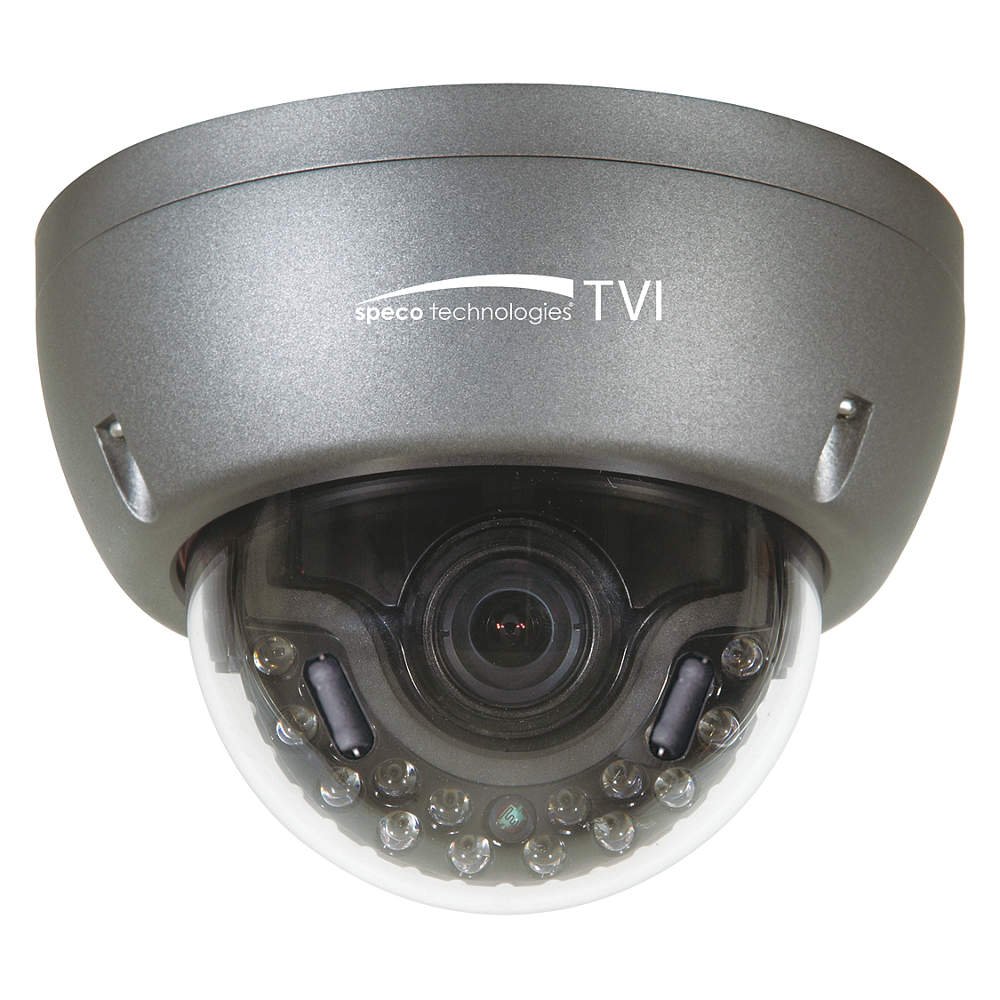
Figure 1: Speco Technologies HT5941T Dome Camera with its dark gray housing and dome design.
5. Istruzioni per l'uso
5.1 Powering On and Initial View
Once the camera is properly wired and powered, it will automatically begin transmitting video. Connect your HD-TVI DVR or monitor to view il feed dal vivo.
5.2 Menu di visualizzazione su schermo (OSD)
The camera features a full OSD menu for configuration, accessible via on-board controls or UTC (Up The Coax) control from a compatible DVR.
- Accesso all'OSD: Use the joystick or buttons on the camera (if present) or the UTC control function on your DVR to bring up the OSD menu.
- Navigazione: Use the directional controls to navigate through menu options. Select options to adjust settings such as exposure, white balance, and image enhancements.
- Caratteristiche principali:
- Vero WDR: Wide Dynamic Range for clear images in high-contrast lighting.
- Intense IR: Adapts IR intensity to the subject, preventing saturation and providing vivid night vision.
- Day/Night Operation: Mechanical IR cut filter automatically switches between color (day) and monochrome (night) modes for optimal image quality.
6. Manutenzione
6.1 Pulizia
Una pulizia regolare aiuta a mantenere una qualità ottimale dell'immagine.
- Gently wipe the camera lens and housing with a soft, lint-free cloth.
- Per sporco ostinato, leggermente dampen the cloth with water or a mild lens cleaning solution. Avoid abrasive cleaners.
- Prima di procedere alla pulizia, assicurarsi che la fotocamera sia spenta.
6.2 Considerazioni ambientali
The HT5941T features heater circuitry and anti-moisture glass to reduce fog or condensation in various weather conditions. No specific user maintenance is required for these features, but ensure the camera's power supply is stable to allow these functions to operate effectively.
7. Risoluzione Dei Problemi
| Problema | Possibile causa | Soluzione |
|---|---|---|
| Nessuna uscita video | No power; Loose cable connection; Incorrect video format (not HD-TVI compatible DVR) | Check power supply and connections; Ensure DVR supports HD-TVI input. |
| Scarsa qualità dell'immagine (sfocata, distorta) | Dirty lens; Improper focus; Cable interference; Insufficient lighting | Clean the lens; Adjust focus via OSD; Use shielded coaxial cable; Verify adequate lighting or IR function. |
| L'IR non funziona di notte | Insufficient power; Day/Night setting incorrect; IR sensor blocked | Check power supply; Verify Day/Night mode in OSD; Ensure nothing obstructs the IR LEDs or sensor. |
| Il menu OSD non viene visualizzato | Incorrect control method; DVR not compatible with UTC | Try on-board controls if available; Consult DVR manual for UTC compatibility and operation. |
8. Specifiche
| Caratteristica | Specificazione |
|---|---|
| Numero di modello | HT5941T |
| Marca | Tecnologie speciali |
| Risoluzione di acquisizione video | 1080p (Full HD) |
| Frequenza dei fotogrammi | 30 fotogrammi al secondo |
| Tecnologia di connettività | HD-TVI (Coaxial) |
| Fonte di alimentazione | 12VDC & 24VAC Dual Voltage |
| Tipo di montaggio | Wall Mount (3-axis adjustment) |
| Fattore di forma | Cupola |
| Tecnologia a bassa luminosità | Day/Night, Intense IR |
| Caratteristiche speciali | True WDR, Heater circuitry, Anti-moisture glass, Chameleon Cover |
| Valutazione internazionale di protezione | Grado di protezione IP67 |
| Dimensioni (L x P x A) | 5.12 x 4.84 x 3.66 pollici |
| Peso dell'articolo | 1.5 libbre |
| Materiale | Vetro (lente) |
9. Garanzia e supporto
For warranty information and technical support, please refer to the official Speco Technologies webo contattare il servizio clienti. Conservare la ricevuta d'acquisto come prova d'acquisto per eventuali reclami in garanzia.
Speco Technologies Official Websito: www.specotech.com