
Introduzione
This manual provides essential information for the installation, operation, and maintenance of your Intel Core i5-6400 processor. The Intel Core i5-6400 is a 6th generation desktop processor designed for reliable performance in various computing tasks.
Configurazione e installazione
Lista di controllo pre-installazione
- Scheda madre compatibile: Ensure your motherboard supports the LGA 1151 socket and is compatible with 6th generation Intel Core processors.
- Memoria (RAM): DDR4 RAM is required for this processor generation.
- Alimentazione elettrica: A stable power supply unit (PSU) with sufficient wattage for your entire system.
- Soluzione di raffreddamento: An appropriate CPU cooler (a fan and heat sink are typically included with boxed processors).
- Pasta termica: If your cooler does not have pre-applied thermal paste, ensure you have a tube available.
Processor Installation Steps
- Preparare la scheda madre: Place your motherboard on a non-conductive surface. Locate the CPU socket, typically covered by a protective plastic cap.
- Aprire il socket: Gently push down and away on the small lever next to the CPU socket to release it. Lift the load plate.
- Allinea il processore: Carefully remove the processor from its packaging. Identify the gold triangle or notch on one corner of the processor and align it with the corresponding mark on the CPU socket. Do not force the processor into the socket.
- Inserire il processore: Gently lower the processor straight down into the socket. It should sit flush without resistance.
- Proteggere il processore: Close the load plate over the processor, then push the lever back down and under the retention tab until it clicks into place.
- Applicare la pasta termica (se necessario): Se il dissipatore della CPU non è dotato di pasta termica pre-applicata, applicane una piccola quantità, grande quanto un pisello, al centro del dissipatore di calore integrato (IHS) del processore.
- Installare il dissipatore della CPU: Place the CPU cooler onto the processor, ensuring proper contact. Follow the cooler's specific instructions for securing it to the motherboard. Connect the CPU fan cable to the designated CPU_FAN header on the motherboard.

Image: Intel Core i5 processor, showing the top view with the Intel logo and Core i5 branding.
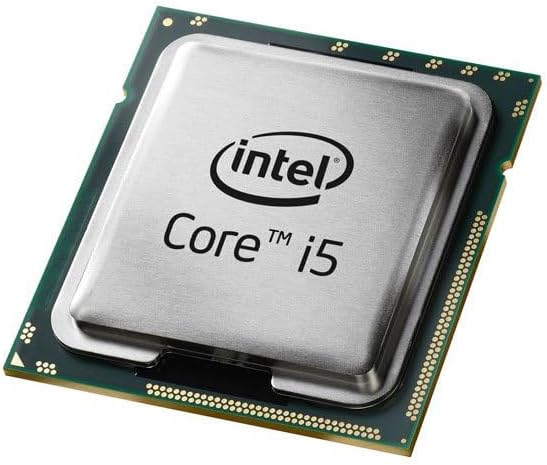
Image: Close-up of an Intel Core i5 processor, highlighting its integrated heat spreader and the underlying substrate.
Istruzioni per l'uso
Once correctly installed and your computer system is assembled, the Intel Core i5-6400 processor operates automatically. Its base clock speed is 2.7 GHz, with Intel Turbo Boost Technology dynamically increasing frequency when needed for demanding tasks. The processor manages its power and performance states based on system load and thermal conditions.
- Accensione del sistema: Ensure all components are connected, then power on your computer.
- Sistema operativo: Install a compatible operating system (e.g., Windows 10, Linux) and necessary drivers for your motherboard and other components.
- Prestazione: The processor will adjust its performance based on the applications running, providing efficient power usage for everyday tasks and increased speed for intensive applications like gaming or content creation.
Manutenzione
Proper maintenance ensures the longevity and optimal performance of your Intel Core i5-6400 processor.
- Rimozione della polvere: Regularly clean dust from your computer case, especially around the CPU cooler's fan and heatsink fins. Dust accumulation can impede airflow and lead to higher operating temperatures.
- Monitoraggio della temperatura: Use system monitoring software to periodically check your CPU temperatures. Ensure they remain within safe operating limits, especially under heavy load.
- Flusso d'aria: Maintain good airflow within your PC case by ensuring cables are neatly managed and case fans are functioning correctly.
- Pasta termica: If you notice consistently high temperatures, consider reapplying thermal paste after several years of use, following proper cleaning procedures.
Risoluzione dei problemi
In caso di problemi, prendere in considerazione i seguenti passaggi di base per la risoluzione dei problemi:
- Nessuna visualizzazione/Il sistema non si avvia:
- Verificare che tutti i cavi di alimentazione (ATX a 24 pin, CPU a 8 pin) siano collegati saldamente alla scheda madre.
- Assicurarsi che la CPU sia correttamente inserita nel suo alloggiamento e che la leva sia bloccata.
- Verificare che i moduli RAM siano inseriti correttamente nei rispettivi slot.
- Confirm your monitor is connected to the correct display output (either motherboard integrated graphics or dedicated graphics card).
- Instabilità/arresti anomali del sistema:
- Monitor CPU temperatures to rule out overheating.
- Assicurati che il sistema operativo e i driver (in particolare i driver del chipset e della scheda grafica) siano aggiornati.
- Eseguire strumenti di diagnostica della memoria per verificare la presenza di problemi alla RAM.
- Surriscaldamento:
- Verificare che il dissipatore della CPU sia installato correttamente e che faccia un buon contatto con il processore.
- Check that the CPU fan is spinning and connected to the correct header.
- Pulisci la polvere dal dissipatore e dalla ventola.
- Verificare l'applicazione della pasta termica.
For more advanced troubleshooting, consult your motherboard's manual or the Intel support websito.
Specifiche
| Caratteristica | Specificazione |
|---|---|
| Modello del processore | Processore Intel Core i5-6400 |
| Numero modello articolo | Numero di telefono: BX80662I56400 |
| Presa CPU | LGA1151 |
| Velocità della CPU | 2.7 GHz (base) |
| Numero di core | 4 |
| Cache del processore | 6 MB di SmartCache |
| Supporto tipo di memoria | Memoria DDR4 |
| Grafica integrata | Grafica Intel HD 530 |
| Peso dell'articolo | 10.4 once |
| Dimensioni del prodotto | 4.6 x 4.2 x 3.3 pollici |
| Componenti inclusi | Fan and Heat Sink (with boxed version) |
Informazioni sulla garanzia
Intel processors typically come with a limited manufacturer's warranty. For specific details regarding the warranty period and terms for your Intel Core i5-6400 processor, please refer to the documentation included with your product or visit the official Intel websito. Per le richieste di garanzia potrebbe essere richiesta la prova d'acquisto.
Supporto e risorse
For further assistance, technical support, driver downloads, and additional product information, please visit the official Intel support websito:
Supporto Intel Websito: www.intel.com/support
Puoi anche trovare forum della comunità e basi di conoscenza su Intel website for peer-to-peer support and solutions to common issues.