
MOOER Groove Loop X2
MOOER Groove Loop X2 Looper and Drum Machine User Manual
Model: Groove Loop X2
1. Introduzione
The MOOER Groove Loop X2 is a versatile guitar effect pedal combining a looper and a drum machine. It allows musicians to record and layer guitar phrases while providing a rhythmic accompaniment. This manual provides detailed instructions for setting up, operating, maintaining, and troubleshooting your Groove Loop X2.
2. Caratteristiche principali
- Integrated Looper and Drum Machine functionalities.
- Dedicated controls for Loop and Drum volume.
- Adjustable drum speed (tempo).
- Multiple drum genres and patterns.
- Save functionality for recorded loops.
- Compact and durable metal casing.
3. Prodotto finitoview
Familiarize yourself with the various components and controls of the Groove Loop X2.

Figura 3.1: Controlli del pannello frontale
This image displays the front panel of the Groove Loop X2 pedal, showing the "LOOP" and "DRUM" volume knobs, "SPEED" and "GENRE" knobs for drum settings, and the "PATTERN" knob. Below these are the "SAVE" button and the two footswitches labeled "REC/PLAY/DUB" and "STOP/TAP". LED indicators are visible on the left side.
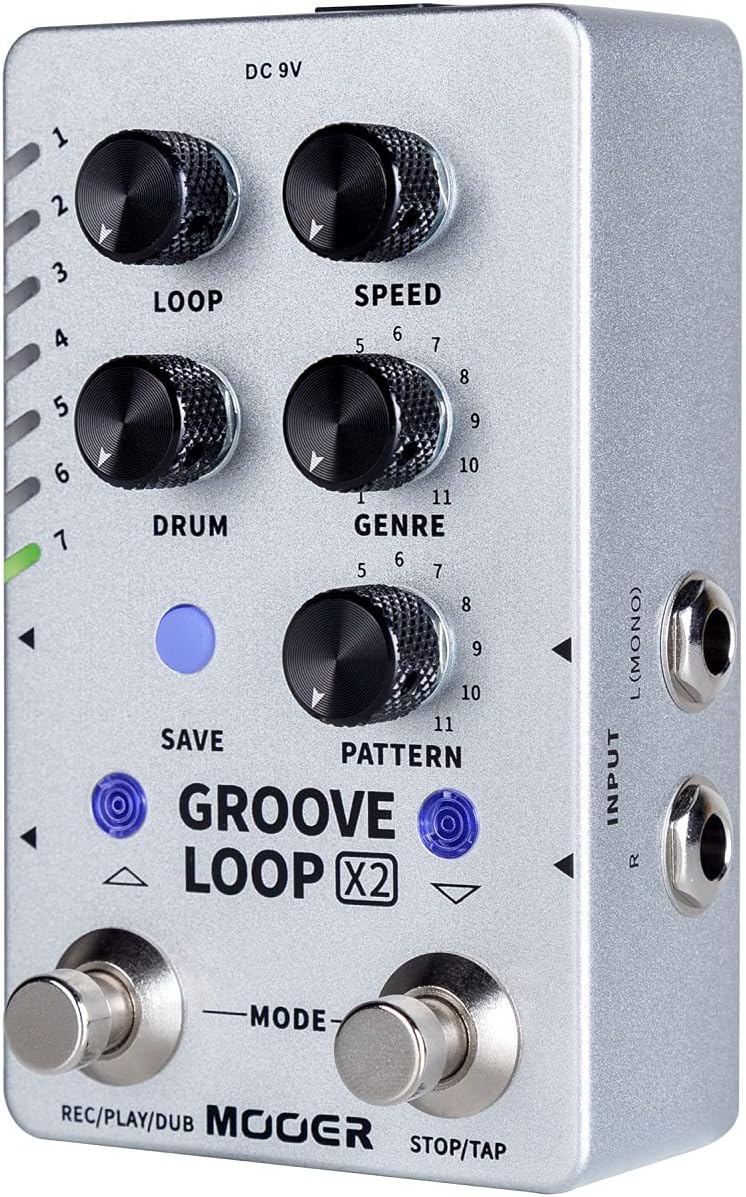
Figure 3.2: Side Panel (Input)
This image shows the right side of the Groove Loop X2 pedal, featuring the "INPUT" jacks labeled "L (MONO)" and "R" for connecting your instrument.

Figure 3.3: Top Panel (Output and Genre List)
This image displays the top panel of the Groove Loop X2 pedal, showing the "OUTPUT" jacks labeled "L (MONO)" and "R", and an "EXT CTRL" jack. A list of drum genres (Pop, Funk, Blues, Rock, Metal, Jazz, Fusion, Punk, Latin, Hip-pop, Disco) is printed on the casing.

Figure 3.4: Rear Panel (Power and USB)
This image shows the rear panel of the Groove Loop X2 pedal, featuring the "USB" port (Type-C) and the "DC 9V 300mA" power input jack.
4. Impostazione
4.1 Collegamento di alimentazione
Connect a standard 9V DC power adapter (center negative, 300mA minimum) to the "DC 9V" input jack on the rear of the pedal. Ensure the power supply meets the specified requirements to prevent damage.
4.2 Collegamenti audio
- Ingresso: Connect your instrument (e.g., guitar) to the "INPUT L (MONO)" jack on the right side of the pedal using a standard 1/4-inch instrument cable. If using a stereo setup, connect the right channel to the "INPUT R" jack.
- Produzione: Connect the "OUTPUT L (MONO)" jack on the top of the pedal to your amplifier or audio interface using a standard 1/4-inch instrument cable. For stereo output, connect both "OUTPUT L (MONO)" and "OUTPUT R" to your stereo amplificatore o miscelatore.
4.3 Connessione USB (opzionale)
The USB-C port on the rear of the pedal can be used for firmware updates or managing saved loops via a computer. Connect a USB-C cable from the pedal to your computer.
5. Istruzioni per l'uso
5.1 Basic Looper Operation
- Documentazione: Press the "REC/PLAY/DUB" footswitch once to start recording your loop. The LED indicator will change color to indicate recording mode.
- Giocare: Press the "REC/PLAY/DUB" footswitch again to stop recording and immediately start playback of your loop.
- Sovraincisione: While the loop is playing, press the "REC/PLAY/DUB" footswitch once to enter overdub mode. You can now record additional layers over your existing loop. Press again to stop overdubbing and continue playback.
- Stop: Press the "STOP/TAP" footswitch once to stop loop playback.
- Annulla/Ripristina: While playing, press and hold the "REC/PLAY/DUB" footswitch for 2 seconds to undo the last recorded layer. Hold again to redo.
- Chiaro: While the loop is stopped, press and hold the "STOP/TAP" footswitch for 2 seconds to clear the current loop.
5.2 Funzionamento della drum machine
- Attiva/Disattiva: Press the "STOP/TAP" footswitch twice quickly to activate or deactivate the drum machine.
- Tempo (SPEED): Use the "SPEED" knob to adjust the tempo (BPM) of the drum pattern.
- Genere: Use the "GENRE" knob to select a drum genre. Refer to the list on the top panel (Figure 3.3) for available genres (Pop, Funk, Blues, Rock, Metal, Jazz, Fusion, Punk, Latin, Hip-pop, Disco).
- Modello: Use the "PATTERN" knob to select a specific drum pattern within the chosen genre.
- Volume del tamburo: Use the "DRUM" knob to adjust the volume of the drum machine.
- Loop Volume: Use the "LOOP" knob to adjust the volume of the recorded loop.
5.3 Saving Loops
The Groove Loop X2 allows you to save your recorded loops to internal memory slots.
- After recording a loop, press the "SAVE" button (blue button above "GROOVE LOOP X2" text).
- Use the "REC/PLAY/DUB" and "STOP/TAP" footswitches (or the up/down arrows next to the SAVE button) to navigate through the available save slots (indicated by the LEDs on the left).
- Press the "SAVE" button again to confirm saving to the selected slot.
5.4 Loading Loops
To load a previously saved loop:
- Ensure the looper is stopped.
- Use the up/down arrows (or footswitches in a specific mode, refer to advanced manual if available) to select the desired loop slot.
- Press the "REC/PLAY/DUB" footswitch to load and play the loop.
6. Manutenzione
- Pulizia: Utilizzare un panno morbido e asciutto per pulire la superficie del pedale. Non utilizzare detergenti abrasivi o solventi.
- Magazzinaggio: Conservare il pedale in un ambiente asciutto, lontano da temperature estreme e dalla luce solare diretta.
- Alimentazione elettrica: Always use the correct power supply (9V DC, center negative, 300mA minimum) to prevent damage. Disconnect power when not in use for extended periods.
- Aggiornamenti del firmware: Check the MOOER official website periodically for firmware updates to ensure optimal performance and access to new features. Use the USB-C port for updates.
7. Risoluzione Dei Problemi
| Problema | Possibile causa | Soluzione |
|---|---|---|
| Nessun potere | Incorrect power supply; loose connection | Ensure 9V DC, center negative, 300mA minimum power supply is used and connected securely. |
| Nessuna uscita audio | Incorrect audio connections; volume knobs set to zero; faulty cables | Check input/output cable connections. Ensure LOOP and DRUM volume knobs are not at minimum. Test with different cables. |
| La drum machine non funziona | Drum machine deactivated; volume too low | Double-press "STOP/TAP" footswitch to activate. Increase DRUM volume knob. |
| Loop recording issues | Incorrect timing; memory full | Practice timing for recording. Clear old loops or save to a new slot if memory is full. |
8. Specifiche
| Parametro | Valore |
|---|---|
| Marca | MOOER |
| Modello | Groove Loop X2 |
| Requisiti di potenza | 9V DC, 300mA (center negative) |
| Dimensioni (L x P x A) | 11.5" x 1.1" x 5.8" (circa) |
| Peso dell'articolo | 1 Ounce (approx.) |
| Ingresso | 1/4" Mono/Stereo Jack |
| Produzione | 1/4" Mono/Stereo Jack |
| Porta USB | USB-C for firmware updates/data management |
9. Garanzia e supporto
Per informazioni sulla garanzia e supporto tecnico, fare riferimento al sito ufficiale MOOER webo contattare il distributore locale. Conservare la ricevuta d'acquisto per eventuali reclami in garanzia.
MOOER ufficiale Websito: www.mooeraudio.com
Documenti correlati - Groove Loop X2
 |
Manuale dell'utente della stazione per fraseggio e batteria Mooer GL100 Groove Loop Series Manuale utente completo per la Phrase and Drum Station della serie Mooer GL100 Groove Loop, che descrive in dettaglio caratteristiche, controlli, funzionamento e integrazione software. |
 |
Manuale dell'utente della stazione per fraseggio e batteria Mooer GL100 Groove Loop Series Manuale utente completo per la Phrase and Drum Station della serie Mooer GL100 Groove Loop, che descrive in dettaglio le sue caratteristiche, i controlli, il funzionamento e l'integrazione del software per i musicisti. |
 |
Pedale NUX DUAL LOOP STEREO: Guida utente e specifiche Guida completa al pedale NUX DUAL LOOP STEREO, che ne illustra le caratteristiche, il pannello di controllo, i jack di ingresso/uscita, le opzioni di connessione, le istruzioni d'uso, la funzionalità USB, le specifiche tecniche e il contenuto della confezione. Ideale per chitarristi e cantautori alla ricerca di loop creativi e accompagnamenti ritmici. |
 |
Guida all'aggiornamento del firmware del Donner Circle Looper Istruzioni dettagliate per aggiornare il firmware del pedale per chitarra Donner Circle Looper, garantendo prestazioni ottimali e accesso alle funzionalità più recenti. |
 |
Pedale Looper Stereo Mooer Looper X2 - Manuale dell'utente Questo manuale fornisce istruzioni dettagliate per il pedale Mooer Looper X2 Stereo Looper, che riguardano precauzioni, caratteristiche, layout, collegamenti, funzionamento, utilizzo del software e specifiche. |
 |
NUX JTC Drum & Loop NDL-2: Manuale utente del mini pedale Manuale utente per il mini pedale NUX JTC Drum & Loop NDL-2, che ne descrive in dettaglio le caratteristiche, i controlli e il funzionamento per chitarristi, tra cui un looper a 24 bit e una drum machine con Smart Tap Tempo. |
Ask a question about this manual
Ask about setup, troubleshooting, compatibility, parts, safety, or missing instructions. Manuals+ will review the question and use this page’s manual context to help answer it.