
Solight TE09
Solight TE09 Weather Station User Manual
Modello: TE09
Introduzione
Thank you for choosing the Solight TE09 Weather Station. This manual provides essential information for the proper setup, operation, and maintenance of your device. Please read it thoroughly before use and retain it for future reference.
Informazioni sulla sicurezza
- Non esporre il dispositivo a temperature estreme, alla luce solare diretta o a elevata umidità.
- Evitare di far cadere o sottoporre il dispositivo a forti impatti.
- Non tentare di smontare o modificare il dispositivo. Ciò invaliderà la garanzia.
- Tenere le batterie fuori dalla portata dei bambini. In caso di ingestione, consultare immediatamente un medico.
- Smaltire le batterie usate secondo le normative locali.
- Pulire il dispositivo con un panno morbido e asciutto. Non utilizzare detergenti abrasivi o solventi.
Contenuto della confezione
Si prega di controllare il contenuto della confezione al momento del disimballaggio. Se qualche articolo risulta mancante o danneggiato, contattare il rivenditore.
- Solight TE09 Weather Station Unit
- Manuale dell'utente (questo documento)
Prodotto finitoview
The Solight TE09 Weather Station is designed to provide accurate indoor temperature and humidity readings. Its compact design makes it suitable for various indoor environments.
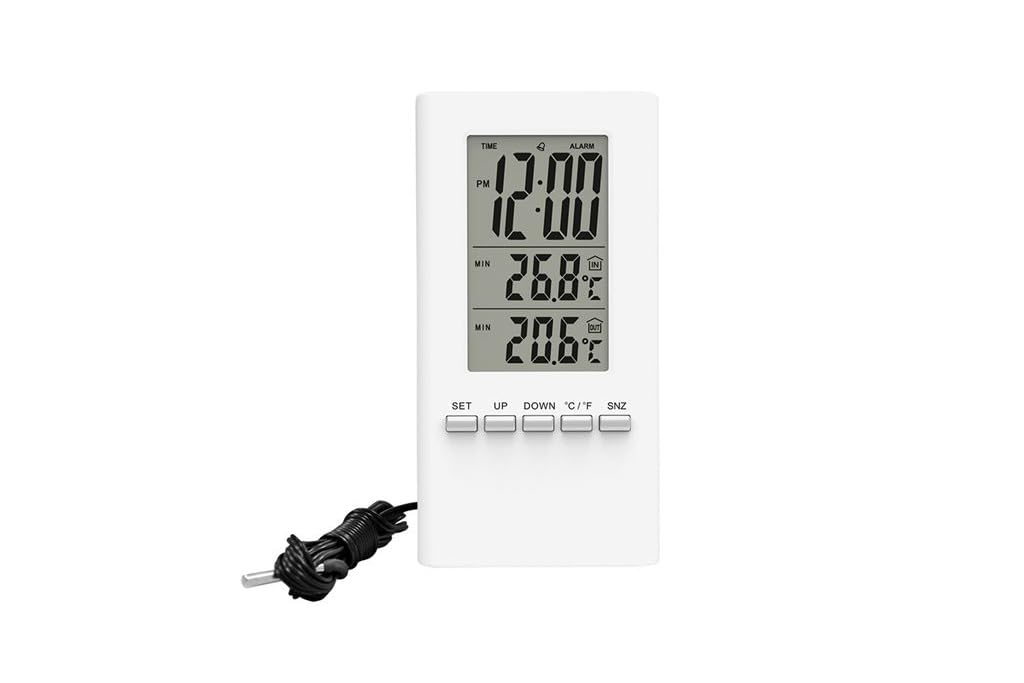
Immagine 1: Davanti view of the Solight TE09 Weather Station, displaying its screen and compact white casing.
Componenti chiave:
- Schermo LCD: Shows temperature, humidity, and other relevant information.
- Pulsanti di controllo: For setting time, units, and other functions.
- Vano batteria: Situato sul retro dell'unità.
Impostare
1. Installazione della batteria
- Locate the battery compartment cover on the back of the Solight TE09 Weather Station.
- Per aprirlo, far scorrere o sganciare il coperchio.
- Insert 1.5V AAA alkaline batteries (not included) according to the polarity indicators (+ and -) inside the compartment.
- Chiudere saldamente il coperchio del vano batterie.
Nota: Ensure batteries are inserted correctly. Incorrect insertion may damage the device.
2. Initial Power-On and Placement
- Once batteries are installed, the device will power on automatically and display initial readings.
- Place the weather station in a suitable indoor location, away from direct sunlight, heat sources, and drafts, which could affect temperature and humidity accuracy.
- Allow the device a few minutes to stabilize and display accurate readings after initial setup.
Istruzioni per l'uso
1. Displaying Temperature and Humidity
The main display continuously shows the current indoor temperature and humidity. No specific action is required to view queste letture.
2. Changing Temperature Units (Celsius/Fahrenheit)
Per passare da Celsius (°C) a Fahrenheit (°F):
- Locate the "°C/°F" button, usually on the back or side of the unit.
- Press the button once to toggle between the two temperature units. The display will update accordingly.
3. Setting Time and Date (if applicable)
Nota: The Solight TE09 is primarily a temperature and humidity monitor. If your model includes time/date functionality, follow these general steps:
- Press and hold the "SET" or "MODE" button for a few seconds until the time display starts flashing.
- Use the "UP" or "DOWN" buttons to adjust the hour, then press "SET" or "MODE" to confirm and move to minutes.
- Repeat for minutes, then for date (year, month, day) if available.
- Press "SET" or "MODE" again to exit the setting mode.
Manutenzione
1. Pulizia del dispositivo
- Wipe the exterior of the weather station with a soft, dry, or slightly damp stoffa.
- Do not use abrasive cleaners, alcohol, or corrosive chemicals, as these can damage the surface and internal components.
- Assicurarsi che nessun liquido penetri nel dispositivo.
2. Sostituzione della batteria
- When the display becomes dim or the device stops functioning, it's time to replace the batteries.
- Follow the "Battery Installation" steps in the Setup section to replace the old batteries with new 1.5V AAA alkaline batteries.
- Dispose of old batteries responsibly according to local environmental regulations.
3. Conservazione
If the device will not be used for an extended period, remove the batteries to prevent leakage and store the unit in a cool, dry place.
Risoluzione dei problemi
| Problema | Possibile causa | Soluzione |
|---|---|---|
| Nessun display o display poco luminoso. | Le batterie sono scariche o inserite in modo errato. | Sostituire le batterie con nuove batterie alcaline AAA da 1.5 V, assicurandosi della corretta polarità. |
| Letture imprecise di temperatura/umidità. | Device placed near heat sources, direct sunlight, or drafts. | Relocate the weather station to a stable indoor environment away from interfering factors. Allow time for readings to stabilize. |
| I pulsanti non rispondono. | Problema software temporaneo o batteria scarica. | Remove and reinsert batteries to reset the device. If the issue persists, replace batteries. |
Specifiche
- Modello: Solight TE09
- Colore: Bianco
- Materiale: Plastica
- Fonte di energia: Battery (AAA alkaline, 1.5V)
- Batterie incluse: NO
- Codice GTIN: 08592718012212
- Produttore: Sole
- Prima data disponibile: 7 ottobre 2018
Garanzia e supporto
For warranty information and technical support, please refer to the documentation provided at the point of purchase or contact your retailer. Keep your purchase receipt as proof of purchase.
Ask a question about this manual
Ask about setup, troubleshooting, compatibility, parts, safety, or missing instructions. Manuals+ will review the question and use this page’s manual context to help answer it.