
Supersonic IQ3710DJBT
Supersonic IQ Sound IQ-3710DJBT Portable DJ Speaker User Manual
Modello: IQ-3710DJBT
Importanti istruzioni di sicurezza
Please read all instructions carefully before operating this device. Keep this manual for future reference.
- Non esporre questo apparecchio a pioggia o umidità.
- Non ostruire le aperture di ventilazione.
- Non installare vicino a fonti di calore come radiatori, bocchette di riscaldamento, stufe o altri apparecchi (inclusi amplificatori) che producono calore.
- Proteggere il cavo di alimentazione dall'essere calpestato o schiacciato, in particolare in corrispondenza di spine, prese di corrente e nel punto in cui escono dall'apparecchio.
- Utilizzare solo accessori/componenti specificati dal produttore.
- Scollegare l'apparecchio durante i temporali o quando non viene utilizzato per lunghi periodi di tempo.
- Affidare tutte le operazioni di manutenzione a personale di assistenza qualificato. L'assistenza è necessaria quando l'apparecchio è stato danneggiato in qualsiasi modo.
Prodotto finitoview
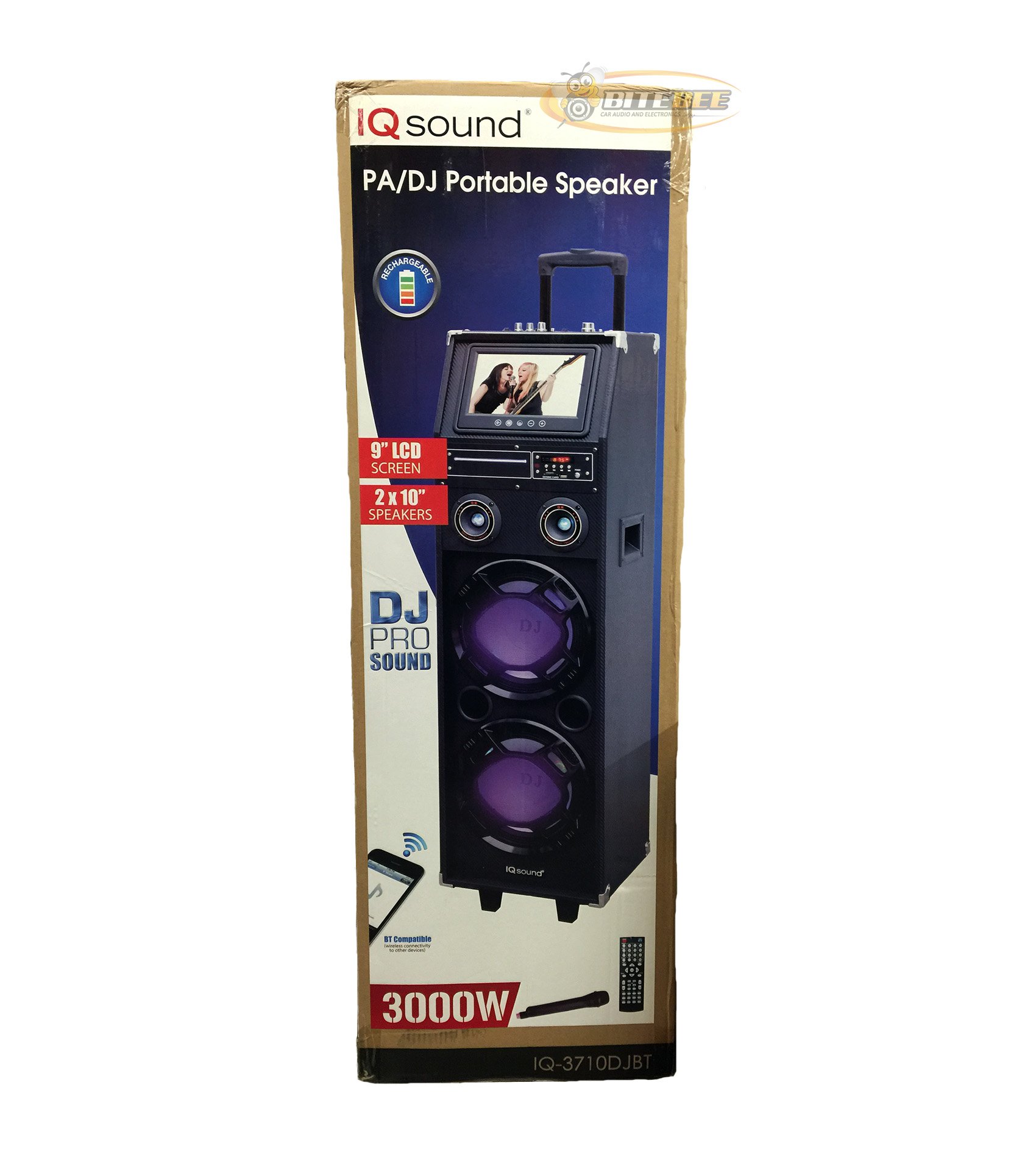
Immagine: Frontale view of the Supersonic IQ Sound IQ-3710DJBT Portable DJ Speaker, showcasing its dual speakers, 9-inch LCD screen, and control panel.
Caratteristiche
- Dual 10-inch Full Range Speakers
- Built-in Bluetooth for wireless audio streaming
- Sintonizzatore radio FM
- 5-Band Equalizer for audio customization
- 9-inch LCD Display for video and menu navigation
- Built-in Rechargeable Battery for portability
- Integrated LED Lights for visual effects
- Multimedia Compatible (supports various video and music formats)
- USB Input for external audio devices
- SD Card Slot for media playback
- 1 Ingresso chitarra
- 1 Microphone Jack (includes 1 microphone)
- Telecomando incluso
- Built-in Handle and Wheels for easy transport
Contenuto della confezione
- IQ-3710DJBT Portable DJ Speaker
- Adattatore di alimentazione
- Microfono
- Telecomando
- Manuale dell'utente (questo documento)
Controls and Connections (General)
The main control panel is located on the top or rear of the speaker, featuring buttons for power, mode selection, playback controls (play/pause, skip), volume adjustment, EQ settings, and light controls. Input ports for USB, SD card, microphone, and guitar are also present. The 9-inch LCD display provides visual feedback for media playback, FM radio tuning, and menu navigation.
Impostare
1. Carica della batteria
- Connect the included power adapter to the speaker's DC input port.
- Plug the power adapter into a standard wall outlet (AC 100-240V, 50/60Hz).
- The charging indicator light (if present) will illuminate. Allow approximately 6-8 hours for a full charge before first use.
- L'altoparlante può essere utilizzato durante la ricarica.
2. Accensione iniziale
- Assicurarsi che l'altoparlante sia completamente carico o collegato a una fonte di alimentazione.
- Locate the Power button (usually on the control panel) and press it to turn on the speaker.
- The LCD display will illuminate, and the speaker will enter the default mode.
3. Collegamento di periferiche
Microfono: Insert the included microphone's cable into the Microphone Jack.
Chitarra: Insert your guitar's cable into the Guitar Input.
Istruzioni per l'uso
Selezione della modalità
Premere il tasto MODALITÀ button on the control panel or remote control to switch between available modes: Bluetooth, FM Radio, USB, SD, and AUX (if applicable). The current mode will be displayed on the LCD screen.
Funzionamento Bluetooth
- Turn on the speaker and switch to Modalità Bluetooth using the MODE button. The LCD will display "Bluetooth" or a similar indicator.
- Sul tuo dispositivo abilitato Bluetooth (ad esempio, smartphone, tablet), attiva il Bluetooth e cerca i dispositivi disponibili.
- Seleziona "IQ-3710DJBT" dall'elenco dei dispositivi.
- Once paired, the speaker will emit a confirmation sound, and you can now play audio wirelessly from your device.
- Use your device or the speaker's controls for playback (play/pause, skip tracks, volume).
Funzionamento della radio FM
- Passa a Modalità radio FM utilizzando il pulsante MODE.
- Premere il tasto RIPRODUCI/PAUSA button (or a dedicated scan button) to automatically scan and save available FM stations.
- Utilizzare il PRECEDENTE SUCCESSIVO pulsanti per navigare tra le stazioni salvate.
- Adjust the volume using the main volume knob or remote control.
Riproduzione USB/scheda SD
- Inserisci un'unità flash USB nel Porta USB o una scheda SD nel Slot per scheda SD.
- The speaker should automatically switch to USB or SD mode and begin playing media. If not, press the MODALITÀ pulsante per selezionare l'input corretto.
- Use the playback controls (play/pause, previous/next) on the speaker or remote to manage your media.
- The 9-inch LCD display will show file information and video playback (if applicable).
Regolazione dell'equalizzatore (EQ).
The 5-band EQ allows you to fine-tune the audio output. Locate the EQ controls on the speaker's panel. Adjust the sliders or knobs for different frequency bands (e.g., bass, mid-range, treble) to achieve your desired sound profile.
Microphone and Guitar Use
Once connected, adjust the individual volume controls for the microphone and guitar (if available) on the speaker's control panel. The main volume knob controls the overall output.
Controllo delle luci a LED
Premere il tasto LUCI button (or similar) on the control panel or remote to cycle through different light modes or to turn the lights on/off.
Schermo LCD
The 9-inch LCD display shows current mode, track information, FM frequency, and can play video files from USB or SD card. Navigate menus using the dedicated navigation buttons or remote control.
Manutenzione
- Pulizia: Use a soft, dry cloth to clean the exterior of the speaker. Do not use abrasive cleaners or solvents. For the LCD screen, use a screen-specific cleaning solution and a microfiber cloth.
- Cura della batteria: To prolong battery life, fully charge the speaker before first use and recharge it regularly, even if not in frequent use. Avoid completely draining the battery. Store in a cool, dry place.
- Magazzinaggio: When not in use for extended periods, store the speaker in a cool, dry environment, away from direct sunlight and extreme temperatures.
- Trasporto: Utilize the built-in handle and wheels for easy and safe transport of the speaker.
Risoluzione dei problemi
| Problema | Possibile causa | Soluzione |
|---|---|---|
| L'altoparlante non si accende. | Battery is drained or power adapter is not connected. | Connect the power adapter and charge the speaker. Ensure the power outlet is functional. |
| Nessuna uscita audio. | Volume is too low, incorrect mode selected, or device not properly connected. | Increase volume. Verify correct mode (Bluetooth, USB, FM). Reconnect Bluetooth device or reinsert USB/SD card. Check microphone/guitar connections. |
| L'associazione Bluetooth non riesce. | Speaker not in Bluetooth mode, device too far, or interference. | Ensure speaker is in Bluetooth mode. Move device closer to speaker. Turn off and on Bluetooth on your device. Try pairing again. |
| La ricezione della radio FM è scarsa. | Segnale debole o interferenza. | Spostare l'altoparlante in un'area con una ricezione migliore. Eseguire nuovamente la scansione automatica. |
| USB/SD media not playing. | Non supportato file format, corrupted media, or improper insertion. | Ensure media is inserted correctly. Check file formats (refer to specifications for supported types). Try a different USB drive or SD card. |
Specifiche
- Modello: IQ-3710DJBT
- Marca: Supersonico
- Tipo di altoparlante: Altoparlante portatile per DJ
- Relatori: 2 x 10-inch Full Range
- Display: LCD da 9 pollici
- Connettività: Bluetooth, USB
- Ingressi: USB, SD Card, Microphone (1), Guitar (1)
- Radio: sintonizzatore FM
- Equalizzatore: Equalizzatore a 5 bande
- Fonte di energia: Built-in Rechargeable Battery, AC Power Adapter
- Dimensioni (L x P x A): 15 x 14 x 45 pollici (circa)
- Peso: 54 libbre (circa)
- Accessori inclusi: Microphone, Remote Control, Power Adapter
Garanzia e supporto
This product comes with a standard manufacturer's warranty. For specific warranty terms and conditions, please refer to the warranty card included in your package or visit the official Supersonic websito.
For technical support, service inquiries, or to purchase replacement parts, please contact Supersonic customer service. Contact information can typically be found on the product packaging or the official brand websito.
Supporto online: www.supersonicinc.com (Questo è un link segnaposto, verifica il supporto effettivo URL.)
Ask a question about this manual
Ask about setup, troubleshooting, compatibility, parts, safety, or missing instructions. Manuals+ will review the question and use this page’s manual context to help answer it.