
1. Introduzione
Grazie per l'acquistoasing the Marvo G904 6D Optical Wired Gaming Mouse. This manual provides essential information for the proper setup, operation, and maintenance of your new gaming mouse. Please read this manual thoroughly before use to ensure optimal performance and longevity of the product.
2. Prodotto finitoview
The Marvo G904 is a high-performance 6D optical wired gaming mouse designed for precision and comfort. It features an AVago3050 sensor, adjustable DPI settings, and programmable buttons to enhance your gaming experience.

Figure 1: Marvo G904 Gaming Mouse with blue LED lighting, showcasing its ergonomic design and illuminated accents.

Figure 2: Marvo G904 Gaming Mouse displaying green LED lighting, indicating different lighting modes or DPI settings.
3. Impostazione
Follow these steps to set up your Marvo G904 gaming mouse:
- Disimballare il mouse: Carefully remove the mouse and any accessories from its packaging.
- Connessione al computer: Plug the USB connector of the mouse into an available USB port on your computer. The mouse is plug-and-play for basic functionality.
- Install Driver (Optional for Advanced Features): For full functionality, including macro programming and advanced DPI settings, insert the provided CD driver into your computer's optical drive and follow the on-screen instructions to install the software. If your computer does not have an optical drive, please visit the official Marvo websito per il download dei driver.

Figure 3: Marvo G904 Gaming Mouse packaging, which includes the driver CD.
4. Istruzioni per l'uso
The Marvo G904 mouse features 6 buttons and adjustable DPI settings for versatile control.
4.1 Funzioni dei pulsanti
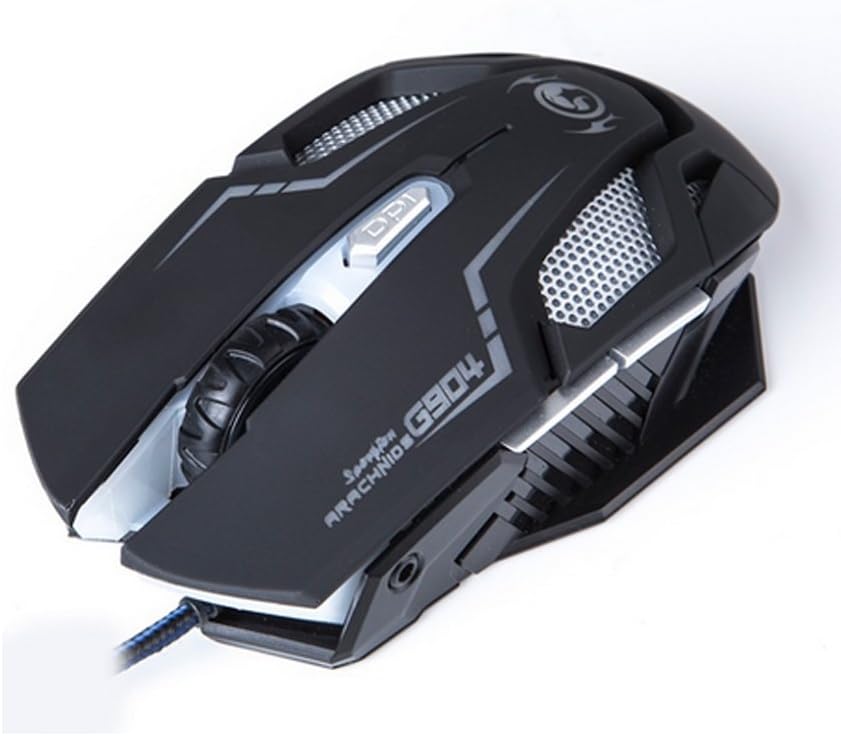
Figura 4: in alto view of the Marvo G904 Gaming Mouse, highlighting the placement of its 6 buttons.
- Pulsante sinistro del mouse: Funzione standard di clic primario.
- Pulsante destro del mouse: Funzione di clic secondario standard.
- Rotella di scorrimento: Scrolls up/down. Can also be pressed for a middle click function.
- DPI Shift Button: Cycles through DPI settings (1000, 2000, 3000, 4000).
- Pulsanti laterali (2): In genere funzionano come "Avanti" e "Indietro" in web browser e file explorers. These can be programmed using the driver software.
4.2 Regolazione DPI
Premere il tasto DPI Shift Button (located behind the scroll wheel) to cycle through the available DPI settings: 1000, 2000, 3000, and 4000 DPI. Each DPI level may be indicated by a change in the mouse's LED lighting color or pattern, depending on the current light mode.
4.3 Macro Programming (with Light Mode)
Utilize the included CD driver software to customize button functions and create macros. The software also allows you to configure the mouse's LED lighting modes. Refer to the software's help section for detailed instructions on macro creation and light mode customization.
5. Manutenzione
Una corretta manutenzione garantisce la longevità e le prestazioni ottimali del tuo mouse da gioco.
- Pulizia: Utilizzare un panno morbido e asciutto per pulire la superficie del mouse. Per lo sporco ostinato, leggermente dampPulire il panno con acqua o una soluzione detergente delicata. Evitare l'uso di prodotti chimici aggressivi o materiali abrasivi.
- Cura del sensore: Mantenere pulito e privo di polvere o detriti il sensore ottico sul fondo del mouse. Se necessario, utilizzare un cotton fioc o aria compressa.
- Gestione dei cavi: Per evitare danni, evitare di piegare bruscamente o tirare eccessivamente il cavo USB.
- Magazzinaggio: Quando non lo si utilizza, conservare il mouse in un ambiente pulito e asciutto, lontano da temperature estreme.
6. Risoluzione Dei Problemi
If you encounter issues with your Marvo G904 mouse, refer to the following common problems and solutions:
| Problema | Soluzione |
|---|---|
| Il mouse non risponde. |
|
| Le impostazioni DPI non cambiano. |
|
| I pulsanti non funzionano correttamente. |
|
| Mouse cursor movement is erratic or jumpy. |
|
7. Specifiche
Detailed technical specifications for the Marvo G904 Gaming Mouse:

Figura 5: In basso view of the Marvo G904 Gaming Mouse, displaying model number, DPI range, and certification marks.
| Caratteristica | Dettaglio |
|---|---|
| Modello | G904 |
| Tipo di sensore | Optical (AVago3050) |
| Impostazioni DPI | 1000 / 2000 / 3000 / 4000 DPI |
| Pulsanti | 6D (6 Buttons) |
| Tasso di segnalazione | Frequenza 1000 Hz |
| Durabilità chiave | 10 milioni di clic |
| Lunghezza del cavo | 1.5 metri |
| Dimensioni (L*W*H) | Dimensioni: 143 * 76 * 42 millimetri |
| Volume nominaletage | 5V |
| Corrente nominale | 10mA |
| Compatibilità | PC |
| Colore | Nero |
8. Garanzia e supporto
For warranty information and technical support, please refer to the documentation provided with your purchase or contact your retailer. You may also visit the official MARVO website for further assistance and updated driver software.