
Introduzione
This manual provides detailed instructions for the installation, operation, and maintenance of your Zenec Z-E3726 2-DIN Car Radio Navigation System. The Z-E3726 is specifically designed for FIAT Ducato, Citroën Jumper, and Peugeot Boxer vehicles, offering advanced multimedia and navigation functionalities. Please read this manual thoroughly before using the device to ensure proper operation and to maximize your user experience.
Configurazione e installazione
The Zenec Z-E3726 is engineered for optimal integration into FIAT Ducato, Citroën Jumper, and Peugeot Boxer dashboards. Professional installation is recommended.
Integrazione del veicolo
- The unit's design and amber key illumination are specifically matched to these vehicle models.
- An optionally available Stalk interface allows connection to an existing multifunction steering wheel, supporting audio and phone functions.
Posteriore View Connessione della fotocamera
The Z-E3726 supports easy connection of a rear-view telecamera.
- Connect the camera to the designated input on the device.
- The camera activates automatically when reverse gear is engaged.
- Optional guidelines can be displayed on the screen for improved distance estimation, regardless of the camera model.
- The E>GO is compatible with cameras featuring integrated microphones.
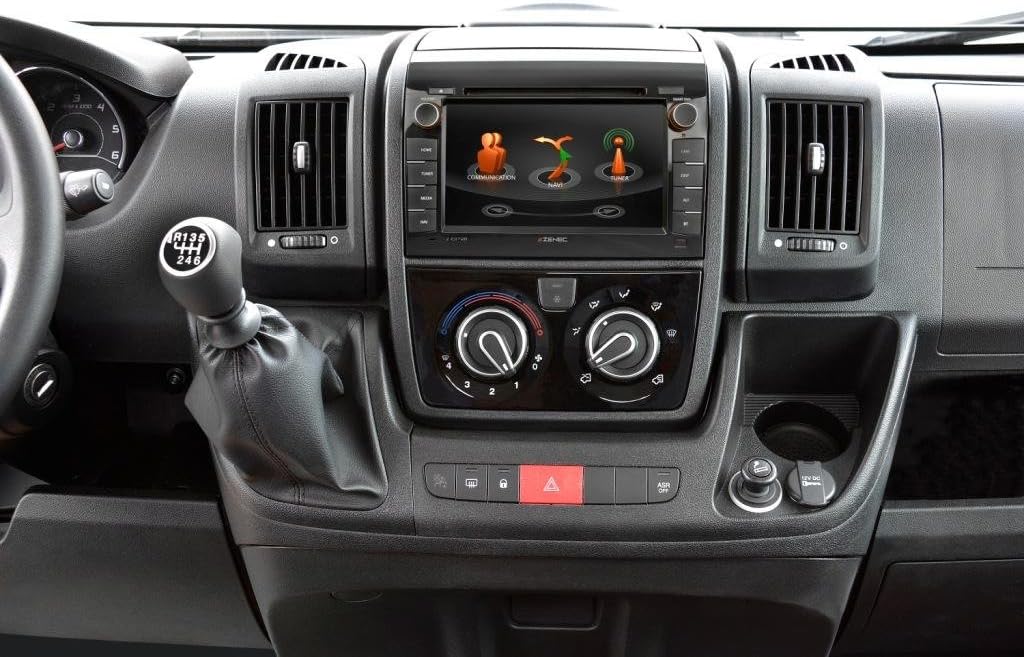
Image: The Zenec Z-E3726 unit seamlessly integrated into the dashboard of a compatible vehicle, showcasing its 7-inch display and physical control buttons.

Immagine: Un dettaglio view of the Zenec Z-E3726 within the vehicle's interior, demonstrating its fit and the interactive display showing communication and navigation options.
Istruzioni per l'uso
The Z-E3726 features a high-resolution 7-inch (17.8 cm) touchscreen for intuitive control. The menu is available in 28 languages.
Sistema di navigazione
- The system uses the Zenec Primo NextGen navigation engine with an EU map package covering 47 countries.
- Includes over 6 million Premium Points of Interest (P.O.I.).
- Features detailed 3D maps, TMC (Traffic Message Channel), auto-zoom, and lane assist.
- CampingSchaf P.O.I. Database: A pre-installed, comprehensive database (in German) provides detailed information on approximately 20,000 camping and parking sites across Europe.
- Route planning can be optimized by selecting a vehicle profile and entering vehicle-specific data.
- Map updates are available for free for one year after initial use via the Naviextras portal.

Image: The Zenec Z-E3726 screen displaying a detailed navigation map, including route information and options for alternative routes.
Funzionalità multimediali
- Sintonizzatore DAB+: Enjoy a wide variety of digital radio programs with crystal-clear reception through the multituner system.
- Unità CD/DVD: Integrated drive supports various audio and video formats.
- Porta USB: A rear USB port (with 80 cm cable extension) supports modern audio and video formats.
- Ottimizzazione audio: Features a 4 x 50 watt amplifier with a DSP suite, including runtime correction and an equalizer with presets.
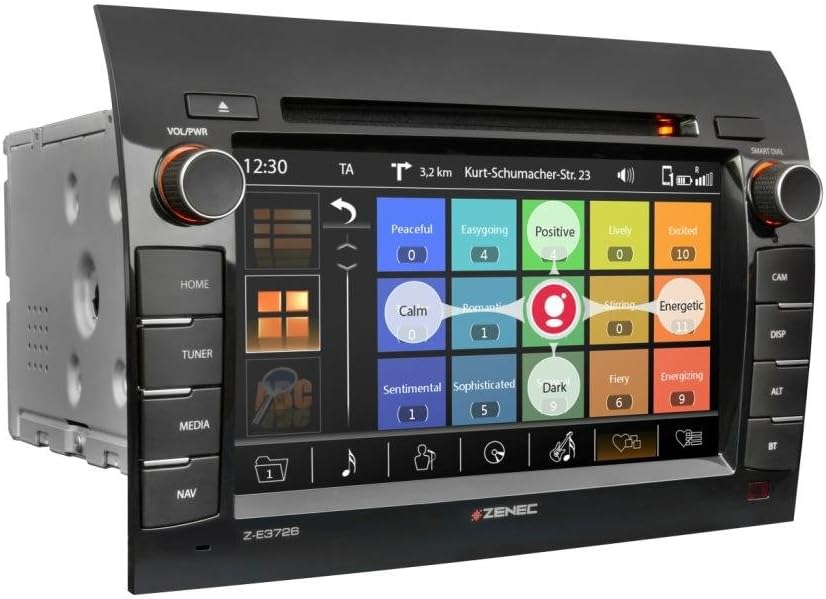
Image: The Zenec Z-E3726 interface displaying multimedia options, possibly for music selection based on mood or genre.
Connettività Bluetooth
- A powerful, database-supported Parrot Bluetooth unit enables hands-free calling.
- Supports comfortable music streaming while driving.

Image: The Zenec Z-E3726 screen showing an incoming call interface, demonstrating its Bluetooth phone functionality.
Posteriore View Funzionamento della fotocamera
- In addition to automatic activation, the Z-E3726 features a dedicated CAMMA button on the front panel for direct selection.
- This allows manual activation of the rear-view camera system whenever needed, aiding in maneuvering and parking.
Manutenzione
- Pulizia dello schermo: Utilizzare un panno morbido e privo di lanugine per pulire delicatamente il touchscreen. Per i segni ostinati, strofinare leggermenteampPulisci il panno con acqua o un detergente per schermi. Evita materiali abrasivi o sostanze chimiche aggressive.
- Aggiornamenti software: Regularly check the official Zenec website or the Naviextras portal for available software and map updates to ensure optimal performance and access to the latest features.
- Cura generale: Mantenere l'unità libera da polvere e detriti. Assicurare un'adeguata ventilazione attorno all'unità per evitare il surriscaldamento.
Risoluzione dei problemi
If you encounter issues with your Z-E3726, refer to the following common problems and solutions:
| Problema | Possibile causa | Soluzione |
|---|---|---|
| Nessuna alimentazione / L'unità non si accende. | Cablaggio errato, fusibile bruciato, problema alla batteria del veicolo. | Controllare i collegamenti elettrici e i fusibili. Assicurarsi che la batteria del veicolo sia carica. Consultare un installatore professionista. |
| Nessun suono. | Volume troppo basso, modalità muto attivata, sorgente audio errata, problema di cablaggio degli altoparlanti. | Aumenta il volume. Controlla se la modalità muto è attiva. Seleziona la sorgente audio corretta. Verifica i collegamenti degli altoparlanti. |
| Navigazione non funzionante o imprecisa. | GPS signal loss, outdated maps, incorrect settings. | Garantire chiaro view of the sky for GPS signal. Update maps via Naviextras. Check navigation settings. |
| Problemi di connessione Bluetooth. | Device not paired, Bluetooth off on phone, interference. | Assicurati che il Bluetooth sia abilitato su entrambi i dispositivi. Riassocia il dispositivo. Avvicinati all'unità. |
| Il touchscreen non risponde o è lento. | Temporary software glitch, dirty screen, system overload. | Restart the unit. Clean the screen. Perform a system reset if necessary (refer to advanced settings). |
If the problem persists after attempting these solutions, please contact Zenec customer support or a qualified service technician.
Specifiche
| Caratteristica | Dettaglio |
|---|---|
| Marca | zenec |
| Nome del modello | Z-E3726 |
| Numero modello articolo | 02027Z-E3726 |
| Dimensioni dello schermo | 7 pollice (17.8 cm) |
| Risoluzione | 1024x600 |
| Tipo di montaggio | Supporto per cruscotto |
| Tipo di servizio del veicolo | Fiat Ducato, Citroën Jumper, Peugeot Boxer |
| Caratteristiche speciali | Bluetooth, Navigation, DAB+ |
| Tecnologia di connettività | Bluetooth, USB |
| Tipo di mappa | Europa (47 paesi) |
| Modalità di uscita audio | Digital, Stereo |
| Dimensioni del pacco | Dimensioni: 31.8 x 28 x 20.6 cm |
| Peso dell'articolo | 3.94 kg |
| Prima data disponibile | 15 gennaio 2020 |
Informazioni sulla garanzia
Zenec products are covered by a manufacturer's warranty. Please refer to the warranty card included with your product or visit the official Zenec websito per termini e condizioni dettagliati. Conservare la prova d'acquisto per eventuali reclami in garanzia.
Map updates are guaranteed for one year free of charge after initial activation via the Naviextras portal.
Assistenza clienti
For technical assistance, troubleshooting, or general inquiries regarding your Zenec Z-E3726, please contact Zenec customer support.
- Supporto online: Visit the official Zenec websito per FAQ, download di software e moduli di contatto.
- Rivenditori autorizzati: For installation support or service, contact your authorized Zenec dealer.