
Introduzione
This manual provides essential instructions for the safe and efficient operation of your PowerWalker AVR 3000 SIV FR Automatic Voltage Regulator. This device is designed to protect your electronic equipment from voltage fluctuations, ensuring a stable power supply. Please read this manual thoroughly before installation and use.
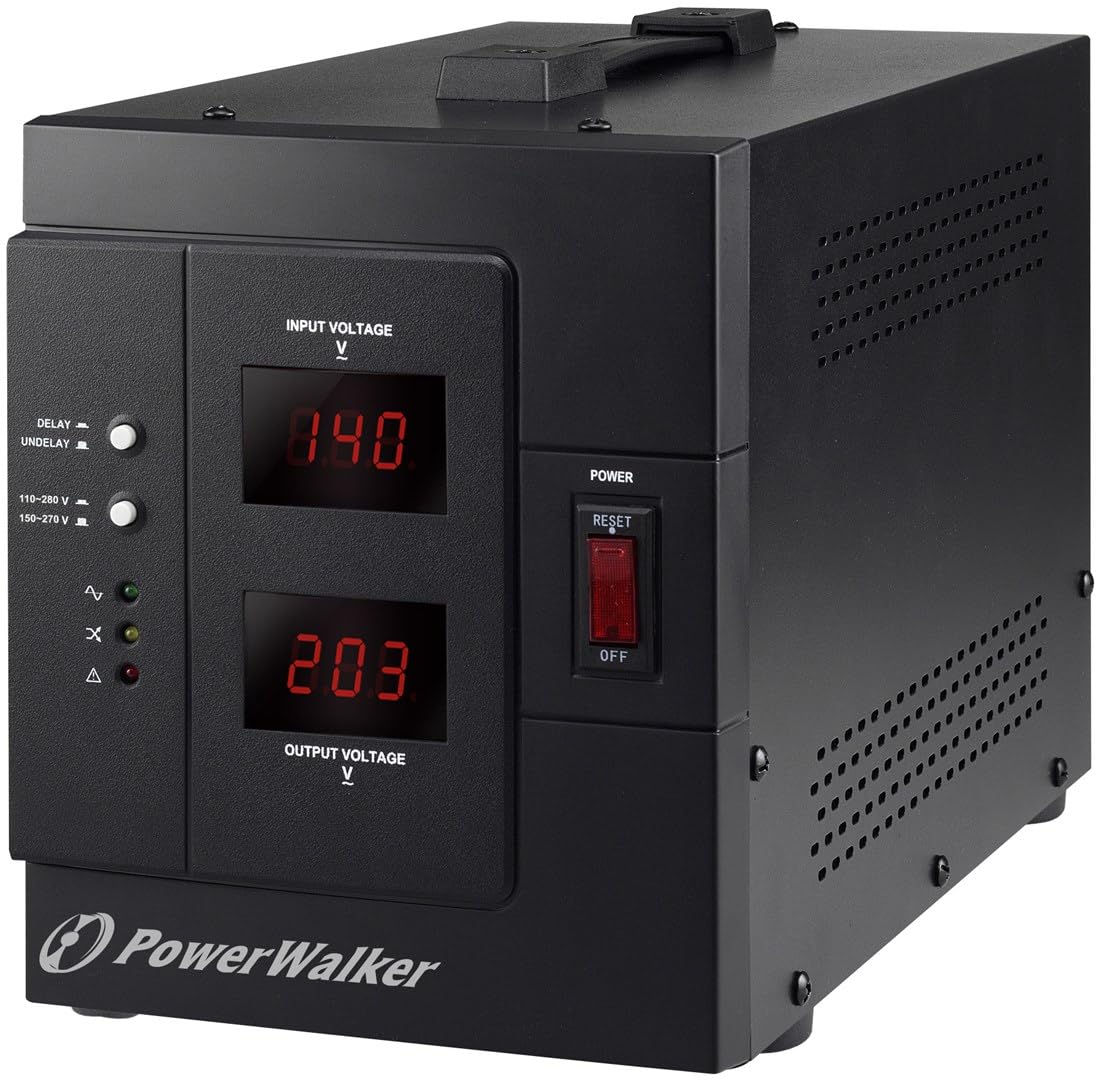
Immagine: Frontale view of the PowerWalker AVR 3000 SIV FR Automatic Voltage Regulator, showing the display and control panel.
Istruzioni di sicurezza
Osservare le seguenti precauzioni di sicurezza per evitare lesioni o danni al dispositivo e alle apparecchiature collegate:
- Solo per uso interno: This device is intended for indoor use in a controlled environment. Do not expose it to rain, moisture, or direct sunlight.
- Messa a terra corretta: Ensure the power outlet used is properly grounded. Do not remove the grounding prong from the power cord.
- Ventilazione: Do not block ventilation openings. Allow adequate space around the device for proper airflow to prevent overheating.
- Evitare il sovraccarico: Do not connect equipment that exceeds the device's maximum output capacity (2400 Watts / 3000 VA).
- Nessuna parte riparabile dall'utente: Non tentare di aprire o riparare il dispositivo. Per qualsiasi intervento di assistenza, rivolgersi a personale qualificato.
- Liquidi e corpi estranei: Keep liquids and foreign objects away from the device.
- Disconnessione d'emergenza: In an emergency, disconnect the device from the main power supply immediately.
Caratteristiche e componenti del prodotto
Pannello frontale

Immagine: dettagliata view of the front panel, highlighting the display, switches, and indicator LEDs.
- Ingresso volumetage Visualizzazione: Shows the current incoming AC voltage.
- Volume di uscitatage Visualizzazione: Shows the regulated AC voltage fornito ai dispositivi collegati.
- Delay/Undelay Switch: Controls the output delay function. "DELAY" provides a time delay before output power is supplied, protecting equipment during power fluctuations. "UNDELAY" bypasses this delay.
- Voltage Range Switch: Selects the operating input voltage range (e.g., 110-280 V or 150-270 V). Ensure this matches your local power supply.
- LED di stato:
- Normale (verde): Indicates stable output voltage.
- Overload (Yellow): Indicates connected load exceeds capacity.
- Guasto (rosso): Indicates an internal error or severe voltage problema.
- Interruttore di alimentazione: Accende o spegne il dispositivo.
- Pulsante di reset: Used to reset the device after an overload or fault condition.
Pannello posteriore

Immagine: Posteriore view of the device, showing the power input and output sockets.
- Presa di ingresso: Connects the device to the main AC power supply using the provided power cord.
- Prese di uscita: Connect your electronic equipment to these sockets for regulated power.
Impostare
- Disimballare e ispezionare: Carefully remove the AVR from its packaging. Inspect for any shipping damage. If damage is found, do not use the device and contact your supplier.
- Posizionamento: Place the AVR on a flat, stable surface in a well-ventilated area, away from direct sunlight, heat sources, and moisture. Ensure at least 10 cm (4 inches) of clear space around all ventilation openings.
- Collegare l'alimentazione in ingresso: Connect the supplied power cord to the AVR's Input Socket on the rear panel, then plug the other end into a properly grounded wall outlet.
- Seleziona il volumetage Gamma: On the front panel, set the Voltage Range Switch to match your local input voltage (e.g., 110-280 V or 150-270 V). Refer to your local power utility for exact specifications.
- Collegare l'attrezzatura: Plug your electronic devices into the Output Sockets on the rear panel of the AVR. Ensure the total power consumption of all connected devices does not exceed 2400 Watts.
- Accensione iniziale: Ensure all connected devices are turned off. Flip the Power Switch on the front panel to the "ON" position. The Input and Output Voltage displays will illuminate.
Istruzioni per l'uso
- Accensione: After connecting the AVR and your devices, turn on the AVR using the Power Switch. The Input Voltagee Vol. uscitatage displays will show the current readings. The "Normal" LED should illuminate.
- Understanding Displays:
- IL Ingresso volumetage Visualizza shows the raw voltage coming from your wall outlet.
- IL Volume di uscitatage Visualizza mostra il volumetage being supplied to your connected devices after regulation by the AVR. This value should remain stable around 230V.
- Delay/Undelay Function:
- Impostare l'interruttore su RITARDO for a time delay (typically 6 seconds) before the output power is supplied. This protects sensitive equipment from rapid power cycling or unstable voltage immediately after a power restoration.
- Impostare l'interruttore su RITARDO if you require immediate power output without a delay.
- Monitoring Status LEDs:
- Green (Normal): The AVR is operating correctly and providing stable output.
- Yellow (Overload): The total power consumption of connected devices exceeds the AVR's capacity. Disconnect some devices and press the Reset button.
- Red (Fault): An internal error or severe voltage condition has occurred. Turn off the AVR, disconnect it from the wall, and contact support if the issue persists after restarting.
- Spegnimento: To turn off the AVR, first turn off all connected devices, then flip the Power Switch to the "OFF" position.
Manutenzione
- Pulizia: Regularly clean the exterior of the AVR with a soft, dry cloth. Do not use liquid or aerosol cleaners. Ensure ventilation openings are free from dust and debris.
- Ventilazione: Periodically check that the ventilation openings are not obstructed to ensure proper heat dissipation.
- Magazzinaggio: If storing the device for an extended period, ensure it is powered off, disconnected from all power sources and devices, and stored in a cool, dry place.
Risoluzione dei problemi
| Problema | Possibile causa | Soluzione |
|---|---|---|
| No power to AVR or connected devices. |
|
|
| Volume di uscitatage è instabile o non corretto. |
|
|
| "Overload" LED is illuminated. |
|
|
| "Fault" LED is illuminated. |
|
|
Specifiche
| Marca | PowerWalker |
| Numero di modello | 10120315 |
| Tipo | AC automatico Voltage Regolatore e Stabilizzatore |
| Capacità | 3000VA |
| Ingresso volumetage Gamma | 110-280 V (selectable) |
| Volume di uscitatage | 230 Volt |
| Potenza di uscita | 2400 Watt |
| Peso | 8.6 chilogrammi |
| Colore | Nero |
Garanzia e supporto
For warranty information, please refer to the documentation included with your purchase or visit the official PowerWalker website. For technical support or service inquiries, please contact your retailer or the PowerWalker customer service department.