
1. Introduzione
This manual provides detailed instructions for the installation, operation, and maintenance of your THINKWARE X500D Dashcam with Rear View Camera. The X500D is designed to provide comprehensive front and rear surveillance of your vehicle, capturing Full HD 1080p video with a Sony Exmor image sensor for the front camera and a Full HD 1080p rear camera.
Key features include advanced driver assistance systems (ADAS) such as lane departure, front collision, red light, and speed camera alerts, as well as a built-in GPS tracker for recording time, speed, and location data. For optimal performance and longevity, please read this manual thoroughly before using the device.
2. Informazioni sulla sicurezza
- Installazione: Assicurarsi che la dash cam sia installata in una posizione che non ostruisca la visuale del conducente view o interferire con i dispositivi di sicurezza del veicolo (ad esempio, gli airbag).
- Fonte di energia: Use only the provided cigarette power cable or an official THINKWARE hardwiring cable for power. Using unauthorized power sources may damage the device and void the warranty.
- Temperatura di esercizio: The device is designed to operate within a specific temperature range. Avoid exposing the dash cam to extreme temperatures (e.g., direct sunlight for extended periods in hot climates) to prevent damage.
- Scheda MicroSD: Use only genuine THINKWARE microSD cards or high-endurance cards from reputable brands. Frequent formatting of the microSD card is recommended to maintain optimal recording performance.
- Pulizia: Clean the lens and screen with a soft, dry cloth. Do not use harsh chemicals or abrasive materials.
- Aggiornamenti del firmware: Controlla e installa regolarmente gli aggiornamenti del firmware per garantire prestazioni ottimali e l'accesso alle nuove funzionalità.
- Disclaimer: This device is pre-loaded with firmware and GPS data specific for use within the US only. Proper device operation cannot be guaranteed outside of the US.
3. Contenuto della confezione
Verifica che tutti gli articoli siano presenti nel tuo pacco:
- Main Dash Cam Unit (THINKWARE X500D)
- Posteriore View Telecamera
- Montare con nastro adesivo 3M extra
- Cavo di alimentazione per accendisigari
- Fermacavi adesivi
- Scheda MicroSD THINKWARE da 32 GB con adattatore per scheda SD
- Quick Start Guide/Warranty Information
- Posteriore View Cavo della fotocamera

Image: The THINKWARE X500D Dashcam main unit, rear camera, 32GB MicroSD card, and SD card adapter, representing the typical package contents.
4. Prodotto finitoview
4.1. Front Dash Cam Unit (X500D)

Immagine: Frontale view of the THINKWARE X500D Dashcam, showing the main lens and the "FHD Recorder" label.

Immagine: Posteriore view of the THINKWARE X500D Dashcam, displaying the LCD screen with live view and control buttons on the left side.
The main unit features a Full HD 1080p camera with a Sony Exmor image sensor, a 2.7-inch LCD touchscreen for live view and settings, and various control buttons. It also includes a built-in GPS module and G-sensor for incident detection.
4.2. Posteriore View Telecamera

Image: The compact THINKWARE rear view camera, designed for discreet installation on the rear window.
La parte posteriore view camera provides Full HD 1080p recording for the rear of your vehicle, connecting to the main dash cam unit via the provided cable.
4.3. Scheda microSD

Image: A THINKWARE branded 32GB MicroSD card alongside its larger SD card adapter.
The included 32GB MicroSD card is specifically designed for THINKWARE Dash Cams, featuring SPOR (Sudden Power Off Recovery) technology to protect recorded data.
5. Configurazione e installazione
5.1. Inserimento della scheda MicroSD
- Assicurarsi che la dash cam sia spenta.
- Locate the microSD card slot on the side of the main unit.
- Insert the 32GB MicroSD card into the slot until it clicks into place. Ensure the card is inserted with the correct orientation.
5.2. Montaggio della Dash Cam anteriore
- Pulisci la zona del parabrezza dove verrà montata la dash cam. Assicurati che sia priva di polvere e grasso.
- Attach the mount to the dash cam unit.
- Remove the protective film from the 3M adhesive tape on the mount.
- Firmly press the mount onto the windshield, ideally behind the rearview specchio, assicurandosi che non ostruisca il tuo view. Hold for at least 30 seconds.
- Adjust the camera angle to ensure the road ahead is clearly visible and centered in the frame.

Image: The THINKWARE X500D Dashcam mounted on a car's windshield, viewed from inside the vehicle, showing the screen and controls.
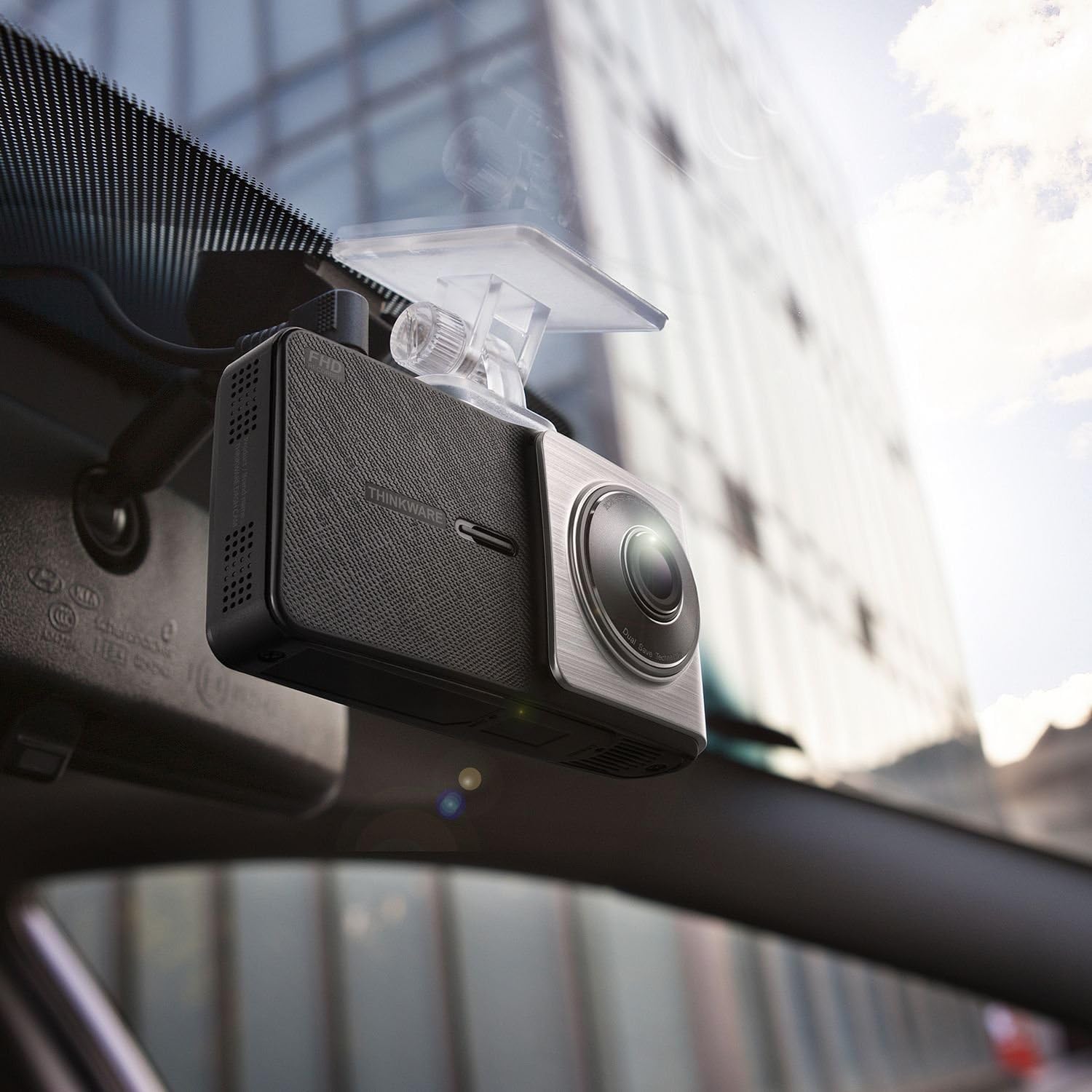
Immagine: Un angolo view of the THINKWARE X500D Dashcam installed on a car's windshield, showing its compact design and how it blends with the interior.
5.3. Mounting the Rear View Telecamera
- Clean the rear windshield area where the rear camera will be mounted.
- Remove the protective film from the adhesive tape on the rear camera mount.
- Firmly press the rear camera onto the rear windshield, ensuring it captures a clear view della strada dietro.
- Connect the rear camera cable to the rear camera and route it neatly along the vehicle's headliner and pillars to the main dash cam unit. Use the provided adhesive cable clips to secure the cable.
- Connect the other end of the rear camera cable to the designated port on the main dash cam unit.
5.4. Collegamento dell'alimentazione
- Connect the cigarette power cable to the power port on the main dash cam unit.
- Plug the other end of the cigarette power cable into your vehicle's 12V power outlet (cigarette lighter socket).
- Upon starting your vehicle, the dash cam will power on automatically and begin recording.
- Opzionale: For Parking Surveillance mode, a separate hardwiring cable (sold separately) is required. Refer to the hardwiring kit's instructions for installation.
6. Istruzioni per l'uso
6.1. Modalità di registrazione
- Registrazione continua: The dash cam automatically records continuously when the vehicle's ignition is on. Videos are saved in 1-minute segments.
- Registrazione dell'incidente: In the event of an impact or sudden braking, the built-in G-sensor triggers incident recording. These files are saved separately and are protected from being overwritten by continuous recording.
- Registrazione manuale: Press the manual recording button on the device to initiate a manual recording of an event.
- Modalità di sorveglianza del parcheggio: If the dash cam is hardwired, it can record events while the vehicle is parked. This mode includes motion detection and impact detection.
6.2. Funzionalità GPS
The built-in GPS module records your vehicle's speed, location, and time data, which can be viewed during video playback using the THINKWARE PC Viewsoftware.
6.3. Sistemi avanzati di assistenza alla guida (ADAS)
The X500D includes ADAS features to enhance driving safety:
- Sistema di avviso di deviazione dalla corsia (LDWS): Ti avvisa se il tuo veicolo esce dalla corsia.
- Sistema di avviso di collisione frontale (FCWS): Alerts you to potential collisions with the vehicle ahead.
- Red Light Camera Alert: Notifies you of upcoming red light cameras.
- Avviso autovelox: Notifies you of upcoming speed cameras.
These features can be configured or toggled on/off via the dash cam's settings menu.
6.4. Using the LCD Screen and Buttons
The 2.7-inch LCD screen allows for live view, video playback, and access to settings. Navigate through menus using the physical buttons located on the side of the device.
- Pulsante Home: Ritorna al menu principale.
- Pulsante di registrazione: Initiates manual recording.
- Pulsante Menu/Impostazioni: Accede alle impostazioni del dispositivo.
- Pulsanti su/giù: Navigare attraverso le opzioni del menu.
- Pulsante OK: Conferma le selezioni.
7. Manutenzione
7.1. Gestione della scheda MicroSD
Regularly format the microSD card (at least once a month) to prevent recording errors and ensure optimal performance. This can be done through the dash cam's settings menu or using the THINKWARE PC Viewsoftware.
Note: Formatting the card will delete all recorded files. Back up important videos before formatting.
7.2. Pulizia del dispositivo
Use a soft, dry, lint-free cloth to clean the dash cam's lens and LCD screen. Do not use liquid cleaners or abrasive materials, as they may damage the device.
7.3. Aggiornamenti del firmware
THINKWARE periodically releases firmware updates to improve performance, add features, or fix bugs. Visit the official THINKWARE website to download the latest firmware for your X500D model. Follow the instructions provided with the firmware update package carefully.
8. Risoluzione Dei Problemi
| Problema | Possibile causa | Soluzione |
|---|---|---|
| La dash cam non si accende. | Nessuna alimentazione; cavo difettoso; problema con la presa di corrente del veicolo. | Check power cable connection. Ensure vehicle's power outlet is working. Try a different power source if available. |
| La registrazione si interrompe o si blocca. | Errore scheda MicroSD; scheda piena; scheda incompatibile. | Format the microSD card. Replace the microSD card if the issue persists. Ensure you are using a high-endurance card. |
| La qualità video è scarsa. | Lente sporca; pellicola protettiva ancora sulla lente; impostazioni errate. | Pulisci l'obiettivo. Rimuovi qualsiasi pellicola protettiva. Controlla le impostazioni della risoluzione video nel menu. |
| Segnale GPS non acquisito. | Ostruito view of sky; device location. | Assicurati che la dash cam abbia una visuale libera view of the sky. Move the vehicle to an open area. GPS acquisition may take a few minutes on first use or after a long period of inactivity. |
| ADAS alerts are inaccurate or not working. | Incorrect calibration; environmental factors (weather, lighting). | Ensure the dash cam is properly calibrated and mounted centrally. ADAS performance can be affected by severe weather or poor lighting conditions. |
9. Specifiche
| Caratteristica | Dettaglio |
|---|---|
| Nome del modello | Modello X500D |
| Numero modello articolo | TW-X500D |
| Risoluzione di acquisizione video | 1080p (Full HD) Front & Rear |
| Sensore di immagine | Sony Exmor (Front) |
| Tipo di visualizzazione | LCD |
| Caratteristica speciale | GPS integrato |
| Tecnologia di connettività | USB |
| Metodo di controllo | Touch (via LCD) |
| Peso dell'articolo | 1.6 once (circa 45 grammi) |
| Dimensioni del prodotto | 4.1 x 1.1 x 2.2 pollici (circa 10.4 x 2.8 x 5.6 cm) |
| Componenti inclusi | Main Dash Cam Unit, Mount, Cigarette Power Cable, Adhesive Cable Clips, 32GB MicroSD Card with SD Adapter, Quick Start Guide/Warranty, Rear View Fotocamera, posteriore View Cavo della fotocamera |
10. Garanzia e supporto
10.1. Garanzia del produttore
The THINKWARE X500D Dashcam comes with a One-year Manufacturer's Limited Warranty. This warranty covers units sold at authorized retailers only. Please note that microSD cards typically have a shorter warranty period, often 6 months.
For specific warranty terms and conditions, please refer to the Quick Start Guide/Warranty information included in your package or visit the official THINKWARE websito.
10.2. Assistenza clienti
For technical assistance, troubleshooting, or warranty claims, please contact THINKWARE customer support. Contact information can typically be found on the official THINKWARE websito o nella documentazione del prodotto.
When contacting support, please have your product model number (TW-X500D) and proof of purchase readily available.