
Introduzione
This manual provides detailed instructions for the Inateck Bluetooth 4.1 Sport Headset, Model P20 (BH1001). Please read this guide thoroughly before using the product to ensure proper operation and to maximize your listening experience. This headset is designed for active lifestyles, offering wireless audio with a secure fit and integrated microphone.
1. Impostazione
1.1 Contenuto della confezione
Verificare che tutti gli articoli siano presenti nel pacco:
- Inateck Bluetooth Sport Headset (P20 / BH1001)
- Cavo di ricarica USB
- Multiple pairs of silicone ear tips (various sizes)
- Borsa da trasporto
- Manuale dell'utente (questo documento)
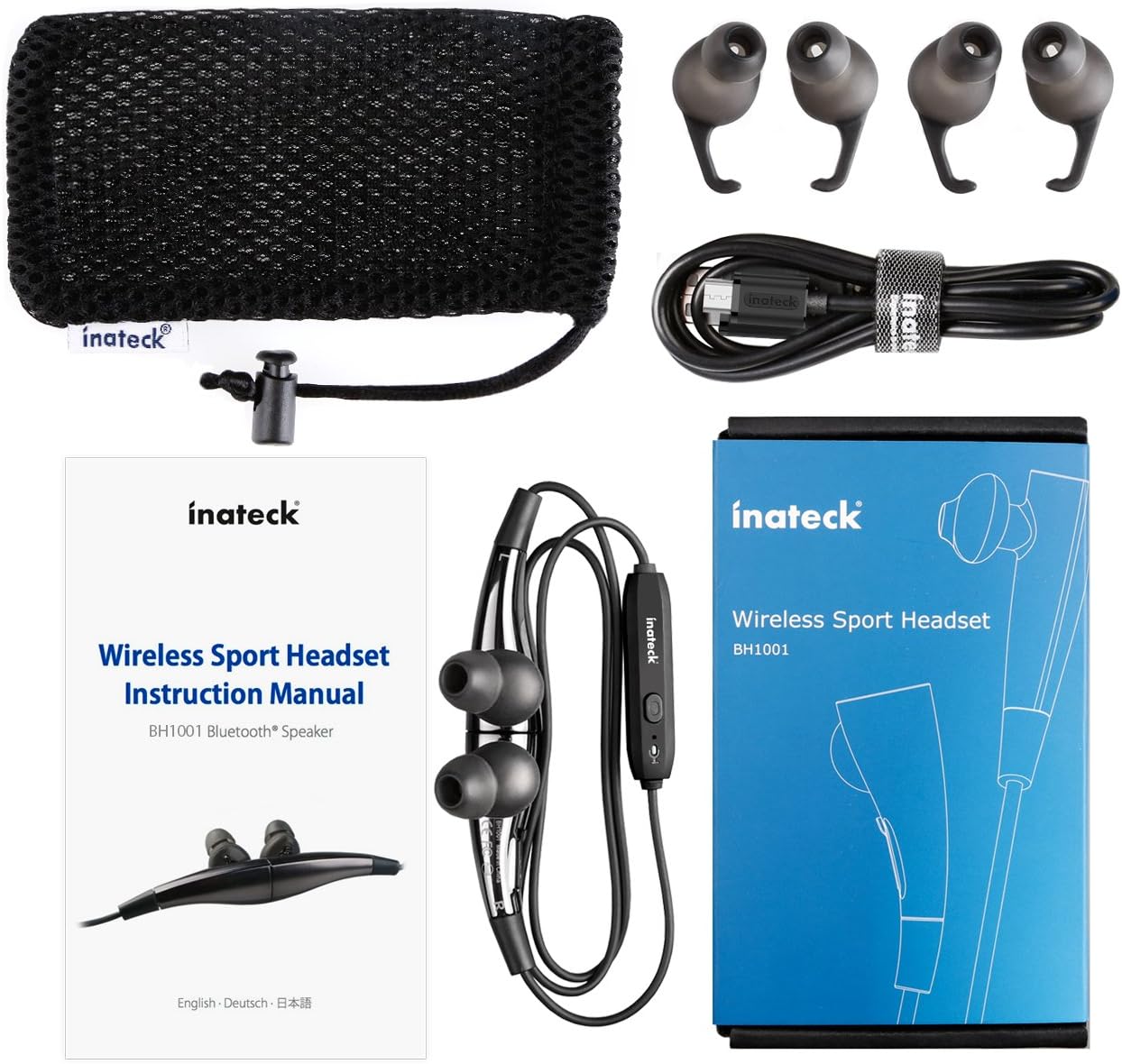
Figura 1.1: Contents of the Inateck Bluetooth Sport Headset package.
1.2 Ricarica dell'auricolare
Before first use, fully charge the headset. A full charge takes approximately 3 hours and provides at least 8 hours of music playback.
- Locate the Micro USB charging port on the headset.
- Connect the small end of the provided USB charging cable to the headset's Micro USB port.
- Collegare l'estremità più grande del cavo USB a una fonte di alimentazione USB (ad esempio, una porta USB del computer, un adattatore da parete USB).
- The status indicator light will illuminate during charging. It will change color or turn off once charging is complete.

Figura 1.2: Charging the Inateck Bluetooth Sport Headset via Micro USB.
1.3 Associazione con un dispositivo Bluetooth
To connect your headset to a smartphone or other Bluetooth-enabled device:
- Assicurati che le cuffie siano spente.
- Press and hold the Multifunction Key (MFB) on the inline control unit for approximately 5-7 seconds until the status indicator light flashes red and blue alternately. This indicates pairing mode.
- On your Bluetooth device, enable Bluetooth and search for new devices.
- Select "Inateck BH1001" or "Inateck P20" from the list of available devices.
- Once paired, the status indicator light on the headset will flash blue slowly, and you may hear an audible confirmation.
- The headset will automatically attempt to reconnect to the last paired device when turned on.

Figura 1.3: Inateck Headset paired with a mobile device for music playback.
2. Istruzioni per l'uso
2.1 Controlli delle cuffie
The inline control unit provides easy access to various functions:

Figura 2.1: Sopraview of the Inateck Headset control unit.
- Multifunction Key (MFB):
- Press and hold (5-7s): Power On/Off, Enter Pairing Mode
- Pressione breve: riproduci/metti in pausa la musica, rispondi/termina una chiamata
- Long press (during incoming call): Reject call
- Volume su (+) / Traccia successiva:
- Pressione breve: aumenta il volume
- Pressione lunga: passa alla traccia successiva
- Volume giù (-) / Traccia precedente:
- Pressione breve: Diminuire il volume
- Long press: Go to previous track
- Porta micro USB: Per caricare l'auricolare.
- Indicatore di stato: Visualizza lo stato di alimentazione, associazione e ricarica.
- Microfono: Per chiamate in vivavoce.
2.2 Indossare l'auricolare
Select the ear tips that provide the most comfortable and secure fit for your ears. The headset is designed to be worn with the cable behind your neck, ensuring stability during physical activity.

Figura 2.2: Proper wearing of the Inateck Sport Headset for active use.
2.3 Funzionalità degli auricolari magnetici
The earbuds feature integrated magnets. When not in use, you can connect the two earbuds together, forming a necklace around your neck. This action automatically pauses music playback and prevents the headset from falling off.

Figura 2.3: Magnetic earbuds feature for secure wearing around the neck.

Figura 2.4: Headset worn as a necklace using the magnetic feature.
3. Manutenzione
- Pulizia: Pulisci le cuffie con un panno morbido e asciutto. Non utilizzare detergenti abrasivi o solventi.
- Suggerimenti per le orecchie: Rimuovere e pulire regolarmente i gommini auricolari in silicone con acqua e sapone neutro. Assicurarsi che siano completamente asciutti prima di riapplicarli.
- Magazzinaggio: When not in use, store the headset in the provided carrying pouch to protect it from dust and damage. Avoid extreme temperatures.
- Resistenza all'acqua: The headset is designed to be water-resistant for sports and exercise (e.g., sweat, light rain). Do not submerge it in water or expose it to heavy rain.
4. Risoluzione Dei Problemi
4.1 Impossibile accendere
Ensure the headset is fully charged. Connect it to a power source using the USB cable and allow it to charge for at least 30 minutes before attempting to power on again.
4.2 Impossibile associare il dispositivo
- Ensure the headset is in pairing mode (status indicator flashing red and blue alternately).
- Make sure Bluetooth is enabled on your device and it is within range (typically 10 meters or 33 feet).
- Disattiva e attiva la funzione Bluetooth sul tuo dispositivo.
- If previously paired, try "forgetting" or "unpairing" the headset from your device's Bluetooth settings and then re-pair.
- Assicurarsi che nessun altro dispositivo Bluetooth interferisca con la connessione.
4.3 Nessun suono o scarsa qualità del suono
- Controllare il livello del volume sia sull'auricolare che sul dispositivo connesso.
- Assicurati che l'auricolare sia correttamente associato e connesso al tuo dispositivo.
- Move closer to your device to reduce potential interference or range issues.
- Ensure the ear tips are correctly seated in your ears for optimal sound delivery.
- Riavviare sia l'auricolare che il dispositivo connesso.
4.4 Connessione intermittente
- Assicurarsi che non vi siano ostacoli fisici tra l'auricolare e il dispositivo.
- Avoid placing your device in areas where the signal might be blocked (e.g., deep pockets, behind thick walls).
- Ridurre al minimo le interferenze provenienti da altri dispositivi wireless (router Wi-Fi, altri dispositivi Bluetooth).
- Keep the headset and your device within the recommended Bluetooth range.
5. Specifiche
| Marca | Inattivo |
| Nome del modello | P20 |
| Numero di modello | BH1001 |
| Tecnologia di connettività | Bluetooth 4.1 |
| Fattore di forma | In-ear (auricolare) |
| Posizionamento dell'orecchio | Intra-aural |
| Presa per cuffie | USB (per la ricarica) |
| Livello di resistenza all'acqua | Waterproof (suitable for sweat/light rain) |
| Caratteristiche speciali | Sports and exercise, integrated microphone, magnetic earbuds |
| Peso dell'articolo | 78 grammi |
| Tipo di controllo | Volume Control, Multifunction Button |
| Materiale | Plastica |
6. Informazioni sulla garanzia
Inateck products typically come with a limited warranty. For specific warranty terms and conditions applicable to your Inateck Bluetooth Sport Headset, please refer to the warranty card included in your product packaging or visit the official Inateck websito. Conservare la prova d'acquisto per eventuali reclami in garanzia.
7. Assistenza clienti
If you encounter any issues not covered in this manual or require further assistance, please contact Inateck customer support. You can usually find contact information, FAQs, and additional resources on the official Inateck websito:
Websito: www.inateck.com
Please have your product model (P20 / BH1001) and purchase details ready when contacting support.