
Introduzione
This manual provides essential information for the safe and efficient installation, operation, and maintenance of your APC Smart-UPS SRT 8kVA Rack Mount Uninterruptible Power Supply (UPS) with a 208V to 120V Step-Down Transformer. Please read this manual thoroughly before installing or operating the equipment.
The APC Smart-UPS SRT 8kVA is designed to provide protected power to electronic equipment from utility power outages, sags, surges, and small utility fluctuations. The integrated step-down transformer converts 208V input to 120V output for compatible equipment.
Importanti istruzioni di sicurezza
SALVA QUESTE ISTRUZIONI - This manual contains important instructions that should be followed during installation and maintenance of the UPS and batteries.
- Questo UPS è destinato esclusivamente all'uso in ambienti interni.
- Non utilizzare questo UPS alla luce diretta del sole, a contatto con liquidi o in luoghi eccessivamente polverosi o umidi.
- Collegare il cavo di alimentazione dell'UPS direttamente a una presa a muro. Non utilizzare limitatori di sovratensione o prolunghe.
- La manutenzione delle batterie deve essere eseguita o supervisionata da personale esperto di batterie e delle necessarie precauzioni. Tenere il personale non autorizzato lontano dalle batterie.
- Quando si sostituiscono le batterie, sostituirle con batterie o pacchi batteria dello stesso tipo e numero.
- Non smaltire le batterie nel fuoco. Le batterie potrebbero esplodere.
- Non aprire o mutilare le batterie. L'elettrolita rilasciato è dannoso per la pelle e gli occhi. Potrebbe essere tossico.
- Una batteria può presentare un rischio di scossa elettrica e di elevata corrente di cortocircuito. Le seguenti precauzioni devono essere osservate quando si lavora sulle batterie:
- Togliere orologi, anelli o altri oggetti metallici.
- Utilizzare utensili con manici isolati.
- Indossare guanti e stivali di gomma.
- Non appoggiare utensili o parti metalliche sulle batterie.
- Scollegare la fonte di carica prima di collegare o scollegare i terminali della batteria.
Contenuto della confezione
Inspect the package upon receipt. Notify the carrier and dealer if there is any damage. The package contains:
- APC Smart-UPS SRT 8kVA UPS Unit
- 208V to 120V Step-Down Transformer
- Hardware per il montaggio su rack
- Cavo di comunicazione seriale
- Cavo di comunicazione USB
- CD di documentazione
- Istruzioni di sicurezza
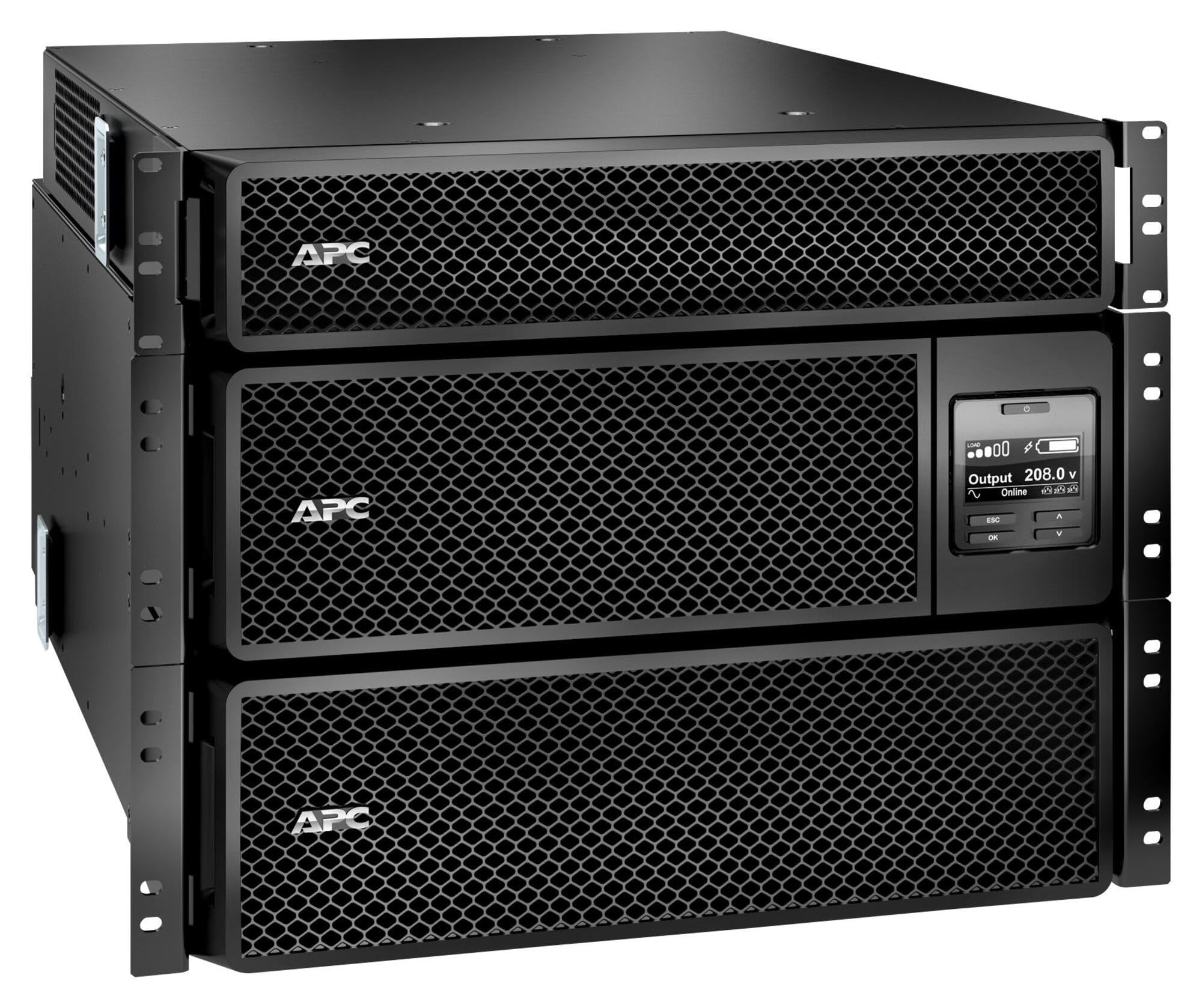
Image: APC Smart-UPS SRT 8kVA Rack Mount UPS with 208V to 120V Step-Down Transformer. This image shows the main UPS unit and the accompanying step-down transformer, typically in a rack-mountable configuration.
Impostare
1. Posizionamento
The UPS and transformer are heavy. For rack-mount installations, ensure the rack is stable and capable of supporting the combined weight of the UPS, transformer, and any other equipment. For tower installations, place the unit on a flat, stable surface.
- Maintain at least 20 cm (8 inches) of clearance from the front and rear panels for proper ventilation.
- Evitare di posizionare l'unità vicino a fonti di calore o alla luce diretta del sole.
2. Collegamento della batteria
The UPS is shipped with the internal batteries disconnected for safety. Follow these steps to connect the batteries:
- Remove the front bezel or access panel to expose the battery compartment.
- Connect the internal battery cables as indicated by the labels or instructions inside the compartment. Ensure a secure connection.
- Replace the front bezel or access panel.
3. Collegamento elettrico
Connect the UPS to utility power and your equipment.
- Potenza in ingresso: Connect the UPS input power cord (NEMA L6-30P) to a dedicated 208V AC outlet. Ensure the outlet is properly grounded and rated for the UPS capacity.
- Collegamento del trasformatore: Connect the output of the UPS to the input of the 208V to 120V Step-Down Transformer.
- Potenza di uscita: Connect your 120V equipment to the 120V output receptacles on the step-down transformer. Do not overload the transformer or the UPS.
- Cavi di comunicazione: Connect the serial or USB communication cable from the UPS to your computer or server for monitoring and management.
4. Avvio iniziale
Dopo aver effettuato tutti i collegamenti:
- Press the power ON button on the UPS front panel. The UPS will perform a self-test.
- Allow the UPS to charge its batteries for at least 24 hours before connecting critical loads to ensure full runtime capacity.
- Verify the UPS display shows normal operation status.
Funzionamento dell'UPS
Display e controlli del pannello frontale
The front panel features an LCD display and control buttons for monitoring and configuring the UPS. Refer to the detailed user manual on the documentation CD for specific menu navigation.
- Pulsante ON/OFF: Powers the UPS on or off.
- Escape/Menu Button: Navigates back or enters the main menu.
- Frecce su/giù: Scrolls through menu options or adjusts settings.
- Pulsante Invio: Seleziona un'opzione o conferma un'impostazione.
- Indicatori LED: Provide quick status updates (e.g., On Line, On Battery, Fault).
Funzionamento normale
During normal operation, the UPS will be in "On Line" mode, providing conditioned power to connected equipment and charging its batteries. The LCD display will show input/output voltage, percentuale di caricotage, e livello di carica della batteria.
Modalità batteria
If utility power fails or fluctuates outside acceptable limits, the UPS will automatically switch to battery power. An audible alarm may sound, and the display will indicate "On Battery" mode. The runtime available depends on the load and battery charge level.
Procedure di spegnimento
- Graceful Shutdown: Use the PowerChute software (if installed) to gracefully shut down connected equipment before the UPS runs out of battery power.
- Spegnimento manuale: Press and hold the OFF button on the front panel until the UPS powers down. Ensure all connected equipment is safely shut down first.
Manutenzione
Sostituzione della batteria
The batteries in the UPS are user-replaceable hot-swappable battery modules. Refer to the specific battery replacement instructions provided with your replacement battery kit or on the APC website. Always use genuine APC replacement battery cartridges (RBCs).
- Battery life is typically 3-5 years, but can vary based on temperature and discharge cycles.
- Replace batteries when the UPS indicates a "Replace Battery" warning or when runtime significantly decreases.
Pulizia
Keep the UPS and transformer free of dust and debris. Use a dry cloth to clean the exterior. Do not use liquid cleaners or solvents.
Aggiornamenti del firmware
Controllare periodicamente l'APC website for available firmware updates for your UPS model. Firmware updates can provide enhanced features, improved performance, or bug fixes. Follow the instructions provided with the firmware update package carefully.
Risoluzione dei problemi
This section provides solutions to common issues. For more complex problems, contact APC Technical Support.
| Problema | Possibile causa | Soluzione |
|---|---|---|
| L'UPS non si accende. | Battery not connected; No input power; UPS fault. | Ensure battery cables are securely connected. Verify input power cable is plugged into a live outlet. If fault persists, contact support. |
| L'UPS emette segnali acustici continui o frequenti. | On battery mode; Overload; Low battery. | Check utility power. Reduce connected load. Allow batteries to charge. |
| L'indicatore "Sostituire la batteria" è acceso. | Batteries are at end of life or faulty. | Order and install new APC replacement battery cartridges. |
| Connected equipment not receiving 120V. | Transformer not connected or faulty; UPS output issue. | Verify transformer connections. Check UPS output voltage on display. Ensure equipment is plugged into the 120V outlets of the transformer. |
Specifiche
The following table outlines the key specifications for the APC Smart-UPS SRT 8kVA Rack Mount with 208V to 120V Step-Down Transformer (SRT8KRMXLT-5KTF).
| Caratteristica | Dettaglio |
|---|---|
| Marca | APC |
| Numero di modello | SRT8KRMXLT-5KTF |
| Capacità (VA/Watt) | Potenza: 8000 VA / 8000 W |
| Ingresso volumetage | 208 V CA |
| Volume di uscitatage | 120 V AC (via Step-Down Transformer) |
| Corrente di uscita | 66.67 Amps |
| Gamma di frequenza | Frequenza 50/60 Hz |
| Tipo di batteria | Piombo acido |
| Tempo di carica della batteria | 1.5 ore |
| Tempo di esecuzione tipico (carico completo) | 5 minuti |
| Fattore di forma | Rack / Tower Mountable (8U) |
| Dimensioni del prodotto (P x L x A) | 28.2" x 17" x 13.9" (71.6 cm x 43.2 cm x 35.3 cm) |
| Peso dell'articolo | 341 libbre (154.7 kg) |
| Connessioni di uscita | 1 x NEMA L6-30R, 4 x NEMA 5-20R (via transformer) |
| Materiale di recinzione | Metallo |
| Colore | Nero |
| Standard di sicurezza | UL1778 |
Garanzia e supporto
For detailed warranty information, please refer to the warranty card included with your product or visit the official APC website. APC offers technical support to assist with installation, troubleshooting, and product inquiries.
- Supporto online: Visita l'APC website for FAQs, documentation, and software downloads.
- Supporto telefonico: Contact APC Technical Support using the numbers provided on the APC websito per la tua regione.
- Registrazione del prodotto: Register your product online to receive notifications about firmware updates and product information.