
1. Introduzione
The Sony SBH54 is a versatile Stereo Bluetooth Headset designed for wireless communication and audio playback. It offers both handset and headset functionalities, allowing you to take and make calls, view messages, listen to music, and tune into FM radio directly from its display. Crafted from premium metal with a splash-proof design, it combines elegance with durability.
Key features include Bluetooth Wireless 3.0, NFC technology for easy pairing, an OLED display, and built-in noise cancellation for clear audio during calls. The headset supports A2DP profile and can connect to two devices simultaneously.
2. Prodotto finitoview
The SBH54 features a compact design that fits comfortably in your hand. It includes an OLED display for information at a glance and physical controls for media and call management.
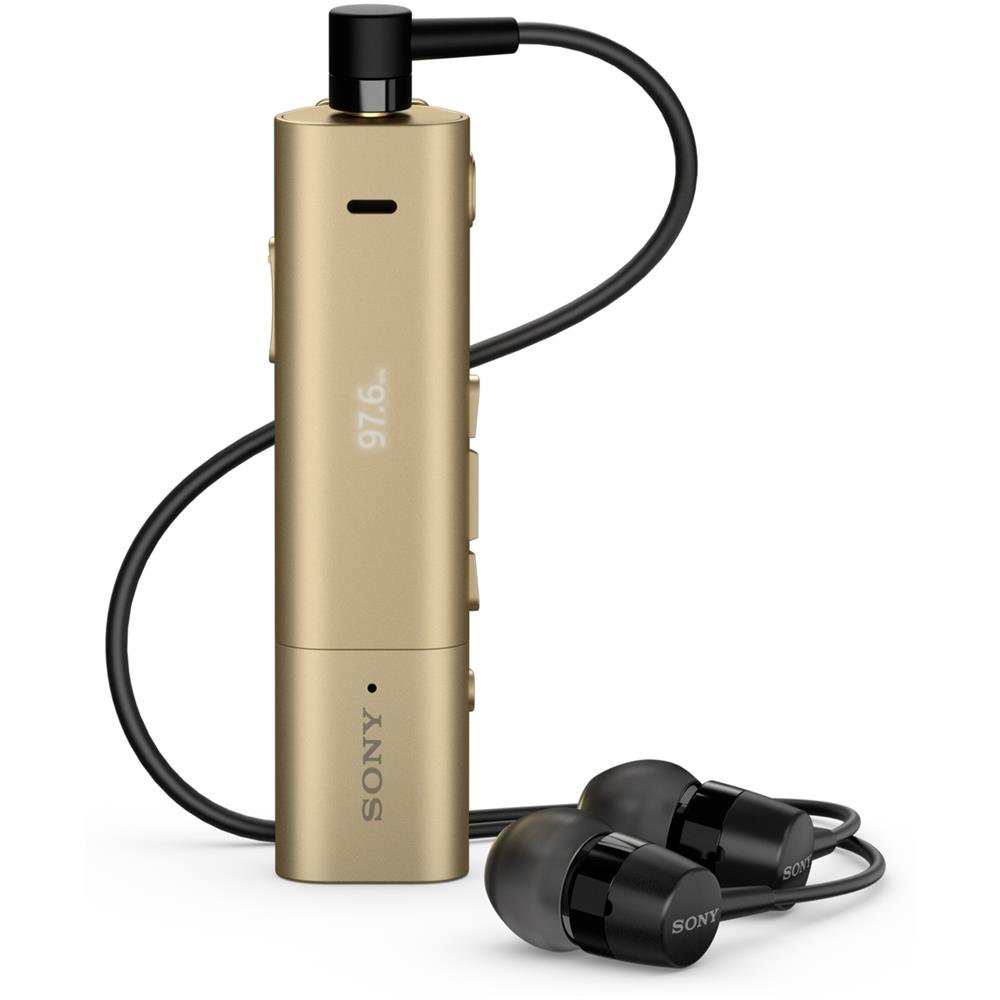
Image: Sony SBH54 Gold Stereo Bluetooth Headset. This image displays the compact, gold-colored headset with its integrated clip and display screen.
Comandi e indicatori:
- Display OLED: Shows caller ID, messages, music track information, and FM radio frequency.
- Pulsante multifunzione: For call answering/ending, play/pause music.
- Pulsanti del volume: Regola il volume dell'audio.
- Pulsanti di navigazione: For menu navigation and track skipping.
- Microfono: Integrated for voice calls.
- Jack per cuffie: 3.5mm port for connecting the included premium headphones.
- Porta di ricarica: Porta micro USB per caricare il dispositivo.
3. Impostazione
3.1 Ricarica dell'auricolare
- Connect the supplied USB cable to the headset's charging port and to a USB power adapter or a computer's USB port.
- L'indicatore della batteria sul display mostrerà lo stato di carica.
- Caricare completamente l'auricolare prima del primo utilizzo.
3.2 Associazione con un dispositivo (Bluetooth)
- Assicurarsi che l'auricolare sia carico e spento.
- Press and hold the power button until the headset enters pairing mode (indicated by a specific light pattern or message on the display).
- Sul tuo smartphone o altro dispositivo abilitato Bluetooth, attiva il Bluetooth e cerca i dispositivi disponibili.
- Select "SBH54" from the list of found devices.
- If prompted, enter the passcode "0000" (four zeros).
- Una volta effettuata l'associazione, l'auricolare indicherà una connessione riuscita.
3.3 Pairing with a Device (NFC)
For devices with NFC (Near Field Communication):
- Ensure NFC is enabled on your smartphone and the screen is unlocked.
- Touch the NFC detection area of your smartphone to the NFC detection area on the SBH54 headset.
- Seguire le istruzioni visualizzate sullo schermo per completare il processo di associazione.
4. Utilizzo dell'auricolare
4.1 Accensione/spegnimento
- Per accendere: Tenere premuto il pulsante di accensione finché il display non si illumina.
- Per spegnere: Tenere premuto il pulsante di accensione finché il display non si spegne.
4.2 Effettuare e ricevere chiamate
- Risposta a una chiamata: When a call comes in, press the multi-function button.
- Terminare una chiamata: During a call, press the multi-function button.
- Rifiutare una chiamata: Press and hold the multi-function button when a call comes in.
- Effettuare una chiamata: Dial the number on your phone. The call will automatically route to the headset. You can also use voice commands if supported by your phone.
- Funzione del ricevitore: The compact SBH54 can be used as an unobtrusive handset for calls.
- Cancellazione del rumore: The headset features echo, wind, and noise cancellation for clear voice transmission.
- Voce HD: Enhances voice clarity for both parties during a call.
4.3 Riproduzione di musica
- Riproduci/Pausa: Premere il pulsante multifunzione.
- Traccia successiva: Press the forward navigation button.
- Traccia precedente: Press the backward navigation button.
- Controllo del volume: Utilizzare i pulsanti volume su/giù.
4.4 Radio FM
- Attiva la radio FM: Navigate through the headset menu to select the FM Radio function.
- Sintonizzare le stazioni: Use the navigation buttons to scan or manually tune to FM frequencies.
- Salva preimpostazioni: The headset may allow saving favorite stations (refer to on-screen prompts).
5. Manutenzione
- Pulizia: Pulisci il visore con un panno morbido e asciutto. Evita di utilizzare prodotti chimici aggressivi o materiali abrasivi.
- Resistenza all'acqua: The SBH54 has a splash-proof design. This means it can withstand light splashes of water but should not be submerged or exposed to heavy rain. Ensure the charging port cover is securely closed.
- Magazzinaggio: Conservare le cuffie in un luogo fresco e asciutto, lontano dalla luce solare diretta e da temperature estreme.
- Cura della batteria: Per prolungare la durata della batteria, evitare di scaricarla completamente frequentemente. Caricarla regolarmente.
6. Risoluzione Dei Problemi
Problemi comuni e soluzioni:
- L'auricolare non si accende: Assicurarsi che la batteria sia carica. Collegare a una fonte di alimentazione e riprovare.
- Impossibile associare un dispositivo:
- Assicurarsi che l'auricolare sia in modalità di associazione.
- Assicurati che il Bluetooth sia abilitato sul tuo dispositivo.
- Avvicina l'auricolare al dispositivo.
- Riavviare sia l'auricolare che il dispositivo.
- Cancella le precedenti connessioni Bluetooth sul tuo dispositivo e prova ad associarlo di nuovo.
- Nessun audio o scarsa qualità audio:
- Controllare i livelli del volume sia sull'auricolare che sul dispositivo connesso.
- Assicurati che l'auricolare si trovi nel raggio d'azione del tuo dispositivo.
- Disconnettere e riconnettere la connessione Bluetooth.
- Ensure the headphones are properly plugged into the 3.5mm jack.
- La radio FM non funziona: Assicurati di trovarti in una zona con una buona ricezione del segnale FM.
7. Specifiche
| Caratteristica | Dettaglio |
|---|---|
| Marca | Sony |
| Numero di modello | SBH54GD |
| Colore | Oro |
| Posizionamento dell'orecchio | Nell'orecchio |
| Fattore di forma | Nell'orecchio |
| Controllo del rumore | Cancellazione attiva del rumore |
| Peso dell'articolo | 0.1 chilogrammi |
| Tipo di driver audio | Driver dinamico |
| Gamma di frequenza | 20 Hz - 20,000 Hz |
| Materiale di recinzione | Metallo |
| Dispositivi compatibili | Smartphone, laptop, tablet, dispositivi abilitati Bluetooth |
| Livello di resistenza all'acqua | Water Resistant (Splash-proof) |
| Tecnologia di connettività | Bluetooth, NFC |
| Tecnologia senza fili | Bluetooth, NFC |
| Versione Bluetooth | 3.0 |
| Tipo di controllo | Controllo multimediale |
| Metodo di controllo | Remoto |
8. Garanzia e supporto
For warranty information and customer support, please refer to the documentation included with your purchase or visit the official Sony support websito. I termini di garanzia specifici possono variare in base alla regione e al rivenditore.
Supporto online: www.sony.com/elettronica/support