
Introduzione
The Master Lock No. X055ML large digital combination safe is designed for protecting valuable items such as laptops, jewelry, documents, money, and other electronics within a home environment. Its internal dimensions are suitable for A4-sized documents. This safe features a programmable electronic lock, allowing users to set their own combination, and includes an override key for access in case of a forgotten code. The interior is carpeted to prevent scratching of stored items. For enhanced security, the safe can be bolted down using the included hardware, preventing unauthorized removal. The robust steel construction and pry-resistant door with two live-locking bolts provide a high level of security for your belongings.
Informazioni sulla sicurezza
- Always keep the override keys in a secure location away from the safe. Do not store them inside the safe.
- Ensure the safe is securely bolted down to a floor or wall to prevent unauthorized removal, if applicable.
- Do not store flammable materials or open containers of liquids inside the safe.
- Keep the keypad clean and dry to ensure proper operation.
- Sostituire tempestivamente le batterie quando appare l'indicatore di batteria scarica per evitare di rimanere bloccati.
Contenuto della confezione
- 1 x Master Lock Security Safe (Model X055ML)
- 2 x chiavi di override
- 1 x Bolt Down Kit (for securing the safe)
- Manuale dell'utente (questo documento)
Impostare
1. Installazione della batteria
The safe requires 4 AA batteries (not included) for the electronic lock to function. The battery compartment is located on the inside of the safe door. Open the safe using the override key if it is currently locked.
- Individuare il coperchio del vano batterie sul lato interno dello sportello della cassaforte.
- Remove the cover by sliding it or unscrewing it, depending on the design.
- Inserire 4 batterie AA nuove, assicurandosi della corretta polarità (+/-).
- Riposizionare saldamente il coperchio del vano batteria.
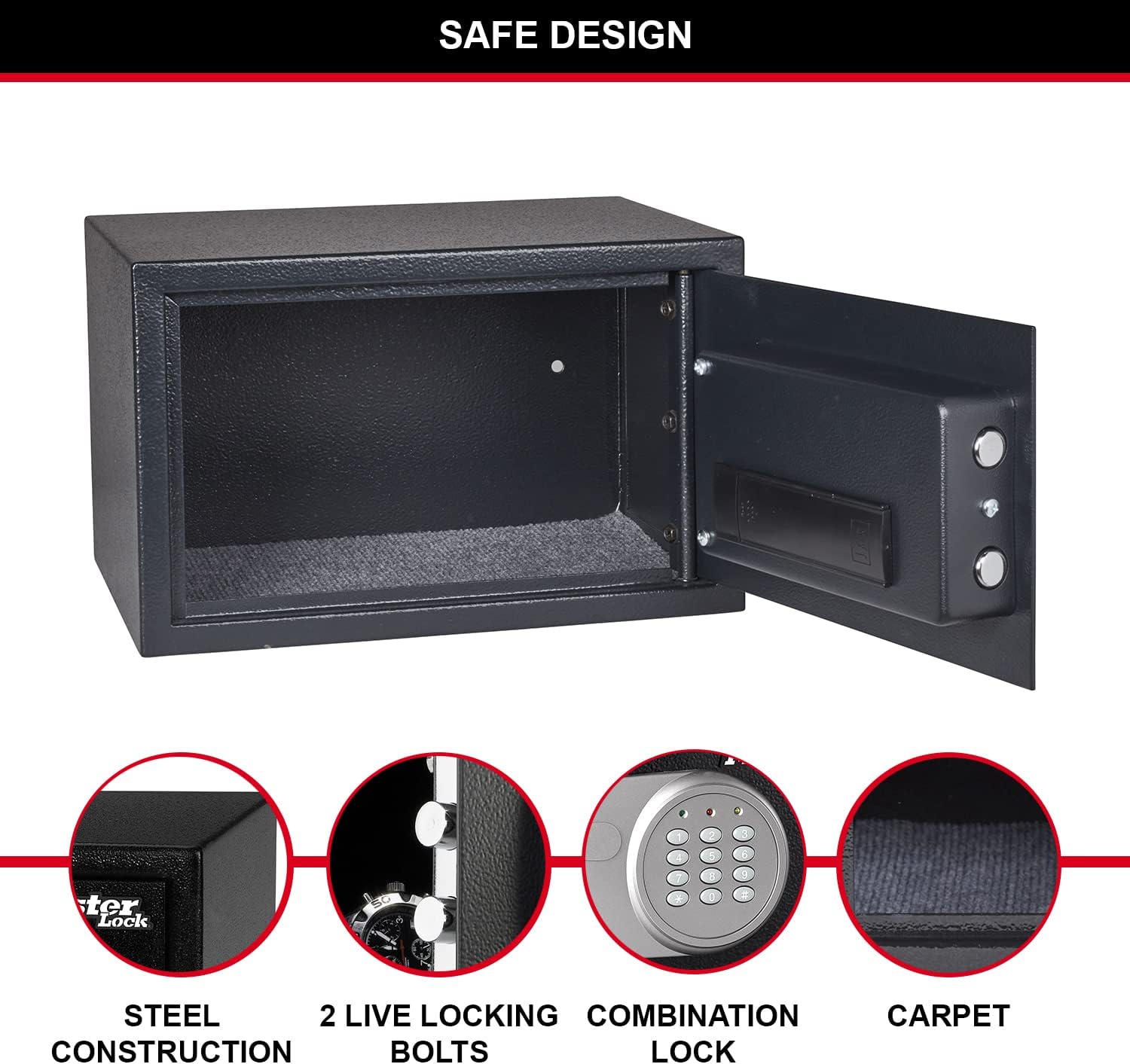
Figure 1: Inside of the safe door, highlighting the battery compartment and live-locking bolts.
2. Impostazione della combinazione personale
Upon first use, or after battery replacement, you will need to set your personal combination. The factory default code is typically 1-2-3-4, but it is highly recommended to change it immediately.
- With the safe door open, locate the red reset button on the inside of the door, near the battery compartment.
- Press the red reset button. The yellow light on the keypad will illuminate.
- Enter your new 3 to 8 digit combination on the keypad.
- Press the "A" or "B" button (or "#" or "*" depending on model) to confirm. The yellow light will turn off, indicating the new code is set.
- Test your new combination with the door open to ensure it works correctly before closing the safe.
3. Securing the Safe (Optional)
For maximum security, the safe can be bolted to a floor or wall using the included bolt-down kit. This prevents unauthorized removal of the safe.
- Choose a suitable location for the safe, such as inside a wardrobe or cabinet.
- Segnare i punti di foratura attraverso i fori preforati nella parte inferiore o posteriore della cassaforte.
- Drill pilot holes into the mounting surface using an appropriate drill bit.
- Align the safe with the drilled holes and secure it using the provided bolts and washers.

Figura 2: Esample of safe placement within a cabinet for secure storage.
Istruzioni per l'uso
1. Opening the Safe with Digital Combination
- Enter your personal 3 to 8 digit combination on the keypad.
- Press the "A" or "B" button (or "#" or "*" depending on model) to confirm.
- If the code is correct, the green light will illuminate. Within 5 seconds, turn the knob clockwise to open the safe door.
- If an incorrect code is entered, the yellow light will flash. After three incorrect attempts, the safe will enter a lockout period.

Figura 3: Fronte view of the safe with the digital combination lock.
2. Opening the Safe with Override Key
The override key provides emergency access to the safe, useful if batteries are depleted or the combination is forgotten.
- Individuare la serratura, solitamente nascosta dietro una piccola copertura sul pannello della tastiera.
- Insert one of the provided override keys into the keyhole.
- Ruotare la chiave in senso orario e contemporaneamente ruotare la manopola nello stesso senso orario per aprire lo sportello della cassaforte.
- Una volta aperta la cassaforte, rimuovere la chiave.
3. Chiusura e blocco della cassaforte
To lock the safe, simply close the door and turn the knob counter-clockwise until the bolts engage. The electronic lock will automatically secure the safe.
Manutenzione
1. Sostituzione della batteria
When the batteries are low, the red light on the keypad may flash or the safe may not respond to combination entries. Replace all 4 AA batteries as described in the "Battery Installation" section under Setup.
2. Pulizia
Pulisci l'esterno della cassaforte con un panno morbido eamp cloth. Do not use abrasive cleaners or solvents. Keep the keypad and internal components dry.
Risoluzione dei problemi
| Problema | Possibile causa | Soluzione |
|---|---|---|
| La cassaforte non si apre con la combinazione. | Incorrect combination entered; low batteries. | Re-enter combination carefully. Replace batteries. Use override key. |
| Le spie della tastiera non si accendono. | Batterie scariche o installate in modo errato. | Sostituire tutte e 4 le batterie AA, assicurandosi della corretta polarità. |
| La porta della cassaforte non si chiude correttamente. | Obstruction in the door frame; bolts not fully retracted. | Check for obstructions. Ensure the knob is fully turned to retract bolts before closing. |
| Combinazione dimenticata. | Combination lost or forgotten. | Use the override key to open the safe, then reset the combination. |
Specifiche
| Caratteristica | Dettaglio |
|---|---|
| Numero di modello | X055ML |
| Dimensioni esterne (AxLxP) | 13.78" H x 8.66" W x 10.63" D (22 x 35 x 27 cm) |
| Dimensioni interne (AxLxP) | 21.6 cm di altezza x 34.6 cm di larghezza x 22 cm di profondità |
| Capacità | 16 litri |
| Peso | 14.11 libbre (6400 grammi) |
| Tipo di blocco | Digital Combination with Key Override |
| Materiale | Acciaio legato |
| Fonte di alimentazione | Alimentazione a batteria (4 batterie AA necessarie, non incluse) |
| Caratteristiche speciali | Pry-resistant door, two live-locking bolts, carpeted floor, bolt-down hardware included. |

Figure 4: Detailed dimensions of the safe.
Garanzia e supporto
This Master Lock product is covered by a 1-year spare part availability duration in the EU. For specific warranty details, technical support, or to inquire about replacement parts, please refer to the official Master Lock websito o contattare direttamente il servizio clienti. Conservare la ricevuta d'acquisto per eventuali reclami in garanzia.
Per ulteriore assistenza, visitare il Negozio Master Lock su Amazon.