
Monster MH ISRT WLS IE BK BT WW
Manuale utente delle cuffie auricolari wireless Bluetooth Monster iSport Superslim
Model: MH ISRT WLS IE BK BT WW
Prodotto finitoview
The Monster iSport Superslim Bluetooth Wireless In-Ear Headphones are designed for active lifestyles, offering a super slim, low-profile design with exceptional wireless sound quality. They feature a patented Sport clip for a secure fit during physical activity and provide total noise isolation for an immersive audio experience.

Image: The Monster iSport Superslim headphones, featuring two black earbuds connected by a flat cable. An inline remote control is visible on the cable, positioned closer to the right earbud.
Impostare
Caricare le cuffie
Before first use, fully charge your Monster iSport Superslim headphones. A micro-USB charging cable is included in the package.
- Locate the micro-USB charging port, typically on the inline remote control.
- Connect the micro-USB cable to the headphones and the other end to a USB power source (e.g., computer USB port, wall adapter).
- The indicator light will show charging status (refer to the specific light behavior in your quick start guide for details).
- Una carica completa garantisce circa 5 ore di durata della batteria.
Associazione con un dispositivo Bluetooth
The headphones use Bluetooth connectivity for wireless audio. Ensure your device is within the 10-meter Bluetooth range.
- Assicurati che le cuffie siano spente.
- Press and hold the multi-function button on the inline remote until the indicator light flashes rapidly (usually blue and red), indicating pairing mode.
- Sul tuo dispositivo abilitato Bluetooth (smartphone, tablet, ecc.), vai alle impostazioni Bluetooth e abilita il Bluetooth.
- Cercare available devices. "Monster iSport Superslim" or a similar name should appear in the list.
- Select the headphones from the list to connect. Once connected, the indicator light will typically turn solid blue or flash slowly.
Montaggio degli auricolari
Proper fit is crucial for sound quality and comfort, especially during sports. The headphones come with patented Sport clips and multiple eartip sizes.
- Experiment with different eartip sizes to find the best seal for your ear canal. A good seal provides optimal bass response and noise isolation.
- Position the Sport clip within your ear's concha (outer ear bowl) to secure the earbud in place. Adjust until comfortable and stable.
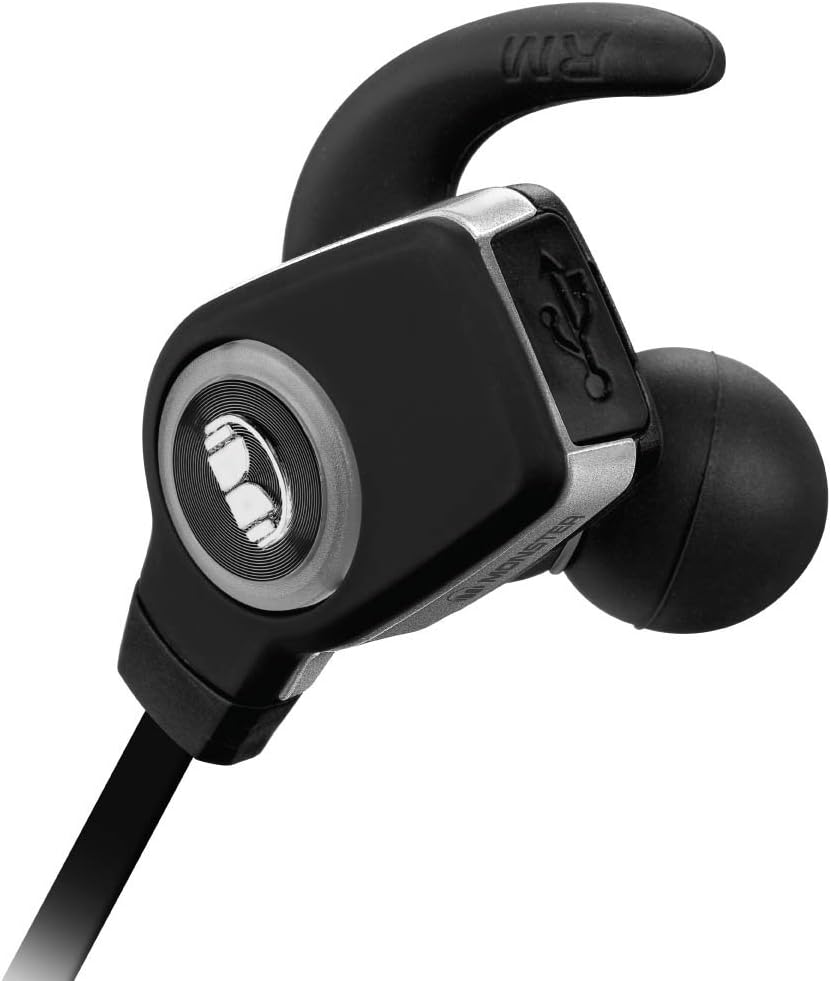
Immagine: Un dettaglio view of a single Monster iSport Superslim earbud, highlighting its ergonomic shape and the integrated Sport clip designed for a secure fit.
Istruzioni per l'uso
The inline remote control allows for easy management of audio playback and calls.

Image: The front side of the inline remote control for the Monster iSport Superslim headphones, featuring clearly visible volume up (+) and volume down (-) buttons, and a central multi-function button.

Image: The reverse side of the inline remote control, displaying the Monster logo and branding.
Accensione/spegnimento
- Accensione: Press and hold the multi-function button until the indicator light illuminates.
- Spegni: Tenere premuto il pulsante multifunzione finché la spia non si spegne.
Controllo della riproduzione della musica
- Riproduci/Pausa: Premi una volta il pulsante multifunzione.
- Traccia successiva: Premere due volte il pulsante multifunzione.
- Traccia precedente: Premere tre volte il pulsante multifunzione.
- Aumenta volume: Premere il pulsante '+'.
- Volume basso: Premere il pulsante '-'.
Gestione delle chiamate
- Rispondi/Termina chiamata: Premi una volta il pulsante multifunzione.
- Rifiuta chiamata: Tieni premuto il pulsante multifunzione per 2 secondi.
- Ricomponi l'ultimo numero: Premere due volte il pulsante multifunzione quando non si è impegnati in una chiamata.
Manutenzione
Una cura adeguata garantisce la longevità e le prestazioni delle cuffie.
- Pulizia: Gently wipe the earbuds and cable with a soft, dry cloth. For eartips, remove them and clean with mild soap and water, then dry thoroughly before reattaching.
- Magazzinaggio: When not in use, store the headphones in the included travel pouch to protect them from dust and damage. Avoid extreme temperatures.
- Resistenza all'acqua: The headphones are water resistant, making them suitable for sports and exercise. However, they are not designed for submersion. Avoid exposing them to excessive moisture or direct water jets.
- Cura della batteria: Per preservare la durata della batteria, evitare di scaricare completamente le cuffie frequentemente. Caricarle regolarmente, anche se non vengono utilizzate costantemente.
Risoluzione dei problemi
Se riscontri problemi, prova le seguenti soluzioni:
| Problema | Soluzione |
|---|---|
| Le cuffie non si accendono. | Assicurati che le cuffie siano cariche. Collegale a una fonte di alimentazione e lasciale caricare per il tempo necessario. |
| Impossibile associare il dispositivo. |
|
| Nessun suono o volume basso. |
|
| Sound crackling or cutting out. |
|
Specifiche
- Modello: MH ISRT WLS IE BK BT WW
- Connettività: Bluetooth (apt-X + AAC)
- Posizionamento dell'orecchio: In-ear (auricolare)
- Tipo di controllo: Controllo multimediale, remoto
- Controllo del rumore: Isolamento acustico
- Durata della batteria: Fino a 5 ore
- Gamma Bluetooth: Fino a 10 metri (33 piedi)
- Resistenza all'acqua: Water Resistant (suitable for sports)
- Materiale: Plastica
- Dimensioni: 6 x 1.63 x 8.75 pollici (Prodotto)
- Peso dell'articolo: 7.52 once
- Incluso: Micro-USB charging cable, travel pouch, various eartips and Sport clips.
Garanzia e supporto
For detailed warranty information, product registration, or technical support, please refer to the documentation included with your product or visit the official Monster websito. Conservare la prova d'acquisto per eventuali reclami in garanzia.
Produttore: Monster Power, LLC
Ask a question about this manual
Ask about setup, troubleshooting, compatibility, parts, safety, or missing instructions. Manuals+ will review the question and use this page’s manual context to help answer it.