
PRORECK PARTY 15
PRORECK Party 15 Portable PA Speaker System
Manuale d'uso
Model: PARTY 15
Introduzione
Grazie per l'acquistoasing the PRORECK Party 15 Portable PA Speaker System. This system is designed to deliver powerful and clear audio for various applications, including parties, DJ events, home studios, and social gatherings. Featuring Bluetooth connectivity, USB/SD card playback, FM radio, and integrated LED lights, the Party 15 offers versatile audio solutions. Please read this manual thoroughly before operating the system to ensure proper use and to maximize its performance and longevity.
Informazioni importanti sulla sicurezza
Quando si utilizza questo prodotto, seguire sempre le precauzioni di sicurezza di base per ridurre il rischio di incendi, scosse elettriche e lesioni.
- Non esporre questa apparecchiatura alla pioggia o all'umidità.
- Do not open the speaker enclosure. There are no user-serviceable parts inside. Refer all servicing to qualified service personnel.
- Garantire l'alimentazione voltage corrisponde al volumetage specificato sull'unità.
- Proteggere il cavo di alimentazione per evitare che venga calpestato o schiacciato, in particolare in corrispondenza delle spine, delle prese di corrente e del punto in cui esce dall'apparecchio.
- Scollegare l'apparecchio durante i temporali o quando non viene utilizzato per lunghi periodi di tempo.
- Non ostruire le aperture di ventilazione. Installare secondo le istruzioni del produttore.
- Utilizzare solo con il carrello, il supporto, il treppiede, la staffa o il tavolo specificati dal produttore o venduti insieme all'apparecchio.
Cosa c'è nella scatola
Carefully unpack your PRORECK Party 15 system and ensure all items listed below are present and in good condition. If any items are missing or damaged, please contact your retailer immediately.

Image: Complete PRORECK Party 15 system with all included accessories.
- 1 x altoparlante attivo
- 1 x Passive Speaker
- 2 x supporti per altoparlanti
- 1 microfono cablato
- 1 x Speakon Cable (for connecting active to passive speaker)
- 1 x cavo di alimentazione
- 1 x telecomando

Immagine: dettagliata view of the wired microphone, remote control, and various cables.
Impostare
Follow these steps to set up your PRORECK Party 15 speaker system.
1. Montaggio del supporto per altoparlanti
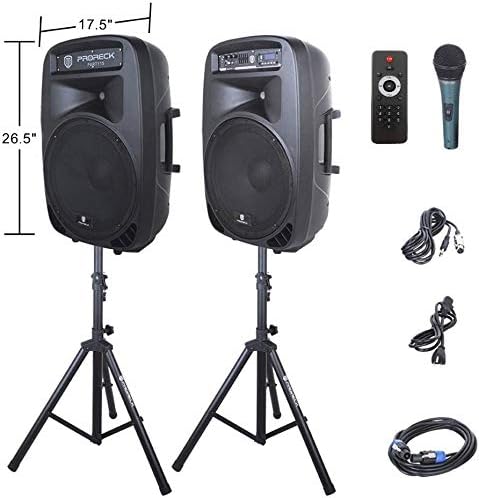
Image: The two included speaker stands.
- Unfold the tripod legs of each speaker stand until they are fully extended and stable.
- Loosen the height adjustment knob on the stand and extend the pole to your desired height. Ensure the safety pin is inserted through the appropriate hole to secure the height.
- Serrare saldamente la manopola di regolazione dell'altezza.
2. Posizionamento degli altoparlanti
- Carefully lift each speaker and place it onto the top pole of a speaker stand. Ensure the speaker is securely seated.
- Position the active speaker (the one with the control panel) near a power outlet.
- Place the passive speaker within reach of the included Speakon cable from the active speaker.
Image: PRORECK Party 15 speakers set up on their stands.
3. Collegamento degli altoparlanti
- Locate the Speakon output on the rear panel of the active speaker and the Speakon input on the rear panel of the passive speaker.
- Connect one end of the Speakon cable to the active speaker's Speakon output and the other end to the passive speaker's Speakon input. Ensure a secure connection.

Image: Rear panels of the active and passive speakers, highlighting the Speakon connection.
4. Collegamento elettrico
- Ensure the master volume knob on the active speaker is turned down to its minimum setting.
- Connect the power cable to the active speaker's power input and then plug it into a suitable electrical outlet.
Istruzioni per l'uso
This section details how to operate your PRORECK Party 15 speaker system and utilize its various features.
Pannello di controllo Fineview

Immagine: dettagliata view of the active speaker's control panel.
The active speaker features a comprehensive control panel with an LCD display, various input options, volume controls, and an equalizer.
1. Accensione/spegnimento
- After connecting the power cable, locate the power switch on the rear panel of the active speaker.
- Flip the switch to the "ON" position to power on the system. The LCD display will illuminate.
- Per spegnere, portare l'interruttore in posizione "OFF".
2. Selezione della modalità
Premere il tasto MODALITÀ button on the control panel or remote control to cycle through available input modes: Bluetooth, USB, SD Card, FM Radio, and Line Input.
3. Connettività Bluetooth
- Select "Bluetooth" mode using the MODALITÀ button. The LCD display will show "BLUE".
- Sul tuo dispositivo abilitato Bluetooth (smartphone, tablet, ecc.), cerca i dispositivi Bluetooth disponibili.
- Select "PRORECK PARTY 15" from the list. Once paired, the speaker will emit a confirmation sound.
- Ora puoi riprodurre l'audio dal tuo dispositivo tramite gli altoparlanti.
4. Riproduzione tramite scheda USB/SD
- Inserire un'unità USB o una scheda SD contenente audio MP3 files nell'apposito slot sul pannello di controllo.
- The system will automatically switch to USB or SD mode and begin playing the first compatible audio fileIn caso contrario, premere il tasto MODALITÀ pulsante per selezionare l'input corretto.
- Utilizzare il RIPRODUCI/PAUSA, PRECEDENTE, E PROSSIMO buttons on the control panel or remote to manage playback.
5. Radio FM
- Select "FM Radio" mode using the MODALITÀ pulsante.
- Premere il tasto RIPRODUCI/PAUSA button to initiate an automatic scan for available FM stations. The system will save detected stations.
- Utilizzare il PRECEDENTE E PROSSIMO pulsanti per navigare tra le stazioni salvate.
6. Utilizzo del microfono
- Connect the wired microphone to the 1/4'' MIC input on the control panel.
- Adjust the "MIC VOL" knob to control the microphone's volume level.
- Ensure the main volume is set appropriately to avoid feedback.
7. Funzioni di controllo remoto
Image: The included remote control.
The remote control allows for convenient operation from a distance (up to 20 feet). Functions include:
- DIREZIONI: Passa da una modalità di input all'altra.
- RIPRODUCI/PAUSA: Riproduci o metti in pausa la riproduzione audio.
- PRECEDENTE SUCCESSIVO: Skip tracks or navigate FM stations.
- VOL+/VOL-: Regola il volume principale.
- EQ: Scorrere le preimpostazioni dell'equalizzatore.
- Numeric buttons for direct track selection (in USB/SD mode).
8. Regolazione dell'equalizzatore
The control panel features a 5-band graphic equalizer. Adjust the sliders to fine-tune the audio output to your preference. Experiment with different settings to achieve the desired sound for various music genres or vocal performances.
9. Luci LED

Image: PRORECK Party 15 speakers demonstrating various LED light colors.
The PRORECK Party 15 speakers are equipped with built-in LED lights that activate with sound. These lights enhance the party atmosphere. There is a dedicated switch on the rear of the active speaker to turn the LED lights on or off.
Manutenzione
Una corretta manutenzione garantisce la longevità e le prestazioni ottimali del tuo sistema di altoparlanti.
- Pulizia: Use a soft, dry cloth to clean the exterior of the speakers. Do not use abrasive cleaners, waxes, or solvents.
- Magazzinaggio: Quando non vengono utilizzati per lunghi periodi, conservare gli altoparlanti in un luogo fresco e asciutto, lontano dalla luce solare diretta e da temperature estreme.
- Ventilazione: Assicurarsi che le aperture di ventilazione siano libere da polvere e detriti per evitare il surriscaldamento.
- cavi: Controllare regolarmente tutti i cavi per verificare la presenza di segni di usura o danni. Sostituire immediatamente eventuali cavi danneggiati.
Risoluzione dei problemi
If you encounter issues with your PRORECK Party 15 system, refer to the following common problems and solutions.
| Problema | Possibile causa | Soluzione |
|---|---|---|
| Nessun potere | Cavo di alimentazione non collegato; Interruttore di alimentazione spento; Malfunzionamento della presa. | Ensure power cable is securely connected and plugged into a working outlet. Check power switch on rear panel. |
| Nessun suono dagli altoparlanti | Volume too low; Incorrect input mode; Speakon cable loose/damaged; Audio source issue. | Increase master volume. Select correct input mode. Check Speakon cable connection between active and passive speakers. Verify audio source is playing. |
| Bluetooth non associato | Altoparlante non in modalità Bluetooth; Dispositivo troppo lontano; Dispositivo già associato a un altro altoparlante. | Ensure speaker is in Bluetooth mode ("BLUE" on display). Move device closer to speaker. Disconnect device from other Bluetooth connections. |
| Il microfono non funziona | Mic volume too low; Microphone not connected properly; Microphone faulty. | Increase "MIC VOL" knob. Ensure microphone is fully inserted into the 1/4'' input. Test with another microphone if available. |
| Suono distorto | Volume too high; Input signal too strong; Equalizer settings. | Reduce master volume or input source volume. Adjust equalizer settings. |
| Le luci a LED non funzionano | LED switch off; Volume too low for activation. | Ensure the LED switch on the rear panel is in the "ON" position. Increase volume to activate sound-reactive lights. |
Specifiche
| Nome del modello | FESTA 15 |
| Tipo di altoparlante | Altoparlante |
| Dimensioni dell'altoparlante | 15 pollici |
| Potenza massima in uscita dell'altoparlante | 2000 Watts P.M.P.O (Peak Music Power Output) |
| Tecnologia di connettività | Cablato, Wireless (Bluetooth) |
| Tecnologia di comunicazione wireless | Bluetooth |
| Portata Bluetooth | 10 metri (circa 33 piedi) |
| Caratteristiche speciali | LED Light, FM Radio, USB Port, SD Card Reader, Digital LCD Display |
| Ingressi | 1/4'' Mic, RCA Line Inputs, USB, SD Card |
| Risultati | Speakon Output (for passive speaker), RCA Line Output |
| Materiale | Acrilonitrile Butadiene Stirene (ABS) |
| Dimensioni del prodotto (ogni altoparlante) | 19"D x 30"W x 29"H (approximate, likely including handles/feet) |
| Peso dell'articolo (totale) | 81.6 libbre |
| Fonte di alimentazione | Elettrico con cavo |
Garanzia e supporto
PRORECK products come with a limited warranty. For specific warranty terms and conditions, please refer to the warranty card included with your product or visit the official PRORECK website. For technical support, troubleshooting assistance, or parts inquiries, please contact PRORECK customer service through their official channels.
Manufacturer: PRORECK AUDIO
Ask a question about this manual
Ask about setup, troubleshooting, compatibility, parts, safety, or missing instructions. Manuals+ will review the question and use this page’s manual context to help answer it.